PinPal
- 196.00
- 4.9
- Installs
- 10.00K
- Price
- $8.99

Screenshots
Analysis by Reviewed
When I try a new bowling scorekeeper, I want to know one thing first: can I use it at the lanes without turning a casual game into a phone task? PinPal is built around recording bowling scores and making performance easier to review later. That focus makes it a practical option for bowlers who want more than a paper scorecard, though it is not a general-purpose tool for planning every part of a bowling outing.
What to Expect from a Bowling Scorekeeper
PinPal is a sports app from developer Jeff Stuart, and its appeal is fairly focused: record games, then use the resulting detail to understand how you bowl. It has a 4.8 average from around 1.4 thousand ratings, with over 10 thousand installs. It costs $8.99, is rated for Everyone, and has been available since September 15, 2010. Those details put it in a different position from a free, disposable score pad: it makes most sense if you expect to return to your results and care about your bowling over time.
For a first-time user, I’d keep the first session simple. Open the app when you are ready to bowl, enter the score as the game progresses, and aim to finish one complete game before exploring the statistics. That gives you an immediate, useful result and helps you see whether recording frames on your phone feels comfortable while other people are waiting to bowl. If you are playing with friends, agree in advance who is entering the score so the phone does not become a distraction passed around after every delivery.
Keeping Score the Easy Way
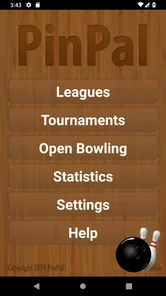
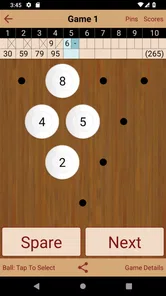
First things first, let's talk about how PinPal makes keeping score a breeze. Gone are the days of smudged paper scorecards or trying to remember how many strikes you've bowled. With this app, you can effortlessly track your scores with just a few taps on your phone. It’s as simple as entering your pin count, and the app does all the heavy lifting for you. I found this feature incredibly helpful, especially during those competitive games where every pin counts!
Tracking Your Progress
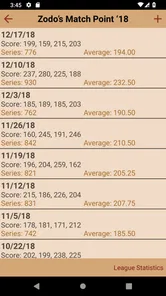
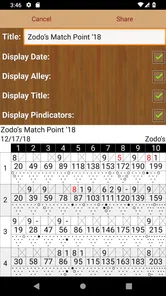
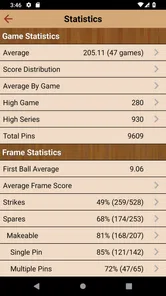
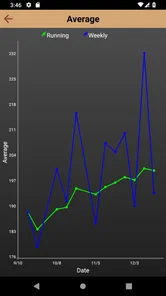
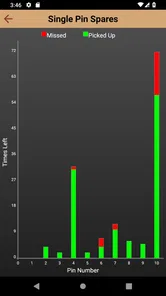
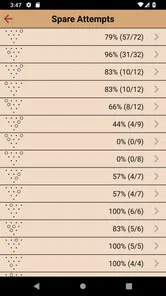
One of the standout features of PinPal is its ability to track your progress over time. Whether you're a casual bowler or a league regular, keeping tabs on your performance is a great motivator. The app provides detailed statistics and graphs that highlight your strengths and pinpoint areas for improvement. I loved being able to see my progress visualized over weeks and months. It definitely added a layer of excitement to my bowling nights, knowing I could see tangible evidence of my improvement.
The statistics are most useful when I treat them as a prompt for a question, not as a verdict on my ability. After a rough night, for example, a record of completed games gives me a better basis for judging whether the session was an off day or part of a pattern. A practical habit is to review the numbers after bowling rather than between frames: it keeps the game social, and makes it easier to notice a trend without overreacting to one spare or open frame. For league regulars, that historical view can make practice more purposeful; a once-in-a-while bowler may find the same depth more than they need.
From Setup to a Useful First Session
Before your first game, decide whether you want to keep the record for personal progress or use it as the group’s shared score. That small choice affects how carefully you enter each frame. If you are tracking your own bowling, consistency matters more than trying to analyze every result on the spot. Enter the score accurately, complete the game, and then look at the statistics afterward. This simple workflow makes the first successful use clear: you finish with a score saved in a format that can help you compare later sessions.
More From Our News Desk

 Gmail
Gmail in a Busy Inbox: Who Benefits Most?
From first account to crowded workday, Gmail earns its place through dependable search and flexible sorting—but its best fit depends on how much inbox maintenance you can tolerate.

 Prime Video
Switching to Prime Video: What Changes in Your Viewing Routine
Prime Video can make a compelling second home for streaming, but switching means learning a different catalog, rental layer, and route from browsing to playback.

 Universal TV Remote Control
 Works Best as a Reliable Backup
A phone remote earns its place through quick setup and reliable habits. Here is how to get more from Universal TV Remote Control—and where its limits show.

 Weather - By Xiaomi
Weather by Xiaomi Review: Clear at a Glance, Less Clear Up Close
Xiaomi’s weather app makes everyday forecasts quick to scan, but its calm surface can leave useful details and recovery paths harder to find than they should be.

 X
X Under Pressure: Can It Recover When Posting Goes Wrong?
A resilience-focused review of X, examining setup, mistaken posts, interruptions, weak connections, and the gaps that matter when recovery needs to be dependable.

 Clash of Clans
 Is Won Between the Battles
Its raids are quick; its community is a long-term project of coordination, teaching, rivalry, and shared responsibility—with all the friction that entails.
Latest News



In a normal weeknight scenario, I would use it after work with a friend: keep the phone beside the scoring area, record the game without interrupting conversation, and check the performance details on the way home or before the next visit. A paper card is quicker to pass around and needs no screen attention, while a bowling-center scoring display is convenient for following the live game. PinPal’s reason to choose it is different: it gives an individual bowler a place to keep records and look for patterns beyond tonight’s total. If all you want is a one-off score, the paper card or lane display may be simpler.
Making the Statistics Work for You
One useful trade-off is deciding how much attention to give the app during play. Entering scores as you go can prevent the end-of-game scramble to remember what happened, but it also means handling your phone at the lanes. I’d prioritize safe, accurate use over speed: record a frame when there is a natural pause, and let the group’s regular scoring screen remain the shared reference if everyone is following it. The app is best as a personal record, not a reason to split attention while someone is bowling.
Another good approach is to compare sessions under roughly similar circumstances rather than drawing big conclusions from a single night. Bowling with different people, at a different time, or with a different level of focus can affect how a game feels. PinPal can organize results, but interpreting them still takes judgment. I would use its detail to decide what to practice next, not expect a statistic to explain every missed spare or sudden high score.
Lane Availability and Reservations
Another aspect where PinPal shines is in managing your bowling alley visits. With its lane availability feature, you can easily check which lanes are open at your favorite bowling spots. This is a real time-saver! No more showing up only to find out there’s a long wait. Plus, the app lets you make reservations directly, ensuring your lane is ready when you arrive. This feature was a game-changer for me, especially on busy weekends.
One minor hiccup I encountered was that not all bowling alleys are integrated with the app for reservations, but the developers are continually expanding their network, so it’s only a matter of time before all my favorite spots are included.
For a first-time user, the sensible move is to check whether the bowling center you actually visit is supported before relying on the app to arrange a busy-night outing. If it is not, call the center or use its usual booking method and keep PinPal for the scorekeeping side. That division of jobs avoids a frustrating surprise at the door. I would not choose the app solely for lane planning; its most dependable reason to keep it is the bowling record and the ability to review performance.
Who Will Get the Most from It?
I’d recommend PinPal most readily to someone who bowls often enough to care about progress, enjoys looking back at completed games, or wants a neater personal record than loose paper cards provide. It can also suit a casual bowler who likes tracking improvement, as long as the statistics feel motivating rather than like homework. By contrast, a family that only needs a score for one evening, or a player who dislikes using a phone around the lanes, may be happier with the center’s scoring system or a paper card.
The main friction is the attention and consistency that any personal score log requires. If you forget to record games, the historical picture becomes less useful; if you enter results hurriedly, the numbers are less trustworthy. I would start with one game and see whether the process fits your routine before making it part of every visit. That trial is a better test than judging the app by how many statistics it can show.
Making a Score Log Worth Keeping
A useful way to get value from a detailed score history is to choose a small question before you review it. Maybe you want to know whether your games are becoming steadier, or whether a high score was part of a broader improvement rather than a one-off. Looking at one trend at a time keeps the statistics approachable and gives you a practical takeaway for your next visit. I would avoid trying to turn every session into a performance audit; the app should support the fun of bowling, not replace it.
If you bowl with a regular group, it can help to separate the shared game score from your personal record. The lane display can keep everyone oriented, while you enter your own results for later reflection. That avoids debates about which screen is authoritative and means friends do not have to learn your tracking routine. It is also a good compromise when others want to bowl casually but you want to keep a consistent history.
Choosing It Over Simpler Options
The usual alternatives each have a clear advantage. A paper card is immediate, familiar, and easy to share; the center’s scoring display handles the live game without asking you to manage a separate record. A general notes app can store a number, but it does not give bowling-focused statistics the same role. PinPal makes most sense when the history matters enough to justify the extra step of entering results. I would not pay for a specialized scorekeeper just to replace a display that already meets your needs.
The price also makes the decision more personal than trying a free paper card. At $8.99, I’d ask myself whether I will log games repeatedly and actually revisit the statistics. If the answer is probably yes, a dedicated record may be worthwhile; if I bowl only occasionally or dislike phone use while playing, I would stick with the center’s system. Its Everyone age rating makes it suitable for a broad audience, but an adult or regular bowler may be the person most likely to appreciate the long-term tracking.
Final Thoughts
All in all, PinPal is a must-have for any bowling enthusiast. Its user-friendly interface, combined with features that genuinely enhance your bowling experience, make it a standout in the app world. Whether you're looking to improve your game or just want a more organized way to enjoy your bowling nights, this app has got you covered. So, dust off those bowling shoes, grab your friends, and let PinPal be your guide to a perfect game!
My recommendation comes with one qualification: it is a better fit for someone who will use the record than for someone who only wants a convenient score display. Start by logging a complete game, then decide whether the statistics give you a useful reason to return. If they do, the paid app can earn its place in your bowling routine; if your visits are rare or you prefer to keep your phone away, the familiar alternatives are perfectly reasonable.
PinPal Frequently Asked Questions
What is PinPal and what does it do?
PinPal is a versatile app designed to help users manage their daily tasks and events efficiently. It acts as a personal organizer that allows you to pin important reminders, schedule events, and track your to-do lists all in one place. With its user-friendly interface, PinPal ensures you never miss an important deadline or appointment again.
Is PinPal available for both Android and iOS?
Yes, PinPal is available for both Android and iOS platforms. You can download it from the Google Play Store for Android devices or the Apple App Store for iOS devices. The app ensures a seamless experience across both platforms, allowing users to sync their data and access their schedules from any device.
How does PinPal help in managing tasks efficiently?
PinPal offers a range of features to enhance task management, including customizable reminders, calendar integration, and task categorization. Users can set priority levels for tasks, create recurring events, and receive notifications to stay updated. The intuitive interface simplifies navigation, making it easy to organize tasks and boost productivity effectively.
Is there a cost associated with using PinPal?
PinPal offers a free version with basic features, which is suitable for most users. However, for those seeking advanced functionalities, there is a premium version available with additional features such as enhanced customization options and ad-free experience. Pricing details can be found on the app’s download page on respective stores.
Can I sync PinPal with other apps or devices?
Yes, PinPal supports synchronization with various apps and devices. It can integrate with popular calendar apps like Google Calendar and Apple Calendar, allowing for a unified scheduling experience. Additionally, users can sync their data across multiple devices, ensuring access to their tasks and reminders wherever they go.
Pros
- User-friendly interface for easy navigation
- Real-time location tracking of pin pals
- Customizable alerts for specific activities
- Seamless integration with social media
- Low battery consumption for prolonged use
Cons
- Requires constant internet connection
- Limited free features; in-app purchases needed
- Occasional app crashes reported
- Privacy concerns with location sharing
- Complex setup for non-tech savvy users