

Pilot
- 26.52K
- 4.6
- Installs
- 1.00M
- Price
- Free

Screenshots
Analysis by Reviewed
On a long drive, a stop is useful only if it fits the route and gives me a clear reason to pull in. That is the practical appeal of Pilot: myRewards+: it brings Pilot and Flying J stops, fuel information, and rewards into one travel-focused app. I see it less as a general trip planner and more as a tool for making a stop I already need feel easier to manage.
Rewards that make a planned stop count
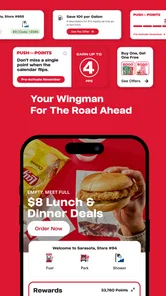
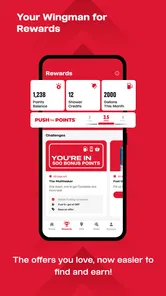
The central idea is straightforward: use the app around visits to Pilot and Flying J travel centers, keep track of rewards, and check for offers that may make a purchase more worthwhile. In everyday use, that means the benefit depends on whether those locations are already part of your route. A rewards balance is useful when it nudges me toward a convenient stop; it is less compelling if earning or redeeming rewards would send me out of my way.
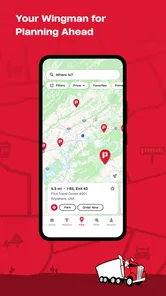
I would treat the app as a companion to a route rather than the reason to choose one. Before setting off, I can use its location and fuel information to consider possible stops, then check the app when I arrive for relevant rewards or offers. That small habit can help keep the decision in context: convenience first, reward second. The app is free, and its Everyone age rating makes it broadly accessible, though the rewards are naturally most relevant to people who visit these travel centers.
Making a stop work better on the road
As a Travel & Local app from Pilot Flying J, it has a clear focus rather than trying to replace every navigation or trip-planning tool. It has a 4.7 average from around 267,000 ratings and more than a million installs. The app dates back to November 2011, and version 6.30.1 is the current release. Those figures give a sense of its established audience, but what matters most to me is whether its tools fit the way I actually travel.
Features That Stand Out
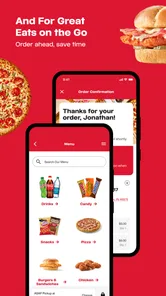
The app’s interface is pretty intuitive, which is always a plus. I’m not a fan of overly complicated menus, especially when I’m on the road and need to make quick decisions. With this app, finding locations, checking fuel prices, and even reserving showers is a breeze. Yes, you heard that right—you can reserve showers! This is a game-changer for anyone who knows the struggle of finding a clean spot to freshen up during long hauls.
Another feature that caught my eye is the ability to track and redeem rewards. As you fuel up, grab a coffee, or snag a snack, you earn points that can be redeemed for goodies. It’s like a little pat on the back for all those miles you’re racking up. Plus, the app sends you notifications for exclusive deals, so you’ll never miss out on savings.
A useful routine for a real trip
Imagine leaving early for a long drive with a planned break already in mind. I would check nearby travel centers and fuel prices before committing to a stop, then use the rewards area to see whether an offer suits something I was going to buy anyway. If I also need a shower, checking its reservation option before arriving can make the stop easier to organize. The useful insight is to do this while parked or before departure, not while driving: planning ahead makes the information helpful without turning the phone into a distraction.
More From Our News Desk

 Weather - By Xiaomi
Weather by Xiaomi Review: Clear at a Glance, Less Clear Up Close
Xiaomi’s weather app makes everyday forecasts quick to scan, but its calm surface can leave useful details and recovery paths harder to find than they should be.

 X
XX Under Pressure: Can It Recover When Posting Goes Wrong?
A resilience-focused review of X, examining setup, mistaken posts, interruptions, weak connections, and the gaps that matter when recovery needs to be dependable.

 Clash of Clans
Clash of Clans Is Won Between the Battles
Its raids are quick; its community is a long-term project of coordination, teaching, rivalry, and shared responsibility—with all the friction that entails.

 Android Auto
Android Auto Makes the Case for Quieter Car Software
The car interface is no longer judged by how much it can do, but by how quietly it helps. Android Auto shows what drivers now expect—and what still gets in the way.

 MobiOffice: Word, Sheets, PDF
MobiOffice: Transforming Mobile Productivity with Seamless Integration
MobiOffice: Word, Sheets, PDF is redefining mobile productivity with a surprising blend of functionality and innovation.

 EA SPORTS FC Soccer Mobile 26
EA SPORTS FC™ Mobile Soccer: Redefining Mobile Sports Gaming
Dive into EA SPORTS FC™ Mobile Soccer, where immersive gameplay and strategic depth transform mobile sports gaming.
Latest News



For a truck driver or someone who regularly makes long highway journeys, combining fuel, a break, and a rewards check in one routine can be more practical than opening separate tools for every decision. For an occasional traveler, the value is more conditional. If a Pilot or Flying J is already a convenient stop, the app can add useful context; if not, a broad map or navigation app may be better for comparing all nearby options without focusing on one network.
Where the convenience has limits
The app’s focus is also its main trade-off. Its location and rewards tools are most useful when Pilot and Flying J fit your journey, so I would not rely on it as my only way to find fuel or plan a route. A fuel price can help inform a choice, but it should be considered alongside distance, timing, and the rest of the drive rather than treated as the whole decision. Likewise, offers are a bonus, not a reason to buy something you do not need.
There is a small workflow advantage in checking the app before you reach a busy stop: you can decide what you need, look at the available information, and avoid browsing in a rush at the counter. Notifications may surface deals, but I would keep them useful rather than letting every offer influence the plan. The app is better as a quick reference for a specific travel-center visit than as something to monitor constantly.
The Travel Companion You Didn’t Know You Needed
One of the best things about the app is its real-time updates. I found the fuel price feature particularly useful, as it allowed me to compare prices and plan my stops accordingly. No more guesswork or surprises at the pump. Plus, the app’s map feature is pretty spot-on, helping me locate the nearest travel centers with ease.
Not to be overlooked, the customer service component is top-notch. If you run into any issues, the app provides easy access to support, ensuring your journey is as smooth as possible. It’s like having a travel buddy right in your pocket.
My practical recommendation is to make one check before each planned stop: confirm the location suits the route, look at the fuel information, and see whether a reward or shower reservation is relevant to that visit. This keeps the app focused on decisions it can help with. I would skip it if I rarely travel near Pilot or Flying J, or if I want a neutral directory of every fuel provider rather than a network-specific companion.
How I would fit it into an ordinary travel day
For a family setting out on a weekend drive, I would not make this the main navigation screen. I would use a regular route planner to decide the broad journey, then open this app when a Pilot or Flying J stop is a realistic option. That division of labor is useful: navigation tools are designed to keep the whole route in view, while this app is more relevant when I am deciding what to do at a particular travel center.
Say I am approaching a stretch where the next break matters more than saving a few minutes. Before leaving a safe parking spot, I can check whether a listed center is near the route, compare its fuel information with the next alternative, and decide whether I need a meal break or shower. If a reward applies to a purchase I already planned, I can factor it in. If the offer would prompt an unnecessary detour or extra spending, I would ignore it. That simple order—route, practical need, then reward—keeps the app from turning a small incentive into a bad travel decision.
There is also a useful distinction between planning a stop and changing plans at the last moment. When I have time, I can check the app in advance and choose a suitable center. When I am already tired or close to the next exit, I would not assume that a listed offer outweighs the value of stopping safely and promptly. The app is most helpful when it supports a decision I can make calmly, not when I am trying to inspect a screen under pressure.
What the reward angle does—and does not—change
Rewards can make regular visits feel more worthwhile, but I would not judge the app solely by how quickly a balance grows. Their practical value depends on the purchases I make and whether I can use them in a way that suits my habits. A driver who already buys fuel, coffee, or snacks at these centers has a more natural reason to check. Someone who visits only once in a while may find the tracking less important than simply finding a convenient place to stop.
I also recommend checking an offer before buying rather than trying to remember it afterward. That is a small, concrete habit that can reduce the chance of missing a relevant deal without encouraging aimless browsing. At the same time, I would keep expectations modest: an offer is a reason to consider a planned purchase, not proof that the whole stop is cheaper than every alternative. Fuel cost, extra distance, time, and the needs of anyone traveling with me still matter.
The distinction matters because the app combines several reasons to visit a travel center, and they do not carry equal weight on every trip. A shower reservation may be more valuable to a long-haul driver than a food offer; a location close to the highway may matter more to a family on a tight schedule than a small reward. I like that the app can support different kinds of stops, but I would decide what the stop is for before opening the rewards section.
Choosing it alongside other travel tools
Compared with a general map, the advantage here is the focus on Pilot and Flying J locations and the related stop experience. A broad map is usually the better first choice if I want to survey fuel brands, restaurants, and services across an entire area without favoring one operator. A dedicated navigation app is also the better tool for turn-by-turn directions and managing a full route. I would use those tools for the overall journey, then use this one for details connected to a Pilot or Flying J visit.
That is not a weakness so much as a boundary worth understanding before downloading. A brand-focused app can be more convenient when I know which network I plan to use, because I can look at fuel information and rewards in the same place. It is less useful when I have no preference and simply want the widest comparison. Keeping a general map available alongside it gives me a fairer view of alternatives, especially on an unfamiliar route where choosing the nearest suitable stop matters more than collecting rewards.
For frequent highway travelers, the combination can reduce small bits of friction: check the route in one tool, inspect a relevant travel center in this app, and return to navigation when ready to drive. I would avoid juggling both while moving. The value is not having every travel function in one screen; it is knowing which tool is best for each decision and using the rewards app only when its network is relevant.
Who is likely to get the most from it
I would recommend trying it first if Pilot and Flying J are already familiar stops on your regular routes. Truck drivers and other people who spend long stretches on highways may have repeated opportunities to use the location information, fuel checks, rewards, and shower reservation option. In that situation, even a quick pre-stop check can become a useful routine rather than another app to remember for a single vacation.
It can also suit occasional drivers who have a specific journey coming up and know they are likely to visit one of these centers. The app is free, so trying it before the trip is a reasonable way to see whether its stop information fits how you travel. I would not install it expecting it to replace a route planner, show every competing station, or make every purchase a bargain. Its strongest case is narrower: it helps a planned visit to this travel-center network feel more informed.
On the other hand, I would skip it if my usual routes rarely pass Pilot or Flying J, if I prefer to choose stops only through a provider-neutral map, or if I dislike having rewards and promotional offers in my travel routine. A person who wants one app for broad navigation, live traffic, and all nearby fuel choices should start with a general mapping tool instead. That is a more honest fit than trying to make a network-specific companion cover needs it was not built around.
Small habits that make the app more useful
My first tip is to make the check part of a planned break, not a reason to handle the phone while driving. Look at the location and fuel information before departure or while safely parked; then close the app and focus on the road. This preserves the convenience without creating a distraction, and it makes the information easier to compare because I am not making a rushed decision at the last moment.
My second tip is to set a purpose for the stop before browsing. If I need fuel, I compare location and price; if I need a shower, I look at the reservation option; if I am buying a snack anyway, I check whether a relevant offer is available. This is more effective than opening every section without a clear need. It also helps me avoid spending more time at the screen than the decision deserves.
Finally, I would keep a backup way to find alternatives. The app’s focus on its own travel centers is useful when one is convenient, but a general map can help me see other providers if the route changes or the nearest location does not suit the moment. I would not treat the app’s fuel information as a guarantee that a location is the best choice for every traveler; it is one useful input alongside distance, schedule, and personal needs.
Wrap-Up: Is It Worth It?
So, what’s the verdict? If you’re a frequent traveler or a trucker, Pilot: myRewards+ is definitely worth downloading. It’s packed with useful features that make travel more convenient and rewarding. Whether you’re in it for the rewards, the real-time updates, or simply the convenience of having one less thing to worry about on the road, this app has got you covered.
In summary, Pilot: myRewards+ transforms your travel experience from a mundane task into a series of rewarding pit stops. So, next time you’re planning a trip, why not give it a try? You might just find yourself looking forward to those fuel stops!
Pilot Frequently Asked Questions
How much space should I have available before installing Pilot: myRewards+?
Pilot: myRewards+ is a free travel and local app from Pilot Flying J. Before installing it, make sure your device has enough free storage for the download and the app to run comfortably. You can check available space in your device settings and remove files or apps you no longer need if necessary. The app is rated for Everyone.
Is Pilot: myRewards+ available for Android and iOS?
Pilot: myRewards+ is available for mobile devices, and its minimum operating-system requirement is 8.0. Check your phone or tablet’s operating-system version before downloading so you know it meets that requirement. Keeping the operating system and app current can help you have a smoother experience when checking rewards, offers, or travel tools.
What devices can run Pilot: myRewards+?
Pilot: myRewards+ is a travel and local app from Pilot Flying J, and it is available for devices running iOS 8.0 or later. Before downloading, check that your device meets this minimum requirement and has enough available storage. Keeping your operating system and the app up to date can also help the app work smoothly when you are looking for rewards or travel tools.
What is Pilot: myRewards+ and how can it benefit me?
Pilot: myRewards+ is a loyalty and rewards application designed for frequent travelers, especially those who often visit Pilot and Flying J locations. The app offers exclusive deals, discounts, and rewards points that can be redeemed for various services and products. By using the app, you can easily track your rewards, find nearby locations, and enhance your travel experience with personalized offers. Its focus on quicker fuel rewards, exclusive offers, and helpful tools makes it particularly useful when Pilot and Flying J stops are already part of your travel routine.
How do I earn and redeem rewards using the Pilot: myRewards+ app?
Earning rewards with Pilot: myRewards+ is simple. Users can earn points every time they make a purchase at Pilot or Flying J locations. These points accumulate and can be redeemed for discounts on fuel, food, beverages, and other services. To redeem rewards, simply present the app at the checkout. The app also offers bonus points and special promotions to help you earn rewards faster. Since offers and rewards can vary, it is worth checking the app before a stop so you know what is available to use.
Pros
- User-friendly interface
- easy to navigate.
- Comprehensive reward tracking system.
- Regular updates enhance features.
- Customizable notifications for deals.
- Wide network of participating locations.
Cons
- Limited to specific geographic areas.
- Occasional app crashes reported.
- Requires internet for full functionality.
- Some features hidden behind paywall.
- Limited customer support options.











