

Pill Identifier & Drug Search
- 563.00
- 3.7
- Installs
- 100.00K
- Price
- Free

Screenshots
Analysis by Reviewed
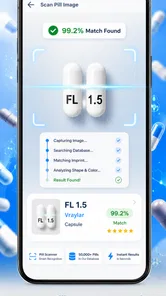
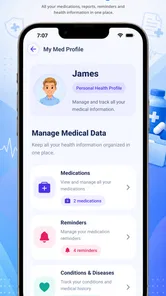
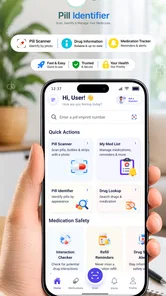
I use medication tools for one simple reason: when a tablet is unfamiliar, I want a clear starting point before I do anything else with it. Pill Identifier & Drug Search is built around that moment. It is a free medical app from FriendsApp Listing that helps identify pills, search for different drugs, and read related drug information. In my experience, its appeal is less about replacing professional advice and more about putting a practical reference within reach when a label is incomplete, a medicine has been moved into a weekly organizer, or two products look confusingly similar.
The app has reached over one hundred thousand installs and carries an average rating of 3.7 from around one thousand ratings, so it has attracted a meaningful audience without looking universally loved. That combination tells me to approach it as a useful reference with room for friction rather than as an authority that solves every medication question. It is free to use, rated for Everyone, and runs on Android starting with version 7.0. Those details make it accessible to many households, including people using older phones.
How Pill Identifier & Drug Search fits into real medication checks
The most useful way to think about Pill Identifier & Drug Search is as a first-pass lookup tool. You can search for a drug when you already know part of its name, or use the pill-identification idea when the physical tablet is the thing you need to investigate. That distinction matters. A search by name is usually faster when you have a prescription label, while identification is more valuable when the medicine has been separated from its original packaging.
A realistic example is a shared household medicine cabinet. Someone finds a loose tablet beside a water glass and cannot remember whether it belongs to a regular prescription or an older medicine. Instead of guessing from color alone, I would use the app to begin a lookup, compare the visible markings and appearance with the result, and then check the original packaging or ask a pharmacist before taking it. The app can make the investigation more organized, but the safe decision still depends on confirmation from a reliable source.
That workflow is also useful when helping a family member organize medicines. I would treat each result as a prompt to inspect the bottle, dosage instructions, and prescribing information, not as permission to combine, stop, or change medication. A pill can look similar to another product while differing in strength or release format. The app is most helpful when it reduces confusion at the beginning of the process.
What the free access actually means for value
The important cost detail is straightforward: the app is free. That removes the biggest barrier for someone who needs an occasional lookup and does not want to pay for a reference tool they may open only a few times a year. It also makes sense for students, caregivers, travelers, and households that want a backup resource without committing to a subscription or a paid medical reference.
Free access does not automatically make an app the best value, though. In this case, the value comes from convenience and availability, not from a promise that every search will settle a medical question. If you already have direct access to a pharmacist, a trusted health service, or the official information supplied with a prescription, those sources may be more appropriate for decisions involving dosage, interactions, side effects, or treatment changes.
More From Our News Desk

 Gmail
GmailGmail in a Busy Inbox: Who Benefits Most?
From first account to crowded workday, Gmail earns its place through dependable search and flexible sorting—but its best fit depends on how much inbox maintenance you can tolerate.

 Prime Video
Switching to Prime Video: What Changes in Your Viewing Routine
Prime Video can make a compelling second home for streaming, but switching means learning a different catalog, rental layer, and route from browsing to playback.

 Universal TV Remote Control
Universal TV Remote Control Works Best as a Reliable Backup
A phone remote earns its place through quick setup and reliable habits. Here is how to get more from Universal TV Remote Control—and where its limits show.

 Weather - By Xiaomi
Weather by Xiaomi Review: Clear at a Glance, Less Clear Up Close
Xiaomi’s weather app makes everyday forecasts quick to scan, but its calm surface can leave useful details and recovery paths harder to find than they should be.

 X
XX Under Pressure: Can It Recover When Posting Goes Wrong?
A resilience-focused review of X, examining setup, mistaken posts, interruptions, weak connections, and the gaps that matter when recovery needs to be dependable.

 Clash of Clans
Clash of Clans Is Won Between the Battles
Its raids are quick; its community is a long-term project of coordination, teaching, rivalry, and shared responsibility—with all the friction that entails.
Latest News



I also would not judge the app by the price alone. A free tool is valuable when it helps me ask a better question quickly. If it only produces a vague match, asks me to repeat a search, or leaves me unsure whether the result applies to my country or prescription, the time saved may be limited. That is why I see the app as a convenient supplement rather than a replacement for professional medication guidance.
Where the app delivers practical value
The strongest benefit is the combination of identification and search in one place. A general web search can return advertisements, forum discussions, outdated pages, or results that use a similar name for a different product. A dedicated pill-search app gives the task a narrower focus. That does not guarantee accuracy in every situation, but it is a better starting point than typing a vague description into a broad search engine.
Searching by a known drug name can also help when a person wants to review basic information before speaking with a clinician or pharmacist. I find this useful for preparing questions. Instead of saying, “What is this medicine?” I can note the exact product name, then ask about its purpose, expected effects, precautions, or whether it fits with another medicine. The app’s value is therefore partly organizational: it helps turn uncertainty into a more specific conversation.
A less obvious use is checking a medicine after it has been moved between containers. Many people use pill organizers for convenience, but once tablets are separated from their labeled packaging, it becomes easier to mix up similar-looking products. I would use the app to support a careful re-check, while keeping the original container nearby. If the appearance, imprint, or strength does not line up, I would stop rather than treating the closest result as correct.
Another useful habit is to search before an appointment and write down anything that needs clarification. This can help a caregiver who manages several medicines for another person. The app may reduce the effort needed to recognize names, but the final medication list should still be checked against prescription records and the advice of a healthcare professional. That extra step is especially important when medicines have similar names or when a brand and generic name are both involved.
Important limits when identifying a pill
Pill identification is inherently sensitive to small details. Color, shape, size, and markings all matter, and a user may describe one of those details incorrectly. Lighting can change perceived color, a worn imprint can be hard to read, and a tablet may have been split or damaged. For that reason, I would never rely on a visual resemblance alone, especially if the medicine is intended for a child, an older adult, or someone taking several prescriptions.
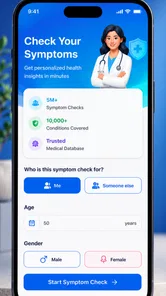
The app should also not be treated as a diagnostic tool. Finding information about a drug does not explain why a person has a symptom, whether a reaction is dangerous, or whether a treatment should be stopped. If someone has trouble breathing, severe swelling, fainting, confusion, or another urgent reaction, searching an app is not the right next step. Immediate medical help is more important than completing a lookup.
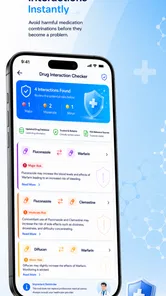
There is a similar limitation with interactions. A drug search can be a useful preparation step, but interaction questions depend on the complete medication list, health conditions, allergies, age, pregnancy status, and sometimes laboratory results. A casual search may not capture all of that context. I would use the result to prepare a question for a pharmacist, not to make a complicated combination decision independently.
Small habits that make the app more useful
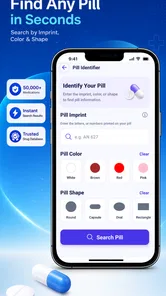
My first tip is to record the exact imprint rather than relying on color. If a tablet has letters or numbers, those markings are generally more useful for narrowing a search than a description such as “small white pill.” I would also note whether the tablet is round, oval, scored, or coated, then compare the result with the physical medicine and its packaging.
My second tip is to search one medicine at a time when reviewing a cabinet. Mixing several names into a rushed session makes it easier to attach the wrong information to the wrong bottle. I would keep a simple written list, mark each item as confirmed or needing professional verification, and avoid discarding packaging until the check is complete.
My third tip is to use the app before, not during, a stressful medication decision whenever possible. Looking up a prescription in a calm moment gives me time to notice the generic name, prepare questions, and compare the result with the label. In an emergency, the app is not a substitute for emergency services, poison control, or a clinician.
A fourth practical point is to be cautious with old or loose pills. Even a correct identification does not confirm that the medicine is still safe to use, stored properly, or prescribed for the current person. Expiration, storage conditions, and ownership are separate questions. The app can help identify what a tablet may be, but it cannot turn an unknown medicine into a safe one.
How it compares with the usual alternatives
Compared with a general internet search, this app has a clearer purpose. It avoids some of the distraction that comes with broad results and puts pill and drug lookup at the center. For a quick first check, that focus is convenient. The trade-off is that a search engine may lead more directly to an official manufacturer page, a hospital resource, or a local health service, depending on the question.
Compared with a pharmacist, the app is faster to open and available when a pharmacy is closed, but it cannot ask follow-up questions or inspect the medicine in person. A pharmacist can consider the full medication list and explain what to do next. For anything involving a possible error, side effect, interaction, or change in treatment, I would choose the pharmacist over the app.
Compared with a hospital or health-system medication portal, this app may feel simpler for an isolated lookup. A portal is usually more useful for medicines already connected to a person’s records, instructions, refills, and care team. Pill Identifier & Drug Search makes more sense as a general reference, particularly when the user is starting with an unidentified tablet rather than a complete digital medication list.
It also differs from a paper leaflet. The leaflet is tied to a specific product and is often the best source for the instructions that came with that medicine. The app is more convenient when the packaging is missing or when a user needs to search across different drugs. I would use both when possible: the app for orientation, the official leaflet for product-specific instructions.
Who is likely to get the most from it
This app is a good fit for people who occasionally encounter unfamiliar pills, caregivers who help organize medicines, and users who want a free reference for preparing questions. It is especially practical for someone who understands that identification is only the first step. The Everyone content rating and support for Android 7.0 make it approachable for a broad range of users and devices.
It can also help students or family members learn the difference between a drug name and a pill’s physical appearance. That is a small but useful distinction: the name tells me what I am searching for, while the imprint and form help me check whether the tablet in front of me matches the search. The app encourages that two-part process, provided I do not skip the final confirmation.
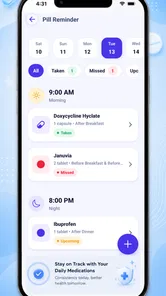
I would recommend skipping it if you want a complete personal medication manager, a replacement for a clinician, or a guaranteed answer from a photograph or short description. It is also not the right tool for deciding whether to change a dose, combine medicines, or respond to a serious reaction. Someone who needs detailed records, reminders, refill management, or care-team communication may be better served by a health-system app or a dedicated medication-management service.
What the rating and current version suggest
The app’s average rating is 3.7, based on around one thousand ratings, with more than five hundred written reviews. I read that as a sign of mixed real-world experiences: enough people find the core idea useful, while others may encounter search limitations, mismatches, or an interface that does not fit their expectations. A rating in that range makes me more careful about verifying results rather than assuming the app will work perfectly for every pill.
The current version is 5.2.4, and the app was released on January 25, 2019. That gives it a longer presence than a brand-new utility, which is reassuring when I want a familiar concept rather than an untested experiment. Still, longevity does not remove the need for caution. Medication information can be complicated, and an app should be judged by how responsibly I use its results, not only by how long it has been available.
FriendsApp Listing has kept the product focused on identification and drug search rather than presenting it as a complete healthcare service. I appreciate that narrow purpose because it is easy to understand. The limitation is equally clear: a focused lookup tool cannot answer every question that appears after the lookup. The user has to know when the task has moved beyond identification.
My final recommendation
For me, Pill Identifier & Drug Search earns its place as a free backup reference. It is useful when a pill has been separated from its packaging, when I want to search a drug name quickly, or when I need to prepare a more precise question for a pharmacist. Its best value is convenience without a purchase barrier, not medical authority.
I would install it if I wanted an extra lookup option on an older Android phone and was comfortable checking every important result against packaging or professional advice. I would not make it my only medication resource, and I would not use it to make urgent or high-risk decisions. The right way to use this app is as a first check, never as the final safety check.
That makes the buy-or-skip decision fairly simple. Choose it if free pill and drug searching sounds useful and you can apply sensible verification habits. Skip it if you expect a fully personalized medication system or definitive clinical guidance. In my view, the app delivers reasonable practical value for occasional identification, but its usefulness depends on pairing the search with careful judgment.
Pill Identifier & Drug Search Frequently Asked Questions
Is Pill Identifier & Drug Search free, and what devices can run it?
Pill Identifier & Drug Search is free to download and is listed for users of all ages. It runs on compatible Android devices with version 7.0 or later, so it is worth checking your device’s operating system before installing. The app is in the Medical category and is intended for people who want a convenient way to look up pills and medicines.
Who develops Pill Identifier & Drug Search, and what is the app’s main focus?
The app is developed by FriendsApp Listing, and its main focus is pill identification and drug information. Its short description is “Pill Identifier,” while its broader purpose is to help users identify pills, search for different drugs, and find medication information. It may be useful as a quick reference, but any important decision about taking or changing medicine should involve a healthcare professional.
What is Pill Identifier & Drug Search used for?
Pill Identifier & Drug Search is designed to help users find general information about medicines by searching their name, imprint, shape, color, or other identifying details. It can be useful when checking a prescription, reviewing possible uses, or learning about common warnings. However, the app should be treated as an informational reference, not as a replacement for a doctor, pharmacist, or official medication instructions.
Can Pill Identifier & Drug Search accurately identify every tablet or capsule?
The app may identify many commonly prescribed or over-the-counter medicines, but no digital pill identifier can guarantee a correct result in every situation. Different countries, manufacturers, dosages, and counterfeit products may use similar appearances. Packaging, imprint codes, and tablet markings should always be checked carefully. If the pill is unknown, damaged, unmarked, or looks different from the result, ask a pharmacist before taking it.
Does the app provide dosage instructions and medical advice?
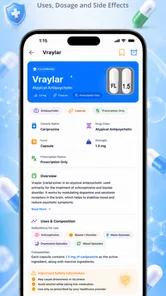
Pill Identifier & Drug Search may display medication details such as typical uses, warnings, side effects, or general dosage information, depending on the medicine and available database data. This information is not personalized medical advice. Dosage can vary according to age, weight, health conditions, pregnancy status, and other medicines. Always follow your prescription label or consult a qualified healthcare professional before changing how you take a medication.
Pros
- Quickly identifies many medications by name
- imprint
- shape
- and color.
- Useful drug information is available in a simple
- easy-to-navigate interface.
- Search tools help users compare medicines and check common alternatives.
- Can support medication research while traveling or visiting a healthcare provider.
- Helpful warnings and interaction details may encourage safer medication use.
Cons
- Results may be incomplete for uncommon
- newly approved
- or region-specific medicines.
- Identification should not replace advice from a doctor or pharmacist.
- Some features or drug databases may require an internet connection.
- Information accuracy can vary by country
- brand
- and database update schedule.
- Advertising or premium features may interrupt the search experience.












