Picture Editor
- 89.00
- 4.8
- Installs
- 1.00M
- Price
- Free

Screenshots
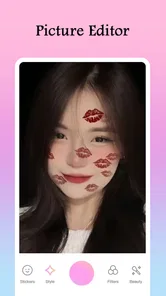
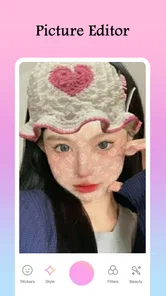
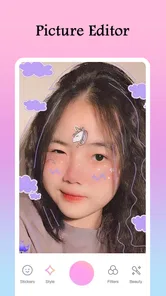
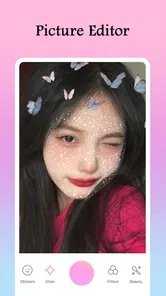
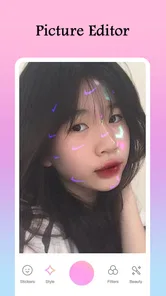
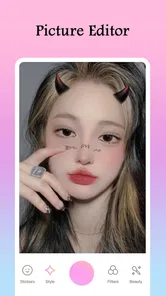
Analysis by Reviewed
When I’m choosing a photo editor, I care about more than whether a filter looks good: I also want to know what kind of editing experience I’m getting and where I should be careful with personal images. Picture Editor is a free beauty app from Galaxy studio apps, with a 4.8 average from around 16,000 ratings and over a million installs. It is rated for everyone, and its current version is 2.1.2. Those details make it an established option to consider, but popularity alone doesn’t tell me whether it suits every photo or every user.
What I’d check before editing
My first practical step with any photo app is to notice what the device asks for when I open an image or try to save an edit. I’d grant only the access needed for the task in front of me, and I’d revisit those choices in the device settings if I changed my mind. Permission prompts can vary by device and operating system, so I would judge the actual choices on my screen rather than assume that every installation behaves identically.
I would also separate two questions that are easy to blur together: whether an app can open the picture I select, and what happens to that picture afterward. A permission prompt alone does not answer every question about storage or handling. If a photograph is sensitive, I’d first check the app’s visible privacy information and controls; if those do not give me enough confidence, I’d use a different editor or leave that image untouched.
A small, useful test before committing
Rather than start with a treasured portrait, I’d use a non-sensitive photo to learn the basic flow. I’d make one edit, save or export it if that option is available, then check the resulting image in the phone’s usual photo viewer. That simple test helps answer practical questions: does the finished picture look the way I expected, and does the workflow suit how I normally handle photos?
I’d keep the original untouched while experimenting. When an effect changes the mood more than I intended, having the source image makes it easy to begin again instead of trying to undo a long chain of choices. This is especially useful with beauty effects, where a small adjustment can change the overall impression of a face or make the lighting feel less natural.
First Impressions
When I first downloaded the Picture Editor, I was immediately impressed by its sleek and intuitive interface. It's like the app knew exactly what I wanted to do with my photos, and it guided me through the process seamlessly. Whether you're a seasoned photo editing pro or just someone looking to touch up vacation pics, this app caters to all skill levels.
What to expect from its editing style
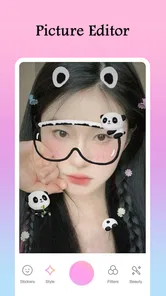
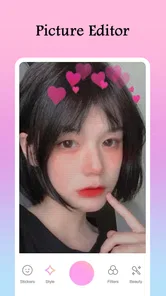
The app’s beauty focus and picture-editor identity make it most appealing when I want a quick visual change rather than a carefully controlled, multi-step retouch. The store summary points to effects, filters, and stickers, so I’d approach it as a playful tool for social pictures and casual experiments. That is a different aim from a conventional editor built around detailed color correction, masking, or a repeatable professional workflow.
More From Our News Desk
 Instagram
’s Power Comes From Its Place in Your Phone
A close look at how Instagram turns Meta’s reach, recommendation systems and everyday camera habits into durable platform power—and what that costs users.

 Gmail
Gmail in a Busy Inbox: Who Benefits Most?
From first account to crowded workday, Gmail earns its place through dependable search and flexible sorting—but its best fit depends on how much inbox maintenance you can tolerate.

 Prime Video
Switching to Prime Video: What Changes in Your Viewing Routine
Prime Video can make a compelling second home for streaming, but switching means learning a different catalog, rental layer, and route from browsing to playback.

 Universal TV Remote Control
 Works Best as a Reliable Backup
A phone remote earns its place through quick setup and reliable habits. Here is how to get more from Universal TV Remote Control—and where its limits show.
 Weather - By Xiaomi
Weather by Xiaomi Review: Clear at a Glance, Less Clear Up Close
Xiaomi’s weather app makes everyday forecasts quick to scan, but its calm surface can leave useful details and recovery paths harder to find than they should be.

 X
X Under Pressure: Can It Recover When Posting Goes Wrong?
A resilience-focused review of X, examining setup, mistaken posts, interruptions, weak connections, and the gaps that matter when recovery needs to be dependable.
Latest News



For a practical everyday use, imagine taking a quick photo before meeting friends and wanting it to feel a little more polished or expressive before sharing. I’d try a single effect first, then compare the result with the original and add a sticker only if it contributes something. This small-step approach helps avoid the common trap of piling on edits until the subject and the photo’s natural lighting no longer feel believable.
When a quick edit is the right call
I see the strongest case for this kind of beauty editor in one-off pictures: a selfie for a group chat, a casual portrait that needs a more playful mood, or a quick image for a social post where personality matters more than technical precision. The appeal is not that every photo needs a filter. It is that choosing a ready-made look can be less effort than learning a complex editor when I only want one image to feel a little different.
For a family gathering, for example, I’d keep the edit light and make sure the people in the picture still look like themselves. If I’m preparing several photos from the same event, I’d review them together before sharing; a bold effect that works on one image may look inconsistent on another because of different lighting or backgrounds. That quick comparison is a useful check, even when the app is being used casually.
Features That Stand Out
The app is packed with features that make it a go-to for photo editing enthusiasts. One of the highlights is the vast array of filters available. From vintage vibes to modern aesthetics, there's a filter for every mood. I found myself experimenting with different looks, and it was surprising how a simple filter could transform a photo's entire feel.
Another standout feature is the precision editing tools. The app offers everything from basic cropping and rotating to more advanced options like adjusting exposure, saturation, and contrast. It's like having a mini Photoshop in your pocket, without the overwhelming complexity.
How to judge filters against the original
When a filter changes several aspects of a picture at once, I find it more useful to judge the whole image than to focus on the effect’s name or preview. I’d look at skin tones, bright areas, and the background in turn. If the face looks too warm while the room still looks cool, or a bright area loses detail, I’d try a gentler option or return to the unedited version rather than forcing a look to work.
A less obvious trade-off is that a striking effect can make a photo feel finished quickly while also making it harder to use in a different context later. A playful sticker may suit a private message but not a profile picture or a work-related image. I’d save decorative choices for the copy I plan to share, and keep a clean original for uses where a simpler appearance matters.
How I’d use it without over-editing
A useful habit with any filter-led editor is to decide what the picture needs before opening the effects: a warmer mood, a cleaner crop, or a fun detail. I’d make the framing choice first, since a sticker or strong effect can distract from a crop that still needs work. Then I’d apply one change at a time and pause to check whether the face, background, and colors still look coherent together.
That workflow also clarifies when another option may be better. If I need precise retouching, consistent edits across a batch of images, or fine control over individual parts of a photograph, I’d choose a more technical photo editor. If I only want a quick, expressive finish for one image, Picture Editor’s beauty-oriented effects and stickers are a more natural fit than a complex tool whose controls I may not need.
How it compares with other editing approaches
Compared with a phone’s built-in photo tools, a beauty-focused app is most useful when I want a more decorative result than a basic crop or light adjustment. The built-in editor is often the simpler choice for straightening a picture or making a modest correction without adding visual extras. Picture Editor makes more sense when I’m specifically in the mood to experiment with effects, filters, or stickers rather than just fix a small flaw.
At the other end, more advanced editors are a better match for precise selections, repeatable color treatment, or a consistent look across a large set of images. I would not choose this app as a substitute for that kind of workflow based on its beauty-editor focus. The useful distinction is purpose: quick and expressive here, more controlled and methodical elsewhere. Neither approach is automatically better; the right one depends on how much control the image needs.
User Experience
One thing that really sets Picture Editor apart is its user-friendly design. Navigating through the app is a breeze, and the tools are clearly labeled, making it easy to find what you're looking for. I particularly appreciated the tutorial section, which offers tips and tricks for getting the most out of the app. It's perfect for beginners who might be a bit overwhelmed by the plethora of options available.
Additionally, the app is surprisingly fast. Editing and processing images happen almost instantaneously, which is a huge plus for those of us who are always on the go. No one likes waiting around for edits to render, and thankfully, that's not an issue here.
A sensible routine for sharing
Before posting an edited picture, I’d check it at the size where people are likely to see it. A detail that looks subtle while zoomed in can become the main thing that stands out in a small preview; conversely, a sticker that seems prominent on the editing screen may become hard to notice once the picture is displayed smaller. A quick look at the saved result in its intended context can prevent a last-minute mismatch.
I’d also be deliberate about which version I share. A fun edit can be right for a close-friends chat but not for every audience, and beauty effects can alter the way a person appears. If I’m editing someone else’s photo, I’d keep the treatment respectful and ask before sharing a noticeably changed portrait. The creative choice is mine, but the image still represents a real person.
Privacy, spending, and control
Photos can be personal, so I would take a moment to review the permissions requested on the device and consider whether each one makes sense for the task I’m doing. I wouldn’t assume anything about storage, sharing, or account controls without checking the app’s current settings and privacy information. For especially sensitive pictures, my cautious choice would be to avoid editing them in any app until I’m comfortable with the choices it presents.
The app is free to download, with optional in-app purchases ranging from $0.99 to $99.99 per item. I’d keep that in mind before confirming any purchase and check what is being offered on the purchase screen, rather than treating every effect as automatically included. The app runs on Android 5.0 or later; its release date was June 15, 2023. These basics make it easier to judge compatibility and cost, but they don’t replace checking the actual options visible on your device.
Keeping spending and access intentional
For a free app with optional purchases, my rule is simple: I’d explore the free experience first and pause whenever a purchase prompt appears. Before paying, I’d read the item description and price shown at that moment and decide whether the specific option is worth it to me. The listed purchase range is broad, so I would not treat an in-app purchase as a small or predictable add-on without checking the exact offer.
If a child is using the app, the Everyone rating is a useful age-content signal, but it does not replace a grown-up’s attention to purchases and device access. I’d review the device’s purchase controls and make sure the user understands that free installation does not mean every optional item is free. That is a practical distinction for any household sharing a phone or tablet.
Who will enjoy it—and who may not
I’d recommend trying Picture Editor if you enjoy experimenting with looks, want a low-pressure way to dress up casual photos, or are learning what different effects do. Its Everyone content rating and accessible positioning make it approachable for a broad audience, while the large community of users suggests it has found an audience among people looking for straightforward picture editing.
I’d skip it if your priority is a highly controlled retouch, a dependable professional workflow, or clear assurances about how a particular sensitive image is handled that you have not independently checked. The same goes for anyone who dislikes optional purchases or prefers an editor focused on subtle adjustments rather than decorative effects. A beauty editor can make a picture more fun, but it is not automatically the right tool for every editing job.
Who should choose a different tool
I’d also steer away from it for images where accuracy matters more than style, such as a record of a product’s condition or a document photo that needs to remain clear and unembellished. In those cases, even a pleasing effect can change colors or add decoration that gets in the way. A basic crop-and-adjust tool is the safer choice when the goal is faithful representation, not a new look.
Likewise, anyone who wants to process many images in a consistent way should consider whether a dedicated batch-oriented editor fits better. A one-picture-at-a-time approach is comfortable for casual experimentation, but it can become tedious when every image needs the same careful treatment. I’d match the app to the size and importance of the job rather than expect a beauty editor to cover every photo task.
Final Thoughts
After spending some quality time with the Picture Editor, I can confidently say it's a must-have for anyone who loves photography. Whether you're looking to make minor tweaks or completely overhaul an image, this app has got you covered. It's packed with features, yet remains incredibly user-friendly, making it accessible to everyone.
So, if you're on the hunt for a reliable photo editing app that won't let you down, give Picture Editor a shot. You might just find it becoming your new favorite tool in your photography arsenal. Happy editing!
My cautious recommendation
I’d frame my recommendation more narrowly: this is worth considering when the goal is a quick, expressive beauty edit and you’re comfortable checking permissions and purchase prompts for yourself. Its free entry point and approachable style make trying it reasonable, while optional purchases and the personal nature of photos call for a little attention rather than automatic trust.
For an everyday selfie or a playful image to share, I’d start with one effect, keep the original, and judge the saved result before sending it anywhere. For sensitive pictures, precise retouching, or work that needs consistency across many files, I’d choose a tool whose controls and privacy choices better match that specific need. That balance is why I see Picture Editor as a useful casual option, not a universal answer to photo editing.
Picture Editor Frequently Asked Questions
Can I add filters, effects, and stickers to my pictures?
Yes. Picture Editor’s focus is on trendy effects, filters, and stickers, giving you ways to change the look of a photo and make it stand out. You can try different combinations to find a style that suits the image and your preferences. The app is aimed at people who want to give pictures a more eye-catching appearance.
Is Picture Editor free to download?
Picture Editor is free to download, so you can try the app without paying an upfront price. It also offers optional in-app purchases, with individual items priced from $0.99 to $99.99. If you are considering paid content, review the purchase details in the app before confirming, so you can decide whether the free experience is enough for your editing needs.
Who makes Picture Editor, and what kind of app is it?
Picture Editor is a beauty app developed by Galaxy studio apps. Its emphasis on effects, filters, and stickers makes it suited to users who want to enhance the appearance of their pictures rather than simply leave them untouched. The app is designed for a broad audience, and its content rating is Everyone, making it appropriate for general users.
Is Picture Editor suitable for quick edits before sharing photos?
Picture Editor is a beauty app focused on giving photos a more polished, eye-catching look with effects, filters, and stickers. It may suit users who want to make a quick visual change before sharing an image, as well as those who enjoy experimenting with different styles. The app’s overall purpose is to help users enhance pictures for a more noticeable result.
What features does Picture Editor offer for photo editing?
Picture Editor is packed with a variety of photo editing tools designed to enhance your images. It offers features such as cropping, filters, brightness and contrast adjustment, red-eye removal, and more. Additionally, it provides advanced tools like layers, masks, and blending modes for users looking to perform more complex edits.
Pros
- User-friendly interface for quick edits
- Wide range of filters and effects
- High-resolution export options
- Supports various image formats
- Regular updates with new features
Cons
- In-app purchases for premium features
- Occasional ads disrupt editing flow
- Limited free version functionality
- Requires internet for some features
- Can be resource-intensive on older devices