Picrew PFP & OC Maker
- 1.12K
- 4.2
- Installs
- 1.00M
- Price
- Free

Screenshots
Analysis by Reviewed
I like character makers most when they are easy to dip into: a few minutes can turn a vague idea into a face I can use for a profile or develop into a story character. Picrew Character Creator&Maker is aimed squarely at that creative, visual kind of play. It is an art and design app from TETRACHROMA INC., and its appeal is less about drawing from a blank canvas than about assembling a look from available choices.
That distinction shapes who will enjoy it. I can use a character maker when I want to explore an idea before committing to a more demanding project, or when I need an expressive portrait without building every feature by hand. The trade-off is equally clear: the result depends on the styles and parts available, so it is a poor fit if I need exact control over a particular design.
From First Creations to a Lasting Habit
Have you ever wanted to create your own avatar or character but didn't know where to start? Well, let me introduce you to Picrew Character Creator&Maker. It's a fun and intuitive app that lets you design your very own character from scratch. Whether you're looking to make a cute avatar for social media or a unique character for a story, this app has got you covered.
The First Week: Quick Wins and Creative Momentum
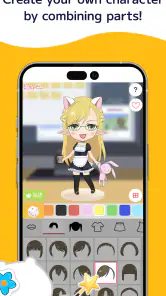
At first glance, Picrew Character Creator&Maker might seem like just another avatar maker, but it's so much more. The app offers a plethora of customization options that let you get creative with every aspect of your character's appearance. From hairstyles and facial features to clothing and accessories, the possibilities are endless. What I love most is how the app allows you to mix and match different styles, making it possible to create characters that are as unique as you are.
The app's user interface is incredibly intuitive, which makes the whole character creation process a breeze. You can easily navigate through different categories and pick out the elements you want to use. Each category offers a wide range of options, so you're never short on choices. And the best part? You can see changes in real-time as you tweak your character's look. It's like playing dress-up, but in a digital space!
That immediacy makes a useful difference when you have a small idea but not the drawing skills or time to render it yourself. I can start with a hair shape or outfit and let the available combinations suggest a personality. For a profile picture, I would make the face readable at thumbnail size before spending time on tiny details: strong contrast and a clear silhouette tend to survive cropping better than subtle accessories. If the image is for a character reference, I would instead keep a short note of the choices that define the character, since a finished portrait alone may not capture the story behind it.
One useful first-session habit is to make two or three deliberately different versions before polishing any one of them. I might keep the same basic character idea but try a contrasting hairstyle, expression, or outfit, then compare the overall impression. That makes the app’s mix-and-match approach work like a quick visual brainstorming tool instead of a long search for a single “perfect” combination. It is especially handy when I know the mood I want but cannot yet picture the details.
More From Our News Desk

Weather by Xiaomi Review: Clear at a Glance, Less Clear Up Close

X Under Pressure: Can It Recover When Posting Goes Wrong?

Clash of Clans Is Won Between the Battles

Android Auto Makes the Case for Quieter Car Software

MobiOffice: Transforming Mobile Productivity with Seamless Integration

EA SPORTS FC™ Mobile Soccer: Redefining Mobile Sports Gaming
For a busy day, the appeal is that I can treat a short visit as a complete task: decide what the image is for, shape the character around that purpose, and stop once the design reads clearly. Someone who enjoys visual experimentation but does not draw may find that satisfying. Someone who wants to practice anatomy, lighting, or line work should choose a drawing tool instead; assembling a portrait and learning to draw one are different kinds of creative work.
Making the Results Useful Beyond the App
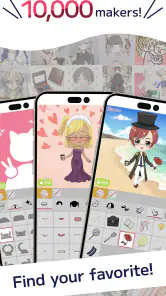
One of the standout features of the app is its vast library of user-generated content. You can explore creations made by other users and even use them as a base for your own designs. This not only sparks creativity but also fosters a sense of community among users. It's fascinating to see the diverse range of characters that people come up with, and it definitely inspires you to push your creative boundaries.
Browsing other people’s work is most valuable to me as a way to get unstuck, not as a shortcut to a finished design. I might notice a color pairing or a combination of features I would not have considered, then make a new version that feels more like my own idea. A practical workflow is to decide what the character needs to communicate first—cheerful, reserved, fantasy-inspired—and only then browse or adjust details. That keeps the large menu of choices from turning into aimless tweaking.
When I am developing several characters for one story, I would use the app to explore visual contrast rather than force every portrait to match perfectly. Giving each one a distinct silhouette or color direction can make a small cast easier to tell apart at a glance. The limitation is that a consistent series depends on the choices available to me, so I would treat these portraits as planning references, not as final production art that must follow a strict house style.
Once you're satisfied with your creation, sharing it with the world is just a tap away. The app makes it easy to download your character in high resolution or share it directly on social media platforms. Whether you're showcasing your latest creation to friends or using it as a profile picture, Picrew Character Creator&Maker ensures that your character looks stunning in any format.
For an everyday example, I could make a new avatar before changing a social profile, save the finished image, and check how it looks in a small circular crop before using it. If I were building a cast of characters for a personal story, I would treat each design as a visual mood board rather than assume it replaces a full illustration workflow. A character maker is quick for appearance and broad visual direction; drawing software is better when I need precise poses, a specific scene, or complete control over every line.
Before sharing a portrait, I would also check whether the image still communicates the same expression after it has been cropped or reduced. A design that looks lively at full size can lose its defining details in a tiny profile icon. Saving a version with a simpler composition for that purpose can be more useful than trying to make one image work equally well as a social avatar, a story reference, and a decorative post.
Month-to-Month Value and the Cost of Returning
Moreover, the app is constantly updated with new content and features, so there's always something fresh to explore. This keeps the experience exciting and encourages users to keep coming back for more. Plus, the developers are active in engaging with the community, often taking feedback and suggestions to improve the app further.
Fresh material can give me a reason to revisit a character, but novelty alone does not guarantee a lasting routine. The stronger recurring use is practical: keeping an avatar current, trying a new visual direction, or creating a quick reference when a story idea changes. I would not install it expecting a deep, structured art course or a complete character-design workspace. Its value is in low-pressure experimentation and readily shareable results, which may be enough for casual creators and social profile users.
For someone who updates a profile now and then, the app can be useful without becoming a daily habit. I would return when there is a reason—a new account, a change in personal style, or a character idea worth testing—not simply because an app is available. That makes its recurring value personal: people who enjoy revisiting and refining visual identities have more reason to keep it around than someone who only needs one avatar once.
It also helps to separate the fun of making a portrait from the practical question of whether I need to keep it. If I am creating a character for a story, I can save the image alongside a written description and use it as a prompt when planning scenes. If I am making a profile picture, I can keep the finished image ready for a later update. These uses give a creation a life beyond the session, but they do not turn the app into a filing system or a full project organizer.
The main trade-off is that the choice-rich approach can make it tempting to keep adjusting small details long after the design already works. I find it helps to set a purpose before starting and stop when the image serves that purpose. For a profile image, I would prioritize the face and overall color balance; for a story concept, I would focus on traits that distinguish one character from another. This small limit makes sessions feel intentional instead of like endless browsing.
A simple way to keep the process from eating up more time than planned is to decide on one thing to change during a return visit. I might refresh the outfit while keeping the character’s recognizable features, or revisit the expression without rebuilding the whole look. That approach makes small updates feel purposeful and helps preserve continuity. If I keep changing everything, I may end up with a collection of attractive but unrelated portraits rather than a character whose identity develops over time.
If you are deciding whether to try it, the basics are straightforward: it is free to install, rated for teens, and has optional in-app purchases ranging from $1.99 to $39.99 per item. The current version is 1.2.8 and it runs on Android 6.0 or later. The app has a 4.2 average from around 32,000 ratings, with more than 1 million installs. Those figures suggest a well-used option, but they do not tell me whether its style or creation flow will suit you; the best test is whether you enjoy building characters from preset elements.
The free starting point makes it reasonable to see whether the available look and workflow click for you before spending anything. I would only consider an optional purchase after I had returned enough times to know that it addresses a real need. For occasional avatar making, paying for extras may not add much value; for a creator who repeatedly uses the app and finds a particular option useful, the calculation could be different. The important thing is to judge purchases by how they improve your own routine, not by the excitement of having more choices.
Compared with a general-purpose drawing app, this is a faster route to a polished character portrait but offers less freedom over the exact result. Compared with a basic avatar editor, its character-building focus and user-created material give me more room to explore different looks. I would skip it if I need original hand-drawn assets, detailed control over anatomy, or a guaranteed match to a particular art direction. I would also be cautious about buying extras before I know how often I will return: a free first try is a sensible way to see whether the available styles fit my taste.
There is another trade-off in choosing a character maker over a blank canvas: it encourages decisions within a visual language rather than letting me define every mark. That can be a relief when I want a quick result, but restrictive when an idea depends on unusual proportions, precise clothing details, or a specific pose. In those cases, I would use a portrait from the app as a starting reference and move to an illustration tool for the parts that need more control.
The app is also not the best choice if the main goal is to produce a highly individualized illustration for a commission, a detailed comic panel, or a polished scene. Those tasks usually need control over composition and drawing that a preset-based character creator is not meant to replace. I would pick it when speed, experimentation, and an appealing character portrait matter more than total artistic freedom; that is the distinction that helps me decide whether to open it or another creative tool.
Will It Earn a Place on Your Phone?
In conclusion, if you're looking for a fun and engaging way to express your creativity, give Picrew Character Creator&Maker a try. It's an app that not only lets you create amazing avatars but also connects you with a community of like-minded individuals. So go ahead, unleash your inner artist, and create characters that are truly one-of-a-kind!
My longer-term verdict is that it earns space for people who regularly need fresh profile art or enjoy inventing characters in short, relaxed sessions. Its simple controls and mix-and-match approach reduce the effort of getting started, while community creations can help when inspiration stalls. It is less compelling for someone who only wants one highly specific illustration or who prefers drawing every detail themselves. I would keep it as a handy creative tool rather than expect it to replace a sketchbook or full art app; that is where its easy, repeatable appeal makes the most sense.
For a teen who likes making avatars, a casual social media user, or a writer who wants a quick visual cue for an original character, I can see a clear reason to try it. For a professional illustrator who needs a precise brief translated into finished artwork, or for anyone who dislikes choosing from preset elements, I would look elsewhere. The app’s strongest case is not that it can do every kind of visual work, but that it makes one small creative task approachable and enjoyable.
So, does it deserve a lasting spot? I think it can, provided I use it for the jobs it handles well: experimenting with character appearances, refreshing a profile image, and finding a visual direction when a story idea is still taking shape. It does not need to become a daily ritual to be worthwhile. If the first-session excitement fades and I rarely have a reason to make another character, it is easy to move on; if I often want quick, expressive portraits, the low-effort return is its real long-term strength.
Picrew PFP & OC Maker Frequently Asked Questions
Is Picrew PFP & OC Maker suitable for teens?
Picrew PFP & OC Maker has a Teen content rating, so it may be a fit for teenagers interested in making character portraits and profile pictures. Parents and guardians may want to consider that rating when deciding whether the app is appropriate. The app’s focus is creative character design, and checking the rating before downloading helps set expectations.
Does Picrew PFP & OC Maker require payment to download?
Picrew PFP & OC Maker is free to download, which makes it possible to try the app without paying upfront. It also offers optional in-app purchases priced from $1.99 to $39.99 per item, so some content or features may involve extra spending. If you are managing purchases on a shared device, it is sensible to review the available purchase controls before use.
Does Picrew PFP & OC Maker work on older Android phones?
Picrew PFP & OC Maker is an Art & Design app for creating character portraits and profile pictures. It supports Android 6.0 and newer, so checking your device’s operating system before downloading can help you avoid compatibility problems. The app is free to download, and its Teen content rating is worth keeping in mind when deciding whether it is suitable for you or someone else.
Who makes Picrew PFP & OC Maker, and what can I create with it?
The app is developed by TETRACHROMA INC. and is presented as a custom character creator and PFP maker. Its focus is designing character images for personal expression, such as an original character or a profile picture. If you enjoy experimenting with character looks and making visual designs, its Art & Design category gives you a useful sense of what kind of app to expect.
What is Picrew Character Creator & Maker?
Picrew Character Creator & Maker is an online platform and mobile app that allows users to create custom avatars or characters. It provides various templates and design elements, enabling users to personalize their avatars with different hairstyles, outfits, facial features, and accessories. This app is popular for its user-friendly interface and creative flexibility.
Pros
- User-friendly interface for easy navigation.
- Wide variety of character customization options.
- Regular updates with new features.
- High-quality graphics and design tools.
- Supports sharing on social media easily.
Cons
- Limited export options for created avatars.
- Some features require in-app purchases.
- Occasional lag on older devices.
- No offline mode available.
- Advertisements can be intrusive.
- Category
- Art & Design
- Version
- 1.2.8











