PicMa: AI Video&Photo Enhancer
- 2.19K
- 4.3
- Installs
- 5.00M
- Price
- Free

Screenshots






Analysis by Reviewed
Have you ever stumbled upon an old photo that instantly transports you back in time, but you wish it could be a bit clearer? Or perhaps you've captured a video that just doesn't do justice to the moment because of low quality? Enter PicMa: AI Video&Photo Enhancer, the app that's here to rescue those precious memories and make them shine like never before.
Transforming Memories with Ease
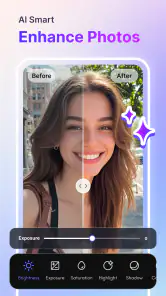
First things first, let's talk about the magic behind PicMa: AI Video&Photo Enhancer. This app harnesses the power of AI to enhance your photos and videos, making them look crisp and vibrant. Just imagine turning those grainy, pixelated images into high-definition works of art with just a few taps. It's like having a professional photo editor right in your pocket!
Features That Impress
Now, let's dive into some of the amazing features PicMa offers. One of the standout features is its ability to upscale images without losing quality. Yes, you heard that right! You can enlarge your photos, and the app ensures they remain sharp and clear. This is perfect for those family portraits or scenic shots you want to print and hang on your wall.
Another cool feature is the video enhancement tool. We all know how tricky it can be to capture the perfect video moment, especially in low light. PicMa comes to the rescue by brightening up those videos and enhancing every detail, so you don't miss a thing.
User-Friendly Experience
What I love about PicMa is that it's incredibly user-friendly. You don't need to be a tech guru to navigate through the app. The interface is intuitive and straightforward, making it a breeze to enhance your media. Plus, with its quick processing time, you can transform your photos and videos in no time.
And let's not forget about the app's sleek design. It's not just about functionality; PicMa makes sure you have a pleasant experience while using it. The layout is clean, and the controls are easy to find, which is always a plus in my book.
Final Thoughts
In a world where capturing moments is as easy as pulling out your phone, having an app like PicMa is a game-changer. Whether you're looking to revive those old memories or want to enhance your recent captures, this app has got you covered. It's like having a magic wand for your photos and videos, bringing them to life in ways you never thought possible.
So, if you're on the lookout for an app that combines simplicity with powerful features, give PicMa: AI Video&Photo Enhancer a try. It's not just an app; it's your personal media enhancer, ready to make every moment picture-perfect.
Pros
- Enhances photos with AI precision.
- User-friendly interface.
- Fast processing times.
- High-quality output results.
- Supports multiple file formats.
Cons
- Limited free features.
- Requires internet connection.
- Occasional processing errors.
- Subscription can be pricey.
- No offline mode available.

- Category
- Photography
- Version
- 3.6.0











