PicFrame
- 1.50K
- 3.6
- Installs
- 100.00K
- Price
- $0.99

Screenshots
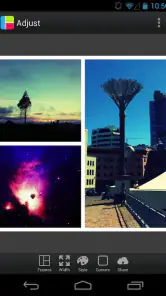

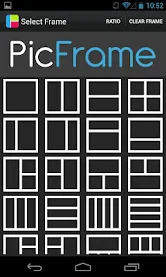




Analysis by Reviewed
Ever found yourself scrolling through your camera roll, thinking your photos could use a little more pizzazz? Enter PicFrame, the app that’s got your back when it comes to spicing up your photo game. Whether you’re a selfie enthusiast or a landscape lover, PicFrame offers a palette of features that can turn your simple snaps into stunning collages.
Why Choose PicFrame?
From the get-go, PicFrame impresses with its user-friendly interface. You don’t need to be a tech wizard to navigate through its options. The app provides a variety of frames and templates that are versatile enough for any occasion. Birthdays, anniversaries, or just a fun day out—you name it, PicFrame’s got a template for it.
Customization Galore
One of the standout features is the customization capability. You can adjust the frame size, add text, and even tweak the color schemes to match your style. The drag-and-drop functionality makes it super easy to move photos around, ensuring that your collage looks just the way you want it. Plus, the app lets you integrate up to nine photos in a single frame, which is perfect for capturing all those memories in one go.
Oh, and did I mention the filters? PicFrame offers a selection of filters that can add that extra oomph to your pictures. Whether you’re going for a vintage vibe or a vibrant pop, there’s a filter to match your mood.
Sharing is Caring
Once you’ve created your masterpiece, sharing it is a breeze. PicFrame allows you to send your collages directly to your social media accounts. Instagram, Facebook, Twitter—you can flaunt your photo-editing prowess with a simple tap. The app even supports high-resolution exports, so your photos look crisp and clear, no matter where you’re showing them off.
Another cool feature is the ability to print your collages. If you’re someone who loves tangible memories, you can easily print your creations and maybe even turn them into a scrapbook or wall art.
Final Thoughts
All in all, PicFrame is a handy tool for anyone looking to add a creative touch to their photos. It’s versatile, easy to use, and packed with features that cater to both novices and seasoned photo editors. So, if you’re on the lookout for an app that can transform your pictures into beautiful works of art, PicFrame is definitely worth a shot.
Pros
- User-friendly interface with intuitive controls.
- Wide variety of frame templates available.
- Supports high-resolution photo exports.
- Seamless integration with social media platforms.
- Regular updates with new features.
Cons
- Limited free features; many require in-app purchases.
- Occasional ads can disrupt user experience.
- Some users report app crashes on older devices.
- Limited customization options for frames.
- No option for video frame creation.

- Category
- Photography
- Version
- 3.7.12











