

Phyn
- 203.00
- 3.6
- Installs
- 10.00K
- Price
- Free

Screenshots


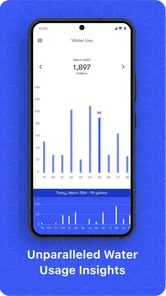
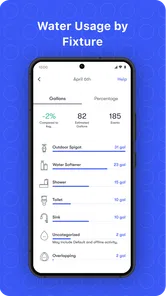
Analysis by Reviewed
Water damage is one of those household problems that feels unlikely until it happens in a place you cannot easily see: behind a washing machine, beneath a sink, or along a pipe in a utility room. Phyn approaches that worry as a smart water assistant rather than as a simple remote control. I found its most useful idea to be the way it turns ordinary water activity into information I can actually use, helping me notice unusual behavior before it becomes an obvious household emergency.
This is a free House & Home app from Phyn LLC, aimed at people who use compatible Phyn water-monitoring equipment. The application itself is not a magic leak detector that works independently in every home. Its value comes from connecting the app with the relevant hardware and then making the resulting water information easier to understand. That distinction matters: if you are looking for an app-only solution, this is not the right expectation to bring to it.
I would recommend it most to homeowners who want more awareness of their plumbing without checking pipes manually every day. It can also make sense for someone who travels, owns a second home, or simply wants an earlier warning when water use does not look normal. At the same time, people renting a property or searching for a purely visual household checklist may find that the setup is more involved than they need.
Turning water activity into something I can act on
The central capability is water monitoring. Instead of treating plumbing as something I only think about when a tap is running, the Phyn experience gives water activity a place in the home dashboard. That changes the conversation from “I hope everything is fine” to “Does this pattern look like normal use?”
That is a meaningful difference. A basic leak alarm usually reacts to water reaching one particular sensor. A smart water assistant works from a broader view of the home’s water behavior. In practice, that can help draw attention to activity that deserves a closer look, even when the source is not immediately visible. I see this as the app’s strongest reason to exist.
The benefit is not that the app removes all plumbing risk. It gives me a better chance to notice a problem while it is still manageable. A slow issue can be much easier to investigate than a fully developed leak discovered after returning from work or a trip. The app is therefore most valuable as an early-awareness tool, not as a replacement for maintenance or a plumber.
The store summary calls it a Smart Water Assistant, and that description fits better than calling it a general home-control app. Its focus is narrow, but the focus is useful. I am not opening it to manage lighting, entertainment, or a collection of unrelated smart devices. I am opening it to understand what my water system is doing and to respond when the behavior seems unusual.
More From Our News Desk

 Gmail
GmailGmail in a Busy Inbox: Who Benefits Most?
From first account to crowded workday, Gmail earns its place through dependable search and flexible sorting—but its best fit depends on how much inbox maintenance you can tolerate.

 Prime Video
Switching to Prime Video: What Changes in Your Viewing Routine
Prime Video can make a compelling second home for streaming, but switching means learning a different catalog, rental layer, and route from browsing to playback.

 Universal TV Remote Control
Universal TV Remote Control Works Best as a Reliable Backup
A phone remote earns its place through quick setup and reliable habits. Here is how to get more from Universal TV Remote Control—and where its limits show.

 Weather - By Xiaomi
Weather by Xiaomi Review: Clear at a Glance, Less Clear Up Close
Xiaomi’s weather app makes everyday forecasts quick to scan, but its calm surface can leave useful details and recovery paths harder to find than they should be.

 X
XX Under Pressure: Can It Recover When Posting Goes Wrong?
A resilience-focused review of X, examining setup, mistaken posts, interruptions, weak connections, and the gaps that matter when recovery needs to be dependable.

 Clash of Clans
Clash of Clans Is Won Between the Battles
Its raids are quick; its community is a long-term project of coordination, teaching, rivalry, and shared responsibility—with all the friction that entails.
Latest News



What the app adds beyond checking a meter
Most households have limited visibility into water use. A meter may tell me that water is moving, but it does not necessarily make the information easy to interpret during a busy day. The Phyn app is more practical because it places that information in a phone-based workflow. I can use it as a prompt to investigate instead of relying only on memory or a monthly bill.
That is especially helpful when several people share a home. A shower, dishwasher cycle, garden watering session, and washing machine load can all make a day look different. The useful question is not whether water use changes; it should. The useful question is whether a change seems out of place for the household routine. The app gives that question somewhere to begin.
One non-obvious advantage is that it can encourage better household conversations. If someone notices a surprising pattern, the family can compare it with what was actually happening at home rather than guessing. That may reveal a forgotten appliance cycle, a guest using an outdoor tap, or a genuine reason to inspect a fixture. The app does not solve the mystery by itself, but it can make the investigation more disciplined.
How I would use it in everyday life
The first practical step is to treat setup as part of a system, not as a quick download. Because the app depends on compatible Phyn equipment, I would confirm the hardware arrangement before expecting useful monitoring. Once connected, I would spend time learning what normal activity looks like in my home rather than judging every change as a warning.
That learning period is important. Water habits vary widely between households, and a pattern that seems unusual in a small apartment may be perfectly ordinary in a busy family home. I would use the app alongside my routine for several days, paying attention to when showers, laundry, dishwashing, and outdoor use usually happen. The goal is to build context, not to become anxious about every burst of activity.
A realistic example is a weekday when I leave home after running a load of laundry. Later, I notice water activity that does not match anything I remember scheduling. Instead of waiting for a visible puddle, I can check whether there is a plausible household explanation. I might ask whether someone used the kitchen, inspect the laundry connections, and look around nearby cabinets. That sequence is more useful than simply receiving information without a plan.
Another good scenario is preparing for a trip. Before leaving, I would make sure the home’s usual water pattern is understood and that the monitoring setup is working as expected. During the trip, an unexpected change would not tell me exactly what failed, but it could give me a reason to contact someone nearby or arrange an inspection sooner. For me, that is where smart monitoring earns its place: it reduces the time between a suspicious event and a sensible response.
A workflow that avoids false alarms
I would not treat every notification or unusual reading as proof of a leak. The better workflow is to check the timing, compare it with what people and appliances were doing, and then inspect the likely areas. This is a small but important habit because connected-home alerts can become easy to ignore when they are interpreted too dramatically.
For example, an evening with several showers and a dishwasher cycle should not be compared with a quiet weekday morning. If the app shows activity while the house is empty, that deserves more attention than a busy period when everyone is home. The practical skill is learning to combine the app’s information with household context.
I also think it is wise to keep ordinary prevention in place. I would still check flexible hoses, look under sinks, maintain appliances, and know where the main water shutoff is located. The app can improve awareness, but it cannot make aging plumbing safe or guarantee that a problem will be identified at the exact moment it begins.
That leads to an important user question: can Phyn replace a plumber or a physical inspection? In my view, no. It can help prioritize an inspection and provide useful context, but it does not diagnose every plumbing fault. If there is visible water, a strong smell of dampness, falling pressure, or a rapidly worsening situation, I would deal with the physical problem immediately rather than waiting for the app to explain it.
The strongest scenario: an empty home
The clearest use case is a home that is unattended for long stretches. When I am present, I can often hear a running toilet, spot water under a cabinet, or notice that an appliance is behaving strangely. When I am away, those clues disappear. A phone-based view of water activity can serve as an extra layer of awareness during that gap.
This is particularly relevant for people who travel regularly, manage a holiday property, or leave home early and return late. The value is not limited to major vacations. Even an ordinary workday can create enough time for a small plumbing problem to grow. The app gives me a reason to investigate sooner instead of discovering the issue only after seeing the damage.
For a second home, I would pair the app with a clear local response plan. A notification is only useful if someone can check the property, understand where the equipment is, and take the next step. That is a concrete trade-off that is easy to overlook: remote awareness without a person or procedure nearby may create concern without creating control.
In a family home, the benefit is slightly different. The app can help separate normal busy-day water use from activity that continues when nobody should be using water. That makes it less about watching individual people and more about understanding the home as a system. I appreciate that distinction because household monitoring should support maintenance, not become a source of unnecessary suspicion.
People often ask whether the app is useful for renters. My answer depends on the property and the available equipment, but I would be cautious. If the necessary hardware is already installed and the landlord permits use, the app may still be helpful. If installing or connecting equipment is outside your control, a simple moisture sensor or landlord-managed solution may be more practical. The app is strongest when the user can take responsibility for the whole monitoring setup.
Where the experience asks for patience
The biggest limitation is that the app’s usefulness depends on a compatible physical system. Downloading it alone does not turn a phone into a complete water-monitoring installation. That makes the product less accessible than ordinary household apps that work immediately with manual entries or phone sensors.
There is also a learning curve in interpreting water behavior. A smart system can present more information than a basic alarm, but more information is not automatically more clarity. I would expect to spend time understanding the household baseline and deciding which changes deserve action. Users who want a single loud warning with no interpretation may prefer a simpler sensor-based approach.
Another trade-off is attention. Once I start checking household water activity, it can be tempting to investigate every irregularity. That is not always productive. The app works best when I establish sensible thresholds for myself: activity during an occupied period is usually less concerning, while unexplained activity during an empty period deserves a closer look.
The rating of 3.6 from around seven hundred ratings suggests that the experience has not been equally smooth for everyone. I would not use that figure as a verdict on the underlying idea, but I would take it as a reminder to keep expectations realistic. Connected-home reliability depends on the app, the hardware, the home network, and the way the system is installed. A good concept can still feel frustrating if any part of that chain is inconvenient.
Compared with a traditional leak detector, Phyn offers a broader view but may require more commitment. A small sensor placed beneath a sink is easier to understand and may be cheaper in effort if the only concern is one known location. Phyn makes more sense when I want household-level awareness and am willing to learn what normal water activity looks like.
Compared with checking a water meter manually, the app is more convenient and more continuous. Manual checks can work for a careful homeowner, but they rely on remembering to perform them and being present at the right time. The connected approach is better suited to people who want monitoring to fit around daily life rather than become another recurring chore.
Compared with a general smart-home platform, Phyn is more specialized. That specialization is a strength if water is the problem I want to solve, but it is not a reason to install it for unrelated home automation. I would choose it for plumbing awareness, not because I expect one app to organize every connected product in the house.
Questions I would settle before installing it
Is it free to download? Yes, the app is offered free of charge. That makes it easy to explore, but I would still separate the app’s price from the wider cost of any compatible hardware and installation decisions. The free download does not mean the complete smart-water setup has no expense.
Will it work on an older phone? The current release requires a relatively recent mobile operating system, with support beginning at version 12. If a household uses an older device, I would check compatibility before planning around the app. This is especially important when the phone is being kept as a dedicated home-monitoring device.
Is it suitable for children? Its content rating is Everyone, but the practical user is an adult who can interpret water activity and respond to a possible plumbing issue. The age label describes the app’s content, not the responsibility involved in managing a home water system.
How mature is the app? It has been available since March 2018 and has passed ten thousand installs, so it is not a brand-new experiment. The current version is 8.25.1, which tells me the software has continued to evolve. Even so, I would judge it by how reliably it fits my particular home rather than by version history alone.
What if I only want to reduce water consumption? The app may help me become more aware of patterns, but I would not mistake awareness for a complete conservation program. Reducing use still requires changing habits, fixing faulty fixtures, and making sensible appliance choices. Phyn can support that process by making water activity more visible, but it is not a substitute for those actions.
Who gets the most value from Phyn
I think the best match is a homeowner who wants one focused tool for plumbing awareness and is comfortable connecting it to compatible equipment. The strongest candidates are people with a second property, frequent travel, valuable flooring or cabinetry near water sources, or a general desire to catch unusual activity earlier.
It is also a good fit for someone who prefers evidence over guesswork. Instead of relying only on a monthly bill or a quick glance under the sink, I can use the app to build a clearer picture of how the home behaves. That does not eliminate uncertainty, but it gives investigations a better starting point.
I would skip it if I need an instant, hardware-free solution, if I rent and cannot manage the installation, or if I know I will ignore notifications. I would also choose a simpler localized alarm when my concern is limited to one appliance or one cabinet. The broader Phyn approach is most worthwhile when the problem is broader than a single spot.
After using it as a smart water assistant, my opinion is positive but deliberately practical. Its real strength is not flashy control; it is the chance to notice that household water behavior has changed and respond while the situation may still be manageable. That is valuable for an empty home and useful for anyone who wants a more informed maintenance routine.
My final advice is to approach it as part of a prevention plan. Learn the normal pattern, investigate unusual activity calmly, keep physical inspections in place, and decide in advance who will respond when you are away. With those habits, Phyn can turn an invisible household risk into something easier to notice and act on. Without them, it may feel like another stream of alerts. For the right homeowner, that distinction makes all the difference.
Phyn Frequently Asked Questions
Is Phyn free to download, and which devices can run it?
Phyn is a free House & Home app from Phyn LLC, intended to work with the company’s smart water system. It is available for Android devices running version 12 or later. Before downloading, check that your phone meets that requirement and that you have compatible Phyn hardware if you want to use the app’s monitoring and control features.
What is Phyn, and what does the app do?
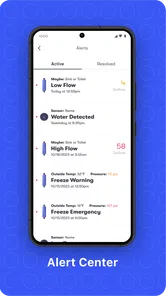
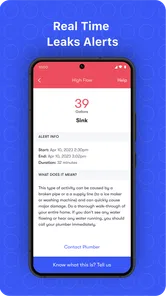
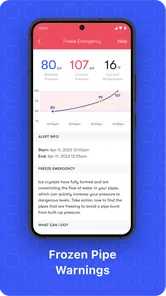
Phyn is a smart water-monitoring and leak-detection system designed to help homeowners understand and protect their plumbing. The app connects with compatible Phyn hardware, allowing you to view water usage, receive alerts about possible leaks, monitor pressure and temperature, and check the health of your home’s water system. Its features depend on the specific Phyn device installed.
Do I need Phyn hardware to use the app?
Yes, the most useful Phyn features require a compatible Phyn device installed in your home. The application is primarily a control and monitoring companion rather than a standalone water-tracking tool. Before downloading, check device compatibility, installation requirements, Wi-Fi specifications, and regional availability. Some functions may also require an active account and a properly configured home network.
Can Phyn detect leaks automatically?
Phyn is designed to identify unusual water activity and potential leaks by analyzing patterns such as flow, pressure, and water usage. When the system detects behavior that appears abnormal, it can send an alert through the app, depending on your notification settings and internet connection. It should be treated as an early-warning and monitoring system, not a guaranteed replacement for professional inspection.
Does Phyn automatically shut off the water during a leak?
Certain Phyn systems may support automatic water shutoff when a serious leak or abnormal flow event is detected, but this depends on the specific hardware model, installation, configuration, and account settings. Users should review the device documentation carefully before relying on this feature. The app may also allow manual control, although plumbing access and system status can affect operation.
Pros
- Monitors water use continuously to spot unusual activity early.
- Installation works with many existing home plumbing setups.
- Customizable alerts help fit different household routines.
- Can help reduce water waste and potentially lower utility bills.
- Useful app history makes it easier to review past water events.
Cons
- Requires compatible plumbing and professional installation in some homes.
- Some features may require a paid subscription or additional service.
- Internet or power interruptions can limit monitoring and alerts.
- Not ideal for renters who cannot modify their home plumbing.
- False alarms may occur with unusual but harmless water usage.







