PhotoTune Video
- 10.00
- 4.0
- Installs
- 1.00M
- Price
- Free

Screenshots





Analysis by Reviewed
Have you ever stumbled upon an app that makes you think, "Where has this been all my life?" Well, that's exactly how I felt when I first tried out PhotoTune Video. If you're into video editing or just want to add a touch of magic to your mundane clips, this app might just be your new best friend.
First Impressions Matter
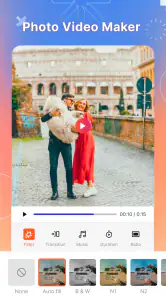
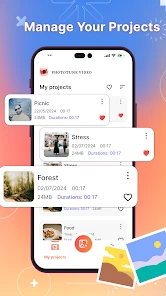
From the get-go, PhotoTune Video impresses with its sleek and user-friendly interface. It's like having a mini editing studio right on your smartphone. The app opens up with a welcoming dashboard that beautifully displays all its features without overwhelming you. It's intuitive enough for beginners but also packed with features that seasoned editors will appreciate. No need for a massive manual here; everything's pretty straightforward.
Dive into the Features
One of the standout features of this app is its AI-powered enhancement tools. With just a click, you can transform your dull, shaky footage into something that looks professionally shot. The stabilization feature is a godsend for all those spontaneous, unplanned videos.
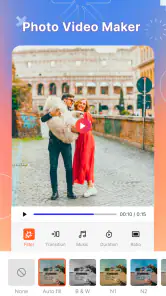
What’s more, the app offers a plethora of filters and effects that can make your videos pop. Whether you're aiming for a vintage look or something more modern, there's something here for every style. And if you're into tweaking details, the app's adjustment tools for brightness, contrast, and saturation won't disappoint.
Editing on the Go
We all lead busy lives, and sometimes sitting down at a computer to edit videos just isn't feasible. That's where PhotoTune Video shines. You can edit your clips anytime, anywhere. Whether you're on a train or waiting for a friend, your creativity doesn't have to wait. Plus, the app's performance is smooth, with minimal lag, even on older devices.
Sharing the Magic
Once you're done editing, sharing your masterpiece is a breeze. The app offers direct sharing options to all major social media platforms. Your friends and followers will be amazed at your editing prowess, and you can bask in the glory of all those likes and comments.
In conclusion, PhotoTune Video is not just another video editing app; it's a robust tool that caters to both casual users and professionals alike. It simplifies the editing process while offering a wide range of features to elevate your videos. So, if you're looking to make your videos stand out, this app is definitely worth a try.
More From Our News Desk

Weather by Xiaomi Review: Clear at a Glance, Less Clear Up Close

X Under Pressure: Can It Recover When Posting Goes Wrong?

Clash of Clans Is Won Between the Battles

Android Auto Makes the Case for Quieter Car Software

MobiOffice: Transforming Mobile Productivity with Seamless Integration

EA SPORTS FC™ Mobile Soccer: Redefining Mobile Sports Gaming
PhotoTune Video Frequently Asked Questions
What is PhotoTune Video, and what does it offer?
PhotoTune Video is a comprehensive application designed for both Android and iOS platforms, offering advanced video editing features. It allows users to enhance their videos with professional-grade tools such as color correction, filters, overlays, and more. This app is ideal for both amateur and experienced video editors looking to create stunning visual content.
Is PhotoTune Video user-friendly for beginners?
Absolutely, PhotoTune Video caters to users of all skill levels. The app features an intuitive user interface with easy-to-navigate tools, making it accessible for beginners. Additionally, it offers tutorials and tips to help new users understand various features and create polished videos without any technical hurdles.
What kind of editing features does PhotoTune Video provide?
PhotoTune Video is packed with a wide range of editing features. Users can access tools like trim, cut, merge, and split for basic editing tasks. It also offers advanced features such as color grading, adding transitions, applying special effects, and integrating music or voiceovers, allowing for a full-fledged editing experience.
Are there any in-app purchases or subscriptions required for PhotoTune Video?
PhotoTune Video offers a free version with basic features, but for those looking to unlock its full potential, there are in-app purchases available. Users can subscribe to a premium version, which provides access to exclusive filters, advanced editing tools, and an ad-free experience, enhancing the overall functionality of the app.
Does PhotoTune Video support exporting videos in high resolution?
Yes, PhotoTune Video supports exporting videos in high resolution, up to 4K quality. This feature ensures that your edited videos maintain their clarity and sharpness when shared on various platforms. Users can choose the export settings according to their needs, ensuring compatibility with different devices and platforms.
Pros
- Easy to use interface.
- High-quality video output.
- Variety of editing tools.
- Fast processing speed.
- Supports multiple formats.
Cons
- Limited free version features.
- Occasional crashes.
- Requires internet connection.
- Large file sizes.
- In-app purchases needed for full access.
- Category
- Video Players & Editors
- Version
- 1.0.4











