PhotoSync Bundle Add-On
- 271.00
- 4.6
- Installs
- 50.00K
- Price
- $5.99

Screenshots



Analysis by Reviewed
When I need to move a batch of photos between a phone and another destination, the awkward part is often not choosing the pictures; it is finding a transfer routine I can repeat without turning the job into a string of one-off shares. The PhotoSync Bundle Add-On is aimed at that kind of work. It is a paid add-on for the main PhotoSync app, so I see it as an unlock for a media-transfer workflow rather than as a photo editor or a new gallery.
Where a repeatable workflow helps
I find a tool like this most useful when my photos are scattered across a phone, tablet, computer, and cloud account, and I want a repeatable way to move them rather than relying on a cable or sending images one by one. A photographer sorting a day’s shoots, or a family member sharing a batch of event pictures with a computer, may value that broader workflow. If you only move an occasional image between devices, the built-in sharing menu or a cable may be simpler and cost nothing extra.
A practical habit is to transfer a small test batch first, especially when sending files to a destination I have not used before. I can check that the chosen location and file selection are right before committing a large group. For backups, I would also make sure the destination is one I can find and access later; an automatic copy is useful only if I know where it went.
How the add-on fits a photo-transfer routine
I’ve been using various apps over the years to transfer my media files, and let me tell you, it can be a real hassle. But with the PhotoSync Bundle Add-On, it felt like a breeze. This app is designed to work hand-in-hand with the main PhotoSync app, unlocking a range of features that make transferring photos and videos easier to work into a routine.
Navigation and the basic task
First things first, let’s talk about its interface. The app is incredibly intuitive, which is perfect for those who might not be the most tech-savvy. Everything is laid out clearly, and you can easily navigate through its features. The simplicity doesn’t sacrifice functionality, though. You can select multiple photos or videos, choose your target device, and start the transfer.
Readability, control, and everyday access
For someone who finds long menus tiring, the key practical question is whether the main task remains easy to follow: choose media, pick a destination, and start the transfer. The experience is straightforward, but I would still recommend trying the selection and destination steps with a few files before relying on a more complicated workflow. That gives you a chance to learn the sequence at your own pace.
On a busy evening, for example, I might want to move a handful of family pictures to a computer while everyone is waiting to see them. A clear selection flow helps, but interruptions can make it easy to choose the wrong items or destination. I’d pause to review the selection before starting, particularly when handling private pictures or a large batch. That small check is more dependable than assuming every transfer choice is obvious at a glance.
More From Our News Desk

Clash of Clans Is Won Between the Battles

Android Auto Makes the Case for Quieter Car Software

MobiOffice: Transforming Mobile Productivity with Seamless Integration

EA SPORTS FC™ Mobile Soccer: Redefining Mobile Sports Gaming

How Microsoft OneDrive Became a Mobile Productivity Giant

How Google Translate Breaks Language Barriers Effortlessly
Moving beyond one-off sharing
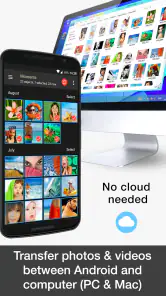
One of the standout features is its ability to transfer files across several kinds of platforms. Whether you’re moving files to your computer, another mobile device, or cloud services, this app is designed for a mixed-device routine. Cross-platform compatibility matters most when your camera roll is not meant to stay on one device and the destination changes from one task to the next.
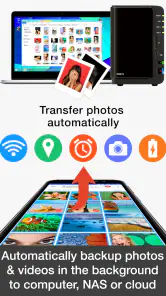
The app also offers automatic backup options, which can help people who often forget to manually copy photos and videos. I would still treat automatic backup as a process to verify, not a reason to stop checking: confirm the destination and make sure a test copy can be found before trusting the routine with irreplaceable pictures.
When the extra flexibility is worth it
The bundle add-on is a paid unlock for the main PhotoSync app, rather than a stand-alone photo editor or a replacement gallery. That distinction matters: its value is in expanding a transfer routine, not in retouching images or organizing an entire library. The $5.99 price makes the most sense to me if I regularly move media between different kinds of destinations; for occasional sharing, a built-in phone option may already do enough.
Compared with the usual alternatives, a cable is dependable for a direct phone-to-computer move but less convenient when devices vary, while basic sharing tools are quick for a few images but can become tedious for a large selection. PhotoSync’s appeal is having a more repeatable route across platforms. The trade-off is that setup and destination choices still need attention, and this add-on works alongside the main app rather than replacing it.
Small batches, destination checks, and reliability
In my experience, the transfers are quick and reliable. I didn’t experience any crashes or lost files during my testing, which is always a concern with similar tools. Whether you’re transferring a single photo or a batch of videos, the process feels smooth and efficient. That said, I would not confuse a smooth run with a guarantee that every destination is configured correctly for every future job.
Good habits for important files
For a large transfer, I would keep both devices available until I can confirm the files arrived where I expected. If a process is interrupted or a destination is not ready, checking the result before deleting the originals is a sensible safeguard. That is not a special trick so much as a good media-handling habit, and it matters more when the photos are important or difficult to recreate.
People who depend on especially large text, simplified controls, assistive input, or specific sensory settings should check the app on their own device before committing to a frequent workflow. A generally clear interface is encouraging, but it does not guarantee that every control suits every person. The same goes for someone working in a noisy, bright, or hurried environment: the app may help move files, yet the surrounding conditions can still make careful selection harder.
Who should use it—and who may not need it
I would put this add-on on the shortlist for someone who regularly has to get a sizeable group of images off a phone, especially when the receiving device or service changes. A person who photographs family gatherings and wants to sort a set on a computer later may benefit more than someone who sends one picture to a friend now and then. The first user has a recurring workflow to simplify; the second may already be well served by the share controls built into a phone.
It is also a poor fit if the main task is editing, tagging, or browsing a collection. PhotoSync is useful in the handoff between places, not as a substitute for tools whose central purpose is changing or organizing images. Before paying, I would ask myself how often I actually transfer batches, whether I use more than one kind of destination, and whether learning a dedicated route would save enough repeated effort to matter.
Practical trade-offs in a mixed-device household
Imagine coming home after a family event with pictures on a phone and wanting to share a selection with someone who prefers viewing them on a computer. A direct share may work for a few favorites, but choosing many files individually can turn into a tedious task. A dedicated transfer routine is more appealing here, particularly if the same handoff happens after holidays or school events. I would first test a small group, confirm the destination, and only then send the full selection.
There is a privacy trade-off in any transfer workflow: the more destinations I use, the more important it becomes to know where each copy is going. A cloud destination can be convenient when I need access from different places; a local device may make more sense when I want a direct handoff. The right choice depends on the task, and no transfer tool removes the need to think about who can access the destination or whether I still need the original files.
Accessibility in real conditions
Readability is only one part of access. A person with limited dexterity may find repeated selection or navigation tiring, while someone with low vision may need to check whether the controls are comfortable to see on their own screen. I would try the entire path—selecting a few images, choosing a destination, and confirming the result—rather than judging the interface from its first screen alone. That test can reveal friction before the app becomes part of a daily routine.
Situational access matters too. If I am outdoors in glare, rushing between appointments, or trying to transfer files while distracted, even a clear workflow can become harder to manage. For an important or large batch, I would wait until I can give the selection and destination my attention. If that is not practical, a small test transfer or a simpler one-off method may be the safer choice.
Details and fit
PhotoSync is a photography app from touchbyte, and version 3.4.1 supports devices running Android 8.0 or later. It is rated for Everyone, has a 4.6 average from around 3.5 thousand ratings, and has over 50 thousand installs. Those figures suggest an established audience, though they cannot tell me whether its workflow will suit your particular devices or access needs. I would treat a quick test on your own setup as the best way to answer that.
My overall assessment
Overall, the PhotoSync Bundle Add-On is a useful choice if you frequently transfer media between devices. It is user-friendly, offers features for a broader transfer routine, and, in my experience, does what I need without much fuss. If you’re tired of repeating awkward transfers, it may become a dependable part of your photo workflow. I would not call it essential for everyone, though: people who seldom move files or mainly want editing tools can sensibly stick with other options.
A balanced recommendation
For me, its strongest case is not that every transfer becomes effortless, but that a varied photo workflow can become easier to repeat once the destinations are familiar. I would recommend it to people who regularly move batches between devices and appreciate a consistent approach. I would skip the paid add-on if I rarely transfer media, need an editor more than a transfer tool, or find the selection process uncomfortable on my device. It is a focused convenience purchase, and that makes the decision fairly personal.
PhotoSync Bundle Add-On was released on August 10, 2016, and costs $5.99. I’d judge it by whether the time and attention it saves in my own routine are worth that cost, rather than by its rating alone. If moving photos is a recurring chore, the extra flexibility may earn its place; if it is an occasional task, the simpler options are likely enough.
PhotoSync Bundle Add-On Frequently Asked Questions
What does the PhotoSync Bundle Add-On unlock in PhotoSync?
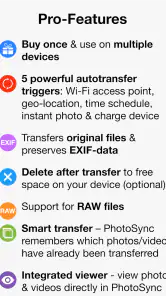
PhotoSync Bundle Add-On is described as a license that enables all features and services in PhotoSync. It is an app in the Photography category, developed by touchbyte, and its purpose is to unlock the main app’s complete feature set. You’ll need PhotoSync itself to make use of the license; the add-on is not a standalone photo-transfer app.
What is the PhotoSync Bundle Add-On?
The PhotoSync Bundle Add-On is an extension to the popular PhotoSync app, designed to enhance your photo and video transfer experience across multiple devices. It offers advanced features such as automatic transfer, enhanced security protocols, and additional cloud storage options. This add-on requires the main PhotoSync app to function, so make sure you have it installed before purchasing.
How does the PhotoSync Bundle Add-On improve my photo transfer experience?
The PhotoSync Bundle Add-On significantly improves your photo transfer experience by providing features like automatic transfer of photos and videos as soon as they are captured, support for a wider range of cloud services, and priority customer support. It also includes enhanced privacy features ensuring your data is transferred securely across devices.
Is the PhotoSync Bundle Add-On free to use?
No, the PhotoSync Bundle Add-On is a paid extension that requires a one-time purchase. It is priced at $5.99, and the cost is justified by the array of premium features it offers, including advanced cloud integration, enhanced transfer speeds, and comprehensive customer support. It's a worthwhile investment for users who frequently transfer media across devices.
What devices are compatible with the PhotoSync Bundle Add-On?
The PhotoSync Bundle Add-On is compatible with both Android and iOS devices. It seamlessly integrates with the main PhotoSync app, allowing you to transfer media across smartphones, tablets, and computers. Ensure your device is running on the latest operating system for optimal performance and compatibility.
Pros
- Seamless integration with cloud services.
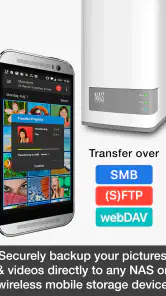
- Supports transfer to NAS and personal servers.
- User-friendly interface for easy navigation.
- Allows background transfers without interruptions.
- High transfer speed even with large files.
Cons
- Requires in-app purchase for full features.
- Limited support for some older devices.
- Initial setup can be time-consuming.
- Some users report occasional connection drops.
- Compatibility issues with certain cloud services.
- Category
- Photography
- Version
- 3.4.1











