Photo Prints Now: CVS Photo
- 14.52K
- 4.8
- Installs
- 1.00M
- Price
- Free

Screenshots

Analysis by Reviewed
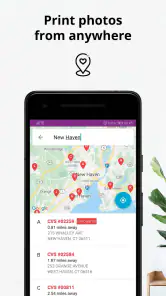
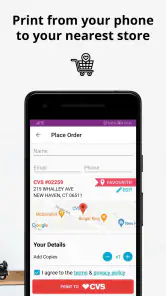
I find Photo Prints Now: CVS Photo most useful when I want phone pictures turned into physical prints without making a separate trip just to place an order. It is a free personalization app from Print Photos - 1 Hr Phone Printing, and its central appeal is straightforward: choose images on your phone, send an order to a CVS location, then collect the prints. That makes it a practical choice for everyday photo printing, especially when a digital album is not quite enough.
Choose it for pickup, not for every photo task
Before installing, I’d ask one simple question: do I want prints soon, and is collecting them at CVS convenient for me? This app is built around that kind of local pickup workflow. It can suit someone making a small set of family pictures, preparing a last-minute keepsake, or printing a few snapshots for a scrapbook. If I only want to store, sort, or edit pictures, my phone’s gallery is the more natural tool; this app is for moving selected images toward a physical print.
A realistic example: after a weekend visit with relatives, I might pick a handful of clear portraits and send them for printing while I’m already out running errands. The useful part is not just avoiding a trip to place the order; it is being able to choose the photos while the occasion is still fresh. I would still check the crop and framing of each image before submitting, because a phone screen can make a composition look more forgiving than a small print does.
Effortless Printing on the Go
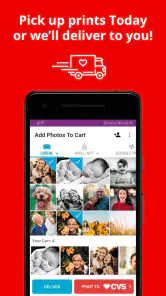
With the Photo Prints Now: CVS Photo app, printing photos is as easy as pie. I mean, who doesn’t love a good pie, right? Seriously, this app lets you select photos straight from your phone and send them off to your nearest CVS store for printing. Whether you're at home, at work, or chilling at a café, you can effortlessly order prints without any hassle. It’s like having a mini photo studio right in your pocket.
Simple and User-Friendly Interface
Now, let’s talk about the interface. The app is designed with simplicity in mind, making it super user-friendly. Even if you're not the most tech-savvy person out there, you'll find navigating through this app a breeze. Just a few taps, and you’re on your way to ordering those cherished prints. It’s perfect for anyone who wants a straightforward, no-fuss experience.
A Range of Photo Print Options
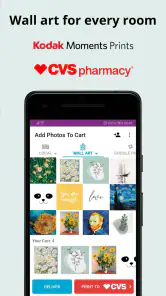
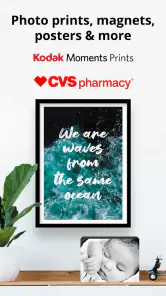
One cool thing about this app is the variety of print options it offers. Whether you're looking to print standard-sized photos or want something a bit more creative like photo cards or canvas prints, Photo Prints Now has got you covered. It’s like having your own personal photo lab with endless possibilities.
For a better result, I’d make a quick “print” selection in my camera roll before opening the order flow. That small bit of curation helps avoid sending near-duplicate shots or images that only look good on a bright screen. For group gifts, I’d also confirm that everyone agrees on the chosen image and crop before ordering; a print is less convenient to revise than a digital share. Those habits matter more than elaborate editing when the goal is a simple, attractive keepsake.
More From Our News Desk

Clash of Clans Is Won Between the Battles

Android Auto Makes the Case for Quieter Car Software

MobiOffice: Transforming Mobile Productivity with Seamless Integration

EA SPORTS FC™ Mobile Soccer: Redefining Mobile Sports Gaming

How Microsoft OneDrive Became a Mobile Productivity Giant

How Google Translate Breaks Language Barriers Effortlessly
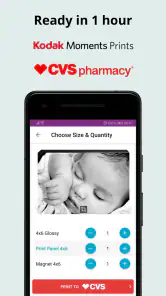
And hey, if you’re someone who’s always on the go, the option to pick up your prints in just an hour is a real game-changer. It’s perfect for those last-minute gifts or when you just can't wait to see your photos come to life. Plus, the quality is top-notch, making your memories look as vibrant as ever.
Convenient and Time-Saving
Let's face it, in today's fast-paced world, convenience is king. The app's ability to let you order prints from anywhere at any time is a huge time-saver. No more waiting in line or dealing with complicated printing machines at the store. Just a few taps, and your photos are ready for pick-up. How cool is that?
Compared with ordering prints for delivery, local pickup is the key trade-off: it can be handy when timing matters, but it still requires planning around a store visit. A mail-order photo service may fit better if I’m making a larger project and prefer delivery, while a dedicated editing app is a better first stop if I need to correct lighting or carefully compose images. I would not treat this app as a replacement for those tools; I’d use it when a straightforward print order is the actual goal.
One practical question is whether I can collect later than the quick-pickup window. I’d check the order details and store information before relying on a specific collection time, especially if I’m coordinating a gift or a tight schedule. Another is what to do with images that started on social media: the app can print photos from Instagram and Facebook accounts, but I’d choose the original, highest-quality copy when it is available. A compressed social upload can be less forgiving on paper than it looks in a feed.
The app has a strong audience fit: people who want a low-effort route from phone gallery to CVS pickup, and who value getting a few prints without learning a complicated design workflow. It is less compelling if there is no convenient CVS nearby, if delivery is essential, or if the job calls for extensive retouching and precise layout control. Those users may be happier with a mail-based print service or an editing tool first, then a printer that matches their preferred fulfillment method.
For context, this is a free app rated for Everyone, with an average rating of 4.8 from around 40,000 ratings and over 1 million installs. It was released in 2017, and version 20.5.1 supports Android 8.0 and later. That track record suggests it has found a substantial audience, though I’d still judge it by whether its pickup-centered approach fits my own routine. The developer is Print Photos - 1 Hr Phone Printing.
Oh, and did I mention that you can also print photos from your Instagram and Facebook accounts? It’s a neat feature that lets you bring your favorite social media moments to life. So, all those amazing vacation shots or fun nights out with friends don't just have to live on your phone anymore.
Making a quick order work smoothly
I’d treat the first order as a small test rather than selecting every picture I might want someday. Pick a few images with clear subjects, submit them, and use the finished prints to judge whether the workflow and result suit you before preparing a larger batch. This is especially sensible for photos that matter emotionally: a phone preview is not a reliable substitute for seeing how a particular image reads on paper.
It also helps to separate the selection task from the pickup task. I can shortlist pictures at home, then place the order when I know which CVS location fits my route. That avoids choosing a store impulsively while out and discovering that collecting there would be awkward. If the prints are for a birthday or family visit, I’d leave room in the schedule for the real-world errand rather than treating the one-hour option as a guarantee that every part of the outing will take exactly that long.
When a different route is more sensible
People often compare photo printing apps as if they differ only in how quickly an image gets printed. I’d compare the whole job instead: how many pictures I need, whether I want to collect or receive them, and whether the images need design work before printing. A local pickup app is appealing for a small, immediate batch; a delivery-focused service is more natural when I want the order to come to me, while a photo editor is better for fixing the image before I decide where to print it.
There is also a useful distinction between printing a keepsake and creating a finished gift. A handful of snapshots can be enough for a scrapbook or a noticeboard, but a project that depends on a carefully arranged layout, captions, or consistent color treatment may need a separate design step. I wouldn’t assume that the quickest route from camera roll to print is also the best route for every presentation. For that kind of job, I’d prepare the images elsewhere and choose a service whose ordering flow matches the project.
Small checks that prevent avoidable disappointment
Before confirming an order, I’d look closely at faces near the edges, horizons, and any important detail close to a crop boundary. A group photo can seem balanced on a tall phone display but lose a person or a bit of context when printed in a different shape. If a picture is sentimental and difficult to replace, I’d compare the selected version with the original in my gallery rather than relying on a social-media copy or a screenshot.
I’d also make the pickup plan part of the decision, not an afterthought. Choose a convenient location, check the order information, and avoid promising someone a particular collection time until the details are clear. For a casual batch, a little flexibility is no burden; for a gift tied to a specific event, that same uncertainty is a reason to order earlier or use a delivery option that better fits the schedule. These are ordinary practical checks, but they matter more than tapping through the order quickly.
The main compromise is focus. The app is designed to get selected pictures into a CVS print order, which is exactly why it can feel simpler than a broader photo-management or editing tool. That narrow purpose also means I wouldn’t choose it to organize a large archive, polish images extensively, or avoid visiting a store. If those needs come first, using a gallery, editor, or delivery-based service may save frustration even if it adds another step.
Final Thoughts
In conclusion, Photo Prints Now: CVS Photo is a fantastic app for anyone looking to print photos quickly, easily, and on-the-go. Its user-friendly interface, variety of printing options, and speedy service make it a standout choice for photo enthusiasts and casual users alike. So, next time you find yourself scrolling through your camera roll, remember that you can turn those digital memories into physical keepsakes with just a few taps. Happy printing!
Photo Prints Now: CVS Photo Frequently Asked Questions
Can I use Photo Prints Now: CVS Photo to order prints for someone else?
Yes, the app can be useful when you want to turn pictures on your phone into a gift or share printed memories with someone. Choose the photos you want to print, then review the available order options before confirming. If the prints are intended for another person, double-check the selected pickup or delivery details so the order goes where you expect.
What should I check before placing a photo order?
Before confirming an order, look over the selected pictures, print sizes, quantities, and the CVS location or delivery choice. This quick review helps catch an incorrect image or an unintended quantity before you pay. Since the app is designed to move photos from your phone into a print order, taking a moment to check those choices can make the process smoother.
Is Photo Prints Now: CVS Photo free to download?
Yes. Photo Prints Now: CVS Photo is free to download, while the prints themselves are paid products. Before placing an order, review the costs shown for your selected prints and quantities so you know what you will be paying. The app is for photo printing and personalization, making it useful for turning pictures on your phone into physical prints.
What is Photo Prints Now: CVS Photo used for?
Photo Prints Now: CVS Photo is an app designed to make printing photos from your smartphone quick and convenient. Users can select photos from their device, and send them to a local CVS store for printing. The app supports a variety of print sizes and formats, allowing users to create prints for albums, gifts, or personal use.
How do I print photos using Photo Prints Now: CVS Photo?
To print photos using Photo Prints Now: CVS Photo, simply download the app, select the photos you wish to print from your mobile device, and choose a CVS store for pickup. The app guides you through selecting print sizes and quantities. Once your order is placed, you can pick up your prints at the chosen CVS location.
Pros
- Easy to use interface
- Fast photo printing
- Multiple print sizes available
- In-store pickup option
- High-quality photo prints
Cons
- Limited editing features
- Requires CVS account
- Occasional app crashes
- No delivery option
- Limited to CVS locations
- Category
- Personalization
- Version
- 20.5.1











