

Photo Dance: AI Photo to Video
- 28.00
- 4.0
- Installs
- 50.00K
- Price
- Free

Screenshots
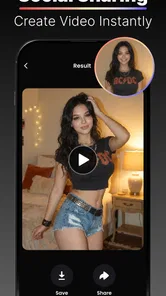
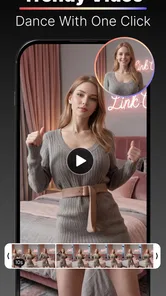
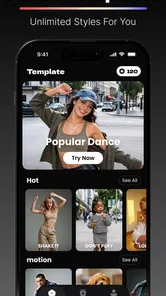
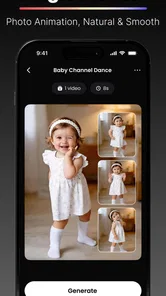
Analysis by Reviewed
I tried Photo Dance: AI Photo to Video as a playful photography app rather than a serious editing suite, and that distinction matters from the first use. Its basic idea is simple: start with a still image and turn it into a short AI-generated dance or face-dance clip. The appeal is immediate because the result is designed for sharing, joking with friends, or giving an ordinary portrait a surprising second life.
Developed by AI Design Labs, the app sits in the photography category but behaves more like a lightweight entertainment tool. It is free to install, carries a Mature 17+ content rating, and includes optional purchases priced from $4.99 to $99.99 per item. The current version is 1.1.3, and it runs on Android 7.0 or later. I would approach it with the right expectations: this is not a replacement for a full video editor, and its value depends heavily on how much fun you get from quick AI transformations.
How Photo Dance feels to use in everyday situations
I find Photo Dance most useful when there’s a specific moment to make more playful, rather than as an app to open out of habit. A clear portrait and a willing subject can turn a casual chat into a quick creative experiment; keeping the result private until everyone has seen it is a considerate way to avoid an awkward surprise. That first burst of fun is easy to understand, but the more practical question is whether it stays worthwhile after the novelty wears off.
Readable enough for a quick experiment
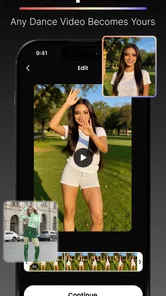
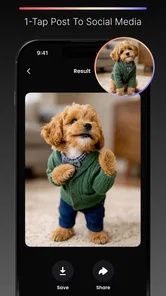
The strongest part of the experience is the straightforward concept. You choose a photo, select the kind of transformation you want, and wait for the app to produce a moving result. That simple path makes the app easy to understand even if you are not familiar with editing software. I did not need to think in terms of timelines, layers, keyframes, or export settings before getting to the main idea.
That simplicity also helps people who find professional creative apps overwhelming. Instead of presenting a crowded workspace, the app focuses attention on the image and the transformation. For a first-time user, that can reduce decision fatigue. You are not asked to learn a complicated editing vocabulary before seeing whether the effect is enjoyable.
The name and store presentation also make the purpose clear. This is for photo dance and face-dance clips, not for correcting exposure, removing objects, or building a polished film. That clarity is useful for readers who want a quick answer: if your goal is to animate a portrait for a joke or social post, the app is aimed at you.
Still, a simple concept does not guarantee a perfect experience for every user. AI creation tools often involve waiting, reviewing a result, and deciding whether the source image was suitable. If the first attempt looks awkward, you may need to try another photograph or another style. That extra trial-and-error is part of the process, and users who prefer predictable controls may find it less comfortable than ordinary editing.
More From Our News Desk

 Gmail
GmailGmail in a Busy Inbox: Who Benefits Most?
From first account to crowded workday, Gmail earns its place through dependable search and flexible sorting—but its best fit depends on how much inbox maintenance you can tolerate.

 Prime Video
Switching to Prime Video: What Changes in Your Viewing Routine
Prime Video can make a compelling second home for streaming, but switching means learning a different catalog, rental layer, and route from browsing to playback.

 Universal TV Remote Control
Universal TV Remote Control Works Best as a Reliable Backup
A phone remote earns its place through quick setup and reliable habits. Here is how to get more from Universal TV Remote Control—and where its limits show.

 Weather - By Xiaomi
Weather by Xiaomi Review: Clear at a Glance, Less Clear Up Close
Xiaomi’s weather app makes everyday forecasts quick to scan, but its calm surface can leave useful details and recovery paths harder to find than they should be.

 X
XX Under Pressure: Can It Recover When Posting Goes Wrong?
A resilience-focused review of X, examining setup, mistaken posts, interruptions, weak connections, and the gaps that matter when recovery needs to be dependable.

 Clash of Clans
Clash of Clans Is Won Between the Battles
Its raids are quick; its community is a long-term project of coordination, teaching, rivalry, and shared responsibility—with all the friction that entails.
Latest News



Choosing the right photo is more important than it looks
One of my most useful observations is that the source image does much of the creative work. A clear portrait with a visible face is a better starting point than a dark group photo, a heavily cropped image, or a picture where the subject is turned away. This is not a setting hidden behind an advanced menu; it is a practical workflow choice that can save time and reduce disappointing generations.
For a family joke, I would choose one person in the frame and leave enough space around the head and shoulders. For a social post, I would also avoid a photo with important text or a busy background, because movement can make the result harder to read. These choices are especially helpful for people who need a visually obvious result rather than a subtle animation that requires close inspection.
A good workflow is to prepare two or three possible photos before opening the generator. That way, if one image produces an unnatural result, you can switch quickly instead of repeatedly editing the same source. It is a small habit, but it makes the app feel less frustrating and gives users more control over the final outcome.
Useful for short, social moments
I can imagine using it when a friend sends an ordinary selfie and the group wants to turn it into something silly. A birthday portrait, a pet owner’s profile picture, or a team photo can become a short conversation starter. The app works best when the purpose is emotional rather than technical: surprise someone, make a private joke, or add a playful clip to a chat.
It is less convincing as a tool for a carefully planned campaign, a professional announcement, or a video that needs exact choreography. The generated movement is the point, but it also means the creator gives up some precision. If you need a person to move in a specific way, match music beats, or maintain a consistent visual identity across several clips, a conventional editor or a more specialized animation tool would be a better choice.
Motor and sensory considerations
Because the main task is based on selecting a photo and starting a generation, the app may be easier for some people with limited fine-motor control than a timeline editor filled with tiny handles. There are fewer editing gestures to master, and the central action is conceptually clear. Someone who struggles with precise trimming may appreciate not having to drag a playhead through a long clip.
At the same time, I would not describe the experience as universally accessible. The app’s practical usability depends on how comfortably a person can browse images, tap controls, inspect a moving result, and repeat the process when the first output is not right. Those needs can be significant for users with tremors, reduced vision, attention difficulties, or sensitivity to fast visual motion.
For users who are sensitive to movement, the dance effect itself may be tiring or distracting rather than entertaining. A generated face or body moving unexpectedly can also feel uncomfortable if the viewer is not prepared for it. I would recommend previewing results in a calm setting and avoiding rapid repeated generations if animated content causes sensory strain.
People with low vision may find the basic idea understandable but still need a larger display, stronger system text settings, or help from another person when judging facial details. I would not assume that every label or control will be equally easy to read in every environment. The safest approach is to test the app with a familiar image and decide whether the visual feedback is comfortable before relying on it regularly.
For users who are deaf or hard of hearing, the core transformation remains understandable because the joke is visual. That is one of the app’s more inclusive qualities: the central result does not depend entirely on spoken instructions. However, if a particular use involves music or audio context elsewhere, the visual clip may not communicate the same way to every viewer. The app is strongest when the movement itself carries the message.
Situational access: when the app fits and when it does not
Photo Dance is well suited to short sessions. I would use it at home, during a casual visit, or while preparing a humorous message. It is not the kind of app I would open when I need a quiet, predictable workflow under time pressure. AI generation can encourage experimentation, and experimentation is difficult when you have only a few minutes or unreliable attention.
It can also be useful for people who do not want to appear on camera themselves. Instead of recording a performance, they can work from an existing photo and create a playful clip. That lowers the social barrier for shy users or anyone who prefers not to film their own face. On the other hand, using another person’s photograph raises an important everyday question: permission. I would only animate images that I own or have permission to use, especially when the result could embarrass someone or be shared publicly.
The Mature 17+ rating is another reason to think about audience and context before sharing. Even if a particular result seems harmless, the app should not automatically be treated as suitable for children. Parents, teachers, and community groups should be cautious about introducing it in mixed-age settings, and users should consider whether a generated face clip might be misunderstood by the subject or by viewers.
For people with limited connectivity or strict data limits, the experience may also require planning. AI-powered creation commonly involves processing that can take time, so I would avoid starting a generation while travelling or when the phone’s connection is unstable. I cannot recommend it as an offline-first tool; its best use is when you have enough time and a dependable connection for the creation process to finish comfortably.
Where it compares well with ordinary photography apps
Traditional photography apps are better when the goal is to improve a still image. They give you familiar control over brightness, color, sharpness, cropping, and composition. Photo Dance offers something different: it turns the photograph into a moment of motion without asking you to build that motion frame by frame.
Compared with a standard video editor, it is quicker for a one-off joke. You do not need to record a performance, cut a long clip, or learn a complex interface. That makes it appealing to casual creators who care more about getting a surprising result than perfect control.
The trade-off is consistency. A conventional editor lets you decide exactly what happens and when. Here, the creative process is more automated, so the output may not match your imagined movement. If you are making content for work, need repeatable results, or want to correct a small visual mistake manually, the usual alternatives remain stronger.
Compared with manually animated photo tools, this app is more approachable for a quick experiment but less suitable for painstaking control. A manual tool rewards patience and precision; Photo Dance rewards choosing a good source image and accepting a degree of unpredictability. Neither approach is universally better. The right choice depends on whether speed or control matters more to you.
Remaining barriers and practical friction
The biggest barrier is not learning the basic idea; it is managing expectations. The phrase “AI dance” can make people imagine a polished performance, but a generated clip can still look strange or less natural than expected. I would treat the first result as a creative draft, not a guaranteed finished post. Users who dislike visual oddities may lose interest quickly.
The free entry point is helpful, but the presence of in-app purchases deserves attention. The available purchase range extends from $4.99 to $99.99 per item, which is a wide gap and makes it important to review any purchase screen carefully before confirming. I would begin with the free experience, decide whether the results are genuinely useful, and avoid paying simply because one generation did not turn out well.
Another limitation is that an automated effect can reduce personal control over representation. If you animate a real person, the result may exaggerate expressions or movement in a way that does not reflect how they actually look or behave. That can be funny with consent, but it can also feel disrespectful. The app is best used with people who understand the joke and are comfortable with the result.
Privacy should also be part of the decision whenever personal photos are involved. I would avoid uploading sensitive documents, private medical images, confidential work portraits, or photographs of people who have not agreed to the experiment. This is sensible practice for any AI photo service, and it is especially important when the output changes a person’s appearance or behavior.
Navigation may be easy for a confident smartphone user, but users who depend on assistive technologies should test the actual controls on their own device rather than assume that a simple interface covers every need. The app’s concept is accessible in plain language, yet the complete experience still involves image selection, visual review, and repeated decisions. Those are meaningful barriers for some people.
Who should try it, and who should skip it
I would recommend it to casual creators, families and friends who enjoy visual jokes, and anyone curious about turning a familiar portrait into a short animated moment. It is also a reasonable first experiment for someone who finds full video-editing apps intimidating. The low commitment of a free app makes it easy to see whether this particular style of AI creativity matches your sense of humor.
I would be more cautious about recommending it to professional photographers, social media managers who need reliable brand output, or users looking for detailed animation control. Those audiences are likely to care about repeatability, precise timing, and a clean production workflow more than the novelty of an unexpected dance.
It is also not the best fit for anyone who wants a conventional photo editor. If your priority is retouching, color correction, collage design, or manual video assembly, you will probably be happier with an app built around those jobs. Photo Dance has a narrow purpose, and its charm comes from staying focused on that purpose.
My inclusive verdict
After using it, I see Photo Dance as an approachable entertainment app with a clear visual idea and a useful low-pressure entry point. Its strongest inclusive quality is that it can let people create a playful clip without filming themselves or learning a complicated editor. The result is also primarily visual, which makes the central joke understandable in more situations than an audio-dependent tool.
Its limits are equally important. Moving imagery may not suit every viewer, the quality depends greatly on the chosen photo, and automated results do not offer the same control as manual editing. The Mature 17+ rating means I would handle sharing carefully, while the optional purchases mean I would check costs before moving beyond the free experience.
The app has an average rating of 4.0 from around 700 ratings, with over 50 thousand installs, so it has attracted a modest audience without becoming something I would call universal. That feels consistent with my experience: it is fun when the situation is right, but it is not a must-have photography utility.
My advice is to start with a clear, single-person portrait, use the app in a relaxed setting, and judge the result as a playful experiment rather than a professional animation. If you want a quick laugh or a surprising message for a friend, I can see the appeal. If you need precise editing, strong predictability, or a workflow designed around accessibility controls, I would choose a more traditional tool instead.
Photo Dance: AI Photo to Video Frequently Asked Questions
Is Photo Dance: AI Photo to Video suitable for all ages?
Photo Dance: AI Photo to Video is rated Mature 17+, so it is intended for adult users rather than children. Before installing it on a shared or family device, consider the age rating and whether the app’s photo-animation content is appropriate for everyone who may use the device. Parents can also review the device’s app restrictions and supervise access.
Which devices can run Photo Dance: AI Photo to Video?
The app requires Android 7.0 or later, so check your device’s operating system before downloading. Photo Dance: AI Photo to Video is a photography app from AI Design Labs, and keeping your device’s software up to date can help with compatibility. If you use an older phone or tablet, confirm that it meets the minimum requirement before trying to install the app.
What is Photo Dance: AI Photo to Video, and what does it do?
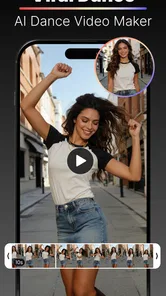
Photo Dance: AI Photo to Video is an entertainment app in the photography category that uses artificial intelligence to animate still images and turn them into short dancing or moving videos. After selecting a photo, the app generally applies motion effects, preset choreography, and visual transitions to create a shareable clip. Results can vary depending on image quality, pose, lighting, and the selected template. Its focus is turning photos into funny dance and face-dance clips.
How do I create a video with Photo Dance: AI Photo to Video?
To create a video, you usually need to import a suitable portrait or full-body image, choose an animation or dance template, and allow the app to process the photo. For the best result, use a clear image with the subject facing the camera and minimal obstruction. Processing time may depend on the template, image resolution, internet connection, and current server demand. Once the clip is ready, review it before sharing to make sure the animation looks as you intended.
Is Photo Dance: AI Photo to Video free to use?
The app is free to download, but some features can require payment through in-app purchases, which range from $4.99 to $99.99 per item. Before generating several videos, check the in-app pricing page carefully, including renewal terms and whether a trial automatically becomes a paid subscription. Availability of specific templates and tools may also depend on your region or app version.
Pros
- Turns still photos into lively dance-style videos with minimal effort.
- Simple interface makes it accessible even for first-time AI app users.
- Offers entertaining templates for quick social media content creation.
- Results can be generated without advanced video-editing knowledge.
- Useful for experimenting with creative photo animations and trends.
Cons
- Output quality may vary depending on the original photo’s resolution.
- Some templates or features may require a subscription or in-app purchase.
- AI animations can occasionally produce unnatural body movements.
- Processing may take longer on older or less powerful devices.
- Privacy terms should be checked before uploading personal photos.










