Phone Cleaner Junk Scan
- 152.00
- 4.4
- Installs
- 100.00K
- Price
- Free

Screenshots
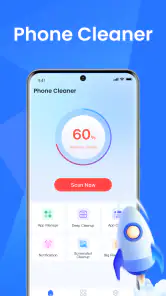
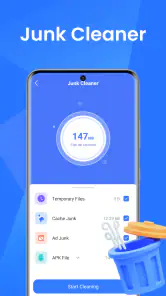
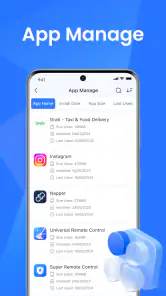
Analysis by Reviewed
I installed Phone Cleaner Junk Scan expecting a quick way to deal with the clutter that slowly builds up on a phone. It is a free tools app from theblue llc, aimed at finding junk and cache rather than replacing the phone’s built-in file manager or becoming an all-purpose storage suite. That distinction matters: its appeal is immediate, but its lasting value depends on whether you actually want a repeatable cleaning routine.
My first impression was straightforward. The app is easy to understand because its purpose is narrow: scan the phone, review what it identifies, and decide what is safe to remove. That makes it approachable for someone who does not want to explore folders manually. At the same time, I would not treat any cleaner as a magic performance button. Removing unnecessary files can free space, but it does not automatically transform an older phone into a newer one.
What the first week feels like
The first scan is where this app makes its strongest case. A phone that has been used for months can accumulate temporary material, cached leftovers, and files that no longer serve a useful purpose. Seeing those items gathered into one cleaning workflow is more convenient than opening individual apps and checking storage screens one by one.
I especially like the decision point before deletion. A cleaner should not make me feel that every result must disappear immediately. The useful habit is to read the categories, consider whether I may need anything, and then remove only what I recognize as disposable. The safest cleaning session is a review session, not a blind tap on a large button.
That approach makes Phone Cleaner Junk Scan suitable for people who regularly receive media in messaging apps, download temporary documents, or keep many apps installed. It can also help when a phone is close to its storage limit and the owner needs a practical first step before deleting personal photos or uninstalling useful apps.
One realistic scenario is a traveler preparing for a trip. Before downloading offline maps, playlists, or shows, I would run a scan, inspect the results, and clear obvious temporary clutter. The benefit is not that the app predicts exactly how much space every future download will need. The benefit is that it gives me a focused place to begin, so I can postpone more painful choices such as deleting family videos.
The app is available at no charge and carries an Everyone age rating, which makes it easy to recommend to a broad household audience. Its current version is 1.3.3, and it requires operating system version 11 or later. That requirement is worth checking before installation, particularly if you are trying to help someone with an older device.
During the first week, the strongest advantage is reduced effort. Instead of hunting through several settings menus, I can start with one tool dedicated to cleanup. The trade-off is that convenience can make users overconfident. A result labeled as junk may be less important than a result that looks disposable, and cached content may be recreated by the original app later.
What it can and cannot replace
Phone Cleaner Junk Scan sits between manual maintenance and more elaborate storage tools. The manual route gives me the most control, but it takes time and requires knowing where each app stores its files. A broader file manager may be better when I need to rename folders, move documents, find duplicates, or organize photographs. This cleaner is more appealing when my question is simply, “What can I review quickly before I start deleting things myself?”
It also should not be confused with a backup solution. Cleaning is not archiving, and freeing space is not protecting memories. I would never use a cleaner as the only step before removing important material. Photos, recordings, work documents, and downloaded travel files deserve their own review and, when necessary, a separate backup process.
Likewise, I would not choose it as the main answer to every slow-phone complaint. If the real issue is a failing battery, an outdated operating system, a badly behaving app, or insufficient hardware, junk removal may have little effect. The app is most convincing when storage clutter is the actual problem.
Where the recurring value comes from
After the initial cleanup, the question changes. A phone that looks tidy today will not stay that way automatically. Apps create temporary data again, downloads return, and messaging conversations continue to grow. That gives a cleaner a possible month-to-month role, but only if the maintenance session remains short enough to feel worthwhile.
I would use this app as an occasional checkpoint rather than opening it every day. A useful routine is to run it when storage begins to feel tight, before a major download, or after a period of heavy messaging and media sharing. That prevents cleaning from becoming a nervous ritual where I repeatedly remove small amounts of data without solving a real problem.
One non-obvious trade-off is that repeated cache clearing can exchange storage savings for convenience. Some apps may need to rebuild images or temporary content after their cache is removed, which can mean extra loading or data use later. For that reason, I would not clear everything merely because a scan found it. If an app is working normally and storage is comfortable, leaving some cache alone may be the more sensible choice.
Another useful workflow is to separate emergency cleanup from routine cleanup. When the phone is nearly full, I would first use the scan to identify low-risk clutter, then check the largest personal categories separately. When the phone has plenty of free space, I would be more selective and avoid turning a maintenance tool into a source of unnecessary deletions.
The app’s value is therefore connected to changing circumstances. It is more useful for a phone that regularly approaches its storage ceiling than for a lightly used device with ample room. Someone who rarely downloads anything may install it, perform one satisfying cleanup, and then have little reason to return for a long time.
Its public reception suggests that many people find the basic idea useful: it holds an average rating of 4.4 from around 3.7 thousand ratings, with more than 100 thousand installs. I read those figures as evidence of interest and general approval, not as a guarantee that every scan will suit every phone. Cleaner results can vary depending on how a person uses the device and how much control the operating system gives third-party tools.
A practical routine that avoids over-cleaning
My preferred routine would be deliberately cautious. I would scan, look at the categories, and identify anything whose name or location I understand. I would then clean the obvious temporary material and stop before moving into personal files that require more thought. Afterward, I would reopen the apps I rely on most, especially anything connected to work, travel, or communication.
This two-stage approach is more reliable than chasing the largest possible number on a cleanup screen. The goal is not to make the result look impressive; it is to recover useful space without creating a new problem. Use the app to reduce clutter, not to outsource every storage decision.
I would also make a note of what repeatedly returns. If the same type of material appears after every scan, the longer-term fix may be inside the app that creates it. Adjusting download behavior, removing an unused app, or changing how media is stored can be more effective than repeating the same cleanup indefinitely.
Maintenance burden and points of friction
The main burden is not learning the interface. It is developing enough judgment to review the results responsibly. A simple cleaner can feel reassuring because it presents a clear action, but the simplicity may hide the fact that storage has different kinds of value. Temporary files, offline content, personal media, and app data should not all be treated as interchangeable.
I would also keep expectations realistic about performance. If the phone is sluggish because one app is malfunctioning, cleaning unrelated junk will not necessarily help. If the battery is worn, clearing cache will not restore battery health. If the storage problem comes from large videos, a junk scan may only address the edges of the problem. In those cases, the phone’s own storage controls or a dedicated file-management workflow may be better.
There is a privacy consideration in the broad sense of trust, too. Any tool that examines storage deserves careful attention during use. I would read each category before approving removal and avoid granting myself the false comfort that a familiar-looking label makes every item harmless. The app is most useful when it supports my decisions rather than replacing them.
The operating-system requirement narrows its audience to devices running version 11 or later. For supported phones, that is a manageable condition, but it means the app is not a universal answer for every Android owner. If I were choosing a cleaner for an older handset, I would begin with the system’s own storage tools or look for an option that explicitly supports that device.
The developer, theblue llc, presents a focused product rather than a crowded toolbox in the information available to users. I see that focus as a strength because it keeps the purpose clear. I also see it as a limitation for advanced users who want detailed folder management, duplicate-file analysis, cloud organization, or backup controls in the same place.
Because the app is free, the cost barrier is low, but free does not mean frictionless. The real cost is attention: every scan asks me to inspect results and decide what I am comfortable removing. That is a fair exchange when storage is tight. It is less attractive when the phone is already well organized and I am unlikely to gain anything meaningful from another scan.
Why the novelty may fade
The first cleanup produces a visible sense of progress. Later sessions can feel less rewarding because the phone may only accumulate small amounts of removable material between visits. This is the central challenge for any maintenance app: its best result is often a problem prevented or postponed, not a dramatic transformation.
There is also a risk of confusing activity with improvement. Running a scan frequently can become a habit without a clear purpose. I would rather open Phone Cleaner Junk Scan when I have a storage-related reason than follow a fixed schedule that treats every phone as if it needs identical care.
Users who dislike reviewing files may find the decision-making tiring. Users who want complete control may find a dedicated file manager more transparent. And users who expect one tap to boost speed, extend battery life, and solve every Android issue are likely to be disappointed. This app earns its place only when its narrower job matches the problem in front of me.
There is a subtler source of fatigue in repeated cache removal. Some temporary content is recreated because apps need it to function smoothly. Clearing it can provide short-term space, but it may not be a permanent solution. I would therefore judge a cleaning session by whether it creates enough usable room for a real need, not by whether the scan reports that something was removed.
For families, the Everyone rating makes the app approachable, but I would still show less experienced users how to inspect results. A child or older relative may understand the large cleanup action without understanding which files matter. A brief explanation can prevent the common mistake of treating every suggested item as disposable.
The app has received 152 written reviews, which gives prospective users some additional public feedback to browse alongside its overall rating. I would still form my own expectations around the specific phone and storage problem involved. A cleaner’s usefulness is highly personal: the same tool can be valuable on one device and unnecessary on another.
Who should keep it installed
I would keep Phone Cleaner Junk Scan on a phone that frequently runs short of space because of temporary clutter, repeated downloads, or heavy media activity. It is also a reasonable choice for someone who wants a simpler starting point than manual folder-by-folder maintenance. The focused design makes it easier to build a cautious cleanup habit without learning a complicated utility.
I would be more selective for a person who already uses the phone’s storage settings effectively. If that user can identify large files, review app storage, and manage downloads without difficulty, an additional cleaner may not add enough value to justify another app. The built-in tools can sometimes be preferable because they are already integrated with the operating system and show storage in a familiar context.
Someone who needs advanced organization should look elsewhere. A dedicated file manager is the better choice for moving documents, sorting folders, and handling personal media deliberately. Someone who needs protection against data loss should prioritize backup. Someone whose main complaint is speed or battery life should diagnose that issue directly instead of assuming junk files are responsible.
My strongest recommendation is to treat this as a maintenance assistant, not a permanent promise of a faster phone. Install it when you have a clear cleanup need, use the scan thoughtfully, and keep it only if the process saves you time on future storage checks. That standard is stricter than simply enjoying the first scan, but it is the right test for lasting usefulness.
My long-term verdict
Phone Cleaner Junk Scan succeeds when I use it for what it is: a free, focused tool for reviewing junk and cache on supported devices. Its first-week appeal comes from convenience, while its month-to-month value depends on whether clutter genuinely returns often enough to justify occasional maintenance. I appreciate that it can make an intimidating storage problem feel more manageable, especially for people who do not want to navigate several settings screens.
Its limitations keep me from recommending it as a universal phone optimizer. It cannot replace backups, careful file management, or troubleshooting the real cause of poor performance. Repeated cleaning may also offer diminishing returns, and cache removal is not automatically beneficial in every situation. Those are not reasons to dismiss it; they are reasons to use it with restraint.
After the novelty fades, I would keep it installed on a crowded phone used for frequent downloads and media sharing. On a lightly used phone, I would probably install it only when storage becomes a problem, complete a careful review, and then decide whether recurring access is worthwhile. Its lasting value is practical rather than spectacular: it earns space when it saves real time and helps me postpone deleting things I actually want to keep.
Pros
- Quickly identifies cached files and other common junk.
- Simple interface makes routine cleaning easy for beginners.
- Can help free storage space without deleting personal files.
- Useful storage overview shows what is consuming device space.
- Cleaning suggestions can make manual file management less time-consuming.
Cons
- Results may include files that users prefer to keep.
- Deep scans can take longer on devices with large storage.
- Some features may require a subscription or in-app purchase.
- Cleaning performance depends on Android system restrictions.
- Frequent alerts or upgrade prompts may feel intrusive.

- Category
- Tools
- Version
- 1.3.3











