

PheedLoop Go
- 0.00
- 0.0
- Installs
- 10.00K
- Price
- Free

Screenshots

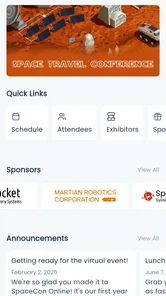
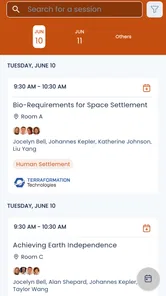
Analysis by Reviewed
Event apps are most useful when they reduce the small stresses that build up around a busy day: finding the right session, keeping track of a changing schedule, and knowing where to look next. I see PheedLoop Go as a companion for events that use PheedLoop, rather than as a general-purpose calendar or a place to discover events. That distinction matters: its value depends on whether the organizer has made it part of the event experience.
In my view, the most useful question is not whether an event app can do everything, but whether it makes the information you need easier to reach in the moment. That is also where an inclusive review needs to be careful. A mobile app can help people manage information at their own pace, but it cannot guarantee that the event itself, its content, or its venues will work for every attendee.
Choosing the right event companion
Before installing an event app, I would start with one practical question: has the organizer asked attendees to use it? PheedLoop Go is designed for events supported by PheedLoop, so the answer determines whether it is useful for your plans. If the event uses another platform, or provides all essential information through a website and email, adding another app may create extra work rather than remove it.
For someone attending several conferences or gatherings that use different systems, I would not expect this app to serve as a single home for every date and appointment. A personal calendar is still better for seeing commitments across work, family, travel, and unrelated events. The event companion can fill a different role: helping me focus on the details of one PheedLoop event once I am preparing for it or taking part.
That distinction can also help you decide whether to install it well in advance or wait. If you have already received an event invitation that points to PheedLoop Go, installing and opening it before the event gives you time to inspect the information at your own pace. If you are only browsing for something to do, it is not the kind of discovery app I would turn to.
Finding your way through an event
I use this section to focus on the practical first step: whether an event’s information is easy to locate before the day becomes busy. I also consider how a little preparation can reduce hurried searching when plans shift, while keeping expectations grounded in what the organizer has made available. From there, I turn to how different people may experience the app’s screens and controls.
Readability and navigation in a busy schedule
PheedLoop Go is an Events app from PheedLoop, built for events that run on the company’s event platform. That makes its role more focused than a broad events guide: it is meant to support an attendee around a particular event, where the organizer’s information is central. I would judge it by how quickly I can answer practical questions—what is happening, what matters to me, and where should I go next—rather than by how many unrelated features it offers.
More From Our News Desk

 Gmail
GmailGmail in a Busy Inbox: Who Benefits Most?
From first account to crowded workday, Gmail earns its place through dependable search and flexible sorting—but its best fit depends on how much inbox maintenance you can tolerate.

 Prime Video
Switching to Prime Video: What Changes in Your Viewing Routine
Prime Video can make a compelling second home for streaming, but switching means learning a different catalog, rental layer, and route from browsing to playback.

 Universal TV Remote Control
Universal TV Remote Control Works Best as a Reliable Backup
A phone remote earns its place through quick setup and reliable habits. Here is how to get more from Universal TV Remote Control—and where its limits show.

 Weather - By Xiaomi
Weather by Xiaomi Review: Clear at a Glance, Less Clear Up Close
Xiaomi’s weather app makes everyday forecasts quick to scan, but its calm surface can leave useful details and recovery paths harder to find than they should be.

 X
XX Under Pressure: Can It Recover When Posting Goes Wrong?
A resilience-focused review of X, examining setup, mistaken posts, interruptions, weak connections, and the gaps that matter when recovery needs to be dependable.

 Clash of Clans
Clash of Clans Is Won Between the Battles
Its raids are quick; its community is a long-term project of coordination, teaching, rivalry, and shared responsibility—with all the friction that entails.
Latest News



For a multi-session event, the first useful habit is to check the app before the day gets crowded. I would look through the schedule in advance, identify sessions I care about, and note any overlap. Even without treating a mobile schedule as a substitute for the organizer’s official announcements, having the event information in one place can reduce the need to switch among email, a browser, and paper notes.
A concrete example: imagine arriving at a conference after a delayed bus, with two sessions starting soon and a friend asking where to meet. An event app can be helpful if the organizer has placed the relevant schedule and event details there; I can consult the event’s information instead of searching through old messages. The practical tip is to review the day’s priorities before travelling, then reopen the app when plans change. That is more reliable than expecting to make every decision while walking between rooms.
There is an important trade-off. PheedLoop Go is tied to events powered by PheedLoop, so it is not a universal planner where I can expect every concert, community gathering, or business meeting to appear. If an event does not use that platform, this app is not the right tool for it. A regular calendar is better for keeping appointments across many unrelated services; this app makes more sense when an organizer has chosen PheedLoop for a specific event.
When reading is difficult or attention is limited, a well-organized event companion can be more useful than a long email thread because the attendee can return to the event context. But that benefit depends on the organizer’s content and on how clearly the app presents it on a particular device. I would not assume that every event will structure its information in the same way. Before relying on it for a tight schedule, I would open the relevant event and check that the details I need are actually there.
Different abilities, devices, and ways of interacting
For motor access, the basic advantage of a phone-based event tool is that information can be checked without handling printed material or asking someone to repeat a schedule. A person who finds carrying papers inconvenient may prefer keeping event details on a device they already use. At the same time, a phone is not effortless for everyone: small touch targets, one-handed use, and repeated scrolling can be tiring or imprecise. I would test the actual screens I need before the event rather than assume that every task will be comfortable.
That test can be simple and practical. Open the event information while seated, try the actions you expect to use, and see whether you can complete them without rushing. If you rely on a particular device setting or assistive method, check whether it works with the app’s screens. I cannot infer specific accessibility controls from the app’s purpose alone, so I would avoid making it the only route to information that is essential for participation.
Sensory needs also vary. Some attendees want the phone to stay quiet and unobtrusive; others depend on clear visual information or need time to process a change before acting. I would keep notifications and other device interruptions in mind, and use the app when it suits the situation rather than continuously checking it. If event updates are important, decide ahead of time how you will notice them without letting the phone become a constant source of distraction.
There is a useful workflow for people who find rapid decisions stressful: review the event ahead of time, choose a small number of priorities, and keep a backup note of the most important time or location. That backup is not a criticism of the app; it is a sensible way to avoid depending on a phone at the exact moment its battery, connection, or screen may be inconvenient. It also helps companions coordinate without forcing one person to navigate the app for everyone.
Access in real-world conditions
Events do not happen in ideal browsing conditions. People check details while moving through a venue, waiting in a line, or trying to hear a conversation. In those moments, the app’s usefulness depends not just on available information but on whether the attendee can comfortably reach and interpret it. My advice is to load or review the details you expect to need before entering a noisy or crowded space, then use the app as a reference rather than trying to learn its layout on the move.
Connectivity is another reason not to leave preparation until the last minute. I would open the event information while I have a dependable connection and make sure I know how to find the key details again. I would not assume that content will remain available in every offline situation. If a specific schedule item or venue instruction is essential, keeping a brief personal backup is a low-effort precaution.
For someone attending with a companion, a small coordination plan can make the experience smoother: agree on a meeting point and a time to reconnect, then use the event information to plan around sessions. This avoids relying on constant messages, which can be hard to manage in a loud venue or when one person is conserving battery. It is a particularly useful approach for groups with different pacing needs, since everyone can decide in advance which parts of the day are priorities and where flexibility is acceptable.
Attendees who need detailed access arrangements should also treat the app and the event as separate questions. An event schedule may help with planning, but it does not by itself establish whether a venue, session, or service meets a person’s needs. I would contact the organizer for arrangements that affect safe or comfortable participation, and use the app for the event information it actually provides. That distinction prevents a digital schedule from being mistaken for a complete accessibility plan.
Where friction can remain
The main limitation is the platform dependency. A person may install the app and still find it irrelevant unless their chosen event uses PheedLoop. That is a different proposition from a general event-discovery app, so people should first check whether their organizer directs attendees to it. If they attend events run across several platforms, a standard calendar or the organizers’ own websites may remain more convenient for the overall picture.
There is also a potential information burden. Event schedules can be dense, and the app cannot make an organizer’s content concise or clear on its own. If details are difficult to scan, or an attendee has to move repeatedly between screens, the convenience of having information on a phone may be reduced. I would save attention by deciding what I need from the app—such as today’s sessions and essential event details—instead of treating it as a place to monitor constantly.
A further friction point is reliance on a personal device. Not everyone wants to use a phone throughout an event, and not everyone can comfortably do so. Battery life, screen glare, input effort, and the social awkwardness of checking a device during a conversation are all ordinary realities. I would keep a backup for the handful of details that would cause real trouble if I could not access the app, and ask the organizer what other information channels are available when that matters.
Who will get the most from it
I think PheedLoop Go is most worthwhile for attendees whose organizers actively use it and who expect to consult event-specific details during the day. It may suit someone who likes to plan sessions ahead, a first-time attendee who wants to orient themselves using the event’s information, or a companion helping coordinate a shared schedule. In each case, the key benefit is having a focused reference for that event, rather than another place to store every appointment in life.
It is less compelling for people who attend events that do not use PheedLoop, those who already find the organizer’s website or printed schedule easier to use, and anyone who does not want to rely on a phone during an event. It may also be a poor fit when a person needs access arrangements that must be confirmed directly with the venue or organizer. I would treat the app as one useful channel, not as proof that all information or accommodations are covered.
One practical way to avoid unnecessary phone use is to check the schedule once before leaving home, note the few details that matter most, and then open the app only when a decision changes. That keeps a digital schedule from becoming a constant task. If a companion is attending too, agree on a meeting point in advance rather than assuming you can always find one another by exchanging messages in a crowded space.
For people choosing between this and a paper program, the trade-off is straightforward: paper can be easier to glance at without unlocking a phone, while an event app can keep event-specific information together in a portable digital form. Neither format is automatically more accessible. The better choice depends on what is easier to read and handle, what information the organizer provides, and whether carrying or checking a device works for you.
For people deciding whether to install it, the practical answer is straightforward: it is free, rated for Everyone, and the current release is version 1.19.3. It launched on March 3, 2026, has over 10,000 installs, and supports Android 8.0 or later. Those facts make it an accessible starting point for compatible Android users, but they do not tell me whether a particular event has the content or interaction style someone needs. The event itself is still the deciding factor.
A useful companion, with realistic expectations
I would recommend PheedLoop Go to someone attending an event that uses PheedLoop, especially if they want event-specific information close at hand and prefer planning their day on a phone. It is less suitable as a general calendar, an event-finding service, or a guaranteed accessibility solution. Compared with paper schedules, it offers the convenience of a digital reference; compared with a regular calendar, it is more event-focused but narrower in scope.
My inclusive verdict is cautiously positive: an event-specific app can make planning easier, but meaningful access comes from the combination of usable software, clear organizer information, and workable arrangements at the venue. I would install it when an organizer points me to it, check the key screens before arrival, and keep another way to reach essential details. With those expectations, PheedLoop Go can be a helpful part of attending an event without asking it to solve problems that belong to the organizer or the venue.
PheedLoop Go Frequently Asked Questions
What is PheedLoop Go used for?
PheedLoop Go is a mobile companion for events that use PheedLoop’s event-management platform. Depending on how organizers configure their event, attendees may be able to browse schedules, view speaker and exhibitor details, receive announcements, and access networking or participation tools. The available features can differ from one event to another, so check the event’s instructions to see what the app supports for your specific occasion.
Do I need an account or event code to use PheedLoop Go?
Access requirements depend on the event organizer’s setup. Some events may let you explore public information, while others require you to sign in, register, or enter an event-specific link or code to see attendee content. If you cannot find your event or reach its features, confirm that you are using the correct event details and contact the organizer for access instructions rather than assuming the app is malfunctioning.
Can I use PheedLoop Go to view the event schedule and receive updates?
Where enabled by the organizer, the app can provide an event schedule and related session information, and it may also display announcements or other updates. The usefulness of these tools depends on organizers keeping event details current and enabling the relevant features. Review the schedule before you travel, and keep the app available during the event so you can check for changes that may affect sessions or activities.
Does PheedLoop Go work without an internet connection?
Do not assume that every part of PheedLoop Go will work offline. Event information and interactive features may need an internet connection to load or refresh, and functions such as networking, live updates, or participation tools are especially likely to depend on connectivity. If you expect weak Wi-Fi or mobile coverage, open the event content in advance where possible and ask the organizer which information, if any, can be accessed offline.
Is PheedLoop Go free, and what should I consider before downloading it?
The app may be available to download without a separate purchase, but access to a particular event can still depend on registration, a ticket, or organizer-provided credentials. Before installing, check that your event uses PheedLoop, confirm any sign-in requirements, and review the app’s current store listing for device compatibility and privacy details. The information and tools you see can vary according to the event’s configuration.
Pros
- Keeps event schedules
- session details
- and venue information in one place.
- Useful for checking speaker and exhibitor profiles while planning your day.
- Supports event networking through attendee profiles and messaging features.
- Can provide timely updates when organizers publish schedule changes.
- Offers a convenient mobile alternative to printed event materials.
Cons
- Its usefulness depends on organizers setting up the app and keeping information current.
- Some features may require an event account
- registration
- or sign-in.
- Networking tools are less valuable when few attendees use the app.
- Event content and available features can vary significantly by organizer.
- A busy schedule or notification stream may take time to navigate.











