

Peerspace: Unique Event Spaces
- 142.00
- 4.7
- Installs
- 100.00K
- Price
- Free

Screenshots


Analysis by Reviewed
I tried Peerspace: Unique Event Spaces with a practical question in mind: could it make finding a suitable venue easier than opening several map apps, browsing scattered listings, and messaging places one by one? My answer is yes, especially when the event depends on the character of the room as much as its basic size. This free events app from Peerspace is built around discovering and booking spaces for gatherings, photo sessions, meetings, and similar plans.
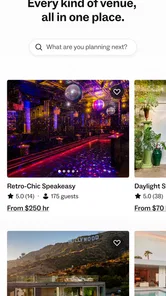
What makes the experience different from a normal venue directory is the way the space itself leads the search. Instead of starting with a hotel, restaurant, or conference center, I could think in terms of the atmosphere I wanted: a bright studio, a polished meeting room, a larger event setting, or somewhere visually distinctive. That approach is useful when a generic room would technically work but would not create the right impression.
The app is available to everyone under its content rating, and its audience is broad. I can see it helping a small team arrange a workshop, a creator plan a shoot, or someone organize a private gathering without immediately committing to a traditional venue. It is not a universal replacement for every booking method, but it offers a more focused starting point when the physical setting matters.
How the current Peerspace experience works
I find the current Peerspace experience most useful when I treat it as a way to shape a plan, not simply locate a room. I can start with the kind of gathering or work I have in mind, then narrow my attention to spaces that seem suited to its mood and practical needs. That makes the next step—deciding who should manage the search and what information to share—especially important.
Searching by the kind of place you actually need
The most useful change in mindset is to search for a space rather than a business category. A conventional search might lead me toward restaurants, hotels, or coworking companies. Peerspace is more helpful when I already know the activity and want the venue to support it. A photo shoot, a team meeting, and a birthday gathering may all require different layouts, lighting, furniture, and levels of privacy.
I would begin with the occasion, location, and timing, then treat the visual presentation as an important part of the decision rather than decoration. Photos can reveal whether a room feels open or cramped, whether the furniture is suitable, and whether the setting matches the tone of the plan. This matters because a space that looks attractive in isolation can still be wrong for the way I intend to use it.
A useful habit is to write down the non-negotiables before browsing. I might need a particular seating arrangement, room for equipment, a quiet environment, or a look that works on camera. Without that list, it is easy to choose the most appealing images and only later notice that the space does not fit the practical side of the event.
More From Our News Desk

 Gmail
GmailGmail in a Busy Inbox: Who Benefits Most?
From first account to crowded workday, Gmail earns its place through dependable search and flexible sorting—but its best fit depends on how much inbox maintenance you can tolerate.

 Prime Video
Switching to Prime Video: What Changes in Your Viewing Routine
Prime Video can make a compelling second home for streaming, but switching means learning a different catalog, rental layer, and route from browsing to playback.

 Universal TV Remote Control
Universal TV Remote Control Works Best as a Reliable Backup
A phone remote earns its place through quick setup and reliable habits. Here is how to get more from Universal TV Remote Control—and where its limits show.

 Weather - By Xiaomi
Weather by Xiaomi Review: Clear at a Glance, Less Clear Up Close
Xiaomi’s weather app makes everyday forecasts quick to scan, but its calm surface can leave useful details and recovery paths harder to find than they should be.

 X
XX Under Pressure: Can It Recover When Posting Goes Wrong?
A resilience-focused review of X, examining setup, mistaken posts, interruptions, weak connections, and the gaps that matter when recovery needs to be dependable.

 Clash of Clans
Clash of Clans Is Won Between the Battles
Its raids are quick; its community is a long-term project of coordination, teaching, rivalry, and shared responsibility—with all the friction that entails.
Latest News



Why the visual browsing style is a real strength
For creative work, the images do more than advertise the room. They help me judge whether the location can carry the visual identity of a project. Someone planning product photography may care about clean backgrounds and flexible composition, while a small team may care more about a table, comfortable seating, and a layout that encourages discussion.
This visual approach also makes the app useful during the early planning stage, before I have a finished brief. I can browse several styles and discover what kind of environment suits the idea. That is more inspiring than a plain list of addresses, although inspiration should not replace checking the practical details before booking.
There is a trade-off here. Attractive presentation can make a space feel more suitable than it really is. I would never rely on photos alone. I would compare the images with the listing information, examine the location carefully, and ask a direct question if an important detail is unclear. The app can narrow the search, but it cannot remove the need for sensible venue planning.
A realistic everyday scenario
Imagine I need a place for a small team workshop. Our usual office is too distracting, a coffee shop is too public, and a hotel meeting room feels unnecessarily formal. I could use Peerspace to look for a room with a table, enough seating, and a more relaxed atmosphere. Once I find a promising option, I would check the timing, review the available information, and contact the host about the details that affect the day itself.
The same workflow suits a creator preparing a short video session. Rather than adapting a random room after booking, I can first look for a setting whose appearance already supports the concept. That may reduce the amount of styling or set dressing required. The important point is that the app helps me make the location part of the creative decision, not merely an address to fill in at the end.
For a private event, the value is slightly different. I can compare atmosphere and layout before deciding whether a space feels appropriate for the guests. I would still think about access, noise, furniture, and how people will move through the room. A visually impressive listing is only a good choice if it remains comfortable and workable once people arrive.
What the latest app details tell me
The current version is 3.13.5, and the app supports devices running Android 7.0 or later. That makes it accessible to people using older Android hardware, which is helpful if I am installing it on a secondary phone used for event planning. The product was released on August 29, 2022, so it is not a brand-new experiment; it has had time to establish a recognizable booking-focused identity.
Its current standing also suggests that people are finding the concept useful. Peerspace has passed 100K installs, with an average rating of 4.7 from around 1.2K ratings and 142 written reviews. I treat those figures as encouraging rather than conclusive. Venue searches vary widely by city and event type, so my own experience will depend heavily on the places available for my intended location and date.
The developer is Peerspace, and the app itself is free to install. That makes trying the search experience low-risk, but “free” should not be confused with a free venue. The real financial decision comes when evaluating and booking a space, so I would use the app to investigate options rather than assume the installation cost tells me anything about the final event budget.
How the product feels for people who already use it
For an existing user, the most valuable part of the current experience is continuity in the planning process. A venue search often changes as the event becomes clearer: first I want a general idea, then I need a specific date, then I realize I need a different layout or a more suitable setting. A dedicated app gives that search a home instead of forcing me to rebuild it across unrelated services.
The product also fits a repeated workflow. A photographer, producer, consultant, or small business may need different spaces for different projects. In that situation, browsing a curated selection can be more efficient than starting from a broad web search each time. I can develop a better sense of what to check and become faster at distinguishing an attractive listing from a genuinely useful one.
However, repeat users should not assume that a previously suitable venue will automatically suit the next project. The purpose, guest count, equipment, and timing can change the decision completely. I would revisit the requirements for every booking instead of treating the app as a shortcut around planning.
Three practical habits that improve the search
- Separate visual fit from operational fit. First decide whether the room looks right for the event, then check whether its layout, access, and working conditions support what you will actually do there.
- Use the listing as a conversation starter. If a detail affects the schedule or equipment, ask about it before relying on the space. A short clarification is easier than redesigning the event on arrival.
- Compare the total effort, not just the room. A nearby space with a simpler setup may be better than a more dramatic location that creates extra travel, transport, or preparation work.
These habits are especially important because the app makes discovery enjoyable. When browsing becomes part of the creative process, I can easily spend more attention on style than on logistics. The best result comes from using the visual search to create a shortlist, then switching into a more careful evaluation mode.
Where it compares well with usual alternatives
Compared with searching through ordinary map results, Peerspace is more focused on the experience of the space. Maps are excellent for finding businesses and checking geography, but they are not always designed around the question, “Can this room work for my particular event or shoot?” Peerspace puts that question closer to the center of the search.
Compared with contacting venues directly, the app can make early comparison less fragmented. Instead of opening many separate websites, I can explore spaces with a similar purpose and visual appeal in one place. Direct contact may still be better when I need a highly customized arrangement, a long-term relationship, or a venue with services that require detailed negotiation.
Compared with hotels and conventional conference venues, the app is appealing when I want personality or flexibility rather than a standardized setting. A hotel may remain the stronger option for formal conferences, predictable service, or established event support. Peerspace is more interesting when the room itself is part of the concept and I am willing to evaluate each listing individually.
Compared with broad short-term rental platforms, its event-oriented focus is a meaningful advantage. A home or apartment may look suitable in photos but still be a poor match for a gathering, production, or meeting. A platform centered on spaces for these activities gives me a more relevant starting point, although I still need to verify whether a particular listing fits my exact plan.
Where the experience still has friction
The biggest limitation is that discovery cannot guarantee a perfect match. A listing may communicate atmosphere clearly while leaving me with questions about the parts that matter most on the day: how the room functions when occupied, how equipment will be handled, or whether the schedule allows enough preparation time. That is not a reason to avoid the app, but it means I should budget time for due diligence.
Another limitation is the importance of local availability. The concept is useful everywhere in theory, but the practical value depends on the selection near me and on whether those spaces fit my date and purpose. If I need a very specific venue type in a smaller area, a local directory or direct outreach may produce better results.
The app may also be less suitable for people who want a completely standardized booking. If I prefer a package with catering, staff, equipment, and a fixed event format already bundled together, a hotel or specialist venue provider could be simpler. Peerspace gives me more room to choose the setting, but that flexibility can shift more planning responsibility onto me.
Cost evaluation requires care as well. Since the app is free to install, it is easy to begin browsing casually. The serious comparison starts when I consider the complete event plan: travel, setup, equipment, guests, and any additional arrangements. I would avoid selecting a venue solely because it looks affordable or attractive at first glance.
Who should use it and who should skip it
I would recommend Peerspace to people who care about finding a distinctive setting and are comfortable making a considered venue choice. It is a strong fit for creators, small teams, organizers of intimate gatherings, and anyone whose event needs more personality than a standard room provides.
It is also a good option for someone at the idea stage. If I know the purpose but have not yet settled on the mood, browsing can help me turn a vague plan into a clearer one. The spaces can influence the format, the guest experience, and even the visual direction of a project.
I would be more cautious about recommending it to someone arranging a large, highly structured event with complex service requirements. In that case, a specialist event company or established conference venue may offer a more complete package. I would also suggest another route if the priority is simply the cheapest nearby room and appearance is unimportant; a basic local search may be faster.
What I would like users to watch as the app evolves
Because the current version is 3.13.5, I would watch how Peerspace continues refining the balance between inspiration and practical booking information. The strongest future direction would be making it even easier to move from an appealing discovery to a confident decision without losing the visual browsing experience that gives the app its identity.
I would also pay attention to how well the product serves different kinds of users. A photographer, a meeting organizer, and a private-event host judge a space differently. The more clearly the app helps each person evaluate a listing against the intended activity, the less likely users are to confuse a beautiful room with a suitable one.
For now, my advice is to use it in two passes. Browse freely at first and collect spaces that match the mood or purpose. Then return to the shortlist with a checklist focused on layout, timing, location, and the questions that could affect the event. That simple separation makes the app more useful and reduces the risk of booking based on first impressions alone.
My final take
Peerspace: Unique Event Spaces is a thoughtful choice for venue discovery when the setting is part of the event’s value. I like that it encourages me to think beyond familiar hotels, offices, and restaurants, and I find the visual approach particularly helpful for shoots, workshops, and gatherings that need a specific feel.
Its weakness is not a lack of purpose but the responsibility that comes with choice. I still need to inspect each option carefully, ask sensible questions, and compare the whole plan rather than judging a room in isolation. For highly standardized or service-heavy events, another booking route may be more efficient.
Overall, I would keep this free app on my phone for the moments when a normal venue search feels too broad or uninspiring. It is best used as a discovery and planning tool: let the spaces expand the possibilities, then apply practical judgement before making the final commitment.
Peerspace: Unique Event Spaces Frequently Asked Questions
Is Peerspace: Unique Event Spaces free to download?
Peerspace is free to download and is an app in the Events category. The app helps people discover and book curated spaces for events, photo shoots, meetings, and other activities. Keep in mind that downloading the app is separate from booking a venue: the cost of a reservation depends on the particular space and the terms shown for that booking.
What devices can run Peerspace: Unique Event Spaces?
Peerspace is available for mobile devices, with a minimum operating-system requirement of version 7.0. Before installing, check that your device meets this requirement and has enough available storage. The app is rated Everyone, so its content rating is suitable for a general audience. Keeping your device’s software current can also help with compatibility and app performance.
What is Peerspace: Unique Event Spaces used for?
Peerspace is a marketplace for discovering and booking distinctive venues by the hour. It is designed for activities such as photo and video shoots, meetings, workshops, parties, weddings, auditions, and other gatherings. The app lets you browse spaces using photos, descriptions, amenities, location details, availability, and pricing before contacting a host or requesting a reservation.
How do I find and book a venue on Peerspace?
Start by entering a city or location, choosing the type of event, and selecting a date, time, and guest count. You can narrow the results with filters for price, venue style, amenities, and capacity. After reviewing the listing and host policies, you can send an inquiry or submit a booking request. Some spaces may require host approval before the reservation is confirmed.
How much does booking a Peerspace venue cost?
Prices vary considerably depending on the city, space, day, duration, event type, and included amenities. Listings generally display an hourly rate, but the final amount can also include service fees, cleaning charges, overtime costs, or other host-defined requirements. Before paying, carefully review the complete price breakdown, minimum booking time, deposit rules, and cancellation terms shown for your reservation.
Pros
- Wide range of unique venues for meetings
- parties
- shoots
- and events.
- Detailed listings include photos
- amenities
- rules
- and capacity information.
- Easy booking requests and direct communication with hosts.
- Hourly rentals can be more flexible than traditional event venues.
- Search filters help narrow spaces by location
- date
- price
- and event type.
Cons
- Availability and pricing vary greatly between locations and hosts.
- Additional cleaning
- service
- or overtime fees may apply.
- Some listings require host approval before a booking is confirmed.
- Venue rules can limit decorations
- music
- catering
- or guest activities.
- The best spaces may be expensive or booked well in advance.











