PeakVisor - 3D Maps & Peaks ID
- 41.00
- 3.8
- Installs
- 50.00K
- Price
- Free

Screenshots
Analysis by Reviewed
I like PeakVisor best when I treat it as a way to read a mountain landscape, not as a magic shortcut through it. Its appeal is easy to understand: it can help put names to distant summits and make the shape of the terrain easier to picture before a walk. That combination gives a hike more context, though it doesn’t remove the need to check conditions, plan carefully, and carry a dependable backup.
That balance matters because the app is more visual than a basic route finder. A named peak can turn an anonymous skyline into something worth exploring, while a three-dimensional map can help me think about ridges and valleys before choosing a trail. Neither tells me whether a path is open, whether weather will change, or whether I’m equipped for the day, so I see PeakVisor as a useful layer in a broader plan rather than the plan itself.
A landscape tool with a clear point of view
PeakVisor is a free travel and local app from Routes Software SRL, rated for Everyone. Its average is 3.8 from around 967 ratings, and it has over 50,000 installs. Those figures suggest a real audience, but also a range of experiences rather than universal approval. I’d start by trying it somewhere familiar, where I can judge how its views and tools suit me without making a new app responsible for a difficult day outdoors.
The main question I would ask before installing it is whether I often look at mountains and wish I knew more about what I was seeing. If the answer is yes, the app’s focus feels distinctive. If I only need the quickest directions between two addresses, a conventional navigation app is likely to be simpler. PeakVisor makes most sense when the landscape itself is part of the reason for going out.
Discovering the World of Peaks
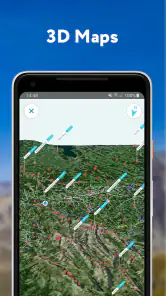
When I first fired up the app, I was greeted with a sleek and intuitive interface that just screams adventure. The main feature that caught my eye was the 3D maps. Imagine being able to visualize the terrain in stunning detail before even setting foot on it. It’s like Google Earth, but with a focus on mountain ranges. You can rotate, zoom, and navigate through the maps with ease, which is fantastic for planning your next hike.
The 3D view is most useful when I want to understand the shape of a route rather than simply trace a line on a flat screen. Before setting off, I can inspect how ridges and valleys sit in relation to one another and get a better sense of what the terrain might feel like. That perspective is a complement to, not a substitute for, a conventional map: a striking view can make a slope look easier than it is, and a rendered landscape cannot tell me whether conditions have changed on the ground.
Peak Identification
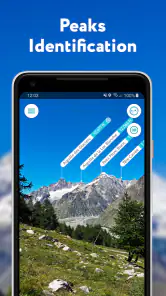
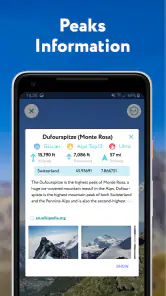
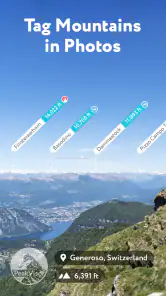
Now, here’s where PeakVisor truly shines: its peak identification feature. Ever been on a hike and wondered what mountain you’re looking at? Just point your phone’s camera towards the peak, and the app instantly identifies it, giving you all the nitty-gritty details like its elevation, the mountain range it belongs to, and even its prominence. It’s like having a mountain encyclopedia right in your hand!
More From Our News Desk

Clash of Clans Is Won Between the Battles

Android Auto Makes the Case for Quieter Car Software

MobiOffice: Transforming Mobile Productivity with Seamless Integration

EA SPORTS FC™ Mobile Soccer: Redefining Mobile Sports Gaming

How Microsoft OneDrive Became a Mobile Productivity Giant

How Google Translate Breaks Language Barriers Effortlessly
This is more than a novelty when a viewpoint opens onto several overlapping ridgelines. I can use the identification view to connect a visible summit with what I see on the map, then decide whether I want to explore that area another day. For the clearest result, I would stop somewhere safe, orient the phone carefully, and compare the labels with the skyline instead of walking while looking through the screen. In dense forest, poor visibility, or a crowded panorama, the camera-based experience may be less useful than consulting the map.
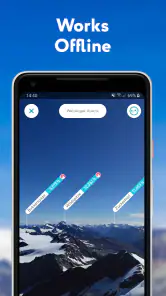
I tested this feature on a recent trip to the Rockies, and it was spot-on every time. The app even works offline, which is a game-changer when you’re deep in the wilderness without a signal.
Offline access matters most when planned in advance: I would check the route and save the material I expect to need before leaving coverage, rather than assume a remote area will load everything on demand. It is also worth keeping a paper map or another dependable navigation option for a serious outing. Peak identification can make a hike more engaging, but an identification result should not be treated as proof that a route is safe or that a summit is reachable.
Getting more from a viewpoint
A useful habit is to make the identification feature part of a short pause, not something I try to operate while moving. I can first choose a stable, unobstructed place to stop, look at the skyline with my own eyes, and then use the camera view to check which peak corresponds to which label. That sequence keeps the screen from taking over the moment and gives me a better chance of noticing whether a label actually matches the shape in front of me.
I would also use peak identification as a way to make a return visit more purposeful. If a summit catches my attention, I can note its name and look at the surrounding terrain later, rather than immediately changing the day’s route to chase it. That is a small but important distinction: curiosity can help me choose a future walk, while an unplanned detour based on a phone display can create avoidable pressure on time, energy, and daylight.
Planning and Navigation
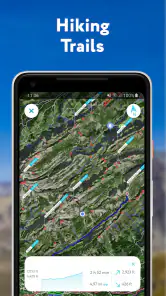
Another aspect I loved about PeakVisor is its ability to assist in planning routes and navigating trails. The app offers detailed topographic maps that are incredibly helpful for both beginners and seasoned hikers. Plus, you can overlay hiking trails and see elevation profiles, which helps in assessing the difficulty of your planned route.
For an everyday example, I might be choosing between two nearby walks for a free afternoon. An elevation profile gives me a more useful comparison than distance alone: a short route with a steep climb may be a poorer fit than a longer, gentler option. I would use that information to match a plan to my energy and available time, then check trail conditions and local guidance separately. That combination makes the app helpful for choosing a walk without encouraging me to mistake a map estimate for a guarantee about how hard the day will be.
One cool feature is the ability to save your routes and access them offline. This means you can save on data and battery life, which is crucial when you're out exploring for hours.
Saving a route before leaving home is a small habit with a practical payoff: I can review the plan when a signal is weak and avoid depending on a fresh download at a trailhead. I would also keep the phone’s battery in mind, since using mapping and camera functions for a long outing can still consume power. People who mainly need turn-by-turn directions for city streets may find a standard navigation app more direct; PeakVisor’s appeal is the mountain context, terrain view, and named peaks rather than everyday urban routing.
Planning without over-trusting the screen
For a more deliberate plan, I would compare the elevation profile with the three-dimensional view instead of relying on either in isolation. The profile helps me see where climbing is concentrated; the terrain view helps me picture the landscape around it. Together, they can prompt better questions before setting out: whether a climb fits my group, whether we want a demanding ascent or a gentler outing, and whether the route makes sense for the time we have.
That comparison is especially useful when I’m walking with people who have different levels of experience. I can discuss the shape of the route in terms everyone can understand, rather than choosing solely by a trail’s distance or a dramatic-looking map. Still, the app’s planning view is not a live report from the trail. I would check local notices and conditions independently, and keep enough flexibility to turn back if the actual day differs from what I expected.
Where It Fits—and Where It Doesn’t
I would recommend this app to curious hikers, visitors who want to put names to a mountain panorama, and walkers who like to study terrain before choosing a trail. It can add context to a familiar outing as well as help a beginner compare possible routes. Experienced hikers may appreciate it as another way to inspect a landscape, but should keep their established navigation and safety routines.
It is less suited to someone who wants only the simplest route from one street address to another, or to anyone expecting a phone app to make remote travel risk-free. The camera feature is most rewarding when the skyline is visible, while route planning is most useful when the user takes time to prepare offline. The current version is 2.9.60, and optional in-app purchases range from $11.99 to $184.99 per item, so I would check what a particular paid option includes before buying rather than assume every capability is part of the free experience.
Who should choose another tool
If my main concern were dependable turn-by-turn navigation, especially in unfamiliar terrain, I would favour a tool built around that specific need and keep PeakVisor as a companion for landscape context. Likewise, someone who rarely hikes, has no interest in identifying summits, and just wants directions to a café or hotel is unlikely to get much from its mountain-first approach. The distinction is not that one kind of app is universally better; it is that the right choice depends on whether I need route guidance, geographic context, or both.
The paid options are another reason to be selective. Since the app is free to start and in-app purchases vary substantially in price, I would first work out which capability I actually want, then read the purchase details before spending anything. That is a better approach than assuming a paid item is necessary for a casual walk or buying on the strength of a feature name alone. A free trial of the basic workflow on a familiar outing can clarify whether the app’s style suits me.
Final Thoughts
All in all, PeakVisor - 3D Maps & Peaks ID is a must-have for anyone who loves the great outdoors. It elevates your hiking experience by giving you all the tools you need to explore, learn, and navigate the mountains safely. Whether you're a curious beginner or a seasoned mountaineer, this app adds a new dimension to your adventures.
My recommendation is a little more specific: try it if identifying peaks and seeing mountainous terrain in three dimensions would genuinely improve your outings, and test the tools on a low-stakes route before counting on them farther afield. Its strongest value is the combination of visual context and practical preparation; its limits matter if you need a dedicated navigation solution or expect the camera view to work equally well in every setting. With sensible backups, I can see it making a walk more informed and more fun.
So, next time you’re heading out for a mountain escapade, make sure you have PeakVisor installed on your phone. It’s like having a mountain guide, map, and encyclopedia all rolled into one. Happy hiking!
PeakVisor - 3D Maps & Peaks ID Frequently Asked Questions
Does PeakVisor need special permissions or equipment to identify mountains?
PeakVisor is made for identifying peaks with a smartphone camera, so you can use its central feature with a compatible phone rather than carrying separate identification equipment. Pointing the camera toward the mountain view lets the app label peaks, while the 3D maps offer another way to explore the surrounding terrain. As with any camera-based tool, a clear view of the landscape makes the feature easier to use.
Who develops PeakVisor, and is it suitable for all ages?
PeakVisor is developed by Routes Software SRL and is listed for a general audience, so it may appeal to adults, families, hikers, and curious travelers interested in mountain scenery. Its purpose is to help users recognize peaks and explore terrain, rather than to replace practical outdoor judgment. Anyone heading into the mountains should still plan carefully and use appropriate navigation and safety practices alongside the app.
What is PeakVisor and what are its main features?
PeakVisor is a comprehensive app designed for outdoor enthusiasts who love hiking and exploring the mountains. Its main features include 3D maps for visualizing terrain, a peak identification tool that names mountains using your phone's camera, and detailed information about each peak. Additionally, it offers hiking trails, distance measurements, and elevation profiles to help users plan their adventures more effectively.
How accurate is the 3D mapping and peak identification in PeakVisor?
PeakVisor uses advanced technology to provide highly accurate 3D mapping and peak identification. The 3D maps are created using high-resolution data, ensuring precise representation of terrain features. The peak identification feature leverages augmented reality to accurately identify and name mountain peaks in real-time, providing reliable information for outdoor enthusiasts. Visibility and the camera's view can affect how easy it is to match a label to a distant summit, so it is sensible to treat the app as a helpful guide rather than a substitute for careful route decisions.
Is PeakVisor available offline, and how does it perform without an internet connection?
Yes, PeakVisor offers offline functionality, which is a crucial feature for hikers and explorers who often find themselves in remote areas without internet access. Users can download maps and use the peak identification tool offline, ensuring they have access to all necessary information during their outdoor adventures. The app performs smoothly offline, maintaining accurate data and functionality. It is worth preparing before leaving a connected area by saving the maps you expect to need.
Pros
- Detailed 3D mountain maps
- Offline maps for remote areas
- Peak identification feature
- Augmented reality support
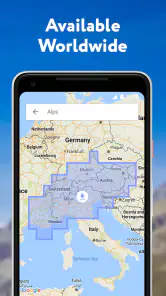
- Extensive global peak database
Cons
- Requires a subscription for full access
- Can drain battery quickly
- Occasional map rendering issues
- Limited free version features
- High data usage for downloads
- Category
- Travel & Local
- Version
- 2.9.60