

PDG PROmote 2026+
- 46.00
- 4.3
- Installs
- 10.00K
- Price
- $34.99

Screenshots
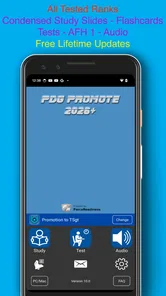
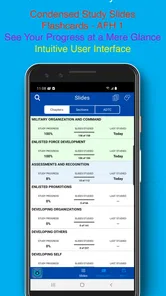
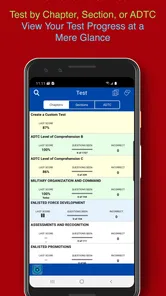
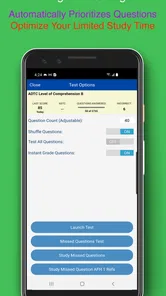
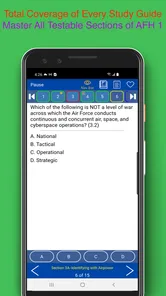
Analysis by Reviewed
Hey there! So, I recently got my hands on the PDG PROmote 2025+ app, and I have some thoughts to share. If you’re in the military or preparing for a promotion, you might have heard about this app. It’s designed to be a study companion for those looking to advance their careers, and honestly, it’s pretty impressive.
Before paying for a dedicated study app, I’d ask one practical question: do I need structured practice for Air Force promotion exams, or am I mainly looking for general leadership reading? That distinction matters. A focused exam-prep tool can make short sessions more purposeful, while broad reading or notes may be enough if you only want to refresh a few topics. I’d choose based on the exam I’m preparing for and whether I’ll return to the material often enough to justify the purchase.
What’s the Deal with PDG PROmote 2025+?
Let’s dive into what makes PDG PROmote 2025+ stand out. This app is like having a personal tutor in your pocket, specifically tailored for Air Force personnel. It’s packed with tons of features to help users study for the Promotion Fitness Examination (PFE) and the United States Air Force Supervisory Exam (USAFSE). The app provides all the necessary study materials in a format that’s easy to digest.
PDG PROmote 2025+ is an education app from ForceReadiness.com, aimed at Airmen studying for promotion to SSgt and TSgt. Its particular strength is that it keeps the preparation centered on that audience instead of asking you to assemble a study plan from general-purpose tools. If those exams are your target, that focus can save effort; if you are studying for a different service, a different promotion level, or a non-military qualification, the subject-specific approach is a reason to look elsewhere.
Choosing a Study Workflow That Fits the Exam
The decision is not simply whether you like studying on a phone. I’d think about whether I need repeated recall practice, whether I can study in short intervals, and whether I’m willing to pay for a resource that is narrowly tied to Air Force promotion preparation. If my main challenge is finding time to review, a collection of exam-oriented material in one place is more useful than a broad reading app. If I already have a dependable plan and only need to look up an occasional topic, adding another paid tool may not improve much.
It also helps to decide what role the app will play before opening it. I would not expect a study app to replace careful reading of official material or my own judgment about what needs more attention. Instead, I’d treat it as a practice companion: use it to test what I can recall, identify gaps, and make a short list of topics for the next study block. That separation keeps the tool useful without letting a good-looking score become the whole plan.
Features Galore
The first thing you’ll notice is the comprehensive nature of the content. There are thousands of questions and flashcards that cover every topic you could think of. What’s cool is that it’s not just about cramming information; the app includes multiple study modes to suit different learning styles. Whether you prefer quizzes, flashcards, or practice exams, there’s something for everyone.
More From Our News Desk

 Gmail
GmailGmail in a Busy Inbox: Who Benefits Most?
From first account to crowded workday, Gmail earns its place through dependable search and flexible sorting—but its best fit depends on how much inbox maintenance you can tolerate.

 Prime Video
Switching to Prime Video: What Changes in Your Viewing Routine
Prime Video can make a compelling second home for streaming, but switching means learning a different catalog, rental layer, and route from browsing to playback.

 Universal TV Remote Control
Universal TV Remote Control Works Best as a Reliable Backup
A phone remote earns its place through quick setup and reliable habits. Here is how to get more from Universal TV Remote Control—and where its limits show.

 Weather - By Xiaomi
Weather by Xiaomi Review: Clear at a Glance, Less Clear Up Close
Xiaomi’s weather app makes everyday forecasts quick to scan, but its calm surface can leave useful details and recovery paths harder to find than they should be.

 X
XX Under Pressure: Can It Recover When Posting Goes Wrong?
A resilience-focused review of X, examining setup, mistaken posts, interruptions, weak connections, and the gaps that matter when recovery needs to be dependable.

 Clash of Clans
Clash of Clans Is Won Between the Battles
Its raids are quick; its community is a long-term project of coordination, teaching, rivalry, and shared responsibility—with all the friction that entails.
Latest News



A useful way to get more from those formats is to alternate them rather than repeat the mode that feels easiest. I’d use flashcards to check recall, then move to questions to see whether I can apply what I studied, and reserve a practice exam for a quieter block of time. That routine helps expose the difference between recognizing an answer and retrieving it without a prompt. Progress tracking can then guide the next session: revisit weak areas instead of spending every study block on familiar material.
One practical trade-off with a large bank of questions and cards is that volume alone doesn’t tell you what to do next. I’d avoid rushing through everything just to feel productive. When a card is easy, move on; when a question catches me out, I’d pause long enough to understand the underlying topic before trying another one. That makes review less like collecting correct answers and more like building reliable recall.
Another useful habit is to keep a small note outside the app of recurring trouble spots, especially when the same subject feels difficult in different formats. The progress view can point me toward areas to revisit, while a short personal list helps turn that signal into a concrete plan for the next session. I would keep those notes brief rather than duplicate the app’s content. The point is to remember what needs attention, not to create a second, more cumbersome study system.
One feature that really caught my eye is the progress tracking. It gives you a detailed overview of how you’re doing, which areas you’re excelling in, and which ones need a bit more attention. This is super handy for keeping your study sessions focused and efficient.
User Experience
Now, let’s talk about the user experience. The app’s interface is clean and intuitive. You won’t be wasting time trying to figure out how to navigate through it. Everything is laid out in a straightforward manner, which is perfect when you’re already juggling a busy schedule. Plus, the app works smoothly without any annoying glitches.
For example, after a duty day, I’d set aside a short break to review flashcards, note which topics keep slowing me down, and return to those areas during a longer session later in the week. That makes the app easier to fit around an unpredictable schedule than a plan that assumes a long, uninterrupted evening. Still, don’t treat a strong score in one mode as proof that you’re ready: use different formats and revisit missed material so a familiar question layout doesn’t create false confidence.
A realistic routine could be modest: a quick card session during a quiet break, followed by a few questions later when I can concentrate, then a longer practice session when the week allows. I’d avoid trying to force a full exam-style session into a noisy or interrupted moment; that kind of setting is better for light recall than for judging readiness. Keeping the purpose of each session clear makes it easier to study consistently without confusing a convenient review with a complete preparation plan.
I’d also give myself a simple stopping point. If I’m tired after work, one focused round and a note about what to return to can be more useful than continuing until I’m clicking through without thinking. The app’s variety supports changing the type of practice, but it doesn’t remove the need to pay attention to concentration. A short, deliberate session is a sensible use of the format; a long session done on autopilot is not.
There are useful alternatives, but they solve different problems. Official study material is a better anchor when you want to verify wording or keep your preparation aligned with the material you are expected to know. A notebook, printable cards, or a general flashcard tool can suit someone who wants to create a custom set or study away from a screen. Those options take more setup, though, and they won’t offer the same ready-made, promotion-focused workflow. I’d use them alongside this app when needed, rather than assume one resource has to do everything.
How It Compares With Other Ways to Prepare
Compared with reading official material alone, this app is oriented toward active practice rather than simply working through pages. That can be valuable if I know I understand a topic while reading but struggle to recall it later. On the other hand, official material remains the sensible reference point for checking details and ensuring my preparation is grounded in what I’m expected to know. I would not treat a quiz app as a reason to stop consulting the material that defines the exam.
Compared with building a custom deck in a general flashcard tool, the appeal here is convenience and a specific promotion-study focus. A self-made deck may be a better fit if I want complete control over what goes into it, already have notes I trust, or need to study material outside this app’s audience. But making and maintaining a deck takes time, and a person with a busy schedule may prefer to spend that time reviewing. The choice is a trade-off between customization and getting started quickly.
Study groups and discussions can help when I need to talk through a confusing concept or hear how someone else remembers it. They are less suited to a quick solo review during a spare moment, and their usefulness depends on having people available and focused on the same goal. I see the app as a better fit for individual practice, with conversation and official reading filling different gaps. It does not need to replace those approaches to earn its place in a study routine.
The main trade-off is the upfront cost: it is priced at $34.99, so I’d make sure the exam focus matches my needs before buying. The app has a 4.3 average from around 34 ratings, with 5K+ installs, and is rated for Everyone. It was released on January 15, 2025; version 11.0 requires Android 9 or later. Those details make it easier to judge whether it fits your device and budget, but they don’t replace checking that the material suits your current exam preparation.
Because the purchase is a meaningful commitment for a study aid, I’d decide based on how I actually study rather than on the size of the content collection alone. If I expect to use flashcards, questions, and progress feedback repeatedly, the focused workflow may be worth paying for. If I only need a brief refresher or prefer to build every study resource myself, the cost is harder to justify. The best value comes from regular, purposeful use, not from downloading an app and hoping motivation follows.
Before committing, I’d also check the device requirement against the phone or tablet I plan to use. The Android version requirement matters if I’m relying on an older device, and the listed Everyone age rating is a basic reassurance about suitability rather than a judgment about whether the content matches an individual’s study needs. My practical checklist would be: confirm the target exams, confirm the device can run it, and decide whether the dedicated study workflow is something I’ll use more than once in a while.
However, it’s worth mentioning that the app is quite content-heavy, so make sure you have enough storage on your device before downloading it. But once you get past that, it’s a breeze to use.
Who Should Choose It—and Who Should Pass
I’d recommend considering it if you’re an Airman preparing for promotion to SSgt or TSgt and want structured practice that can fit around a busy schedule. It is especially appealing if you learn by testing yourself and want more than a stack of reading to work through. The combination of cards, questions, practice exams, and progress tracking gives that sort of learner several ways to work on the same broad goal without having to assemble every part from scratch.
I’d be less enthusiastic about it for someone studying for another service’s exams, a different qualification, or a promotion level outside its stated audience. A broad education or flashcard tool may be a more flexible choice in those cases, even if it requires extra setup. It may also be unnecessary for a person who already has a study routine that is working well and only wants an occasional reference. Paying for a focused tool makes sense when the focus matches; it is not a universal advantage.
If you are unsure whether it suits your learning style, think about the last time you prepared for an exam. Did practice questions help you notice gaps, or did you mainly benefit from reading and writing your own notes? If self-testing keeps you engaged, the app’s format is a natural match. If you prefer to annotate source material slowly or need a resource for several unrelated subjects, a more general approach may fit better. That is a more useful test than assuming that more study modes automatically mean better results.
The Final Say
So, what’s the final verdict? If you’re prepping for Air Force promotions, PDG PROmote 2025+ is an invaluable tool. It’s not just about memorizing facts; it’s about truly understanding the material so you can ace those exams. Its user-friendly interface and diverse study modes make it a must-have for anyone serious about their career advancement.
For an Airman deciding whether this is the right fit, I’d separate the decision into three checks: confirm that the promotion exams it targets match your goal, decide whether its focused practice is worth the one-time purchase for your routine, and make room for it on your device. If you already have a reliable study method and only need an occasional reference, a free or self-made option may be enough. If you want questions, cards, and progress in one exam-oriented place, the paid convenience is easier to justify.
In a nutshell, this app is a game-changer. It’s like having a personal coach that’s available 24/7, and it adapts to your learning pace. So, if you’re looking to climb the ranks in the Air Force, give this app a shot. You won’t regret it!
My recommendation is enthusiastic but specific: I’d put it on the shortlist for an Airman whose promotion preparation matches its focus and who will make regular use of active recall. I would not buy it solely because it has several study formats or because a polished interface sounds convenient. The real question is whether those formats solve a problem I currently have—such as inconsistent review, difficulty spotting weak areas, or not knowing what to practise next.
For me, the strongest plan is to pair app-based practice with a reliable reference and a realistic schedule. Use cards and questions to expose what still needs work, use progress information to choose the next topic, and return to authoritative material when a point needs checking. That division of labor keeps the app’s convenience in perspective while making its focused practice genuinely useful. If that matches the way you prepare, it is a reasonable paid companion; if it doesn’t, a simpler or more flexible option may serve you better.
PDG PROmote 2026+ Frequently Asked Questions
Who is PDG PROmote 2025+ designed for?
PDG PROmote 2025+ is an education app for Airmen studying for promotion to Staff Sergeant (SSgt) and Technical Sergeant (TSgt). Its focus is professional development and preparation for the Air Force’s PDG exams, so it is intended for users who want study support tied to those promotion goals rather than a general-purpose learning app.
Is PDG PROmote 2025+ intended for both SSgt and TSgt promotion preparation?
Yes. PDG PROmote 2025+ is presented as a study app for Airmen preparing for promotion to both SSgt and TSgt. That makes it relevant to users working toward either rank, though the most useful way to approach it is to focus your sessions on the material connected to your own promotion preparation. Its purpose is specialized rather than general academic study.
What is PDG PROmote 2025+ app used for?
PDG PROmote 2025+ is an advanced study application designed specifically for Air Force personnel preparing for their Professional Development Guide (PDG) exams. The app provides a comprehensive range of study materials, practice tests, and flashcards to help users thoroughly prepare for their exams and improve their chances of advancement within the Air Force.
Is PDG PROmote 2025+ free to download and use?
PDG PROmote 2025+ is a paid education app priced at $34.99. This is worth considering before downloading, especially if you are comparing study options or deciding how much to invest in promotion preparation. The app is aimed at Airmen studying for SSgt and TSgt promotion, so its value will depend on whether that specific focus matches your needs.
Which devices can run PDG PROmote 2025+?
PDG PROmote 2025+ requires a device running operating system version 9 or later. Before downloading, check the operating system version on the device you plan to use so you can confirm it meets that requirement. If you study across multiple devices, check each one separately; compatibility on one device does not automatically mean another device meets the same minimum requirement.
Pros
- Detailed study material for Air Force exams.
- User-friendly interface and easy navigation.
- Regular updates with the latest content.
- Includes practice tests for self-assessment.
- Offline access to study materials.
Cons
- Limited customization options for learning.
- Some users report occasional app crashes.
- High subscription cost for full access.
- Limited interactive features or videos.
- Requires frequent updates for new content.













