

Jumpmaster PRO Study Guide
- 66.00
- 3.3
- Installs
- 10.00K
- Price
- $4.99

Screenshots
Analysis by Reviewed
So, I recently got my hands on the Jumpmaster PRO Study Guide app, and let me tell you, it’s quite the treasure trove for anyone diving into the world of airborne operations. Whether you're a newbie or a seasoned pro, this app offers something for everyone. Let’s break it down, shall we?
Where study sessions can get stuck
A study guide for a specialized subject can feel difficult before you even reach the material. You may recognize a procedure but not its exact terminology, or know a term without being able to explain how it fits into a sequence. That makes it tempting to skim, assume the familiar parts are already understood, and move on. I’d resist that urge here: the value of a focused reference is in checking the details you might otherwise gloss over.
Jumpmaster material also asks for more than casual curiosity. If you are preparing for a course or reviewing concepts connected to a professional role, a phone app can make study easier to fit into the day, but it cannot replace formal instruction, supervised practice, or current authoritative guidance. I’d use this as a learning aid rather than treating a screen as approval to act. That distinction matters especially when a topic involves procedures where misunderstanding a small detail can have consequences.
The app is an education product from ForceReadiness.com, and its narrow focus is both its advantage and its main test. It is more relevant to someone who specifically wants to study jumpmaster subjects than a broad military reference or general learning app would be. On the other hand, that focus will not make it useful to someone who simply wants a general introduction to aviation or outdoor activities. Before paying, I’d ask whether this is a subject I genuinely need to revisit, not just one that sounds interesting.
One practical snag with any concentrated study resource is knowing what to do when a passage does not click. I find it helps to note the precise question rather than reread the whole topic repeatedly: Is the unfamiliar part a word, a sequence, or the reason for a step? A glossary can help with terminology, while a visual explanation may make relationships easier to understand. If the point is still unclear, that is a cue to ask an instructor or consult approved material rather than filling the gap with a guess.
Setup checks before relying on it
The app costs $4.99, so I’d check the basic fit before treating it as a casual download. It is rated for Everyone, and its current version is 6.0, but the age rating is not a measure of how specialized the subject matter is. The minimum operating system is version 9, which is worth checking on an older device before purchasing. Its average rating is 3.4 from around 90 ratings, a mixed enough signal that I’d read recent user feedback if I were deciding whether its approach suits me.
There are also in-app purchases at $1.99 per item. That means I would look carefully at what is included before assuming the upfront purchase covers every piece of material I might want. A useful way to avoid disappointment is to decide what I need from a study guide first: core reference, practice, terminology, or visual explanations. Then I can compare those needs with what the app actually presents on my device, rather than paying based on a broad promise of comprehensiveness.
More From Our News Desk

 Gmail
GmailGmail in a Busy Inbox: Who Benefits Most?
From first account to crowded workday, Gmail earns its place through dependable search and flexible sorting—but its best fit depends on how much inbox maintenance you can tolerate.

 Prime Video
Switching to Prime Video: What Changes in Your Viewing Routine
Prime Video can make a compelling second home for streaming, but switching means learning a different catalog, rental layer, and route from browsing to playback.

 Universal TV Remote Control
Universal TV Remote Control Works Best as a Reliable Backup
A phone remote earns its place through quick setup and reliable habits. Here is how to get more from Universal TV Remote Control—and where its limits show.

 Weather - By Xiaomi
Weather by Xiaomi Review: Clear at a Glance, Less Clear Up Close
Xiaomi’s weather app makes everyday forecasts quick to scan, but its calm surface can leave useful details and recovery paths harder to find than they should be.

 X
XX Under Pressure: Can It Recover When Posting Goes Wrong?
A resilience-focused review of X, examining setup, mistaken posts, interruptions, weak connections, and the gaps that matter when recovery needs to be dependable.

 Clash of Clans
Clash of Clans Is Won Between the Battles
Its raids are quick; its community is a long-term project of coordination, teaching, rivalry, and shared responsibility—with all the friction that entails.
Latest News



Jumpmaster PRO has over 10,000 installs, which suggests it has reached a real audience, though popularity alone cannot tell me whether the content matches a particular course or unit’s current requirements. The app was released on June 7, 2014, and the developer is ForceReadiness.com. For a long-running specialist tool, I’d pay attention to the date and version as context, not as proof that every detail is either outdated or current. My practical check would be to compare any important material with the guidance I’m expected to follow now.
If you plan to study away from reliable service, confirm that the parts you need open before you leave a connected area. The published description of an offline mode sounds useful, but I’d still test access on my own device instead of discovering a loading issue at the wrong time. Open the relevant sections in advance, make sure text and any media you intend to use are available, and keep a separate approved reference for anything operational. That quick check turns a vague expectation about offline use into a dependable personal routine.
A better way to use short study windows
For a realistic everyday routine, imagine having a spare stretch of time before a class or during a quiet break. Rather than trying to cover a large topic in one sitting, I’d choose one concept, read it carefully, and then use a quiz or other practice activity if available to check what stuck. I’d write down any point I missed and return to it later. Short sessions are especially useful when the goal is to find weak spots, not to rush through the material and mistake completion for understanding.
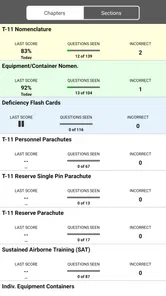
There is a useful trade-off between reading and testing. Reading gives context, but a quiz can expose whether I can recall a point without the answer in front of me. I would avoid using a correct quiz result as proof that I have mastered a procedure; it only shows how I handled that particular question. If I miss something, I’d go back to the relevant explanation and work out why, rather than repeatedly retaking questions until I can recognize the pattern.
It can also help to keep a small list of terms or questions outside the app. That gives a study session a clear stopping point and makes it easier to bring a specific doubt to an instructor. For example, if I understand individual steps but lose track of how they relate, I’d record that distinction. This is more useful than simply marking a broad topic as “done,” and it prevents a pocket reference from becoming a substitute for discussion when I need clarification.
A Deep Dive into the Features
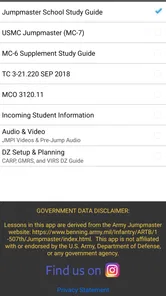
First off, the Jumpmaster PRO Study Guide is like having a seasoned jumpmaster in your pocket. The app covers everything you need to know about airborne operations, from basic jump procedures to more advanced tactics. The interface is super user-friendly, making it easy to navigate through the wealth of information available. And for those of you always on the go, the offline mode is a lifesaver. You can access all the content without needing a constant internet connection, which is perfect for those moments when you're out in the field or just in a spotty service area.
Learning Made Fun and Interactive
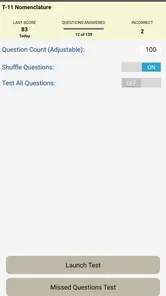
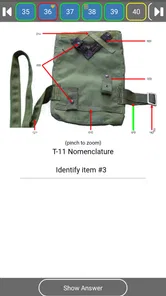
What I love about this app is how it turns learning into a fun, interactive experience. It’s not just about reading pages and pages of text; there are quizzes and interactive modules that test your knowledge and keep you on your toes. It's like having a virtual coach guiding you every step of the way. And let's not forget the detailed illustrations and videos that make understanding complex procedures a breeze. Trust me, this visual aid is something you’ll appreciate, especially when tackling tricky maneuvers.
The app also offers an extensive glossary of terms, which is super handy for anyone unfamiliar with the jargon. It’s like having a dictionary right at your fingertips. Plus, the updates are frequent, ensuring that the material stays current with the latest standards and protocols in airborne operations.
Using the tools without overestimating them
The combination of explanations, glossary entries, quizzes, and visual material can support different kinds of review. If a term is unfamiliar, I’d look it up before trying to memorize a longer passage. If I understand the words but cannot connect the ideas, I’d return to the explanation or illustration. If I can follow the material while reading but struggle to recall it, practice questions are a more revealing next step. That is a more deliberate workflow than treating every feature as something to tap through once.
Visual material can be particularly helpful for making a sequence easier to picture, but a diagram or video is still a teaching aid, not a guarantee that I have interpreted a procedure correctly. I’d pause and check the explanation alongside it, especially if a visual seems to simplify a point that matters in practice. The same goes for quizzes: they can make study active, but they cannot tell me whether a local course expects a different emphasis or uses newer approved material.
For a learner who already has a course manual, the app can work as a companion rather than a replacement. I’d use it to refresh terminology during a short break, then use the official course source when I need exact wording or confirmation. If the two seem to disagree, I would not try to decide which is right from memory. I’d flag the discrepancy and ask the relevant instructor or check the current authoritative reference. That simple habit keeps a convenient study tool in its proper role.
How it compares with familiar study options
Compared with a general-purpose reference or a pile of notes, a dedicated jumpmaster guide has the benefit of keeping related material together. Its glossary can reduce the friction of switching between a lesson and a separate dictionary, while quizzes offer a way to test recall that rereading alone does not. A broad online search may be faster for a single definition, but search results can vary in context and authority. For a structured subject, I prefer a focused resource for routine review and approved course material for decisions that need to be exact.
Compared with studying only from a printed manual, an app is easier to carry and may make quick practice more convenient. Paper, however, can be simpler when I want to annotate a passage, compare pages side by side, or study without worrying about a device. Neither format wins in every situation. I’d choose the app for brief refreshers and its interactive elements, then keep official written material available for careful cross-checking and longer, uninterrupted study.
The audience matters too. Someone who is new to the subject may appreciate having terms, explanations, and visual aids in one place, but should not expect an app to provide the full teaching context of a course. Someone experienced may find it handy for revision but should verify that the material aligns with the standards they currently use. If you are only curious about airborne operations and have no reason to study the details, a broad introductory resource may be a better fit than paying for a specialized guide.
When a problem may be outside the app
If a section will not load or a study session is interrupted, I’d start with ordinary checks rather than assuming the content itself is at fault. I would confirm that the device is running a compatible operating system, close and reopen the app, and check whether the same section behaves differently with a stable connection. If I expect to study offline, I’d verify access beforehand while connected. These steps are simple, but they help separate a temporary device or connection issue from a question about the material.
If the app opens but a topic still feels confusing, repeating the same screen is unlikely to solve every kind of problem. I’d identify whether I need a definition, a clearer sequence, or a source that reflects current course requirements. The glossary may address the first; an explanation or visual may help with the second; an instructor or approved reference is the safer route for the third. Knowing which kind of uncertainty I have saves time and prevents me from treating a technical feature as an answer to a learning question.
There can also be a mismatch between a study tool and the learner’s immediate goal. If I need a quick, authoritative answer for a current duty, I would use the official channel for that information, not rely on remembering a quiz or an illustration from a study session. If I’m preparing for an exam or trying to retain concepts over time, the app’s practice-oriented elements are more relevant. Being clear about that difference is one of the most important ways to use a specialized guide responsibly.
My Personal Take
Honestly, as someone who’s always been fascinated by airborne ops, this app is a game-changer. It’s comprehensive yet easy to digest, making it perfect for anyone looking to either start their journey or brush up on their skills. The developers really thought of everything, and it shows in the polished, seamless experience the app provides.
If I had to nitpick, I’d say the app could benefit from a social feature, where users can connect and share tips or experiences. But even without that, the Jumpmaster PRO Study Guide is an invaluable resource for anyone in the field.
My more measured recommendation is for learners who have a concrete reason to revisit jumpmaster topics and who are comfortable treating an app as one part of their study routine. I would not recommend buying it solely because the subject sounds intriguing, or relying on it as the final word for operational decisions. The combination of focused reference material and active practice can be useful, but the value depends on whether the content fits what you are learning and whether you verify important points through the right channels.
As a paid app with individual in-app purchases, it is also worth approaching the first session as an evaluation. Check whether the material you need is present, see how comfortably you can navigate it, and decide whether the practice tools fit the way you learn. If you are looking for a casual, broad introduction, that level of specialization may feel like more than you need. If you already study this subject, the focused format may make short review sessions easier to maintain.
In conclusion, if you’re serious about mastering the art of airborne operations, this app is well worth the investment. It's a comprehensive guide that’s both educational and engaging. So gear up, download the app, and start your airborne journey today!
Jumpmaster PRO Study Guide Frequently Asked Questions
What devices and operating systems can I use with Jumpmaster PRO Study Guide?
Before downloading, check that your device meets the app’s operating-system requirement. Jumpmaster PRO Study Guide is an education app from ForceReadiness.com, and its current version is 6.0. Compatibility matters if you plan to use it on an older phone or tablet, so make sure your device can run the required system version before installing.
What is Jumpmaster PRO Study Guide and who is it for?
Jumpmaster PRO Study Guide is an application designed to help military personnel, particularly those preparing for the role of a Jumpmaster, to study and improve their knowledge of airborne operations. The app is beneficial for both novices in the field and experienced professionals looking to refresh their skills. It includes comprehensive study materials, practice questions, and simulations to ensure users are well-prepared for real-life scenarios.
What features does Jumpmaster PRO Study Guide offer to enhance learning?
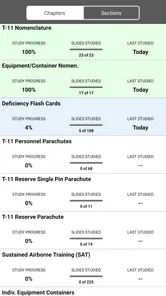
Jumpmaster PRO Study Guide offers a variety of features to enhance learning, including detailed instructional materials, interactive quizzes, and realistic simulations of jump scenarios. Users can track their progress through personalized dashboards and receive feedback to improve their understanding. The app also includes multimedia content such as videos and diagrams to illustrate complex concepts, making it an invaluable tool for thorough preparation.
Is Jumpmaster PRO Study Guide suitable for all ages?
The app has an Everyone content rating, so its rating does not restrict it to adult users. Its subject matter is focused on Jumpmaster study and airborne operations, however, so it is most relevant to people interested in that educational material. Consider whether that topic matches your needs before downloading, especially if you are choosing an app for a younger learner.
Is Jumpmaster PRO Study Guide available on both Android and iOS platforms?
Yes, Jumpmaster PRO Study Guide is available for download on both Android and iOS devices. Users can find the app on the Google Play Store or the Apple App Store by searching for the app name. This cross-platform availability allows users to study anytime, anywhere, using their preferred devices, ensuring they can integrate learning into their daily routines seamlessly.
Pros
- Comprehensive study materials
- User-friendly interface
- Regular updates with new content
- Offline access available
- Interactive practice exams
Cons
- Limited customer support
- Requires a subscription
- No dark mode option
- Occasional app crashes
- Lacks personalized study plans













