

PBIS Rewards Family
- 72.00
- 3.4
- Installs
- 100.00K
- Price
- Free

Screenshots
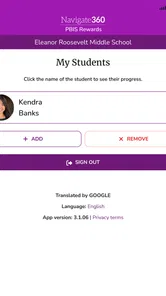
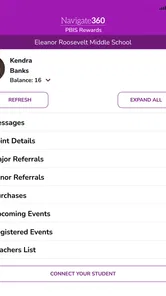
Analysis by Reviewed
When a school uses PBIS Rewards, families need a practical way to understand what is happening beyond the classroom. PBIS Rewards Family is built for that specific bridge: it is an education app from Navigate360, LLC that gives parents and guardians access to the PBIS Rewards system. I found its value less in entertainment and more in visibility. It can help a family follow a school’s positive-behavior routine without relying entirely on a child’s memory or a paper notice.
The first impression is fairly clear. This is not a general parenting tool, a homework planner, or a replacement for direct communication with teachers. Its usefulness depends on whether the child’s school already uses PBIS Rewards and whether the family receives meaningful updates through that system. If those two pieces are in place, the app has a sensible purpose. If they are not, installing it will not create a behavior program by itself.
What the first week feels like for a family
During the first week, I would treat the app as a shared reference point rather than something a child constantly opens. A parent or guardian can use it to check the school’s PBIS-related activity and connect that information with conversations at home. That can make positive behavior easier to discuss because the conversation starts with something more concrete than, “How was school today?”
A realistic example is a child coming home excited about earning recognition at school but struggling to explain exactly what happened. Instead of guessing, a parent can look at the family portal and ask about the specific behavior or school routine reflected there. That turns the app into a prompt for a calmer conversation. It is a small use case, but it is more valuable than simply having another notification on a phone.
The early appeal also comes from reducing uncertainty. Parents often hear about school incentives indirectly, especially when children are young, distracted, or reluctant to discuss their day. A dedicated family view gives adults a way to stay connected to the school’s positive-behavior framework. I particularly like that the app is aimed at parents and guardians rather than trying to make the child manage the entire process alone.
There is an important condition, though: the school has to be participating in PBIS Rewards. This is not an independent behavior tracker that a family can configure from scratch. Before expecting much from it, I would confirm with the school how families are invited, what information is shared, and how often the system is used. That simple check prevents the common disappointment of downloading an app that has little relevance without an active school connection.
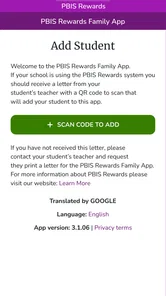
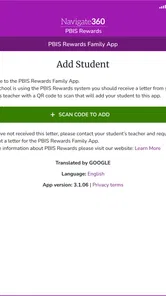
The setup experience should also be approached with realistic expectations. Because this is a portal into a school-linked system, the account or access process is likely to depend on the school’s instructions rather than on a completely self-contained sign-up. I would keep the school’s invitation details available, use the same parent or guardian information supplied by the school, and avoid creating multiple accounts when access does not appear immediately.
More From Our News Desk

 Instagram
Instagram’s Power Comes From Its Place in Your Phone
A close look at how Instagram turns Meta’s reach, recommendation systems and everyday camera habits into durable platform power—and what that costs users.

 Gmail
GmailGmail in a Busy Inbox: Who Benefits Most?
From first account to crowded workday, Gmail earns its place through dependable search and flexible sorting—but its best fit depends on how much inbox maintenance you can tolerate.

 Prime Video
Switching to Prime Video: What Changes in Your Viewing Routine
Prime Video can make a compelling second home for streaming, but switching means learning a different catalog, rental layer, and route from browsing to playback.

 Universal TV Remote Control
Universal TV Remote Control Works Best as a Reliable Backup
A phone remote earns its place through quick setup and reliable habits. Here is how to get more from Universal TV Remote Control—and where its limits show.

 Weather - By Xiaomi
Weather by Xiaomi Review: Clear at a Glance, Less Clear Up Close
Xiaomi’s weather app makes everyday forecasts quick to scan, but its calm surface can leave useful details and recovery paths harder to find than they should be.

 X
XX Under Pressure: Can It Recover When Posting Goes Wrong?
A resilience-focused review of X, examining setup, mistaken posts, interruptions, weak connections, and the gaps that matter when recovery needs to be dependable.
Latest News



That last point is a useful practical tip. When a family has more than one child, it is worth checking how the school expects guardians to view each child before repeatedly registering separate profiles. The cleanest long-term experience usually comes from following the school’s intended access route instead of treating the app like a normal standalone download. This is one of those small decisions that can prevent confusion later.
Where the early value is strongest
The app is most appealing in households where adults want to reinforce school expectations without turning every evening into a disciplinary discussion. Positive-behavior systems work better when the language used at school can continue at home. A family portal can help parents notice progress, ask better questions, and celebrate effort while the experience is still fresh.
It may also help guardians who cannot attend every school meeting or who do not receive much detail from a child after the school day. The app does not replace a teacher’s explanation, but it can give the family a more direct connection to the school’s chosen system. For a busy household, that kind of visibility can be more useful than a collection of broad parenting articles or generic reward charts.
At the same time, I would not expect the first-week novelty to carry the product. The initial curiosity of seeing a new school-related app fades quickly. Its lasting value depends on whether the information remains timely and whether the family actually uses it to support consistent conversations. That makes the next question more important than the download itself: does it continue to help after the first few checks?
Month-to-month value depends on routine
Over several weeks, PBIS Rewards Family makes the most sense as a lightweight habit. I would check it at a natural moment, such as after a school update or before a weekly family conversation, rather than opening it repeatedly throughout the day. The goal is not to monitor a child minute by minute. The goal is to notice patterns and use them to encourage behavior that the school is already trying to develop.
This distinction matters. A parent who treats every entry as a score can accidentally turn a positive-behavior system into a pressure system. In my view, the better approach is to use the app as context: ask what went well, find out what made the day difficult, and help the child connect school expectations with real situations. The portal is useful when it supports that conversation, not when it becomes the conversation.
For month-to-month use, the strongest benefit is consistency between adults. If two guardians share responsibility, the app can give both of them the same point of reference instead of relying on separate recollections. That can reduce mixed messages at home. One adult may still need to contact the school for clarification, but both can begin from the same school-linked information.
Another useful workflow is to combine a quick check with a broader weekly routine. A parent might review the family portal once, then ask the child to describe one successful choice and one difficult moment. This avoids constant checking while still making the school’s positive-behavior language part of ordinary family life. The app becomes a reminder for adults to pay attention, rather than a substitute for attention.
Families should also decide what they will do when the information is unclear. If an entry seems incomplete or does not match what the child remembers, I would avoid treating the app as the final authority. Use it as a starting point, ask the child for context, and contact the school when an actual correction or explanation is needed. That trade-off is important: digital visibility is convenient, but it can never capture every detail of a child’s day.
The app’s free price makes experimentation easier for families who already have access through their school. There is no purchase decision to weigh against a premium alternative, which lowers the barrier to trying it. Still, “free” does not mean costless in practical terms. A family spends time learning the school’s process, checking updates, and deciding how to respond. If those actions do not improve communication, the app may not earn a regular place on the phone.
How it compares with familiar alternatives
The usual alternatives are informal: asking the child, waiting for a teacher message, using a paper behavior chart, or keeping a home-made reward system. Each has a weakness. Children may forget details, paper can be misplaced, and a home chart may not reflect what the school is actually using. PBIS Rewards Family has an advantage when the school’s system is active because it connects the family to that existing structure instead of asking parents to recreate it.
It is less useful than a general school communication platform for broad announcements, assignments, attendance matters, or teacher messaging. I would not choose it as a replacement for an all-purpose school app. Its narrower focus is both its strength and its limitation. Families who want behavior-system visibility may appreciate that focus; families looking for one app for every school task will need something else as well.
It also differs from a generic child reward app. A personal reward chart can be customized around chores, bedtime, or household goals. PBIS Rewards Family is better suited to reinforcing a school’s established approach. That means it may feel less flexible at home, but it also avoids making parents invent a parallel system that could conflict with school expectations.
What creates maintenance work
The maintenance burden is moderate, but it is easy to underestimate. The app itself is only one part of the routine. Parents must keep access working, remember to check relevant updates, and decide how much attention the information deserves. If the school changes procedures or a child moves between programs, the family may need to adjust its habits rather than assuming the same workflow will continue unchanged.
Notification fatigue is another concern. Any school-connected tool can become background noise when updates arrive too often, arrive without useful context, or compete with messages from several other platforms. I would be selective about alerts where the device allows it and make manual checks the default. A calm weekly rhythm is more sustainable than responding to every prompt as if it requires immediate action.
There is also emotional maintenance. Parents should avoid presenting the app as a permanent judgment of the child. Positive-behavior information can encourage progress, but children have uneven days. If every difficult entry leads to a lecture, the portal may create resistance rather than cooperation. The most durable use is supportive and curious: what happened, what helped, and what can we try next time?
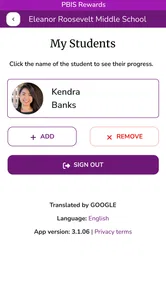
Families with multiple children may face additional organization work. Even without overcomplicating the process, guardians should pay attention to which child an update concerns before drawing conclusions. A quick glance is not always enough when school information is being viewed on a small screen or during a busy moment. I would make it a habit to verify the child and the context before discussing anything sensitive.
Device compatibility is straightforward for many households because the app requires Android 8.0 or later, but older phones may still be a consideration. Before making it part of a family routine, I would check that the device used by the parent or guardian can run it comfortably. The current version is 500005, so keeping the app updated is also sensible when the operating system and school access are both supported.
Where fatigue can set in
The biggest source of fatigue is repetition without a clear payoff. If a parent opens the app and sees information that does not lead to a useful conversation or action, the habit will probably disappear. This is not a criticism of the concept so much as a reminder that a portal needs meaningful school participation behind it. The app cannot manufacture fresh insight when the underlying routine is inactive.
Another source of frustration is dependence on institutional consistency. A family may be ready to use the tool, but the experience can feel uneven if school communication is uneven. In that situation, parents may blame the app for gaps that are really caused by unclear expectations or limited follow-through around the school program. I would judge the complete school-family workflow, not just the application screen.
Some parents may also find the focus too narrow. If the main need is homework tracking, direct teacher contact, calendar management, or urgent announcements, this is not the right central tool. Its purpose is specific enough that using it outside that purpose will make it seem underpowered. I would skip it as a priority download if the school does not actively use PBIS Rewards or if the family wants a broad academic dashboard.
The average rating of 3.4 from around 170 ratings suggests a mixed experience rather than universal satisfaction. I would read that as a reason to keep expectations practical. The app can be worthwhile when access and school participation line up, but it is not the kind of product I would recommend blindly to every parent. The smaller number of written reviews, around 70, also makes personal testing and school guidance more useful than relying on a headline score alone.
Who should keep it installed
I would recommend keeping it installed for a guardian whose child’s school actively uses PBIS Rewards and who wants a simple way to reinforce school behavior at home. It is especially suitable for families trying to move away from vague daily questioning and toward short, specific conversations about choices, effort, and improvement.
It can also suit co-parents or relatives who share caregiving duties and need a common view of the school’s behavior-related communication. The benefit is not that every adult must check constantly. The benefit is that they can coordinate more easily when a child needs encouragement or when a positive achievement deserves recognition.
I would be more cautious for families who already feel overwhelmed by school apps. If the household has no time for another routine, adding this one may create guilt without improving support. In that case, a direct conversation with the school about the most important updates may be more effective. Likewise, families seeking a customizable home reward chart may prefer a tool designed specifically for household goals.
Does it earn permanent space?
After the novelty fades, I think PBIS Rewards Family earns lasting space only when it becomes part of a small, repeatable family habit. A weekly check, a short conversation, and occasional follow-up with the school are enough for many households. Anything more intense risks turning a supportive portal into another monitoring obligation.
Its long-term strength is alignment. Unlike a generic reward app, it can connect home conversations to the school’s own positive-behavior framework. Its long-term weakness is dependence. If the school’s use is limited or the information is not timely, there is little the family can do inside the app to create value independently.
As a free education app rated for Everyone, it is easy to try when a school recommends it. Navigate360, LLC has positioned it as a parent and guardian portal rather than an all-purpose school companion, and that narrow role is worth respecting. I would install it when the school provides a clear reason, test it through a normal school month, and keep it only if it helps the family communicate more clearly.
My final view is positive but conditional. This is not an app I would open for entertainment or browse out of habit. I would keep it because it can make a school’s behavior-support system easier for a family to understand and reinforce. Its recurring value comes from better conversations, not from checking more often. For the right school connection, that is enough to justify a place on a parent’s phone; without that connection, choosing a broader school communication tool or a simple home routine would be the better decision.
PBIS Rewards Family Frequently Asked Questions
What devices can run PBIS Rewards Family?
PBIS Rewards Family is an Education app for Android, and its minimum operating system requirement is Android 8.0. Check your device’s software version before downloading so you can confirm it meets that requirement. The app is free to download, and its age rating is Everyone, making it suitable for a broad audience.
What is PBIS Rewards Family and who is it designed for?
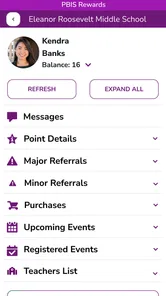
PBIS Rewards Family is a companion app that helps parents and guardians stay informed about their child’s participation in a school’s Positive Behavioral Interventions and Supports program. When the school uses PBIS Rewards, families may be able to view points, recognize positive behavior, check available rewards, and follow announcements or updates. The exact features depend on how the individual school or district has configured its PBIS Rewards system.
How do I sign in to PBIS Rewards Family?
To use PBIS Rewards Family, you generally need an account or invitation connected to your child’s school. Login details may be provided by the school, teacher, or district administrator, and some schools may use a specific access code or email-based setup. If you cannot sign in, your password does not work, or your child is missing from the account, contacting the school’s PBIS coordinator is usually the fastest way to resolve the issue.
Can I see my child’s PBIS points and rewards in the app?
In supported school configurations, the app allows families to review a child’s PBIS points and see information about rewards or recognition opportunities. However, the information shown is controlled by the school’s PBIS Rewards account, so menus and available details can vary. Point totals may also depend on when staff record transactions. If a balance appears incorrect, ask the school to verify the account rather than assuming the app is malfunctioning.
Can more than one parent or guardian use PBIS Rewards Family?
Multiple parents or guardians may be able to access a child’s information, but this depends on how the school or district manages family accounts and permissions. Each adult should normally use their own approved login instead of sharing credentials. If another guardian needs access, the school may need to send an invitation, link the account, or confirm the relationship for privacy and security reasons.
Pros
- Keeps families informed about school-issued points and rewards.
- Simple interface makes it easy for parents to check progress quickly.
- Can encourage positive behavior through visible recognition.
- Useful communication link between home and school staff.
- Available on mobile devices for convenient access anywhere.
Cons
- Requires the school to actively use PBIS Rewards for full value.
- Some features may vary depending on school configuration.
- Notifications can become easy to miss if alerts are disabled.
- Parents may need an invitation or login details from the school.
- Point updates may not appear immediately after classroom activity.











