Paylocity
- 26.16K
- 4.7
- Installs
- 5.00M
- Price
- Free

Screenshots
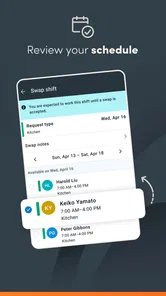
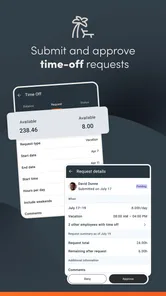
Analysis by Reviewed
What makes Paylocity useful to me is the employee self-service idea: instead of treating routine work questions as a reason to call HR, it puts common work information within reach on a phone. That can make a real difference when you need to check something outside office hours or away from a desk. The benefit depends on your employer using the platform and making the relevant information available, so I’d think of it as a convenient work companion rather than a standalone HR service.
Everyday access to work information
For a quick check, a phone is often easier than signing in at a computer or searching through old emails. Pay stubs, tax forms, and time-off requests are the kind of tasks that suit a self-service app particularly well: you can look up a document when you need it and handle a request without waiting to be at work. I’d still keep important documents somewhere secure if I need them later, but having a mobile route to them can save a few steps.
Where the app fits into a workday
Imagine finishing a shift and realizing you need to review a pay detail before budgeting for the week. Being able to open the app on your phone is more practical than remembering to check at a computer the next day. Or, if you already know when you need time off, you can make the request while the dates are on your mind rather than leaving it until you return to work. These are small conveniences, but they remove the friction from ordinary admin.
A useful habit is to treat the app as the starting point for a question, not always the final answer. If a pay detail looks different from what you expected, note the item and the period before contacting payroll. That makes it easier to explain what you are asking about without relying on memory later. Similarly, when making a time-off request, checking the dates and your workplace’s process before submitting can prevent a simple calendar mix-up. The phone makes it easier to act promptly; a moment of care still matters.
For someone working changing shifts, the benefit is less about doing a full HR task on a small screen and more about being able to check something at the moment it becomes relevant. A worker can look up a document during a break, make a note to follow up after a shift, or submit a request when plans are settled. That flexibility is useful when the workday does not line up neatly with office hours. It is not a reason to rush through sensitive decisions, but it can help keep ordinary administration from becoming one more thing to remember.
I would use it as a place to check and manage work-related information, not as a replacement for every conversation with a manager or HR. A request submitted through an app may still need the usual workplace review, and a personal question can be better handled by speaking to someone directly. Keeping that distinction in mind helps set realistic expectations: mobile access makes routine tasks easier, but it does not make workplace decisions automatic.
What to consider before relying on it
The experience is tied to your employer’s Paylocity setup and the access your workplace provides. If you install it and do not see a particular item you expect, the sensible next step is to check with your employer rather than assume the app itself can supply it. I’d also be careful about reviewing sensitive payroll details in a public place; a phone is handy, but it can be easy for someone nearby to see the screen.
More From Our News Desk

Weather by Xiaomi Review: Clear at a Glance, Less Clear Up Close

X Under Pressure: Can It Recover When Posting Goes Wrong?

Clash of Clans Is Won Between the Battles

Android Auto Makes the Case for Quieter Car Software

MobiOffice: Transforming Mobile Productivity with Seamless Integration

EA SPORTS FC™ Mobile Soccer: Redefining Mobile Sports Gaming
Before making it your only route to a document, think about where you may need that document later. A mobile view is convenient for a quick reference, but a personal, secure filing routine can make it easier to find something when you are offline or using another device. I would avoid leaving payroll paperwork in a casual photo gallery or forwarding sensitive files to an account I do not control. The practical point is simple: use the app for access, and handle any copies with the same care you would give a paper tax document.
There is also a difference between access and authority. Seeing a time-off option does not mean a request is approved, and viewing a pay item does not by itself explain every calculation behind it. If you need a decision, correction, or interpretation, your employer remains the right place to follow up. That distinction keeps the app in its strongest role: making information and routine actions easier to reach, rather than promising to resolve every workplace issue from a phone.
Compared with a general notes app, email, or saved screenshots, a dedicated employee app gives work information a more appropriate home and can make it easier to find the current item instead of hunting through older messages. Those alternatives can still be useful for personal reminders, but they are not a substitute for an employer-managed source. If your workplace does not use Paylocity, or you only need a basic personal calendar, this app is unlikely to add much to your routine.
The comparison with a company intranet or desktop employee portal is more nuanced. A larger screen can be better when you need to read several documents carefully, enter detailed information, or keep multiple work references open at once. The mobile app’s advantage is immediacy: it is already with you when a question occurs away from your desk. I would choose the phone for a quick check or straightforward request, and a computer or direct workplace contact when the task needs careful review or a longer explanation.
That makes it a poor fit for people who want a universal payroll account they can use independently. It is also not the right tool for tracking personal income from unrelated jobs or replacing a budgeting app. Its value comes from the relationship between an employee and a workplace using Paylocity. Without that connection, installing it is unlikely to solve a problem, while a personal finance tool or a simple calendar may be more suitable for individual needs.
Paylocity is a free business app from Paylocity, and its 4.7 average across around 237,000 ratings suggests many users find it helpful. It has over 5 million installs, is rated for Everyone, and version 25.11.3 requires Android 8.0 or later. Released in 2013, it is aimed at employees who already have a reason to use the service through work, rather than people shopping for a general payroll tool.
Those details help place the app, but they do not change the main practical question: does your employer use it, and are the records or tasks you need available through your workplace’s setup? If the answer is yes, the free app can be a useful addition to your routine. If you are deciding whether to install it, I would first confirm with your employer how employees get access and which work tasks they expect people to handle on mobile. That small check can spare you from downloading an app that has no role in your current job.
Embarking on a quest to find the perfect app for managing payroll and HR tasks? Well, let me introduce you to Paylocity. This app has been making waves in the business world, and after giving it a whirl, I can see why.
Getting Started with Paylocity
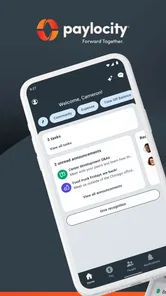
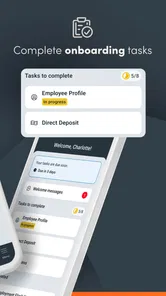
First things first, downloading and setting up Paylocity is a breeze. Available on both Android and iOS, it’s just a tap away on your app store. Once you’re in, the interface greets you like an old friend—simple, intuitive, and not at all overwhelming. The onboarding process is straightforward, ensuring that even the least tech-savvy among us can navigate with ease.
One practical way to get comfortable is to begin with the task you are most likely to repeat, such as checking a pay record or locating a work document. I would not try to learn every part of an employee platform in one sitting. A quick first pass can tell you where the items you actually need are, while leaving less familiar sections for a moment when you have time to explore them. If access or an expected item is missing, checking with your employer is more useful than repeatedly reinstalling the app or guessing at the cause.
Features That Stand Out
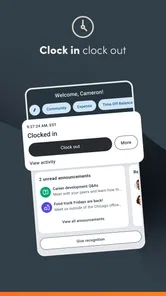
The app boasts a plethora of features that cater to every HR and payroll need. From clocking in and out to managing benefits, it’s like having an HR department in your pocket. One feature I particularly enjoyed is the self-service portal. Employees can access their pay stubs, tax forms, and even request time off—all from their phone. No more scrambling to find a computer or waiting in line at HR!
For me, the most meaningful part of that self-service approach is how it can reduce small interruptions. A person does not have to turn a passing question into a call during office hours if the relevant information is already available to review. It can also help employees keep their own records straight: checking a document close to when it matters makes it easier to spot what they want to ask about. I would still use a direct conversation for anything that depends on context or explanation, but the app can make that conversation more focused.
Another noteworthy feature is the app’s ability to handle compliance and reporting effortlessly. With ever-changing regulations, this tool ensures you stay on top of everything, reducing the risk of any compliance hiccups.
That sort of wording can make compliance sound automatic, so I would keep expectations grounded. An employee-facing app can help people reach workplace information and complete their part of a process, but it cannot replace an employer’s responsibilities or guarantee that every question has been handled correctly. For an employee, the practical benefit is having a more direct place to review relevant work information; for a complicated policy question, I would still ask the appropriate person rather than assume a screen has settled it.
User Experience
When it comes to user experience, Paylocity shines. The app is fast, responsive, and doesn’t lag, which is a must when you’re dealing with sensitive data like payroll. Navigation is smooth, and the design is clean—no clutter, just straightforward functionality.
The customer support is also top-notch. There’s an in-app chat feature that connects you directly to their support team, which can be a lifesaver when you hit a snag. No more waiting on hold for hours; help is just a message away.
In practice, I would first work out whether a snag is about the app itself or about an employer-controlled item. If a screen is confusing or the app is not behaving as expected, support may be relevant; if a document, request, or workplace-specific detail is missing, your employer may be the better first contact. Knowing which route fits the issue can save time and avoid being passed between people. I also would not send sensitive payroll details in a message unless I was comfortable that the channel and recipient were appropriate.
Who is likely to get the most from it?
The strongest match is an employee who already works with a Paylocity-using organization and has occasional reasons to check payroll or HR information away from a computer. People who work shifts, split their time between locations, or prefer handling a small task when it comes to mind may especially appreciate having a mobile option. It is less compelling for someone whose employer does not use the platform, or for a person whose only need is a private budget, a personal calendar, or a general document vault.
For a realistic routine, imagine an employee checking a pay detail after a shift, noting one point they want clarified, and contacting payroll with a specific question the next day. The app helps with the first step and can make the follow-up more precise, but it does not need to become the employee’s only recordkeeping method. That is the balance I like: use mobile access to reduce friction, then switch to a conversation or a more suitable tool when the issue calls for more than a quick lookup.
Final Thoughts
All in all, Paylocity is a powerhouse when it comes to managing payroll and HR tasks. It’s user-friendly, feature-rich, and designed to make your life easier. Whether you’re a small business owner or part of a larger corporation, this app is a game-changer. So, if you’re looking for a reliable app to streamline your HR processes, give Paylocity a shot. Trust me, you won’t be disappointed!
My recommendation is more specific: I would try it if my workplace already relies on Paylocity and I wanted a convenient mobile route to employee information. I would not choose it as a standalone HR system, nor would I judge it by features my employer has not made available. Its strongest case is everyday access, not replacing payroll staff, managers, or a full desktop workflow. Used with that expectation, it can be a practical work companion rather than another app that demands attention without fitting into your job.
Paylocity Frequently Asked Questions
What should I check with my employer before downloading Paylocity?
Ask whether your organization uses Paylocity and whether your account is ready for mobile access. The app is intended to give employees access to Paylocity information around the clock, but downloading it by itself does not create an employer account or provide sign-in details. Checking first can save you time and help ensure you can use the app after installation.
Who develops Paylocity, and what is the app’s main purpose?
Paylocity is developed by Paylocity and is a business app focused on employee access to Paylocity information. Its store summary describes access for employees who need information 24/7. The app is most relevant to people whose organizations use Paylocity, rather than someone looking for a general-purpose business or payroll app without an employer connection.
Who can use the Paylocity app, and do I need an employer account to get started?
Paylocity is a business app for employees and managers whose organizations use Paylocity. Its purpose is to provide employees with access to information around the clock, so the app is most useful when your employer has set up your organization’s account and given you the appropriate sign-in details. Downloading it alone does not replace that setup; check with your employer if you are unsure whether your workplace uses Paylocity.
Is the Paylocity app free to download, and what devices can run it?
Paylocity is free to download and is rated for Everyone. The current version is 25.11.3, and the app requires Android 8.0 or later. These details can help you check basic compatibility before installing. The app is developed by Paylocity and is listed in the Business category, with the central purpose of giving employees access to Paylocity information 24/7.
What is Paylocity and how can it benefit my business?
Paylocity is a cloud-based payroll and human capital management software designed to streamline HR processes for businesses of all sizes. It offers features such as payroll processing, benefits administration, time and labor tracking, and talent management. By using Paylocity, businesses can enhance efficiency, reduce administrative burdens, and improve employee engagement through its user-friendly platform and mobile app.
Pros
- User-friendly interface design.
- Comprehensive payroll management features.
- Mobile app for on-the-go access.
- Excellent customer support.
- Regular updates with new features.
Cons
- Limited customization options.
- Occasional sync issues with bank accounts.
- Some features require additional fees.
- Complex setup process for beginners.
- Limited third-party integrations.