Paycor Mobile
- 11.16K
- 3.8
- Installs
- 1.00M
- Price
- Free

Screenshots
Analysis by Reviewed
I find Paycor Mobile most useful when work details are scattered across different moments of the day: a shift to check before leaving home, a pay stub to review during a break, or a company update to catch between errands. It is a business app from Paycor, Inc., built for employees whose employers use Paycor. That distinction matters: it is not a general-purpose job organizer, and having the app alone does not make it useful if your workplace is not set up for it.
Who gets the most from it
If your employer has enabled the relevant tools, having work information on your phone can save a trip to a computer just to check a schedule or find pay details. I can see it suiting people with changing shifts, employees who are rarely at a desk, and anyone who wants to read workplace updates without relying on a noticeboard or a message passed along by a colleague. It is less compelling for someone whose employer does not use Paycor or who prefers to handle every work task on a desktop.
A practical routine is to check the schedule before planning appointments, then review any updates when they arrive rather than assuming a previously checked shift is still current. For pay questions, opening the pay information gives you a place to start before contacting HR. I would still keep a personal note of important dates or questions: an employee app can make details easier to reach, but it is not a substitute for your own recordkeeping.
How it fits alongside other work tools
Compared with a company portal opened in a mobile browser, a dedicated app can feel more convenient for repeat checks because it keeps work access on the phone’s home screen. Compared with a calendar or messaging app, though, it has a narrower purpose: those tools are better for organizing personal commitments or conversations across different groups, while Paycor Mobile is intended for employer-related information. I would not replace a calendar with it; I would use each for the job it handles best.
Access also depends on your employer’s setup and your account credentials. If you are unsure what your company code is or cannot sign in, asking your workplace administrator or HR contact is a more useful first step than repeatedly guessing. Before relying on the app for a time-sensitive task, I would sign in once and check which sections your organization makes available. That quick check helps set realistic expectations and avoids discovering a missing workplace tool when you need it.
Getting Started with Paycor Mobile
Jumping into the world of Paycor Mobile is like opening the door to a new way of managing work-related tasks. The app is available for both Android and iOS, making it accessible to a wide range of users. Once you've downloaded the app, setting it up is a breeze. You'll need to enter your company code and log in with your credentials. From there, it's smooth sailing.
Features That Make Life Easier
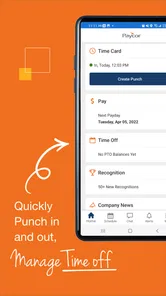
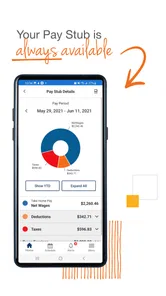
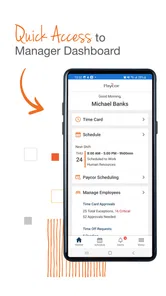
One of the standout features of Paycor Mobile is its user-friendly interface. The design is intuitive, and everything you need is just a tap away. Need to check your pay stub? No problem. The app provides detailed pay information, ensuring you always know where you stand financially.
More From Our News Desk

Weather by Xiaomi Review: Clear at a Glance, Less Clear Up Close

X Under Pressure: Can It Recover When Posting Goes Wrong?

Clash of Clans Is Won Between the Battles

Android Auto Makes the Case for Quieter Car Software

MobiOffice: Transforming Mobile Productivity with Seamless Integration

EA SPORTS FC™ Mobile Soccer: Redefining Mobile Sports Gaming
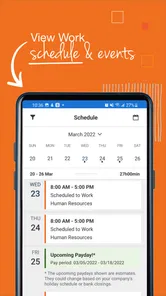
Scheduling is another strong suit. You can view your schedule at a glance, which is perfect for those of us who like to plan ahead. Plus, if there are any changes to your schedule, you'll receive notifications right away. No more surprises!
Communication and Connectivity
In today's fast-paced work environment, staying connected is crucial. Paycor Mobile allows you to receive company news and updates directly on your phone. It’s like having the office grapevine in your pocket! This feature keeps you informed and engaged with what's happening in your company, no matter where you are.
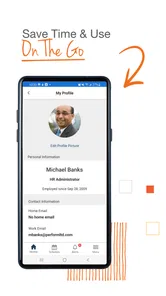
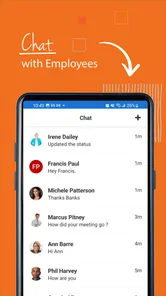
Moreover, the app supports direct communication with your HR department. Got a question or concern? You can easily reach out through the app, saving you time and effort.
Speed, stability, and everyday limits
For routine checks such as opening a schedule or reading a pay stub, my expectation is that the app should feel like a quick stop rather than a full work session. The bigger performance question is often not raw speed but whether the information you need is available in your employer’s setup and whether your login is ready when you need it. A slow connection or forgotten credentials can turn a brief check into a chore, so I would sign in before a shift or an important pay discussion rather than waiting until the last minute.
I would also treat notifications as prompts, not as the only record of a schedule change. A notification is handy when it arrives, but checking the schedule itself before making plans is a sensible habit. If the app seems stuck, I would first check the connection and try opening it again; for account or access problems, HR or the workplace administrator is the more appropriate route. That separates a temporary phone issue from an employer-account issue without wasting time.
Device fit and performance verdict
Paycor Mobile is free, rated for Everyone, and its current version is 6.0.9, with Android 6.0 listed as the minimum operating system. Those details make it worth checking device compatibility before installing, especially on an older Android phone. I would keep enough free space for ordinary app updates and use a stable connection for sign-in, but I would not expect it to replace a larger-screen portal for detailed work or extended administrative tasks.
Its audience is substantial: it has more than a million installs, around 33,000 ratings, and an average rating of 3.9. The app first appeared on August 29, 2012, and has around 11,000 written reviews. I read that as a sign of an established tool with a mixed user experience rather than a guarantee that every employer’s configuration will feel equally smooth. For the employee whose workplace uses it, the convenience of checking essential work details on a phone can outweigh occasional friction; for someone outside that setup, another work portal or a regular calendar is the more sensible choice.
Making it useful during a busy day
One useful way to approach an employee app is to make it part of an existing routine instead of expecting it to manage the whole workday. For example, I would check my upcoming shift while planning the week, then open the schedule again on the day itself before arranging a ride or confirming an appointment. That second look is a small safeguard against acting on an old view or relying on memory. It also keeps the app’s role clear: it helps me access work information, while my calendar remains the place where I coordinate work with family plans, medical appointments, and other commitments.
For someone paid hourly, a pay-stub check can also be more useful when there is a specific question in mind. I would compare the details I can see with my own notes about a pay period, then take a clear question to HR if something needs explaining. That is a better use of the app than treating a number on screen as a complete answer to every payroll concern. It gives the employee a convenient starting point, while leaving interpretation or correction to the appropriate workplace contact.
There is a practical trade-off in keeping work information on a personal phone. The convenience is obvious when you are away from a computer, but it also means being deliberate about when you check work. I would avoid turning every notification into an obligation to respond immediately, especially outside working hours. Use the app to stay informed when that suits your role, and rely on your employer’s normal process for urgent matters rather than assuming a phone notification is the right channel for every situation.
Questions to settle before relying on it
A common first question is whether downloading it is enough to get started. In practice, you need your employer’s Paycor setup and the credentials or company code required to access your account. If your workplace has not given you those details, contacting HR or an administrator is more useful than trying different sign-in guesses. Once you can enter the app, take a moment to find the information you expect to use most often; the available sections depend on how your employer has configured access.
Another sensible question is whether it can replace a company website or desktop portal. I would treat it as a convenient mobile companion, not assume every task is equally comfortable on a phone. Short checks, such as looking at a schedule or opening pay information, suit a smaller screen. If I need to review details for a longer period, compare several records, or work through an involved administrative task, a desktop browser is likely to be easier to use.
People also reasonably wonder what to do if a page does not load or their account is unavailable. I would start with the basics: check that the phone has a working connection, close and reopen the app, and try signing in again only if the issue appears to be with the session. If access still fails, I would contact the workplace administrator or HR rather than assume the app itself is the cause. That distinction matters because a phone connection problem, login issue, and employer account configuration call for different fixes.
The app is aimed at employees, so it is not the right choice for someone looking for a general payroll calculator, a personal budgeting tool, or a shared calendar for a household. Nor would I recommend it as a way to manage work for an employer that does not use Paycor. In those cases, a personal finance app, a calendar, or the employer’s own system is a better fit. Its value depends on the connection to a workplace account, not simply on installing it.
Security and Reliability
When it comes to apps that handle sensitive information, security is always a top priority. Paycor Mobile doesn’t disappoint. The app uses top-notch security measures to protect your data, giving you peace of mind every time you use it.
Reliability is another key aspect. The app runs smoothly with minimal glitches, ensuring that you can access your work information whenever you need it. It's like having a reliable assistant who never takes a day off.
In conclusion, Paycor Mobile is a fantastic tool for anyone looking to streamline their work-related tasks. With its user-friendly design, robust features, and strong security measures, it's an app that truly delivers on its promises. Whether you're a seasoned professional or just starting out, having this app in your arsenal will undoubtedly make your work life more manageable.
My bottom line is straightforward: I would try it when Paycor is already part of my workplace, then judge it by whether the schedule, pay details, and updates I personally need are easy to reach. I would not install it expecting a universal employee hub, nor would I rely on it as my only way to track a shift or resolve an account issue. Used as a companion to an employer’s system, it can make small, recurring work checks easier to fit into the day.
Paycor Mobile Frequently Asked Questions
What should I check before downloading Paycor Mobile?
Paycor Mobile is a workplace app rather than a general-purpose business tool, so first make sure your employer uses Paycor and that you have the appropriate workplace access. The app is free to download, but installation alone does not create an account or grant access to your employer’s services. Checking this first can save you from downloading an app you cannot use.
Will Paycor Mobile work on my phone?
Paycor Mobile is available for Android devices running version 6.0 or later. Before installing, check your phone’s operating system to make sure it meets that requirement. The app is developed by Paycor, Inc. and is listed for everyone. It is a mobile option for employees whose workplaces use Paycor, rather than a standalone service for personal payroll needs.
Who can use Paycor Mobile, and do I need an employer account to get started?
Paycor Mobile is designed specifically for employees of Paycor clients, so it is intended for workplace use rather than as a general-purpose payroll app. Before downloading, check that your employer uses Paycor and be ready to sign in with the access connected to your workplace. The app is free, but having it installed does not by itself provide access to an employer’s Paycor services.
What features does Paycor Mobile offer to users?
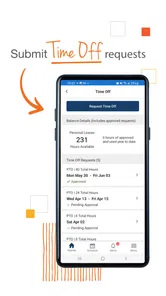
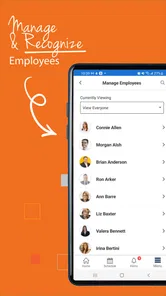
Paycor Mobile is designed to streamline HR and payroll processes on the go. Users can manage employee time and attendance, view pay stubs, access tax documents, and even request time off directly from their mobile devices. The app also supports push notifications for important updates and integrates seamlessly with Paycor's desktop platform for a cohesive user experience.
Is Paycor Mobile secure for handling sensitive employee information?
Yes, Paycor Mobile employs advanced security measures to protect sensitive data. The app utilizes encryption protocols to ensure that all information, such as pay stubs and tax documents, is securely transmitted and stored. Additionally, users must authenticate their identity with a secure login, and the app supports multi-factor authentication for added security.
Pros
- User-friendly interface
- Seamless payroll management
- Robust employee self-service features
- Real-time notifications
- Secure data handling
Cons
- Occasional app crashes
- Limited offline functionality
- Notification overload
- Some features require desktop access
- Slow customer support response











