Paychex Flex
- 11.13K
- 4.5
- Installs
- 5.00M
- Price
- Free

Screenshots
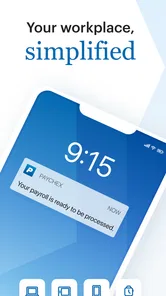
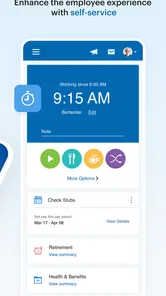
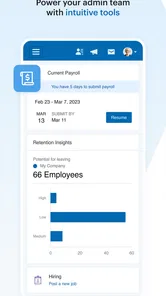
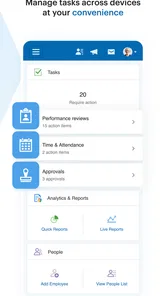
Analysis by Reviewed
Have you ever found yourself tangled in the web of managing payroll, benefits, and human resources for your company? If so, then the Paychex Flex app might just be your new best friend. This app aims to streamline these essential business operations into one mobile experience. Whether it earns a place on your phone depends less on its promise of convenience and more on whether your work already runs through Paychex. I’d treat it as a practical companion to an existing service, not a magic fix for every business task.
Bringing payroll and HR within reach
Firstly, let’s talk about the core functionality of Paychex Flex. It’s a platform designed to bring payroll, HR, and benefits work together for businesses. The attraction is having those areas accessible through one Paychex experience rather than piecing together unrelated tools. For the people who already use the service, that can make routine access simpler. But the phrase “all in one” should not lead you to expect that every role has the same controls or that every detailed task is equally comfortable on a phone.
Choosing a mobile tool for payroll and HR
Before relying on a phone app for work, I’d ask what needs to happen away from a desk. If you mainly need to check payroll or keep HR tasks within reach, Paychex Flex may be a sensible companion to the wider service. If you expect a mobile app to replace every careful review involved in running payroll, I’d be more cautious: consequential decisions still deserve time and a clear view of the details.
Paychex Inc. makes this free business app, which is rated for Everyone and has a 4.6 average from around 75,000 ratings. It has passed one million installs, and version 7.67.0 is listed for iOS 11 or later. Those figures suggest broad use, but they don’t tell you whether it fits your company’s particular payroll setup; I’d judge that by the tasks you actually need to complete and the service your employer or business already uses.
A useful way to decide is to write down the few moments when you currently need payroll or HR information but are away from your computer. Maybe you want to check a work-related detail before calling an administrator, or you need to keep track of an item while moving between appointments. If those are frequent frustrations, mobile access has a clear purpose. If you rarely need this information outside the office, installing another work app may add little to your day.
User Experience and Interface
When it comes to the user interface, simplicity matters. A clean layout can make a difference when you’re trying to find work information quickly, especially if you don’t use HR software every day. Still, I wouldn’t decide on that impression alone. The real test is whether the screens and options make sense for your role and whether you can tell when an item is complete or needs further attention. Payroll work benefits from clarity more than visual polish.
For a small-business owner, the useful test is not whether the screen looks tidy, but whether the app helps separate a quick check from a task that needs a proper review. I’d use a phone for a brief status check or to handle a straightforward item, then move to a larger screen when I need to compare records or carefully verify a payroll decision. That division can prevent the convenience of mobile access from turning into rushed work.
More From Our News Desk

Weather by Xiaomi Review: Clear at a Glance, Less Clear Up Close

X Under Pressure: Can It Recover When Posting Goes Wrong?

Clash of Clans Is Won Between the Battles

Android Auto Makes the Case for Quieter Car Software

MobiOffice: Transforming Mobile Productivity with Seamless Integration

EA SPORTS FC™ Mobile Soccer: Redefining Mobile Sports Gaming
One practical habit is to try the app during an ordinary week rather than waiting for a deadline. Notice which information is easy to locate, which tasks make you stop and double-check, and whether you need to switch to another channel to finish something. That small trial gives you a more realistic picture than simply browsing the interface. It also helps an administrator explain to employees what the app is useful for without promising that it replaces every conversation or procedure.
Mobile access for different roles
Being able to reach work information away from a desk is useful when a question comes up between other responsibilities. The value is not that every business operation should be handled on a phone; it is that some routine checks may be easier when the relevant service is already available. Employees and administrators may both benefit, but they do different jobs, and access is tied to their account and role.
A realistic use case is an owner checking in between appointments: confirm what needs attention, make a note to review a more involved item later, and avoid trying to resolve a complicated payroll question while distracted. Employees may also value having a mobile route to work-related information rather than needing to contact an administrator for every routine query. What each person can do depends on their role and account access, so I’d check that the tasks you need are available to you before making the app central to your routine.
That role-based distinction is worth considering before a busy pay period. An employee looking for personal payroll or benefits information has a different job from the person responsible for processing payroll. I wouldn’t assume that installing the app gives every user the same controls, or that a manager can complete every administrative task from a phone. Confirming access and responsibilities early helps avoid last-minute confusion.
For a team, I’d make the first use deliberately low-pressure. Ask an employee to sign in and locate the information they actually need, then ask an administrator to check the parts relevant to their responsibilities. If either person cannot find an expected item, resolve that before a time-sensitive situation. This is a more useful test than asking everyone to download the app and assuming a shared screen means a shared workflow.
How it compares with other approaches
Compared with separate payroll, benefits, and HR tools, the appeal here is having those work areas connected within a Paychex experience rather than juggling several apps. That can be especially helpful when a business already uses Paychex services and wants a mobile point of access. On the other hand, a company satisfied with a different payroll provider may get little value from adding a standalone app that doesn’t match its existing process. A spreadsheet may be enough for informal tracking, but it is not a substitute for a dedicated payroll service when accurate pay and employee records matter.
There is also a practical trade-off between convenience and review. Mobile access can make routine checks easier, but a small screen and interruptions are not ideal for examining a complicated change. I’d treat the app as a way to stay connected, not as a reason to skip the usual checks before a payroll run. If you need a tool mainly for accounting, project tracking, or general business organization, a product built around that specific job may suit you better.
The right comparison is therefore about fit, not a contest over which app has the longest feature list. A business choosing a payroll provider should consider the wider service and its procedures, not judge the decision from a mobile app alone. If your company already works with Paychex, this app may be a convenient route into that arrangement. If it does not, compare providers and business needs first; downloading this app by itself won’t make it a replacement for the system you currently use.
For an employee, the alternative may be simpler: use the access method your workplace already supports, whether that is this app or another established channel. If you only need an occasional answer and your employer handles those requests promptly, you may not need to add a separate mobile habit. If you regularly need to check work information independently, a direct route can be more convenient, provided your account gives you access to what you need.
Making the switch without disrupting routines
If you’re considering moving a team’s day-to-day work onto Paychex Flex, start by identifying who needs access and what each person expects to do. Ask employees to sign in and check the information relevant to them before relying on the app for a time-sensitive task. For administrators, a low-pressure first run is a better time to learn the mobile workflow than the day a payroll decision cannot wait. This small trial helps reveal whether the app complements your existing process or whether staff still need another channel for certain tasks.
People often wonder whether the app is useful without being a business administrator. It can still make sense for employees who want mobile access to work-related payroll, benefits, or HR tasks available through their account. If you don’t use Paychex through your workplace, though, downloading it alone is unlikely to replace your current provider or create a reason to change services. The app’s value depends on the Paychex relationship and access tied to your account.
Switching habits has a cost even when an app itself is free. Employees need to know where to go for a routine question, administrators need to avoid creating two competing ways to handle the same task, and everyone should know which channel is appropriate when something needs attention quickly. I’d introduce the app alongside existing procedures, then make any change to those procedures only after the team understands what it can do. That avoids the common mistake of treating installation as the same thing as a completed rollout.
Before making it part of a regular workflow, check that each person can sign in and understands what their account is intended to show. Keep a backup route for work that is urgent or needs closer review, especially while people are learning. For an individual employee, this may simply mean knowing whom to contact if an item is unclear. For an administrator, it means keeping established review steps in place rather than assuming a mobile screen will catch every issue.
Handling sensitive work carefully
Payroll and HR information deserves a little more care than an ordinary business notification. A phone is easy to carry and easy to leave unattended, so I’d use a device lock, keep sign-in details private, and avoid opening personal or employee information on a shared device. These are sensible habits regardless of which work app you use; they help prevent convenience from creating an avoidable privacy problem.
If a figure or record looks unexpected, I’d avoid making a rushed correction simply because I happen to be on my phone. Pause, check the relevant details through the appropriate work process, and contact the right administrator or support channel when needed. A mobile app can make information more reachable, but the user still has to decide when a quick glance is not enough.
This is also why I would separate access from authority. Being able to view work-related information does not automatically mean a person should make changes, and having an app on a phone is not a substitute for knowing who is responsible for a decision. Teams that clarify those boundaries can get the convenience of mobile access without blurring accountability.
Who I’d recommend it to
I’d recommend considering Paychex Flex if your workplace already uses Paychex and you want a mobile way to reach the work information or tasks available to your account. It is most compelling for people who have a clear, recurring reason to check payroll or HR matters while away from a desk. The broad rating and install history provide context for its reach, but personal fit still comes down to whether your role and employer’s setup make the app useful.
I’d be less enthusiastic if you want an independent payroll product, a general business organizer, or a replacement for careful administrative work on a larger screen. It is also not an obvious choice for someone whose employer does not use Paychex or whose current process already handles occasional questions well. In those cases, the extra app may create another place to look without solving a real problem.
In conclusion, if you're looking for a comprehensive solution to manage your business operations efficiently, Paychex Flex deserves a spot on your phone. It's designed to save you time, reduce stress, and keep your business running like a well-oiled machine. So why not give it a whirl? You might just wonder how you ever managed without it.
I’d be most comfortable recommending it to people whose employer or business already relies on Paychex and who want a convenient mobile connection to payroll and HR work. I’d suggest looking elsewhere if you need a standalone tool unrelated to a Paychex account, or if your priority is detailed, uninterrupted administration on a larger screen. Used for the right tasks, the app can make routine access easier; used as a substitute for careful review or a compatible service, it is not the answer to every business workflow.
Paychex Flex Frequently Asked Questions
Do I need a Paychex account to use the app?
Paychex Flex is a mobile companion for people who use Paychex services, so having the app installed does not necessarily provide access to its features by itself. Before downloading, check with your employer or business administrator that your organization uses Paychex Flex and that you have the account details needed to sign in. What you can see in the app depends on the access associated with your account.
Is Paychex Flex intended for employees, employers, or both?
Paychex Flex is relevant to people who use Paychex services in a workplace or business setting. Employees may use it as a way to connect with information made available through their account, while employers and administrators may use Paychex services to manage business needs. The experience is tied to the user’s role and access, so check with your organization about which functions are available to you.
Is Paychex Flex free to download, and who publishes it?
Paychex Flex is a free business app published by Paychex Inc. Its store summary is “Paychex Flex - Save Time and Stay Connected,” reflecting its role as a mobile companion for people using Paychex services. Downloading the app does not by itself explain what services or account access may be available to you, so check that your employer or business uses Paychex Flex before installing it.
What devices can run Paychex Flex?
Paychex Flex requires Android or iOS version 11 or later, so check your device’s operating system before downloading. Keeping the operating system current can also help with compatibility and security. The app is rated for Everyone, making its age classification suitable for a general audience, although the information displayed after signing in will depend on the account and access provided to each user.
What is Paychex Flex and how does it benefit businesses?
Paychex Flex is a comprehensive human capital management platform designed to streamline payroll, HR, and benefits management for businesses of all sizes. Its cloud-based system allows for easy access and management of employee data, simplifying administrative tasks. Businesses benefit from increased efficiency, reduced errors, and enhanced compliance with legal requirements.
Pros
- Intuitive user interface design.
- Comprehensive payroll management features.
- Seamless integration with HR systems.
- Mobile app available for on-the-go access.
- Timely customer support services.
Cons
- Limited customization options.
- Occasional app performance issues.
- Higher price for small businesses.
- Complex setup for new users.
- Limited international features.











