

PAX Nav
- 33.00
- 3.6
- Installs
- 50.00K
- Price
- Free

Screenshots

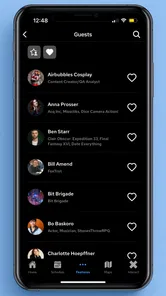

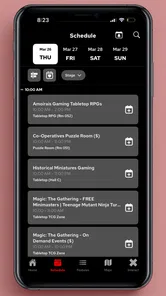

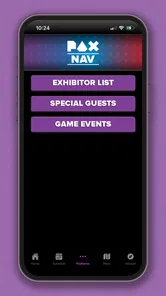
Analysis by Reviewed
When I use PAX Nav, I am not looking for another general event app that tries to do everything. I want one practical job handled well: helping me make sense of a large PAX venue while I am already there. That focus is what makes this free events app from ReedPop Mobile useful, especially for visitors who would rather spend their time discovering panels, exhibitors, and activities than staring at a confusing venue map.
The central capability is navigation. In theory, a map sounds simple. At a busy gaming convention, it becomes much more important because the problem is not merely finding a room. It is deciding whether I can reach that room in time, understanding what is nearby, and changing plans when a line, schedule conflict, or crowded area makes my original route less attractive. PAX Nav is built around that event-day problem rather than around everyday travel.
I see it as a companion for people attending PAX, not as a replacement for a normal maps app, a calendar, or a messaging service. Its value appears when the building itself becomes part of the challenge. The app’s store summary calls it the official app, and that official-event focus gives it a clearer purpose than a generic map tool. Its strongest idea is turning a convention layout into something I can use while making quick decisions.
Why the navigation focus matters at a busy convention
A regular map application can usually tell me where a venue is located. It is much less helpful once I am inside a convention center and need to distinguish rooms, halls, activity areas, queues, and event-specific locations. PAX Nav addresses that gap by putting the event environment at the center of the experience. I am not starting with a city street and working inward; I am starting with the convention and trying to understand its internal geography.
That difference changes how I use it. Before arriving, I can think of the app as a planning surface. Once I am on site, it becomes a reference tool that helps me answer small but important questions: Which area should I head toward next? Is the next destination close enough to fit between two commitments? Am I walking toward the correct part of the venue, or have I confused a hall with a room? Those questions are more useful to me than a long list of promotional material.
The app is also a better fit for first-time attendees than for people who already know every corner of the venue. Experienced visitors may remember the broad layout, but even they can benefit when a convention uses several spaces or when a packed schedule forces an unexpected change. A navigation tool reduces the mental effort of remembering where everything is, leaving more attention for the event itself.
I would not describe it as a full personal organizer. Its usefulness depends on the event information and navigation context it presents, so I still prefer keeping my own must-see list somewhere I can access quickly. That is not a serious flaw; it is a reminder to use PAX Nav for its strongest purpose instead of expecting it to replace every other planning habit.
More From Our News Desk

 Gmail
GmailGmail in a Busy Inbox: Who Benefits Most?
From first account to crowded workday, Gmail earns its place through dependable search and flexible sorting—but its best fit depends on how much inbox maintenance you can tolerate.

 Prime Video
Switching to Prime Video: What Changes in Your Viewing Routine
Prime Video can make a compelling second home for streaming, but switching means learning a different catalog, rental layer, and route from browsing to playback.

 Universal TV Remote Control
Universal TV Remote Control Works Best as a Reliable Backup
A phone remote earns its place through quick setup and reliable habits. Here is how to get more from Universal TV Remote Control—and where its limits show.

 Weather - By Xiaomi
Weather by Xiaomi Review: Clear at a Glance, Less Clear Up Close
Xiaomi’s weather app makes everyday forecasts quick to scan, but its calm surface can leave useful details and recovery paths harder to find than they should be.

 X
XX Under Pressure: Can It Recover When Posting Goes Wrong?
A resilience-focused review of X, examining setup, mistaken posts, interruptions, weak connections, and the gaps that matter when recovery needs to be dependable.

 Clash of Clans
Clash of Clans Is Won Between the Battles
Its raids are quick; its community is a long-term project of coordination, teaching, rivalry, and shared responsibility—with all the friction that entails.
Latest News



Using it before leaving for the venue
My most effective workflow begins before I enter the building. I first identify the sessions, areas, or exhibitors I care about, then use the app to understand how they relate physically. This is more valuable than simply collecting names. A schedule can tell me what happens next, but a map helps me judge whether moving between those choices is realistic.
One useful habit is grouping plans by area. If several things I want to see are close together, I treat them as one block rather than repeatedly crossing the venue. That saves energy and makes the day less vulnerable to delays. I also look for a sensible starting point and an exit direction, because navigation is not only about reaching the next destination; it is about avoiding unnecessary backtracking.
This is where the app can quietly improve a convention visit. It encourages me to think spatially. Instead of building a wish list that ignores distance, I can create a loose route with room for browsing, food, queues, and the inevitable moments when something unexpected catches my attention. I would still write down priority items separately, but PAX Nav helps me make that list practical.
Using it while plans change
The real test is not the first route of the day. It is what happens after the schedule stops behaving neatly. A panel may be full, a queue may take longer than expected, or I may decide that a nearby activity is more appealing than crossing the venue for my original choice. At that point, the app’s map-centered approach becomes more useful than a static printed guide.
I can use it to make a quick comparison between alternatives: stay in the current area, move to a nearby destination, or commit to a longer walk for something I consider essential. That is a small decision, but repeated small decisions shape the whole convention experience. The app does not make the choice for me, and I appreciate that. It gives me context without pretending that an itinerary can predict my mood, energy, or the size of a queue.
A practical tip is to check the next destination before leaving the current one, rather than waiting until I am already moving through a crowd. That gives me time to notice whether I am heading toward the right section and prevents the familiar convention mistake of walking several minutes before realizing I took the wrong corridor. The app is most helpful when I use it proactively, not only after I am lost.
A realistic day with PAX Nav
Imagine I arrive with a short list of priorities but no desire to follow a rigid timetable. I begin by checking the venue layout and locating the first area I want to visit. After spending time there, I use the map to choose a nearby destination instead of returning to the entrance or wandering toward a random hall. Later, when my original plan no longer fits, I compare the next few options by location and choose the one that keeps me moving efficiently.
That scenario shows the app’s real effect. It does not create an exciting itinerary by itself. It reduces friction between decisions. I spend less time asking friends where a location might be and less time retracing my steps. If I am attending with someone who has different interests, the map also gives us a neutral way to discuss where to meet: we can choose a recognizable event location rather than relying on vague directions.
For groups, I find this especially helpful when people split up. A message such as “meet near the next activity area” is much more useful when everyone can see the same event-oriented layout. I would still agree on a backup meeting point in case phones become inconvenient, but the app makes the first plan easier to communicate.
Where the experience can feel limited
The focused design is also the main trade-off. Someone who wants a broad event-management platform may find PAX Nav narrower than expected. I would not choose it as my only tool for personal reminders, travel arrangements, or keeping every note about a convention visit. Its job is more specific, and that can feel limiting if I approach it expecting a complete digital pass for the whole trip.
Navigation apps also depend on the quality of the map and the clarity of the event information available at the time I use them. A digital map cannot remove physical congestion, make a long queue disappear, or guarantee that a route feels obvious when a venue is crowded. In practice, I treat its guidance as a useful orientation aid rather than an exact promise about how quickly I will arrive.
Another point is attention. Checking a phone while walking through a packed convention can be awkward and distracting. I prefer to pause near the edge of a busy area, decide where I am going, and then put the phone away. That workflow is safer and faster than trying to navigate continuously while moving. The app helps most when it supports short checks rather than constant screen use.
I also would not install it merely because I enjoy general map apps. If I am not attending a PAX event, its specialized purpose gives me little reason to keep it open. Likewise, visitors who already have a very small, familiar venue and a simple plan may gain less from it. The strongest case is a large, busy event where orientation and route choices genuinely affect the day.
Who benefits most from the official event approach
First-time PAX visitors are the clearest audience. They have the most to gain from seeing the event as a connected space instead of a pile of separate listings. The app can help them prepare without requiring detailed knowledge of the venue, and it gives them a way to recover when their initial plan changes.
It is also valuable for attendees who prioritize several different types of activity. If I want to move between panels, show-floor areas, and other scheduled destinations, location becomes a major part of planning. PAX Nav helps me notice the cost of those transitions before I commit. That makes it easier to choose between an ambitious schedule and a more relaxed day.
Friends attending together can use it as a shared reference when they separate and reunite. I would not rely on any app as the only group-coordination method, but a common event map is more precise than descriptions based on memory. It is particularly useful when one person knows the convention well and another does not.
On the other hand, people who want a broad social platform, detailed personal scheduling, or a general travel planner should pair it with other tools. That is not a criticism of ReedPop Mobile’s approach. It is simply the boundary of a focused navigation app. I would rather see a tool do one event-specific task clearly than bury that task inside a crowded interface.
What the store details tell me about access
PAX Nav is free to install, which removes the main barrier to trying it before an event. It is rated for Everyone, so its intended audience is broad rather than restricted to a particular age group. The app was released on February 13, 2023, and the current version is 6.1.2, while devices need at least operating system version 10.
Its reach is meaningful without making me assume universal adoption: it has passed fifty thousand installs. The average rating sits at 3.6 from roughly seventy-five ratings, with just over thirty written reviews. I read that combination as a reason to keep expectations practical. It suggests that the app is useful to a real group of attendees, but it is not a substitute for personal preparation or common sense inside a crowded venue.
Compatibility is worth checking before the event, especially if I use an older phone. I prefer installing and opening an event app before travel rather than waiting until I am standing at the entrance with a low battery and a poor connection. That simple preparation also lets me become familiar with the navigation style before I need it under pressure.
My practical advice for getting more from it
I would use PAX Nav in three short stages. First, explore the layout calmly and identify the areas connected to my priorities. Second, create a flexible order based on location rather than trying to force every possibility into a strict timetable. Third, revisit the map only when a decision changes, such as abandoning a queue or choosing a nearby alternative.
I would also keep a compact offline note containing my absolute priorities and a meeting plan. This is not because the app lacks value; it is because an event day can involve battery concerns, noise, crowds, and moments when a phone is inconvenient. PAX Nav should reduce uncertainty, while the note protects the essentials.
My less obvious recommendation is to use the map to plan recovery time. After a long move across the venue, I would avoid scheduling another distant destination immediately. A route that looks manageable on paper can feel tiring after hours of standing and walking. The app gives me the spatial information needed to build a day that is enjoyable rather than merely efficient.
I also find it helpful to compare “nearby and good enough” with “far away but essential.” That trade-off is easy to ignore when reading a schedule in isolation. With the event layout in view, I can decide deliberately instead of discovering the cost only after leaving my current area. For me, that is the difference between a map that displays information and a map that improves decisions.
My final view after using it as intended
I recommend PAX Nav to anyone attending PAX who expects to move around a busy venue and wants a clearer sense of where each choice leads. Its best quality is not flashy presentation; it is the way an official event map can turn vague intentions into workable movement. I use it to reduce backtracking, compare nearby options, and make schedule changes without losing the whole day.
I would skip it if I wanted a universal planner or a general-purpose navigation replacement. It is too specialized for that, and its usefulness is tied to the PAX setting. But that specialization is exactly why I would install it before a convention. When the main challenge is finding the right place at the right moment, a focused event navigation tool can be more valuable than a feature-heavy alternative.
Overall, the free price makes experimentation easy, the Everyone rating keeps it broadly approachable, and ReedPop Mobile has given the app a clear role. My advice is to treat it as a flexible venue guide rather than an all-in-one event manager. If I prepare a few priorities, use the map before moving, and leave room for real-world delays, the app earns its place as a practical PAX companion rather than just another icon on my phone.
PAX Nav Frequently Asked Questions
What features does PAX Nav offer for planning a visit to a PAX event?
PAX Nav is the official app for PAX events, listed in the Events category and developed by ReedPop Mobile. It is intended to help attendees navigate and plan around PAX. The app’s specific tools and event information may vary, so review its current description and screens before relying on it for your visit.
Which devices can install PAX Nav?
PAX Nav supports devices running Android 10 or later. Before downloading, check your phone’s operating system version and make sure there is enough room for the installation. The app is also available for iOS; compatibility requirements can vary by device, so check the Apple App Store listing before installing it on an iPhone or iPad.
What is PAX Nav and what can I use it for?
PAX Nav is a navigation and trip-planning application designed to help users organize routes, view travel information, and follow journeys more conveniently. Depending on the available regional services, it may provide maps, directions, transport details, location information, or other mobility features. Before downloading, check whether its coverage and supported transportation options match your city or travel needs.
Is PAX Nav available for both Android and iPhone?
Availability can vary depending on the country, device, and version of the operating system. Before installing PAX Nav, users should confirm that their Android phone or iPhone meets the requirements shown on the official store listing. It is also important to download the application from Google Play or the Apple App Store to receive the legitimate version and future security updates.
Does PAX Nav require an internet connection to work?
PAX Nav may need an active internet connection for functions such as downloading map data, calculating routes, receiving updated travel information, searching locations, or synchronizing account details. Some navigation applications offer limited offline support, but users should not assume that every feature works without data. If you plan to travel, check the app’s offline capabilities and consider mobile-data usage beforehand.
Pros
- Clear navigation guidance with useful route information
- Supports trip planning for drivers on the go
- Map interface is straightforward and easy to understand
- Helpful for checking locations before starting a journey
- Can make regular commutes more organized
Cons
- Coverage and map accuracy may vary by region
- Some features may require an active internet connection
- Route suggestions can be affected by outdated traffic data
- May use noticeable battery power during extended navigation
- Interface options may feel limited for advanced users











