

ParkNYC powered by Flowbird
- 4.32K
- 4.7
- Installs
- 1.00M
- Price
- Free

Screenshots
Analysis by Reviewed
Have you ever driven around the block multiple times, praying for an available parking spot to magically appear? Living or working in a bustling city like New York can make parking a real nightmare. Say hello to ParkNYC powered by Flowbird, an app that promises to ease your parking woes with just a few taps on your smartphone.
Trust starts with knowing what the app can do
Parking apps ask you to make decisions while you are already focused on traffic, signs, and the clock. I judge one less by grand promises than by whether its purpose is clear and its choices are manageable. ParkNYC is a free travel and local app from NYCDOT ITT, built around paying for New York City parking. Its focused role is useful, but it does not replace checking the curb itself: a phone screen cannot make a space legal if posted restrictions say otherwise.
That distinction matters most when I am in an unfamiliar neighborhood. I would treat the app as a payment aid, not as permission to park anywhere or a guarantee that a space will be open. The app’s name may invite expectations of a citywide parking finder, but I would still use street signs and the actual meter or parking instructions as the final authority. For drivers who want help with the payment step, that narrower job can be valuable; for someone expecting a guaranteed space, it may not be enough.
Useful controls, with a few things to check
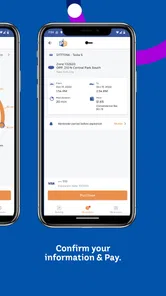
In the original experience, the map and session controls were presented as straightforward, but the most important habit is to pause before confirming: match the zone or location shown in the app to the signs where the car is parked, then check the selected duration and payment method. A wrong location choice can turn a quick task into a frustrating one, especially on a busy block where nearby spaces may follow different rules. I would rather spend a few seconds verifying those details than rush through the screen.
Because a parking session involves a linked payment method, I would also review the account and payment choices available in the app before relying on it for a rushed trip. Keep your phone accessible and make sure you can complete the payment process before leaving the car. Those are practical safeguards, not a claim about particular privacy settings or account controls. I would not assume any permission, data practice, or security feature without checking the app’s own current disclosures and device prompts.
Your Ultimate Parking Companion
Let me tell you, the first time I tried ParkNYC powered by Flowbird, I was skeptical. Could an app really make parking in New York City stress-free? But after giving it a spin, I found myself pleasantly surprised. The app is designed to help users find, reserve, and pay for parking spots without the hassle of circling blocks endlessly.
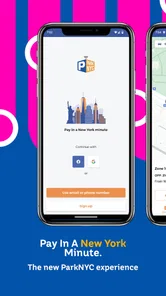
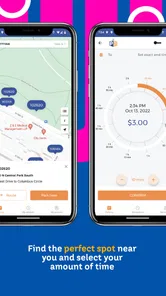
Downloading and setting up the app was a breeze. After a quick sign-up process, the app greeted me with a user-friendly interface. The map feature is quite intuitive, with various pinpoints highlighting available parking spots nearby. I could easily zoom in and out, and the app even provided detailed information about each spot, including pricing and time limits. It's like having a personal parking assistant in your pocket!
More From Our News Desk

 Weather - By Xiaomi
Weather by Xiaomi Review: Clear at a Glance, Less Clear Up Close
Xiaomi’s weather app makes everyday forecasts quick to scan, but its calm surface can leave useful details and recovery paths harder to find than they should be.

 X
X Under Pressure: Can It Recover When Posting Goes Wrong?
A resilience-focused review of X, examining setup, mistaken posts, interruptions, weak connections, and the gaps that matter when recovery needs to be dependable.

 Clash of Clans
 Is Won Between the Battles
Its raids are quick; its community is a long-term project of coordination, teaching, rivalry, and shared responsibility—with all the friction that entails.

 Android Auto
 Makes the Case for Quieter Car Software
The car interface is no longer judged by how much it can do, but by how quietly it helps. Android Auto shows what drivers now expect—and what still gets in the way.

 MobiOffice: Word, Sheets, PDF
MobiOffice: Transforming Mobile Productivity with Seamless Integration
MobiOffice: Word, Sheets, PDF is redefining mobile productivity with a surprising blend of functionality and innovation.

 EA SPORTS FC Soccer Mobile 26
EA SPORTS FC™ Mobile Soccer: Redefining Mobile Sports Gaming
Dive into EA SPORTS FC™ Mobile Soccer, where immersive gameplay and strategic depth transform mobile sports gaming.
Latest News



Easy Payment and Seamless Experience
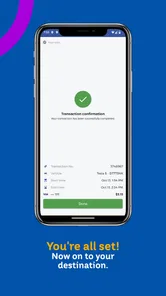
One of the standout features of ParkNYC is its seamless payment system. Gone are the days of fumbling for loose change or dealing with faulty parking meters. With ParkNYC, I could simply select my spot, set the duration, and pay directly through the app using a linked payment method. The app even sends you a notification when your time is about to expire, allowing you to extend your parking session remotely if needed. Convenience at its finest!
For those who love to plan ahead, the app offers a reservation feature. This means you can secure a spot in advance, saving you time and frustration, especially during peak hours. No more arriving at your destination only to find all spots taken!
Making a parking session work in real life
Imagine arriving for an appointment with a few minutes to spare. I would first find a legal space, read the signs, and only then use the app to handle payment. Before walking away, I would confirm that the selected location matches the parking area and that the session details look right. If plans change, the ability to check a session and act before it expires is more useful than trying to remember the meter time while caught up in an appointment.
This is where the app can beat the usual alternatives: paying at a physical meter may be more direct if your phone battery is low or you do not want to use an account, while a parking search or navigation app may be better for comparing garages or planning a destination. ParkNYC’s appeal is the phone-based payment workflow and the chance to manage a session without returning to the vehicle. I would not rely on an advance reservation as proof that a space will be waiting unless the app clearly confirms the exact arrangement for that location.
Who will appreciate it—and who may prefer another option
I can see this being most useful for New York drivers who park at eligible locations often enough to value a repeatable payment routine. Visitors may also appreciate not needing coins, provided they are comfortable creating an account and using a linked payment method. On the other hand, someone making a single stop, avoiding payment apps, or parking somewhere the app does not cover may be better served by the posted meter instructions or another local option.
A practical tip is to set up the account before you are searching for a space, rather than trying to enter details at the curb with traffic behind you. I would also keep an eye on the phone’s battery and notifications: remote session management only helps if the device is available and alerts are noticed. These small preparations make the app less of a last-second gamble and more of a useful part of a parking routine.
Reading the screen carefully when the curb is confusing
New York parking rules can change from one side of a block to another, and a sign may include several time windows or exceptions. I would not try to solve that puzzle by relying on a map pin alone. My safer routine is to read the full sign sequence first, identify the applicable parking area, and then compare that information with the location presented for payment. This is especially worthwhile when a street has loading rules, alternate restrictions, or a nearby intersection that makes the curb location easy to misjudge.
There is also a useful distinction between finding a payment zone and finding a space. A map can help orient me, but it cannot tell me whether a particular curb spot is open by the time I arrive or whether a temporary restriction has changed the situation. I would use the app after I have physically chosen a legal space, rather than letting the app’s map lead me to assume that any nearby curb is available. That order keeps the real-world parking decision in the driver’s hands.
What Could Be Better?
Now, while ParkNYC has plenty going for it, it's not without its quirks. Occasionally, I noticed that the app would lag or show outdated information about spot availability. However, these instances were rare and didn’t detract much from the overall experience. Another thing to keep in mind is that the availability of spots heavily depends on the area you’re in. Popular areas might still present a bit of a challenge.
Those limits matter because parking information changes quickly. I would use any availability indication as a starting point, not a promise, and make the final decision from the curb signs and what is physically open. If the app is slow, the phone loses connection, or the payment flow is not working, the sensible backup is the meter or other official payment method available at that spot—not repeated tapping while blocking traffic.
Account preparation and moments that call for caution
One question a first-time user may have is whether it is worth setting everything up before a trip. I think it is, if you expect to use the app: doing account and payment setup while parked at home is less distracting than doing it beside a busy curb. I would also check which account and payment options are currently visible to me, and read the app’s disclosures and device permission prompts rather than assuming that another parking app handles those choices in the same way.
Another practical question is what to do if a session needs attention while I am away from the car. The app’s session and notification workflow can help, but I would still check the active session directly instead of depending only on a reminder. A notification can be missed, muted, delayed, or overlooked during an appointment. If an extension is not available for the location or the app is not responding, I would follow the posted payment instructions rather than assume that a remote action succeeded.
For people who care about limiting what they share, the sensible approach is to make choices deliberately: provide only what the app asks for to complete the account and payment task, review the current disclosures, and use the phone’s permission controls when prompted. I cannot infer particular data practices from the act of paying for parking, so I would base trust on what the app actually explains and what choices it visibly offers. That is a more useful standard than treating convenience as proof of privacy.
A measured recommendation for New York parking
ParkNYC has a 4.5 average from around 47,000 ratings and has been installed over a million times. It is rated for Everyone, and version 2.1.1 supports devices running iOS 7.1 or later. Those figures suggest it has reached many drivers, but they do not remove the need to check whether the app suits a particular parking location and workflow.
The app is free, and its release on December 16, 2016, makes it a long-running option rather than a brand-new experiment. It has also accumulated around 4,100 reviews, which gives a prospective user a substantial body of public feedback to browse for current issues. I would look for comments that match my own situation—such as the kind of location I park in or the device I use—rather than treating an overall average as a guarantee that every payment will be smooth.
Compatibility is another question worth resolving before relying on it. The listed minimum operating system is 7.1, so I would check the current app-store page for my device and platform before planning a trip around it. If the app is not available or does not work reliably on the phone I carry, the meter’s official instructions are a more dependable fallback than discovering the problem at the curb.
Overall, with the convenience and ease it brings, ParkNYC has become my go-to app for parking in the city. Whether you're a resident or just visiting, this app might just become your new best friend in navigating the concrete jungle.
In conclusion, if you're tired of the parking hustle in New York, give ParkNYC a try. It’s far from perfect, but it’s a solid tool in making your city commute a little less stressful. So next time you find yourself in a parking pinch, remember that a solution might just be a tap away!
ParkNYC powered by Flowbird Frequently Asked Questions
Is ParkNYC powered by Flowbird free to download, and what does it cost to use?
ParkNYC powered by Flowbird is free to download, so you can install it without paying for the app itself. Keep in mind that downloading the app and paying for a parking session are separate matters: parking charges and any applicable transaction fees are shown as part of the payment process. Review the amount displayed before confirming a session.
Who is ParkNYC powered by Flowbird intended for?
ParkNYC powered by Flowbird is designed for people who want to pay for New York City parking using a smartphone. Its focused purpose may suit drivers who would rather handle a parking payment through an app than rely solely on a physical meter. Before downloading, consider whether you want a mobile option for managing parking sessions and are comfortable checking the details on your phone.
What does ParkNYC powered by Flowbird cost to download?
ParkNYC powered by Flowbird is free to download, so you can install it without paying for the app itself. Keep in mind that downloading the app and paying for a parking session are separate matters: parking charges and any applicable transaction fees are shown as part of the payment process. Review the amount displayed before confirming a session.
Which phones and operating systems can run ParkNYC powered by Flowbird?
ParkNYC powered by Flowbird is available on Android and iOS. Its listed minimum operating-system requirement is iOS 7.1, so check your device’s compatibility before installing, particularly if you use an older phone. The app is rated Everyone, and its straightforward parking-payment purpose makes it relevant to drivers who want to manage city parking from a smartphone.
What is ParkNYC powered by Flowbird and how does it work?
ParkNYC powered by Flowbird is a mobile application designed to simplify parking in New York City. The app allows users to pay for parking using their smartphones, eliminating the need for physical meters or cash. Users can find available parking spots, pay for parking time, and even extend their parking sessions remotely. The app integrates GPS technology to provide real-time information and ensures a seamless parking experience.
Pros
- Easy to find parking spots.
- Seamless payment integration.
- Real-time parking availability.
- User-friendly interface.
- Wide coverage across city.
Cons
- Occasional app crashes.
- Limited customer support.
- Inconsistent notifications.
- Battery drain issues.
- Requires constant internet.











