

Park National Bank
- 1.30K
- 4.3
- Installs
- 100.00K
- Price
- Free

Screenshots
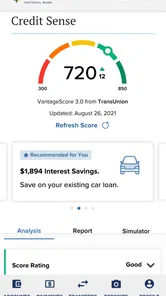
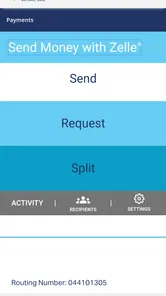
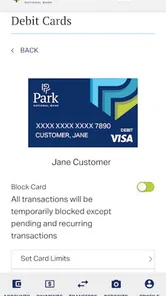
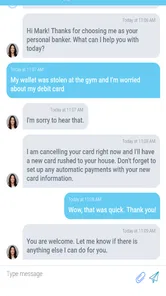
Analysis by Reviewed
I use mobile banking apps for one simple reason: I want to handle ordinary money tasks without turning every balance check into a visit to a branch or a search through a desktop website. Park National Bank is built around that practical idea. It is a free finance app from Park National Corporation, aimed at customers who already bank with Park National and want a mobile way to keep an eye on their accounts.
After spending time with it, I see it as a focused banking companion rather than an all-purpose personal finance manager. It is most useful when I need a quick view of my money, want to review recent activity, or need to deal with a routine account task while away from a computer. The experience is familiar and approachable, but its value depends heavily on whether Park National is already your bank. If it is not, there is no reason to install it just to browse around.
How the everyday banking workflow feels
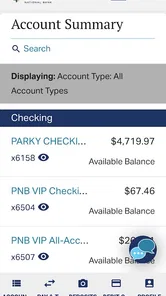
The basic rhythm is straightforward: open the app, sign in, check the account information that matters, and leave. That sounds unremarkable, but it is exactly what I want from a banking app. I do not want a busy home screen pushing unrelated financial products when I am simply trying to confirm whether a payment has cleared or whether my available money is enough for an upcoming purchase.
For a typical morning check, I would use the app to review the current account picture before making a transfer or paying a bill elsewhere. Later, I might return to inspect a transaction and compare it with a receipt. This kind of short session is where Park National Bank makes the most sense. It supports a repeatable habit instead of demanding a long setup process every time I need basic information.
The app is also useful in a more realistic situation: imagine standing at a grocery checkout and realizing that a recent purchase may have reduced your balance more than expected. Rather than guessing, I can open the banking app, review the account activity, and make a calmer decision. That small moment is where mobile access earns its place. It is not about doing something dramatic; it is about reducing uncertainty when timing matters.
Park National Bank is rated for Everyone, which matches its plain banking purpose. The interface is better suited to people who want familiar account access than to users looking for investing tools, elaborate budgeting dashboards, or financial coaching. I would recommend it to an existing Park National customer who values direct access and does not need a large collection of money-management extras.
What I would check before relying on it
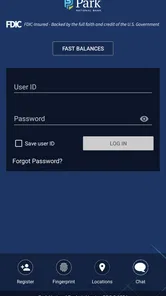
Before making it part of my routine, I would first confirm that my Park National online banking credentials work and that the app recognizes the accounts I actually use. That is a more important first step than exploring every screen. A mobile banking app can look polished, but it only becomes useful when the login process and account visibility fit the customer’s existing relationship with the bank.
More From Our News Desk

 Instagram
Instagram’s Power Comes From Its Place in Your Phone
A close look at how Instagram turns Meta’s reach, recommendation systems and everyday camera habits into durable platform power—and what that costs users.

 Gmail
GmailGmail in a Busy Inbox: Who Benefits Most?
From first account to crowded workday, Gmail earns its place through dependable search and flexible sorting—but its best fit depends on how much inbox maintenance you can tolerate.

 Prime Video
Switching to Prime Video: What Changes in Your Viewing Routine
Prime Video can make a compelling second home for streaming, but switching means learning a different catalog, rental layer, and route from browsing to playback.

 Universal TV Remote Control
Universal TV Remote Control Works Best as a Reliable Backup
A phone remote earns its place through quick setup and reliable habits. Here is how to get more from Universal TV Remote Control—and where its limits show.

 Weather - By Xiaomi
Weather by Xiaomi Review: Clear at a Glance, Less Clear Up Close
Xiaomi’s weather app makes everyday forecasts quick to scan, but its calm surface can leave useful details and recovery paths harder to find than they should be.

 X
XX Under Pressure: Can It Recover When Posting Goes Wrong?
A resilience-focused review of X, examining setup, mistaken posts, interruptions, weak connections, and the gaps that matter when recovery needs to be dependable.
Latest News



I would also decide what I expect the app to do. If my goal is checking balances and transactions, the fit is clear. If I want to combine accounts from several banks, categorize spending across a household, or build a detailed long-term budget, I would use a separate finance tool alongside it. Park National Bank is a bank access point, not a replacement for every financial app on my phone.
One habit I find especially sensible is using the app for verification rather than memory. Instead of remembering whether a transfer or card purchase has posted, I check the activity directly. This can help me catch confusion early, particularly when several similar transactions appear close together. The app’s strongest role is as a current reference for my Park National accounts.
The developer, Park National Corporation, gives the app a clear connection to the institution it represents. That matters because I am not choosing between a collection of unrelated third-party banking tools. I am choosing the mobile channel associated with my bank. The trade-off is equally clear: the experience is tied to one banking relationship, so its usefulness does not travel with me if I change institutions.
Settings and habits worth reviewing
Experienced users do not just install a banking app and forget about it. I would review the available sign-in and notification choices carefully, using the options that make access both practical and responsible on my own device. A banking app should not become difficult to use through excessive caution, but I also would not treat it like a casual shopping app. The right balance is a quick routine with deliberate attention to account security.
I would pay particular attention to how notifications fit my daily life. Alerts can be useful when they help me notice account activity promptly, but too many interruptions can teach me to ignore them. My preference is to keep only the notifications that support a clear action, such as checking an unexpected transaction or reviewing a change I did not initiate. The best setting is not necessarily the one with the most alerts; it is the one I will continue to notice.
Another practical setting check is the device itself. I would keep the operating system within the app’s supported range, avoid using the app on a shared device, and make sure my phone’s screen lock is enabled. These are not exciting features, but they affect the real-world safety of mobile banking more than decorative interface changes do. Park National Bank requires iOS or Android version 11 or newer, so an older phone may need attention before installation.
I also prefer to separate quick checking from impulsive action. When I open the app to confirm a balance, I first read the account and recent activity before deciding whether a transfer or payment is necessary. That two-step pause reduces mistakes caused by looking at one number without considering pending or recent activity. It is a small workflow improvement, but it makes the app more useful for people who manage money on the move.
The current version is 25.2.0, and I would keep it updated through the normal app store process. Updates are part of maintaining a banking app, not merely a way to receive cosmetic changes. I would still avoid assuming that an update alone solves every problem: if a sign-in issue appears, I would check the account credentials, device connection, and bank support options rather than repeatedly retrying without a plan.
Faster patterns for repeat users
The fastest way to use Park National Bank is to give each visit a purpose. I might open it to confirm a balance, inspect a transaction, or handle a routine banking task. If I arrive with that purpose in mind, I am less likely to wander through screens or make an unnecessary change. This is especially helpful when I am using the app in a public place, where speed and attention both matter.
I would build a short review pattern around recurring moments: before a large purchase, after a deposit, when checking whether a payment has posted, and at the end of the week. The exact schedule is personal, but the principle is useful. Repeatable checks are more reliable than opening the app only when I feel worried. That turns the app from an emergency tool into a quiet part of my financial routine.
For transaction review, I would start with the newest activity and work backward only when something looks unfamiliar. That is faster than scanning every historical entry on every visit. When a transaction needs investigation, I would compare its description and timing with receipts, subscriptions, or household purchases before deciding that it is an error. The app can show me the banking record, but my own context is still needed to interpret it correctly.
I would also avoid using a banking app as the only place where I remember future obligations. A balance view tells me what is in the account at a particular moment; it does not automatically replace a personal calendar or a budget plan. My preferred combination is Park National Bank for current account awareness and a separate reminder system for upcoming bills or planned spending. That division keeps each tool doing the job it is best suited for.
There is a useful trade-off here. Keeping the workflow narrow makes the app faster to understand, but it means I may need another tool when my questions become broader. Someone who wants a single dashboard for multiple institutions may prefer an independent financial aggregator. Someone who wants direct, institution-specific access may reasonably prefer Park National Bank, even if it has fewer planning features.
For a family member who is less comfortable with technology, I would explain the workflow in plain language: sign in, read the account, check recent activity, and stop before taking action if anything looks unfamiliar. I would not encourage sharing login details or treating convenience as a reason to bypass normal account safeguards. The app can simplify access, but good habits still matter more than speed.
Where the app reaches its practical limits
The biggest limitation is its narrow audience. Park National Bank is designed around Park National banking, so it is not a useful general finance app for someone whose accounts are elsewhere. Even for an existing customer, it should not be confused with a full financial planning platform. If I need a consolidated view of several banks, detailed spending categories, investment analysis, or long-range forecasting, I would look beyond this app.
That limitation is not necessarily a flaw. Bank-specific apps often have an advantage when I need information tied closely to one institution. The alternative is broader but can be more complicated, especially when accounts need to be connected, synchronized, or interpreted through a third-party interface. I would choose the direct banking app for immediate account access and a broader tool only when the broader view genuinely saves me work.
I would also be careful about expecting every banking task to feel equally convenient on a phone. Small screens are fine for short checks, but detailed review can become tiring when I need to compare many transactions or think through a complicated financial decision. In those cases, a desktop session or a conversation with the bank may be more comfortable. Mobile access is valuable, but it does not make every financial task mobile-sized.
Another boundary is user confidence. A person who frequently forgets passwords, shares devices, or cannot tell the difference between a posted transaction and an expected payment may need more guidance than the app itself can provide. I would recommend learning one workflow at a time rather than trying to use every available banking function immediately. Simplicity helps only when the user understands what each screen means.
The app has an average rating of 4.4 from around 2.8 thousand ratings, with roughly 1.3 thousand written reviews. It has passed 100 thousand installs, which suggests that it has a real audience among Park National customers. I treat those figures as useful context, not as a guarantee that every device or account experience will be identical. My own decision would still depend on whether the app covers the specific banking tasks I perform most often.
Who should use it and who should choose something else
I would choose Park National Bank if I already bank with Park National, want free mobile access, and mainly need a dependable way to review accounts and manage routine banking from my phone. It is a sensible fit for someone who values a direct connection to their bank over a large collection of budgeting or investment features.
I would hesitate if I am searching for a universal money manager. The app is not the right starting point for someone who wants to link several unrelated banks, build an elaborate household budget, or analyze spending trends across all financial accounts. In that situation, a dedicated personal finance app would likely provide a better overview, while the Park National app could remain installed for direct account verification.
I would also consider the phone requirement before recommending it to someone with an older device. Since the minimum supported operating system is version 11, compatibility should be checked before making plans around mobile access. For a person who does most banking on a computer and rarely needs account information away from home, installing the app may offer less benefit than it does for someone who checks money throughout the day.
The free price removes an obvious barrier, but free does not mean universally suitable. The real question is whether the app reduces friction in my existing Park National relationship. In my experience, that is the proper standard: not how many screens it contains, but whether I can complete my common checks without confusion or unnecessary detours.
My verdict after making it part of a routine
Park National Bank succeeds by staying close to its main purpose. I find it most convincing as a focused mobile banking tool for Park National customers who want quick account awareness and a familiar way to handle everyday tasks. The best results come from combining the app with disciplined habits: review the account before acting, tune notifications so they remain useful, keep the device supported, and use a separate planning tool when the financial question extends beyond one bank.
Its limitations are worth accepting only when its directness is what I need. It will not replace a multi-bank dashboard, a full budgeting system, or a desktop workspace for complex financial decisions. That is why I would not recommend it as a general finance download. I would recommend it specifically to an existing Park National customer who wants a practical mobile extension of that relationship.
Park National Bank was released on May 7, 2013, and its current version shows that it remains an actively maintained part of the bank’s mobile presence. The long availability is less important to me than whether the everyday workflow feels dependable, but it does make the app feel like an established banking channel rather than a temporary experiment.
My bottom line: choose Park National Bank for direct, routine access to Park National accounts, not for broad financial planning. Used with a clear purpose, it can make small but important money checks quicker and less stressful. If your needs are wider than one bank, pair it with another tool instead of asking this focused app to become something it was not designed to be.
Park National Bank Frequently Asked Questions
Is Park National Bank’s mobile app free to download, and who publishes it?
Yes. Park National Bank is a free finance app published by Park National Corporation. It is intended for customers who want to access Park National Bank services from a mobile device. Downloading the app does not replace the terms of your bank accounts, so check your account agreement for any charges associated with banking services or transactions.
What devices can run the Park National Bank app?
The app is available for Android and iOS devices, and its current version is 25.2.0. For Android, the minimum operating system requirement is version 11. Check your device’s software version and the app’s page in the official store before downloading to make sure your phone or tablet is compatible and that you can install the current release.
What is Park National Bank, and what can I do with its mobile app?
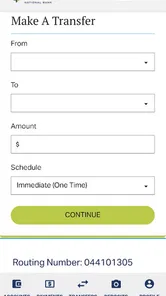
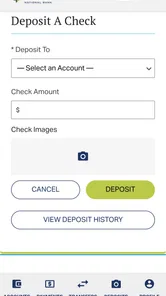
Park National Bank is a financial institution serving personal and business customers through banking products such as checking accounts, savings, loans, mortgages, and other services. Its mobile app is designed to let eligible customers review account balances and transaction history, transfer money, deposit checks where supported, pay bills, manage cards, locate branches or ATMs, and securely contact the bank without visiting a branch.
Is the Park National Bank app safe to use for mobile banking?
The Park National Bank app is intended to provide secure access to your accounts using standard banking protections, including login credentials, encryption, and security verification features that may vary by device and account. You should download it only from the official Google Play Store or Apple App Store, keep your operating system updated, avoid public Wi-Fi for sensitive activity, and never share passwords or one-time security codes with anyone.
Do I need a Park National Bank account to use the app?
Yes, the app is primarily intended for customers who already have eligible Park National Bank accounts and online banking access. You will generally need to enroll or sign in using credentials established with the bank. Availability of specific tools can depend on your account type, customer profile, location, and the services activated by Park National Bank, so prospective customers may need to open an account before using the full app.
Pros
- Secure mobile banking with biometric login options.
- Convenient mobile check deposit from your smartphone.
- Easy bill payments and scheduled transfers.
- Branch and ATM locator helps find nearby services.
- Real-time account alerts can help monitor transactions.
Cons
- Some features may require enrollment through online banking first.
- Mobile check deposits may have daily or monthly limits.
- Availability of services can vary by account type or location.
- App functionality depends on a stable internet connection.
- Customer support and banking hours may be limited outside business times.











