Palmstreet: Buy & Sell LIVE
- 624.00
- 4.6
- Installs
- 100.00K
- Price
- Free

Screenshots



Analysis by Reviewed
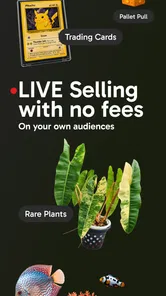
I’d approach Palmstreet - Live shopping less like a conventional online shop and more like browsing a market where sellers demonstrate what they’re offering. That distinction matters: you’re not only searching for an item, you’re also deciding whether you enjoy shopping through live video and conversation. The app is free to download, and its House & Home focus makes it especially appealing if plants, decorative finds, or collectible pieces are already on your mind.
Start with a specific shopping need
For me, the most useful way to begin is with a rough idea of what I’m looking for, rather than opening a live shopping app simply to fill time. If I want a plant for a bright corner, for example, I can pay attention to what a seller shows on camera and use the live format to ask questions before deciding whether to buy. That is a different kind of browsing from typing a plant name into a standard retailer’s search bar and comparing static product pages.
This kind of shopping suits people who like seeing an item presented in context and are comfortable making decisions while a stream is happening. It is less suited to someone who wants a quiet, fast transaction with exact filters and a long list of specifications. I’d also skip it when I already know the precise item I need and have no interest in watching a host talk through products: a conventional shop can be quicker for that job.
Choose a useful starting point
A more deliberate approach is to decide whether I’m browsing for inspiration or trying to solve a specific home problem. Those are different moods. If I’m simply curious about unusual plants or decorative objects, I can treat a stream as entertainment and accept that I may leave without buying. If I need something to fit a particular shelf or corner, I should have the available space and preferred style in mind before joining, so the presentation has a practical purpose.
That distinction also helps answer whether the app is worth opening when I only have a few minutes. A live presentation can be engaging, but it is not always as direct as a search box that returns products immediately. When time is tight, I’d use Palmstreet only if I already know which kind of item or seller I want to explore. When I have time to browse, the less predictable path is part of the appeal.
What Makes Palmstreet Shine?
Imagine combining the thrill of live TV shopping with the convenience of your smartphone. That's exactly what Palmstreet - Live shopping offers. The app brings you live-streamed shopping events where you can watch, interact, and shop in real-time. It's like having a personal shopping channel, but with the added bonus of engaging with hosts and other shoppers.
Once you dive in, you'll find an array of categories to explore. Whether you're hunting for the latest fashion trends, the coolest gadgets, or some unique home decor, Palmstreet has got you covered. Plus, the live aspect means you often get to see products in action, making it easier to decide if something's worth snagging.
More From Our News Desk

 Gmail
Gmail in a Busy Inbox: Who Benefits Most?
From first account to crowded workday, Gmail earns its place through dependable search and flexible sorting—but its best fit depends on how much inbox maintenance you can tolerate.

 Prime Video
Switching to Prime Video: What Changes in Your Viewing Routine
Prime Video can make a compelling second home for streaming, but switching means learning a different catalog, rental layer, and route from browsing to playback.

 Universal TV Remote Control
 Works Best as a Reliable Backup
A phone remote earns its place through quick setup and reliable habits. Here is how to get more from Universal TV Remote Control—and where its limits show.

 Weather - By Xiaomi
Weather by Xiaomi Review: Clear at a Glance, Less Clear Up Close
Xiaomi’s weather app makes everyday forecasts quick to scan, but its calm surface can leave useful details and recovery paths harder to find than they should be.

 X
X Under Pressure: Can It Recover When Posting Goes Wrong?
A resilience-focused review of X, examining setup, mistaken posts, interruptions, weak connections, and the gaps that matter when recovery needs to be dependable.

 Clash of Clans
 Is Won Between the Battles
Its raids are quick; its community is a long-term project of coordination, teaching, rivalry, and shared responsibility—with all the friction that entails.
Latest News



Easy Navigation and User-Friendly Design
Let's talk about the app's user interface. It's sleek, intuitive, and super easy to navigate. Right from the get-go, you're greeted with a home screen that displays ongoing and upcoming live shows. With just a few taps, you can jump into a live session, browse through product categories, or even check out past streams if you missed something juicy.
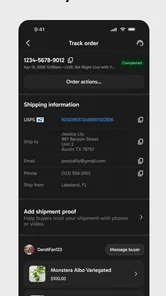
One feature I particularly love is the seamless integration of the shopping cart within the live streams. You can add products to your cart without interrupting the show. It's shopping made simple and, dare I say, a little too convenient!
Follow the item from presentation to decision
The live format can be most helpful when I use it to resolve one concrete uncertainty at a time. I might want to understand how a decorative piece looks from another angle, or whether a plant’s visible condition suits what I had in mind. Rather than treating a host’s presentation as a substitute for my own judgement, I’d ask a focused question, watch the demonstration, and then decide whether the item fits my space and budget.
A practical habit is to keep a short note of what matters before joining a stream: the size you can accommodate, the look you prefer, or the amount you’re willing to spend. It helps counter the urgency of a lively sale and makes it easier to compare options after the show. The trade-off is that live video is not the same as a standardized product page; details can be harder to scan, and the pace may not suit careful side-by-side comparison.
Make the live interaction work for you
For a plant purchase, I’d use the conversation to ask about the specific details that affect my decision, rather than asking a broad question and hoping the answer covers everything. For example, I might ask the seller to show the plant from another angle or clarify which item on display is being discussed. That keeps the exchange focused and reduces the chance that I confuse a general demonstration with a promise about the exact piece I’m considering.
There is a useful limit to what a camera can tell me, too. A live view can help me see appearance and presentation, but it cannot replace checking the item information and purchase details before I commit. I’d treat the stream as a way to narrow my interest, not as a guarantee that every practical question has been settled. This is especially important when I’m buying something for a particular location at home, where size, care needs, and compatibility with the space matter more than the excitement of the show.
Community and Interaction
Shopping should be fun, and Palmstreet knows it. The app encourages interaction not just with hosts but also with fellow shoppers. During live streams, you can drop comments, ask questions, and even participate in live polls. It's like having a shopping party with friends, minus the need for pants.
Plus, the sense of community doesn't end when the stream does. You can follow your favorite hosts and get notified when they're back on air, ensuring you never miss a deal or a fun interaction.
When a live show is worth your time
One realistic use is a relaxed evening browse: I could follow a seller whose plant presentations I enjoy, watch while doing something low-effort at home, and pause my scrolling when an item catches my eye. Following a host is useful when their selection consistently matches my taste; it is less useful if I’m following too many people and the notifications start competing for attention. I’d treat alerts as a way to catch relevant shows, not as a reason to buy something I hadn’t planned to consider.
There is also a handoff between discovery and the actual purchase. The stream helps me notice an item and ask about it, while the cart gives me a place to collect it without leaving the presentation. Before checking out, I would still take a moment to review the item and the total shown in the app. That small pause is worthwhile because the energy of a live event can make an impulse feel more considered than it really is.
From browsing to a considered purchase
In an ordinary shopping session, I’d give myself a simple sequence: decide what I’m looking for, watch long enough to understand the item, ask any question that could change my decision, and then review the cart calmly. If the answer arrives while the show moves on, I wouldn’t feel obliged to keep pace with the host. I can leave an item behind when I’m unsure and come back to another show later; missing one opportunity is better than buying something that does not suit my home.
This workflow is particularly useful for decorative pieces and collectibles, where seeing an item presented live may help me judge its character better than a single product image. But for a routine replacement—something I need in a particular size or specification—the usual retailer’s filters and product listings are likely to be more efficient. Palmstreet is strongest when discovery and presentation add value, not when I’m trying to complete a checklist as quickly as possible.
Deals, Discounts, and More
Now, let's get to the heart of it—the deals. Palmstreet often has exclusive discounts and offers that you won't find anywhere else. And since it's all happening live, you get that adrenaline rush of snagging a deal before it disappears.
There's also a loyalty program that rewards frequent shoppers with additional perks. So, the more you shop, the more you save. It's a win-win!
Costs, expectations, and who should choose another route
The app is free, but in-app purchases are available, so I wouldn’t assume that every part of the shopping experience is cost-free. I’d set a personal spending limit before a show and check the purchase details rather than letting a discount or countdown set the pace. For a one-off household item with a firm budget, a regular retailer may make prices and product details easier to compare; Palmstreet’s appeal is the presentation and interaction, not necessarily the most efficient route to every purchase.
Plant Story is the developer, and the app has an average rating of 4.6 from around 3,400 ratings, with more than 100,000 installs. It is rated for Everyone, and version 8.53.0 requires Android 7.0 or later. Those details make it broadly accessible, but they don’t change the basic fit: this is a better match for curious browsers who enjoy live selling than for shoppers who prefer to search, compare, and check out without a host or audience in the picture.
Where the shopping flow can break down
The format depends on the show holding my attention and covering the item I care about. A stream can move at a different pace from my own shopping, and information delivered aloud is less convenient to revisit than a clearly organized list of specifications. If I join halfway through, I may need to ask for context or wait for the relevant item to come around again. That is a real cost in time, particularly when I am comparing several options or shopping with a fixed list.
Another friction point is the gap between interest and certainty. A lively demonstration can answer a visual question, but I may still want to think, compare, or check whether a purchase fits my budget. The live setting can make that pause feel awkward, even though it is the sensible choice. I’d rather miss a limited-time opportunity than let the momentum of a show decide for me.
For shoppers who prefer quiet browsing, detailed filters, and a predictable checkout path, a standard online shop remains the better tool. A local plant shop may be a stronger option when I want to inspect something in person or get advice tied to my own growing conditions. Palmstreet makes the most sense when the seller’s live presentation is itself useful or enjoyable, and when I’m comfortable making room for that extra step.
Who is likely to enjoy it?
I’d recommend trying Palmstreet if you’re curious about live selling, enjoy discovering distinctive home items, or want to see a seller present plants and collectibles before you decide. It can also suit someone who treats shopping as a social, leisurely activity rather than a task to finish in a few taps. The ability to interact during a show gives the experience a different feel from scrolling a marketplace alone, especially when a clear question can help you judge an item.
I’d be more cautious if you shop mainly by strict specifications, need an item immediately, or find sale pressure hard to ignore. It may also be a poor fit if you dislike video-led shopping or do not want alerts from sellers you follow. In those cases, turning to a regular retailer, a specialist shop, or an in-person store is not settling for less; it is choosing a format better matched to the decision you need to make.
If I were deciding whether to keep using it, I’d ask myself three simple things: Do I enjoy watching live product demonstrations? Do I have enough patience to wait for a relevant show? Can I resist buying just because something seems time-sensitive? A yes to the first and a sensible answer to the last two makes the format much more rewarding. If not, ordinary online shopping will probably feel calmer and more direct.
In conclusion, Palmstreet - Live shopping is more than just another shopping app. It's an experience that blends entertainment with retail therapy in the best way possible. Whether you're a shopaholic or just someone who enjoys a good deal, this app is definitely worth a download. So, what are you waiting for? Happy shopping!
Palmstreet: Buy & Sell LIVE Frequently Asked Questions
Is Palmstreet - Live Shopping suitable for someone who mainly wants to browse plants and collectibles?
Palmstreet brings live shopping together with a focus on plants, beauty, and collectibles, so it may appeal if you enjoy discovering these kinds of products. You can browse live showcases and see items presented by sellers, rather than relying only on static product pages. The app is free to download, making it possible to explore its shopping format before deciding whether it suits your interests.
What should I know about Palmstreet's age rating and device compatibility before downloading?
Palmstreet is rated Everyone and is available for devices running Android 7.0 or later. Before downloading, check that your device meets this minimum requirement and that you have enough space for an app update or installation. Palmstreet is a shopping app, so its main purpose is browsing live product presentations and interacting with sellers and other shoppers.
What is Palmstreet - Live Shopping and how does it work?
Palmstreet - Live Shopping is an innovative mobile application that allows users to participate in live shopping events. Users can watch live streams of vendors showcasing products and make purchases in real-time. The app integrates social interaction, enabling customers to chat with sellers and other buyers, enhancing the overall shopping experience. It's available for both Android and iOS devices.
Is Palmstreet - Live Shopping free to use?
Yes, Palmstreet - Live Shopping is free to download and use. However, users should be aware that while the app itself doesn't charge for usage, purchasing products during live shopping events will incur costs. Keep in mind that prices vary depending on the items you choose to buy. Always check for any additional shipping fees or taxes that might apply. The app also offers in-app purchases, so review any purchase prompts before confirming.
What types of products are available on Palmstreet - Live Shopping?
Palmstreet - Live Shopping offers a diverse range of products, including fashion, electronics, home goods, beauty products, and more. The app features various vendors who host live streams to showcase their offerings. This variety allows users to explore different categories and discover unique items, making it a dynamic shopping platform suitable for all kinds of interests.
Pros
- Interactive live shopping experience.
- Wide variety of products available.
- User-friendly interface.
- Real-time customer support.
- Seamless checkout process.
Cons
- Requires stable internet connection.
- Limited to certain regions.
- Occasional lag during streams.
- Notifications can be overwhelming.
- Not all hosts are engaging.