Pain Tracker & Diary
- 43.00
- 4.2
- Installs
- 1.00K
- Price
- $3.99

Screenshots
Analysis by Reviewed
When pain is unpredictable, even a short note can be hard to remember by the time you speak with a clinician. A tracker can give those moments somewhere to go, and Pain Tracker & Diary is built around recording what you feel. I’d treat it as a way to organize personal observations, not as a diagnosis or a substitute for medical advice. If you’re trying a pain diary for the first time, the most useful goal is simple: make one clear entry you can understand later.
What to expect from a pain diary
This is a medical app from Nanolume LLC, offered for $3.99, with an Everyone age rating. It has a 4.2 average from around 86 ratings and has been installed over 1,000 times. It first appeared on January 2, 2018, and its current version is 4.16.0, with Android 7.0 or later required. Those figures offer a little context, but they don’t tell you whether its approach suits your routine; that depends on whether you’ll actually use it when discomfort is distracting.
Compared with a paper notebook or a general notes app, a dedicated pain tracker can make repeated entries easier to review because the purpose of each record is clear. The trade-off is that a structured log may feel like extra work when all you want is to note “my back hurts.” I’d choose this over loose notes if I wanted a consistent record to bring to an appointment, but stick with a simpler method if filling in an app would make me avoid tracking altogether.
Getting to Know Your Pain
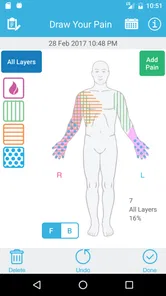
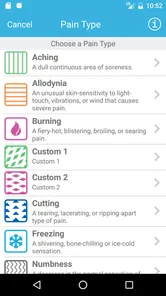
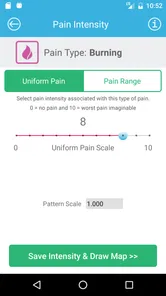
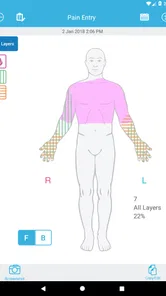
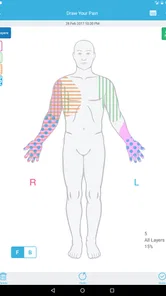
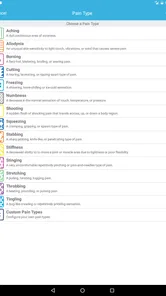
One of the standout features of the Pain Tracker & Diary app is its ability to help you understand your pain better. The app allows you to log every little detail about your discomfort, from the intensity to the type of pain you're experiencing. Whether it's a throbbing headache or a dull backache, you can jot it down with ease. The interface is user-friendly, making it a breeze to navigate even on a busy day.
Start with one useful entry
For a first session, I wouldn’t try to document every detail of my health history. I’d record one current episode while it is fresh, then use the same basic approach the next time pain appears. A practical note might include what the sensation felt like and what was happening around it, if those details are available to enter. The point is to create a record that your future self can interpret, not to produce a perfect medical report.
A small habit can make the log more useful: write an entry close to the time of the pain rather than reconstructing the day from memory at night. If you have recurring symptoms, consistency matters more than lengthy descriptions. A brief, comparable record is easier to discuss than several vivid but unrelated recollections. If logging during a flare is uncomfortable, wait until you can manage it; tracking should not become another source of pressure.
Tracking Your Progress
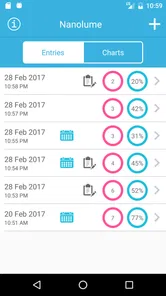
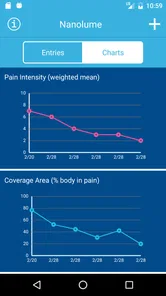
What's really cool about this app is its tracking capability. Over time, you can see patterns emerge in your pain. Maybe that shoulder pain spikes every time you skip your morning stretches or perhaps your migraines align with stressful work deadlines. The app provides neat graphs and charts to visually represent your pain journey. It's almost like solving a mystery, but instead of a detective, you're the protagonist.
More From Our News Desk

 Gmail
Gmail in a Busy Inbox: Who Benefits Most?
From first account to crowded workday, Gmail earns its place through dependable search and flexible sorting—but its best fit depends on how much inbox maintenance you can tolerate.

 Prime Video
Switching to Prime Video: What Changes in Your Viewing Routine
Prime Video can make a compelling second home for streaming, but switching means learning a different catalog, rental layer, and route from browsing to playback.

 Universal TV Remote Control
 Works Best as a Reliable Backup
A phone remote earns its place through quick setup and reliable habits. Here is how to get more from Universal TV Remote Control—and where its limits show.

 Weather - By Xiaomi
Weather by Xiaomi Review: Clear at a Glance, Less Clear Up Close
Xiaomi’s weather app makes everyday forecasts quick to scan, but its calm surface can leave useful details and recovery paths harder to find than they should be.

 X
X Under Pressure: Can It Recover When Posting Goes Wrong?
A resilience-focused review of X, examining setup, mistaken posts, interruptions, weak connections, and the gaps that matter when recovery needs to be dependable.

 Clash of Clans
 Is Won Between the Battles
Its raids are quick; its community is a long-term project of coordination, teaching, rivalry, and shared responsibility—with all the friction that entails.
Latest News



Those patterns are clues, not proof of cause. For example, if a headache and a demanding workday show up together in your notes, that may be worth mentioning to a clinician, but it doesn’t establish that stress caused the pain. I’d look for a recurring association across multiple entries before drawing conclusions. One useful, less obvious approach is to compare similar days rather than searching for a dramatic explanation after a single bad episode.
Make the record useful outside the app
Before an appointment, I’d review the entries and pick a few examples that show what has changed, what repeats, and what I still don’t understand. That makes the diary a conversation aid rather than a pile of data. A realistic use case is logging a headache after work, then noting another episode later in the week; by the time you speak with a healthcare professional, you have concrete examples instead of relying entirely on memory.
The app’s charts may help you notice a trend, but they can’t decide what treatment is appropriate. Bring questions and relevant notes to a qualified professional, especially if symptoms are new, severe, or worrying. I would not delay care to complete a log, and I would not use a pattern in the diary as a reason to change medication or treatment without professional guidance.
Customized Solutions
Another nifty feature is the app's ability to suggest personalized solutions. Based on your entries, it offers tips and tricks to help manage your pain. It might recommend relaxation techniques, dietary changes, or even a gentle reminder to consult a healthcare professional. It’s like having a virtual coach cheering you on towards better health.
I’d take those suggestions as prompts to consider, not instructions that replace individualized care. A suggestion may not fit your health situation, and a dietary or relaxation idea is not automatically right for everyone. If an idea seems unsuitable or conflicts with advice you’ve already received, skip it and ask your clinician. That cautious mindset is especially important for people managing ongoing conditions or several treatments.
Journaling for Relief
Beyond tracking, the diary aspect of the app is therapeutic. Sometimes just writing about your pain can be cathartic. The app provides prompts and space for free writing, allowing you to express your thoughts and emotions. Who knew that pouring your feelings into a digital journal could offer such a sense of relief?
For a first-time user, the diary is most helpful when it captures something a chart cannot: how pain affected your day, what you had to stop doing, or what helped you get through it. I’d keep that reflection short if writing feels tiring. If you mainly want a private place for long-form writing, a general journal may be a better fit; if you want reflections alongside symptom tracking, this app’s combined purpose is more relevant.
Use a routine that fits real life
A pain log is most likely to earn its place on your phone when it fits around the parts of the day you already have. I’d avoid setting an ambitious schedule that turns tracking into homework. Instead, I’d make an entry when a symptom changes, interferes with a task, or seems worth remembering for a clinician. That gives the diary a practical purpose without demanding a full account of every ordinary hour.
One useful technique is to keep wording steady from one entry to the next. If you describe a sensation differently each time, later comparisons become harder; a few familiar terms can make your own notes easier to scan. I’d also separate what I directly noticed from what I suspect. “Pain began after carrying groceries” is an observation; “the groceries caused it” is a conclusion that may need more evidence.
For someone who shares care with a clinician or family member, I’d prepare a short verbal summary from the diary rather than expecting another person to interpret a long string of entries. Mention the change that matters, a couple of examples, and the question you want answered. This keeps the app in its proper role: it helps you remember and communicate, while the medical judgment remains with a professional.
Where the app fits among alternatives
Compared with a paper notebook, a phone-based tracker is easier to have nearby when a symptom occurs, and its charts can make repeated entries less tedious to review. Paper has its own advantage: it can feel quicker and more flexible if you dislike tapping through a digital interface. A general notes app is another reasonable option, especially for occasional symptoms, but you’ll need to keep entries organized yourself if you want to compare them later.
Dedicated tracking is not automatically better. If you are likely to use a paper calendar consistently but would forget to open an app, choose the calendar. If your main need is a detailed medical record with information your clinician specifically wants, follow their preferred format rather than assuming this diary captures everything they need. I see this app as a useful middle ground for people who want symptom tracking and reflection together, not as a replacement for every health-record tool.
Who is likely to find it worthwhile?
I’d recommend trying it if you have recurring discomfort, tend to forget details between episodes, or want a more organized way to prepare for a medical conversation. It may also suit someone who likes combining symptom notes with personal reflection. I’d skip it if you only need an occasional reminder, strongly dislike entering information on a phone, or expect an app to identify the cause of pain or provide a treatment plan.
The price is another practical consideration: at $3.99, it makes sense to decide whether you’ll use a dedicated tracker rather than assuming a paid tool will automatically become a habit. A simple test is to make a few entries during ordinary days and see whether reviewing them helps you answer a real question. If the process feels burdensome, a paper log or basic notes app may be the better choice for you.
Questions to settle before relying on a log
A common first-time concern is whether an entry has to be detailed to be useful. In my view, it does not. A clear note about what you felt and how it affected you can be more helpful than a long description written when you are exhausted. If you later want to add context, you can do so when you feel able; missing a detail is not a reason to abandon the habit.
Another sensible question is how long to track before looking for a pattern. I wouldn’t set a fixed deadline or treat a handful of entries as a verdict. Repeated examples across comparable situations are more informative than one striking day, and a clinician can help decide whether the record is relevant. If symptoms become urgent or alarming, seek care rather than waiting until the diary feels complete.
It is also worth asking whether tracking could make you focus too much on pain. That can happen with any diary if checking and recording starts to dominate your attention. I’d use the app with a clear purpose—remembering changes or preparing for a conversation—and take a break if logging increases worry or gets in the way of daily life. The record should serve you, not become another obligation.
In conclusion, the Pain Tracker & Diary app is a fantastic tool for anyone seeking to take control of their health. It's comprehensive yet simple, making it a perfect companion for those dealing with chronic pain. Whether you're looking to understand your pain patterns or find ways to alleviate them, this app is definitely worth a try. So, if you're tired of letting pain dictate your life, why not give it a shot? Your future self might just thank you for it.
Pain Tracker & Diary Frequently Asked Questions
What devices can run Pain Tracker & Diary?
Pain Tracker & Diary is a medical app from Nanolume LLC, and it requires an operating system version 7.0 or later. Before downloading, check that your device meets this requirement so the app can be installed and used smoothly. It is designed for pain tracking, so its main purpose is recording and reviewing information about your symptoms.
How much does Pain Tracker & Diary cost, and is it suitable for all ages?
Pain Tracker & Diary costs $3.99 and has an Everyone content rating. That makes it worth checking whether the app’s focused, health-related purpose suits the person who will use it, especially if an adult will help a younger user keep a diary. The app is a practical option for people who want to organize pain-related notes in one place.
What features does Pain Tracker & Diary offer to help manage chronic pain?
Pain Tracker & Diary provides a comprehensive set of tools to help users track their pain levels and patterns. It allows you to log the intensity, location, and duration of your pain episodes. Additionally, the app offers diary features to note triggers, medications, and relief methods. Users can generate detailed reports to share with healthcare providers, facilitating better treatment plans.
Is Pain Tracker & Diary suitable for all types of pain conditions?
Yes, the app is designed to accommodate a wide range of pain conditions, making it suitable for users experiencing chronic pain, acute pain, or pain associated with specific conditions like arthritis or migraines. Its customizable tracking options allow users to tailor the app to their specific needs, ensuring it can cater to a wide variety of pain management scenarios.
How secure is my data on Pain Tracker & Diary?
Pain Tracker & Diary prioritizes user privacy and data security. The app uses advanced encryption methods to protect your personal information and pain logs. Users can also set up password protection or biometric authentication for an added layer of security. Additionally, the app does not share data with third parties without explicit user consent, ensuring your information remains confidential.
Pros
- User-friendly interface for easy navigation.
- Comprehensive tracking for various pain types.
- Customizable reminders for medication and therapy.
- Secure data storage with privacy controls.
- Detailed reports to share with healthcare providers.
Cons
- Limited integration with other health apps.
- No real-time chat with healthcare professionals.
- Some features locked behind premium upgrade.
- Occasional syncing issues with cloud storage.
- No multilingual support for non-English users.