PadSplit: Rooms for rent
- 753.00
- 4.5
- Installs
- 100.00K
- Price
- Free

Screenshots
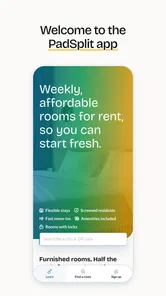

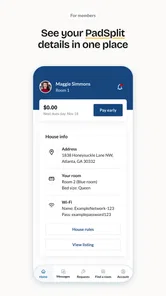
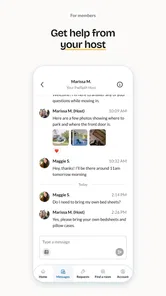
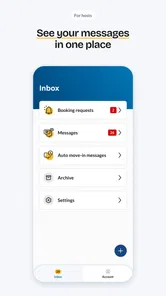
Analysis by Reviewed
If you’re on the hunt for a flexible and affordable living arrangement, let me introduce you to PadSplit: Rooms for rent. This app is like a breath of fresh air for anyone who's ever had to navigate the tricky world of finding a place to stay without all the usual fuss. Let me walk you through my experience exploring this nifty app.
Who this app is really for
I’d start with PadSplit if I wanted a room in a shared home and needed a more targeted search than a general rental marketplace usually offers. It can be especially useful when moving for work or study, relocating on a limited budget, or trying to find a place without taking on an entire apartment. The trade-off is part of the point: you may spend less than you would on a place of your own, but you share kitchens and other common areas with people whose routines become part of your living situation.
If privacy, control over guests, or a quiet home at any hour is non-negotiable for me, I’d look at studios or conventional rentals instead. PadSplit makes more sense when I’m genuinely open to shared living, not merely treating it as a cheaper version of a private apartment. Being clear about that before searching saves time and makes it easier to judge listings fairly.
What to expect from a room-search app
PadSplit is a House & Home app from PadSplit, aimed at people looking for a room rather than an entire apartment. That distinction matters: sharing a home can make a tighter budget more workable, but it also means weighing the room, shared spaces, location, and household fit together. I’d treat the app as a way to identify promising options, not as a substitute for checking the terms and seeing whether a particular home suits your routine.
The app is free, rated for Everyone, and its current version is 1.5.3. It has a 4.6 average from around 3,600 ratings, with over 100,000 installs. Those figures suggest an established audience, but they can’t tell you whether a specific room is right for you; your own checklist and careful review of each listing matter more.
Finding Your Perfect Match
The first thing that strikes you when you open PadSplit is its user-friendly interface. It's as if the app knows that finding a room can be stressful, so it aims to make the process as smooth as possible. You can easily filter through available listings based on your personal preferences—be it location, price range, or even the type of housemates you’d feel comfortable living with.
Getting ready for a useful first search
Before I install a room-search app, I like to decide what a workable result actually looks like. For PadSplit, that means writing down the areas I can realistically live in, the maximum commute I can tolerate, and the parts of shared living I’m willing to accept. I’d also separate “must have” needs from nice extras. This simple preparation makes the filters more useful: otherwise, it’s easy to keep changing preferences every time a new photo catches my eye.
More From Our News Desk

 Gmail
Gmail in a Busy Inbox: Who Benefits Most?
From first account to crowded workday, Gmail earns its place through dependable search and flexible sorting—but its best fit depends on how much inbox maintenance you can tolerate.

 Prime Video
Switching to Prime Video: What Changes in Your Viewing Routine
Prime Video can make a compelling second home for streaming, but switching means learning a different catalog, rental layer, and route from browsing to playback.

 Universal TV Remote Control
 Works Best as a Reliable Backup
A phone remote earns its place through quick setup and reliable habits. Here is how to get more from Universal TV Remote Control—and where its limits show.

 Weather - By Xiaomi
Weather by Xiaomi Review: Clear at a Glance, Less Clear Up Close
Xiaomi’s weather app makes everyday forecasts quick to scan, but its calm surface can leave useful details and recovery paths harder to find than they should be.

 X
X Under Pressure: Can It Recover When Posting Goes Wrong?
A resilience-focused review of X, examining setup, mistaken posts, interruptions, weak connections, and the gaps that matter when recovery needs to be dependable.

 Clash of Clans
 Is Won Between the Battles
Its raids are quick; its community is a long-term project of coordination, teaching, rivalry, and shared responsibility—with all the friction that entails.
Latest News



PadSplit is free to download, so trying it doesn’t require a financial commitment. I’d still approach the search with the same care I’d use on any housing decision. An app can organize options, but it cannot decide whether the home’s location, arrangement, or day-to-day atmosphere will work for me. My first meaningful success would be a short list of plausible rooms, not a rushed choice.
Starting with a useful search
For a first search, I’d begin with the area you actually need to reach regularly, then compare the available rooms against your real daily travel pattern. A low room cost can lose its appeal if it adds a difficult commute, so consider transport, work or study hours, and where you buy essentials before narrowing your choices. Save your attention for listings that could work in practice, rather than browsing every room simply because it appears affordable.
Easy Peasy Navigation
Let’s talk about navigation. The app’s design is intuitive, making it a breeze to scroll through listings. Each room listing comes with detailed descriptions, high-quality photos, and even reviews from previous tenants. It’s like having a sneak peek into what your life could be like if you choose that particular abode. And honestly, who doesn’t love a good preview?
What I found particularly helpful were the virtual tours. These tours give you the chance to explore the space as if you were physically there. It’s a game changer, especially for those of us who are too busy to visit multiple locations in person.
Turning browsing into a practical shortlist
When you compare rooms, I’d keep a short note for each one: what looks appealing, what is unclear, and what you need to ask before making a decision. This is more useful than relying on a quick impression from photos or a tour. Look at the room as well as the shared areas, and consider whether the layout would work at the times you’re usually home. A virtual look can help you rule out obvious mismatches, but it doesn’t replace confirming the details that affect your day-to-day comfort.
One common point of confusion is treating a listing’s description as a complete picture of living there. I’d use it to prepare specific questions about the arrangement, household expectations, and the next steps for that particular room. That keeps the conversation focused and helps you compare options fairly instead of assuming that two listings with similar photos offer the same experience.
Making a fair comparison between rooms
A useful comparison is not just “Which room looks nicest?” I’d judge each option across the same few practical areas: how the location fits my week, how the shared spaces appear to be arranged, what the description clearly answers, and what I still need to clarify. A room that is less impressive in pictures may be the stronger match if its location and household setup suit my routine better.
One small but useful habit is to keep questions tied to a specific listing rather than sending the same broad message everywhere. If a tour shows a shared kitchen, for example, I’d ask about the routine that matters to me—such as when I usually cook—rather than assuming the space will work simply because it looks appealing. That approach makes replies more useful and helps me compare real arrangements instead of marketing impressions.
Community Vibes
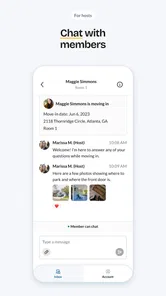
One of the standout features of PadSplit is its focus on community. You’re not just renting a room; you’re potentially joining a community. The app encourages interaction between housemates through its messaging feature. This means you can get to know future roomies before you even move in. It’s a little like a social network but for your living situation. And trust me, knowing who you'll be sharing the kitchen with can make a world of difference.
Moreover, the app promotes a sense of security and responsibility. Each member is verified, and there’s a rating system in place, which adds a layer of trust to the whole process. It’s like having a built-in support system right at your fingertips.
Questions worth asking before you commit
Messaging is most useful when you move beyond “Is this room available?” and ask about the parts of shared living that shape an ordinary week. I’d ask how people handle kitchen use, cleaning, noise, guests, and quiet hours, then consider whether the answers fit my habits. These details can matter more than a polished room photo, especially if you work unusual hours or need a calm place to study.
Verification and ratings can offer helpful reassurance, but I wouldn’t treat them as a guarantee that every household will be a match. They’re one input alongside your own questions and judgment. If you’re uncomfortable sharing common areas or prefer complete control over your home, a private studio or a conventional rental may suit you better, even if it costs more or takes longer to find.
What the app can and cannot settle
A first-time user may wonder whether a photo, tour, or conversation is enough to make a decision. I wouldn’t rely on any one of them alone. Photos and virtual tours help me screen for obvious layout mismatches; messages help me understand the household’s expectations; and my own follow-up checks help me judge whether the arrangement is workable. Each step answers a different question.
I’d also avoid assuming that similar-looking rooms have identical terms or routines. Before moving forward, I would read the details for the room I’m considering and make sure the next steps are clear. That extra pause is especially worthwhile if I’m moving from far away or have little time to view places in person. Convenience should help me organize the search, not pressure me to skip ordinary care.
Flexibility at Its Best
In today’s fast-paced world, flexibility is key, and PadSplit shines here. Whether you’re a student, a young professional, or someone simply looking for a change, the app offers short-term and long-term options. This flexibility is a blessing, especially for those who are always on the move or are unsure about committing to a long lease.
And let’s not forget about the budget-friendly aspect. PadSplit provides an affordable alternative to traditional rentals without compromising on quality. It’s a win-win situation.
A realistic first search and what to do next
Picture someone starting a new job in an unfamiliar area with only a few evenings free to look for housing. I’d use PadSplit to narrow the search to rooms that make the commute plausible, inspect the photos and virtual tours, and message about household routines before arranging any next step. That workflow makes the app useful even when an in-person visit is hard to fit in, while still leaving room to verify the practical details before deciding.
For a student with a changing schedule, I’d pay particular attention to noise, shared spaces, and the distance between the room and regular commitments. For someone temporarily relocating, I’d first confirm that the available arrangement matches the period they have in mind. These are different searches, even if both begin with a room and a location; a good shortlist should reflect the reason for moving, not just the budget.
How it compares with broader rental searches
Compared with general rental sites, which often emphasize whole apartments and broad housing searches, PadSplit is more focused on room-based shared living. That focus can save time if sharing is exactly what you want. If your priority is a self-contained home, a broader rental marketplace may give you more suitable choices; if you want a room and value the possibility of learning about a household before moving, PadSplit is the more natural place to start.
That focus is also a limitation. A general marketplace may be better when I’m still deciding between a room, a whole apartment, or another type of housing, because it lets me compare those options in one search. PadSplit is most helpful once I’ve decided that a room in a shared home is a serious possibility. I’d use it to explore that path, while keeping an open mind if the available choices don’t fit my location or living preferences.
My main advice is not to rush from a promising listing straight to a commitment. Use the search to make a shortlist, use tours to screen out poor fits, and use messages to clarify the everyday arrangement. The app is best seen as a practical first step in finding a room, with your own checks completing the decision.
Who should keep looking elsewhere
I’d skip PadSplit if I already know that sharing a kitchen or other common spaces would make me unhappy, or if I need a home arranged around a very specific level of privacy. It may also be the wrong starting point if I’m committed to renting an entire apartment and don’t want to compare room-based options. In those cases, searching conventional rentals directly is more aligned with the goal and avoids spending time on listings I would never choose.
On the other hand, if I’m open to shared living but uncertain about how it feels in practice, I’d use the search to learn what questions matter to me. That doesn’t mean treating any listing as a test run; it means noticing whether the daily trade-offs—shared facilities, household habits, and location—sound acceptable before taking the next step. Being honest about those limits is more useful than trying to convince myself that a low cost automatically makes a room suitable.
A practical next step after browsing
Once I have a shortlist, I’d choose the strongest candidate and send a focused message that covers the details I still need to understand. Then I’d review the response against my original priorities instead of adding new requirements on impulse. If the answers leave a key concern unresolved, I’d keep looking. If they make the setup clearer, I’d move on to the appropriate next step for that listing and continue checking the details carefully.
This is also where patience matters. A room can look promising without being the right room, and a quick search session may be enough to identify questions rather than reach a decision. I’d rather finish the first evening with a small, well-reasoned shortlist than a long collection of saved possibilities I can no longer distinguish.
All in all, PadSplit: Rooms for rent is more than just an app; it's a revolution in the way we think about renting. It combines affordability, flexibility, and community in a way that’s refreshing and much-needed in today’s rental market. So if you’re ready to take the plunge into a new living arrangement without the usual headaches, give PadSplit a try. You might just find your next home sweet home.
PadSplit: Rooms for rent Frequently Asked Questions
Is the PadSplit app free to download, and what devices can use it?
PadSplit is a free House & Home app from developer PadSplit. It is rated for Everyone and runs on devices using iOS 8.0 or later. The app is a way to explore PadSplit’s shared-housing service, so downloading it does not itself mean you have secured a room or become a member.
What is PadSplit and how does it work?
PadSplit is a unique platform that connects individuals looking for affordable housing with available rooms for rent. The app operates on a shared housing model, allowing users to find and rent fully furnished rooms at a fraction of the cost of traditional rentals. Members pay a weekly fee that covers rent, utilities, and other essential services, making it a convenient and cost-effective housing solution.
Is PadSplit affordable compared to traditional renting?
Yes, PadSplit is designed to be an affordable alternative to traditional renting. By focusing on shared housing, PadSplit significantly reduces living costs for individuals. The weekly membership fee includes rent, utilities, and amenities, providing a transparent and budget-friendly housing option. This model is ideal for those seeking cost-effective living arrangements without long-term commitments.
What are the requirements to become a PadSplit member?
To become a PadSplit member, applicants must meet certain criteria, including being at least 18 years old, having a steady income, and passing a background check. Additionally, members are required to adhere to community guidelines, which promote a respectful and cooperative living environment. These requirements ensure a safe and reliable housing experience for all members.
Can I choose my roommates on PadSplit?
PadSplit offers a community-driven approach to housing, which means that while you cannot select your roommates directly, the platform matches members based on compatibility and preferences. The system takes into account factors such as lifestyle, work schedule, and personal habits to ensure a harmonious living environment. This thoughtful matching process helps create a positive experience for all residents.
Pros
- Affordable housing options.
- Flexible rental terms.
- Furnished rooms available.
- Utilities included in rent.
- Community living experience.
Cons
- Limited privacy in shared spaces.
- Potentially noisy environment.
- Strict guest policies.
- Shared bathroom facilities.
- Limited room availability.