

PA Toll Pay
- 596.00
- 3.2
- Installs
- 500.00K
- Price
- Free

Screenshots
Analysis by Reviewed
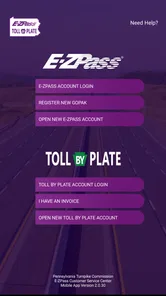
For anyone who regularly uses Pennsylvania’s toll roads, PA Toll Pay is best understood as an account companion, not a general-purpose travel app. Its useful role is keeping toll account tasks close at hand: checking and managing E-ZPass or Toll By Plate activity without treating every trip as a separate chore. I like that practical focus, though I would not choose it as my main navigation tool or assume it replaces every step of managing a toll account.
A focused tool for toll-account chores
Made by TransCore and the Pennsylvania Turnpike Commission, this free Travel & Local app is aimed at people who need to look after a Pennsylvania Turnpike account. It has a 3.3 average from around 1,200 ratings, with more than 500,000 installs, so it is a familiar option rather than an obscure utility. The Everyone age rating makes its intended audience broad, but the real question is whether you have an account to manage. If not, there is little reason to keep it installed.
That distinction matters when comparing it with the usual alternatives. A navigation app is built around directions and route choices; a toll account app has a narrower job, centered on account information and toll administration. I would use a navigation app for planning a drive and this one for account-related checks. Keeping those jobs separate also helps avoid mistaking a trip-planning feature for a guarantee that a toll payment or account detail has been handled.
Where it fits into an ordinary drive
Think of a weekday trip across the turnpike followed by a need to review the account later: the useful moment may be at home, when you can check activity calmly, rather than while driving. I would make a habit of checking the account before a longer journey, especially if more than one vehicle is involved. That small pause can help catch an outdated vehicle detail or an account issue before it becomes a distraction on the road.
It is also worth deciding what you expect from an account app before relying on it. If you mainly want a quick way to manage your Pennsylvania Turnpike E-ZPass or Toll By Plate account, the focus makes sense. If what you need is live directions, broad travel planning, or a single place for every toll system you use, a general navigation app or the relevant toll provider’s own tools may suit that job better. The key trade-off is convenience for this specific account versus coverage across a wider travel routine.
Setting Up with Ease
Getting started with PA Toll Pay is a breeze. I remember thinking, "This is too simple to be true," as I downloaded it from the App Store. Once installed, setting up my account was straightforward. The app prompts you to enter your vehicle information and payment details, and voila, you're good to go! I appreciated how the user interface was intuitive, guiding me through each step without any hiccups.
On the Road Experience
One of the aspects I absolutely love about this app is how it seamlessly integrates with my driving routine. Picture this: You're cruising along the highway, and instead of fumbling for cash or your card at the toll booth, you just zoom through, thanks to the app's automatic toll payment feature. It’s like having your personal toll assistant. The app sends notifications after each transaction, which is a neat feature to keep track of your expenses on the go.
More From Our News Desk

 Weather - By Xiaomi
Weather by Xiaomi Review: Clear at a Glance, Less Clear Up Close
Xiaomi’s weather app makes everyday forecasts quick to scan, but its calm surface can leave useful details and recovery paths harder to find than they should be.

 X
XX Under Pressure: Can It Recover When Posting Goes Wrong?
A resilience-focused review of X, examining setup, mistaken posts, interruptions, weak connections, and the gaps that matter when recovery needs to be dependable.

 Clash of Clans
Clash of Clans Is Won Between the Battles
Its raids are quick; its community is a long-term project of coordination, teaching, rivalry, and shared responsibility—with all the friction that entails.

 Android Auto
Android Auto Makes the Case for Quieter Car Software
The car interface is no longer judged by how much it can do, but by how quietly it helps. Android Auto shows what drivers now expect—and what still gets in the way.

 MobiOffice: Word, Sheets, PDF
MobiOffice: Transforming Mobile Productivity with Seamless Integration
MobiOffice: Word, Sheets, PDF is redefining mobile productivity with a surprising blend of functionality and innovation.

 EA SPORTS FC Soccer Mobile 26
EA SPORTS FC™ Mobile Soccer: Redefining Mobile Sports Gaming
Dive into EA SPORTS FC™ Mobile Soccer, where immersive gameplay and strategic depth transform mobile sports gaming.
Latest News



Something worth mentioning is the real-time traffic updates. I found this feature particularly useful during rush hours. The app provides alternative routes to avoid congestion, saving both time and fuel. It's like having a little GPS buddy that cares about your journey!
Managing Your Account
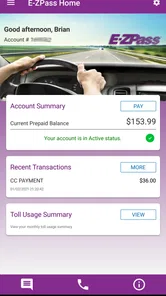
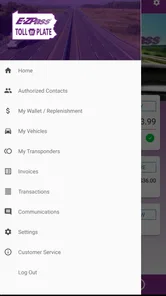
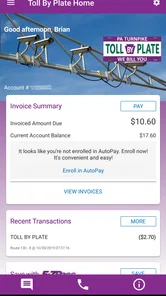
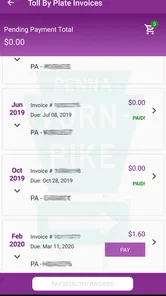
Let’s talk about account management. PA Toll Pay offers a comprehensive dashboard where you can view your trip history, manage multiple vehicles, and even top up your balance. I found this particularly handy as I often switch between my car and my partner’s SUV. The app's flexibility in managing multiple vehicles under one account is a feature that stands out.
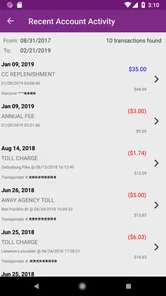
Moreover, if you’re someone who likes to stay on top of your finances, the detailed transaction history is a boon. Every toll payment is logged with precision, allowing you to download statements for your records. It's like having a mini accountant in your pocket.
Living with the trade-offs
The app’s modest average rating is a reminder to approach any account tool with realistic expectations. I would treat it as a convenient place to check and manage toll matters, not as proof that every account task will be effortless or that every drive will be handled automatically. Before setting off, confirm that the account and vehicle details you rely on are current; after a trip, review the activity when you have time to resolve anything that looks unfamiliar.
A less obvious benefit of that routine is separating driving decisions from account housekeeping. Avoid trying to sort out a payment or vehicle record at the roadside. If you share a vehicle, agree on who checks the account and how you’ll review charges; that simple habit can prevent confusion about which trip generated an entry. For a solo driver, occasional checks may be enough, while a household using several vehicles has more reason to make account review part of its regular routine.
Who will get the most from it
I’d recommend it to Pennsylvania Turnpike users who already have an E-ZPass or Toll By Plate account and want a direct way to keep an eye on it. It is particularly relevant for commuters, people who cross the turnpike periodically, and households that need to keep track of more than one vehicle. The app is free, currently version 2.2.81, and supports Android 5.0 and later, so an older compatible phone may be enough for basic access.
On the other hand, occasional visitors who rarely use Pennsylvania toll roads may be better off handling account needs through the channels they already use rather than adding another app. Drivers looking for turn-by-turn navigation should choose a dedicated navigation service, and anyone managing tolls across several states should check whether this Pennsylvania-focused account tool covers their needs before depending on it. I would not install it solely for general traffic planning.
Planning around account checks
A practical way to use an account companion is to give it a place in the routine rather than opening it only when something seems wrong. Before a longer drive, I would check that I can access the account and that the vehicle information looks right. Afterward, I would review the account when parked and not under time pressure. That does not make the journey itself simpler, but it does make any account follow-up easier to handle thoughtfully.
For example, imagine a household member takes the family car across the turnpike while the other person handles the account. A quick review later can help both people connect the trip with the account activity and spot a discrepancy while the journey is still easy to remember. This is a more useful habit than trying to reconstruct several drives at the end of a busy month. It also makes shared use less dependent on one person remembering every detail.
What to check before relying on it
One sensible question is whether a new user can use the app without an existing account. Its purpose is account management, so I would treat having the appropriate Pennsylvania Turnpike E-ZPass or Toll By Plate account as the starting point, not assume the app itself is a substitute for setting one up. If you are preparing for a trip and have not sorted out your toll arrangement, take care of that before departure instead of relying on a last-minute phone setup.
Another useful distinction is between seeing account activity and resolving every issue from the phone. An account view can help you notice a charge or a vehicle detail that deserves attention, but responsible use still means following through if something looks wrong. I would keep any relevant account records and use the appropriate account support route when a concern needs more than a routine check. The app is most valuable as a convenient point of visibility, not as a reason to stop paying attention.
It is also worth thinking about phone access. If the person driving is not the person who manages the account, the driver does not need to be handling account settings on the road. Agreeing in advance who will review the account avoids unnecessary sharing of sign-in details and keeps the task away from the driver’s seat. For a family or small business with several drivers, that simple division of responsibility is more useful than expecting everyone to manage the same account independently.
A narrower alternative to all-in-one travel tools
Some drivers prefer one app for maps, traffic, stops, and toll estimates. That can be convenient for planning, but it is not the same as having a dedicated place to manage a Pennsylvania Turnpike toll account. I see the choice as a division of labor: use a map service to decide where to go, and use this app when the question is about the account. That approach avoids expecting a navigation tool to provide account-specific oversight.
Likewise, drivers who regularly travel across different toll systems should think about whether a single state-focused tool fits their whole routine. It may still be handy for the Pennsylvania portion, but it should not be treated as a universal toll manager. If minimizing the number of apps matters more than having a direct account companion, the account provider’s other available management channels may be a better fit. The right choice depends on whether convenience for one account outweighs keeping everything consolidated.
Final Thoughts
So, is PA Toll Pay worth it? Absolutely! For frequent travelers on Pennsylvania’s toll roads, it’s a game-changer. The convenience of automatic payments, coupled with real-time traffic updates and comprehensive account management, makes this app a must-have. Whether you're a daily commuter or an occasional traveler, this app ensures your journey is as hassle-free as possible. Give it a try, and you might find yourself wondering how you ever managed without it!
My more measured recommendation is to install it when you have a recurring reason to check or manage a Pennsylvania Turnpike account, especially if several vehicles or drivers make charges harder to track. For a person who rarely uses those roads, the benefit may not justify another app. I would also keep navigation and toll-account work separate, and treat account checks as a calm before-and-after driving task rather than something to do in traffic.
Overall, its value is practical rather than exciting: a focused account tool can reduce the friction of keeping tabs on toll activity, but it is only useful when that account is part of your real travel routine. If that describes you, PA Toll Pay is a reasonable companion to try, with sensible expectations and a habit of reviewing important details. If not, a navigation app or the account channels you already use may be enough.
PA Toll Pay Frequently Asked Questions
What devices and software versions can run PA Toll Pay?
PA Toll Pay is available for Android and iOS, giving drivers a way to access their Pennsylvania Turnpike account from a mobile device. On Android, the app requires Android 5.0 or later, so it is worth checking your phone’s software before downloading. The app is free, and its content rating is Everyone.
Who develops PA Toll Pay, and what account types does it support?
PA Toll Pay is developed by TransCore and the Pennsylvania Turnpike Commission. It is intended for people who use Pennsylvania Turnpike E-ZPass or Toll By Plate accounts, with tools to view and manage those accounts from a phone. If you are looking for a general navigation app or a way to manage tolls outside Pennsylvania, this app’s stated purpose is specifically focused on Pennsylvania Turnpike accounts.
What is PA Toll Pay and how does it work?
PA Toll Pay is a convenient mobile application designed to simplify the process of paying tolls in Pennsylvania. Users can easily manage their toll accounts, track expenses, and make payments directly through the app. The app offers features such as real-time balance updates, transaction history, and automatic payments to ensure seamless travel without the hassle of cash payments.
Is PA Toll Pay available for both Android and iOS devices?
Yes, PA Toll Pay is available for download on both Android and iOS platforms. Users can find the app on the Google Play Store for Android devices and the Apple App Store for iOS devices. The app is designed to provide a user-friendly experience across different devices, making it accessible to a wide range of users.
Are there any fees associated with using PA Toll Pay?
While using the PA Toll Pay app itself is generally free, users should be aware that there might be additional fees associated with toll payments, depending on the specific toll roads and services chosen. Additionally, users should check for any service charges or convenience fees that may apply when using certain payment methods within the app.
Pros
- Easy toll payment process
- Supports multiple payment methods
- User-friendly interface
- Quick account setup
- Real-time toll notifications
Cons
- Limited to Pennsylvania tolls
- Occasional app crashes
- Requires internet connection
- No dark mode option
- Customer support response time varies











