

OVSICORI-UNA Alerta Terremotos
- 6.00
- 4.1
- Installs
- 100.00K
- Price
- Free
Screenshots

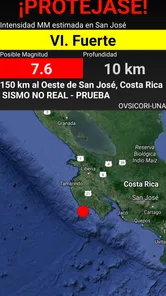
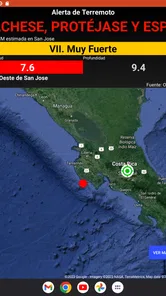
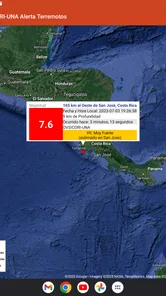
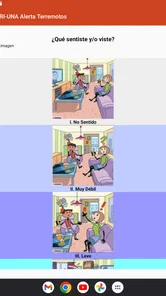
Analysis by Reviewed
When I first opened OVSICORI-UNA Alerta Terremotos, I understood its purpose almost immediately: it is an education-focused app built around receiving earthquake alerts from the OVSICORI-UNA Early Warning System. That narrow focus is its biggest strength. It is not trying to become a general news reader, a disaster-preparedness course, or a map packed with unrelated tools. Instead, it gives people a direct way to stay connected to earthquake warnings associated with OVSICORI-UNA.
That makes it especially relevant for people in Costa Rica who want an official early-warning channel close at hand, as well as families, students, teachers, travelers, and anyone who would rather have a dedicated alert app than depend entirely on social media or word of mouth. I would not treat it as a replacement for common-sense earthquake preparation, but I do see value in having a focused tool whose entire reason for existing is earthquake notification.
The app is free, rated for Everyone, and developed by Billy Burgoa Rosso. It belongs to the Education category, which feels appropriate because its practical role is also informative: it helps users receive time-sensitive information rather than encouraging them to interpret rumors or scattered posts. Its current version is V4.0.1cr_public, and it works on Android 8.0 or later.
What the first launch is really like
The first thing to understand is that an earthquake warning app is only useful when it can reach you at the right moment. Installing it is therefore not the end of the process. The meaningful setup is making sure the app can deliver alerts in the way you expect, then learning what an alert looks and sounds like on your own phone. I recommend doing this calmly, before an emergency, rather than opening the app for the first time while everyone around you is already reacting to shaking.
Because the app has a specific purpose, the interface feels easier to approach than a broad emergency-information platform. You are not choosing between dozens of unrelated subjects. The central question is simple: can this app keep me connected to OVSICORI-UNA earthquake warnings? That clarity is reassuring for first-time users who may not want a complicated dashboard.
There is also a useful psychological benefit to a dedicated app. If earthquake information is mixed into a general notification stream, it can be overlooked beside messages, promotions, headlines, and social updates. A specialized tool gives the alert a clearer place in your routine. I still think users should keep their phone’s broader emergency settings in mind, but this app can serve as a more intentional layer of awareness.
One practical limitation is that no alert app can remove every uncertainty from an earthquake. A warning is not the same as a prediction, and receiving an alert does not mean every location will experience the same intensity or timing. I would use the notification as a prompt to act sensibly, not as a precise promise about what will happen next. That distinction matters, especially for people who have never used an early-warning service before.
More From Our News Desk

 Instagram
Instagram’s Power Comes From Its Place in Your Phone
A close look at how Instagram turns Meta’s reach, recommendation systems and everyday camera habits into durable platform power—and what that costs users.

 Gmail
GmailGmail in a Busy Inbox: Who Benefits Most?
From first account to crowded workday, Gmail earns its place through dependable search and flexible sorting—but its best fit depends on how much inbox maintenance you can tolerate.

 Prime Video
Switching to Prime Video: What Changes in Your Viewing Routine
Prime Video can make a compelling second home for streaming, but switching means learning a different catalog, rental layer, and route from browsing to playback.

 Universal TV Remote Control
Universal TV Remote Control Works Best as a Reliable Backup
A phone remote earns its place through quick setup and reliable habits. Here is how to get more from Universal TV Remote Control—and where its limits show.

 Weather - By Xiaomi
Weather by Xiaomi Review: Clear at a Glance, Less Clear Up Close
Xiaomi’s weather app makes everyday forecasts quick to scan, but its calm surface can leave useful details and recovery paths harder to find than they should be.

 X
XX Under Pressure: Can It Recover When Posting Goes Wrong?
A resilience-focused review of X, examining setup, mistaken posts, interruptions, weak connections, and the gaps that matter when recovery needs to be dependable.
Latest News



Getting through the initial setup without overthinking it
After installation, I would begin by checking that the app is allowed to notify me. On Android, notification behavior can be affected by system settings, battery controls, sound modes, or a manually silenced app. The exact menus vary by phone, so the important habit is to verify the app’s notification access rather than assuming that installation automatically guarantees an audible warning.
I would also avoid placing the app in a folder that I never open or treating it as something that can be forgotten after setup. A quick visit after installing lets you become familiar with its presentation and gives you a chance to confirm that it is still available on your device. If you change phones, use aggressive battery-saving settings, or regularly silence notifications, repeat that check.
The app’s minimum requirement is Android 8.0, so people using an older Android phone should not assume it will install. For compatible devices, the free price removes an obvious barrier to trying it. That is helpful for households that want several family members to have access without turning the decision into a paid subscription calculation.
I would set up the app while connected to a reliable network and keep the phone’s normal communication functions in good working order. An alert system depends on more than the icon on your home screen. The phone needs to be powered, connected, and able to present notifications. This is one of the less visible trade-offs of any mobile warning tool: the app can be well designed, but it cannot help if the device is switched off, disconnected, or configured to suppress it.
For a family, the best workflow is to install it on each person’s own phone rather than relying on one shared device. That creates redundancy. If one phone is charging in another room, muted, or unavailable, another person may still receive the warning. This is a more useful approach than assuming one installation automatically covers everyone in the home.
The first meaningful success: recognizing an alert
The first successful action is not simply opening the app. It is knowing what to do when an earthquake notification appears. I suggest treating the first alert you receive as a familiarization exercise: read the message, notice how it reaches you, and identify where you are likely to see it when you are busy. That small rehearsal can reduce hesitation later.
I would not repeatedly open the app just to look for an event. Its value is tied to receiving relevant warnings, not to turning it into a constantly watched feed. Instead, use the normal app view to understand its purpose, then let the notification channel do the work. If a warning arrives, pause long enough to read it carefully before forwarding it to other people.
A useful household exercise is to agree in advance on a simple response. For example, decide where family members should move if shaking begins and which person will check on children or older relatives. The app itself is not a substitute for that plan, but its alert can become the trigger that starts it. This is where I think the application offers more value than its short store summary suggests: it can fit into a preparedness routine rather than being treated as a standalone gadget.
Another practical tip is to keep the phone somewhere you can normally hear or notice it at night, without assuming that every alert will overcome every sound setting. If you sleep with the device in another room, keep it buried under clothing, or use a mode that silences notifications, the warning may be less useful to you. The right placement depends on your routine, but the principle is simple: an alert must be able to reach your attention.
Where new users may become confused
The most common misunderstanding is expecting an earthquake alert app to provide a complete explanation of an event. A warning is designed to communicate urgency, while detailed interpretation may require other official sources. I would use this app for the initial signal and then look for trustworthy information if I need broader context. That division of labor is healthier than expecting one small application to answer every question about magnitude, damage, location, and aftershocks.
Another source of confusion is assuming that an alert means shaking will be equally strong everywhere. Earthquakes affect places differently, and the experience of a warning can vary with distance, timing, connectivity, and the phone itself. I would never delay a sensible protective action while waiting for a more detailed explanation inside the app.
Some users may also wonder why they need this app when they already follow OVSICORI-UNA through other channels. In my view, the answer depends on how reliably those alternatives reach you. Social networks are useful for discussion and updates, but they also mix official information with speculation and reposts. General news apps can provide context, yet they may not be the fastest or most focused way to notice an alert. A dedicated app is better when your priority is a clear, specialized notification path.
On the other hand, someone who wants historical earthquake analysis, educational lessons, maps, preparedness checklists, or broad disaster coverage may find this app too limited as a single solution. Its focused design is convenient, but focus also means fewer reasons to open it outside its main purpose. I would pair it with a basic household emergency plan and reliable official information rather than expecting it to be an all-in-one safety center.
It is also worth separating the app’s public reputation from your personal experience. It has an average rating of 4.1 from around 1.2 thousand ratings, and it has passed 100 thousand installs. Those figures suggest that many people find it useful, but they cannot tell you how well notifications will fit your particular phone, network, or daily habits. I would consider the rating encouraging, then still perform my own notification check after installation.
How it compares with the usual alternatives
Compared with relying on social media, OVSICORI-UNA Alerta Terremotos feels more focused and less noisy. Social platforms can spread information quickly, but they also invite duplicate posts, emotional reactions, and uncertainty about the original source. If I want the best chance of noticing a dedicated earthquake warning without scanning a busy timeline, I prefer the specialized app.
Compared with a general news application, the advantage is concentration. News apps are better for follow-up reporting, interviews, explanations, and wider regional coverage. They are not always designed around the first alert itself. I would use a news service for context after an event, not necessarily as my only way to notice an earthquake warning.
Compared with the phone’s built-in emergency notifications, the app offers a different kind of relationship with OVSICORI-UNA. System-level alerts can be valuable because they are integrated into the operating system, while a dedicated application gives users a direct, recognizable place associated with this particular warning service. Keeping both available may make sense if they serve different purposes, but users should still understand which one they are hearing and avoid assuming that two notifications mean two separate earthquakes.
Compared with preparedness apps, this one is less useful for learning what to pack, how to secure furniture, or how to plan evacuation routes. Those tools may be better for preparation before an event. OVSICORI-UNA Alerta Terremotos is more compelling for the alert itself. That distinction makes the choice fairly straightforward: install it if receiving OVSICORI-UNA warnings is your priority, but choose an additional resource if you want a full preparedness curriculum.
Who will benefit most, and who should skip it
I think the app is a good fit for residents who want a dedicated earthquake-warning channel, families who want an additional way to stay informed, and students or teachers looking for a practical connection to an educational earthquake-information service. It can also suit people who dislike depending on a fast-moving social feed for urgent information.
It is less suitable as the only tool for someone who expects detailed event analysis or a complete emergency-management toolkit. If your main interest is earthquake history, scientific explanations, or step-by-step preparedness training, you may prefer a broader educational resource alongside it. Likewise, if your phone is older than Android 8.0 or you routinely disable notifications and background activity, the app may not fit your setup well.
For travelers, the decision depends on where they are and what they expect. The app is specifically tied to OVSICORI-UNA, so its relevance is strongest for people connected to the areas and warning context served by that system. I would not install it assuming it is a universal worldwide earthquake solution. Its value comes from its relationship with the service it represents.
A sensible routine after installation
Once the app is installed and notifications are checked, I would make it part of a small routine rather than obsessively monitoring it. Keep the phone charged, review notification behavior after major system changes, and make sure family members know what an alert means. If you use a new Android device, revisit those settings instead of assuming they transferred perfectly.
I would also resist forwarding every alarming message that appears in group chats. The app can help you start from a more focused source, but responsible communication still matters. Read the alert, take appropriate protective action, and use dependable official information for follow-up details. This prevents a useful warning tool from becoming the beginning of unnecessary panic.
The strongest non-obvious benefit is that it can turn an abstract safety intention into a concrete trigger. Many people say they should prepare for earthquakes but never connect that idea to a routine. Installing the app, checking its notifications, and agreeing on a household response creates a small but realistic bridge between awareness and action.
My final view is positive, with clear boundaries. OVSICORI-UNA Alerta Terremotos is free, uncomplicated in purpose, and worth considering if you want earthquake alerts connected to OVSICORI-UNA. I appreciate that it does not need to pretend to be a full news platform to be useful. Its main weakness is the same feature that makes it easy to understand: the experience is specialized, so users wanting maps, lessons, history, or broad emergency planning will need other resources.
For a first-time user, I would install it, confirm that notifications are permitted, keep the phone reachable, and explain the response plan to the people who matter most. Then I would treat the app as one dependable part of preparedness rather than the entire plan. With that realistic expectation, the best reason to use it is simple: it gives earthquake awareness a dedicated place on your phone without charging you to begin.
OVSICORI-UNA Alerta Terremotos Frequently Asked Questions
Is OVSICORI-UNA Alerta Terremotos free to download?
Yes. OVSICORI-UNA Alerta Terremotos is free, so you can download it without paying for the app itself. It is an education app developed by Billy Burgoa Rosso, and its content rating is Everyone. Before installing, check that your device meets the operating system requirement and that you are choosing the correct app for your needs: it focuses on earthquake alerts from the OVSICORI-UNA Early Warning System.
What devices can I install OVSICORI-UNA Alerta Terremotos on?
OVSICORI-UNA Alerta Terremotos is available for Android devices running Android 8.0 or later. Check your device’s Android version before downloading; if it is older than the minimum requirement, the app may not install or run as intended. The app is listed for Android, so iPhone and iPad users should not assume it is available for their devices. Keeping a compatible device and a working internet connection can help you access its earthquake alert information.
What is OVSICORI-UNA Alerta Terremotos?
OVSICORI-UNA Alerta Terremotos is an earthquake information app associated with Costa Rica’s Observatorio Vulcanológico y Sismológico de Costa Rica at the Universidad Nacional. It is designed to provide users with access to earthquake reports, including recent seismic events and related details. The app is especially useful for people who want information from a recognized scientific source rather than relying only on social media or unofficial alerts.
Does OVSICORI-UNA Alerta Terremotos send real-time earthquake alerts?
The app is intended to help users follow seismic activity and consult earthquake information, but users should not assume that every earthquake will generate an instant notification. Detection, verification, publication, and network connectivity can all affect how quickly information appears. It should be used as an informational tool, not as a guaranteed early-warning system or a replacement for official emergency instructions from Costa Rican authorities.
What information can I find about earthquakes in the app?
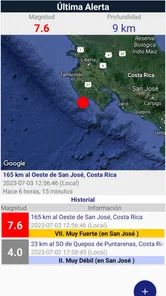
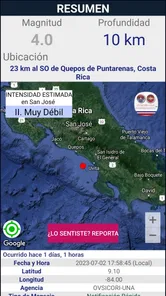
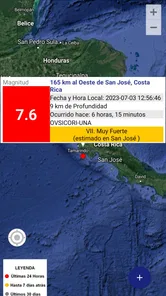
Depending on the available version and the data published by OVSICORI-UNA, users may be able to review details such as an earthquake’s date, time, location, magnitude, depth, and approximate position. Some events may also be displayed geographically or organized in a recent-earthquake list. The exact information can vary because seismic data may be updated, corrected, or expanded after specialists analyze an event.
Pros
- Official earthquake alerts from Costa Rica’s OVSICORI-UNA observatory.
- Provides location
- magnitude
- depth
- and time for detected earthquakes.
- Useful map view helps visualize earthquake locations and distances.
- Can improve awareness of local seismic activity and recent events.
- Simple
- focused interface with little unnecessary content.
Cons
- Primarily useful for Costa Rica
- limiting value for users elsewhere.
- Alerts may arrive after an earthquake due to detection and network delays.
- Requires internet access for updated reports and notification delivery.
- Some earthquake details may be difficult for nontechnical users to interpret.
- Battery and notification behavior may vary by device settings.











