

OutdoorClass: Hunting Courses
- 39.00
- 4.6
- Installs
- 10.00K
- Price
- Free

Screenshots

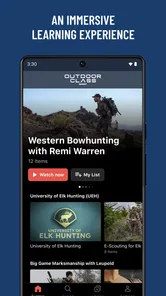
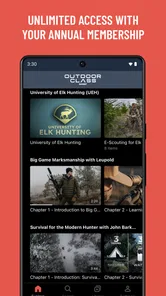
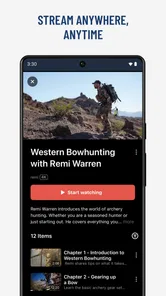

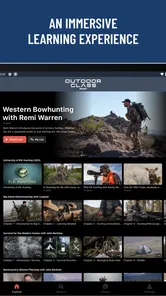
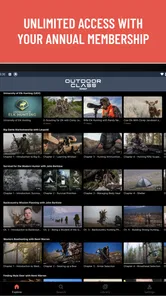
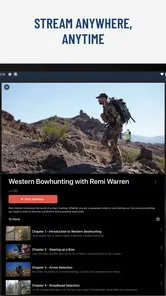
Analysis by Reviewed
I approached OutdoorClass: Hunting Courses as a learning tool rather than as another outdoor entertainment app. Its focus is practical: building knowledge around hunting, cooking, and calling through lessons from experienced specialists. That immediately gives it a clearer purpose than a general video platform, although it also means the app works best when you already know what you want to learn.
In my experience, the most useful way to judge this app is to ask whether it can become part of a real preparation routine. A person planning a first hunting trip, improving field skills, or trying to become more capable in the kitchen may find a structured course easier to follow than scattered clips. Someone looking only for maps, live conditions, local regulations, or a social community will probably need other tools alongside it.
What the learning experience is really suited to
OutdoorClass comes from Outdoor Class and sits in the Travel & Local category, but I would think of it primarily as a specialist education app with an outdoor theme. The store summary points toward learning from leading experts, and that emphasis matters: this is not presented as a replacement for an official safety course or local guidance. It is better viewed as a way to organize instruction and build confidence before putting knowledge into practice.
The three subject areas give the app a useful range. Hunting lessons can support preparation and decision-making, cooking content can help turn harvested food into something practical, and calling instruction addresses a narrower skill that is difficult to learn from text alone. That combination is more interesting than an app devoted to only one part of the experience because it follows the whole path from preparation to field work and finally to the kitchen.
I also like the possibility of using it at different experience levels. A beginner can use a lesson to understand vocabulary and basic routines, while a more experienced user can return to a specific technique before a trip. The trade-off is that a broad catalog can feel less direct than a single-purpose course. If I only wanted a local forecast or a regulation lookup, opening a learning app would add an unnecessary step.
Where it fits beside familiar alternatives
The usual alternative is free video searching. That route offers variety and speed, but it can leave the viewer sorting through inconsistent explanations, unrelated recommendations, and clips that are too short to form a complete method. OutdoorClass has a stronger educational identity, so I would choose it when I want a deliberate lesson rather than a quick answer.
It does not replace a local authority, an in-person instructor, or a guide who understands the exact terrain and rules where I plan to hunt. Those sources are better for jurisdiction-specific requirements, current restrictions, and hands-on correction. The app’s role is complementary: I can use it to prepare questions, review a technique, or create a learning sequence before seeking local confirmation.
More From Our News Desk

 Weather - By Xiaomi
Weather by Xiaomi Review: Clear at a Glance, Less Clear Up Close
Xiaomi’s weather app makes everyday forecasts quick to scan, but its calm surface can leave useful details and recovery paths harder to find than they should be.

 X
XX Under Pressure: Can It Recover When Posting Goes Wrong?
A resilience-focused review of X, examining setup, mistaken posts, interruptions, weak connections, and the gaps that matter when recovery needs to be dependable.

 Clash of Clans
Clash of Clans Is Won Between the Battles
Its raids are quick; its community is a long-term project of coordination, teaching, rivalry, and shared responsibility—with all the friction that entails.

 Android Auto
Android Auto Makes the Case for Quieter Car Software
The car interface is no longer judged by how much it can do, but by how quietly it helps. Android Auto shows what drivers now expect—and what still gets in the way.

 MobiOffice: Word, Sheets, PDF
MobiOffice: Transforming Mobile Productivity with Seamless Integration
MobiOffice: Word, Sheets, PDF is redefining mobile productivity with a surprising blend of functionality and innovation.

 EA SPORTS FC Soccer Mobile 26
EA SPORTS FC™ Mobile Soccer: Redefining Mobile Sports Gaming
Dive into EA SPORTS FC™ Mobile Soccer, where immersive gameplay and strategic depth transform mobile sports gaming.
Latest News



It also differs from a recipe-only application. Cooking is one part of the experience, but the wider outdoor context gives the lessons a different purpose. That is useful for someone who wants a connected skill set. It is less compelling for a cook who has no interest in hunting or outdoor calling and simply wants a large database of everyday meals.
Trust starts with knowing what the app is and who publishes it
The visible identity is straightforward: Outdoor Class is the developer, the app is free to install, and it is aimed at a Teen audience. It has an average rating of 4.6 from around a hundred ratings, with several dozen written reviews, and has passed the ten-thousand-install mark. Those figures suggest that people are using it and responding positively, but I would still treat them as a starting point rather than proof that every course will suit every learner.
The release date is June 6, 2022, and the current version is 10.200.1. For me, that makes it sensible to check the version shown on the device before relying on a particular workflow, especially if an update changes navigation or account behavior. The app supports Android 8.0 and later, which covers many devices but still makes the operating-system requirement worth checking before installation on an older phone or tablet.
Because the app concerns hunting and outdoor practice, trust is not only about smooth playback or attractive presentation. I want to know whether I can understand what I am being asked to do, whether I can control my account choices, and whether I can separate educational material from rules that must be confirmed elsewhere. A polished lesson is helpful, but it should not encourage me to treat general instruction as local legal or safety advice.
Paid choices deserve attention before a learning routine begins
The app is free, but in-app purchases are listed at $69.99 per item. That is a meaningful commitment, so I would not purchase immediately after opening the app. I would first explore the available presentation, identify the subject I actually need, and decide whether I am likely to return often enough to justify the cost of an individual item.
This creates an important difference between “free to install” and “free for complete learning.” I would make the purchase decision with the same care I use for a physical course: define the skill, estimate how often I will practice it, and compare the lesson format with local training or a specialist instructor. A high-priced course may be worthwhile for focused learning, but it is poor value if I only browse out of curiosity.
Families should also pay attention to the Teen rating and purchasing controls on the device. The age label gives useful context, but it is not a substitute for a parent deciding whether the subject matter is appropriate. If a younger person uses the phone, I would secure purchase approval at the operating-system level rather than assuming the app’s free installation prevents accidental spending.
Using it carefully when personal data and account choices matter
I would start by checking the sign-in and account controls before making OutdoorClass part of a regular routine. Knowing how to adjust notifications, manage purchases, and revisit privacy choices can make focused study easier without assuming every setting is essential. With those basics clear, I can turn a lesson into a repeatable practice plan rather than just another video watched and forgotten.
What I would check before creating a habit around it
I would begin by looking at the sign-in flow and the choices shown during setup. The important question is not simply whether an account is required, but whether the app clearly explains what I am agreeing to and gives me a practical way to manage that account later. I would avoid entering unnecessary personal details and would keep payment decisions separate from casual browsing.
I would also review the app’s visible privacy and account controls before starting a long course. If there are options for notifications, saved progress, communication preferences, or account deletion, I would record where they are while the interface is still familiar. That small precaution saves frustration later, particularly when an app becomes part of a regular weekly routine.
I cannot treat a learning app as automatically private simply because its subject is outdoors. Course progress, account information, and purchase history can all become sensitive from a user’s perspective. My approach is simple: allow only what is needed for the task, read each permission prompt instead of accepting it automatically, and revisit settings after major updates.
Moments when I would be especially cautious
The first sensitive moment is installation and first launch. I would pay attention to permission requests and decline anything that does not make sense for viewing lessons or managing an account. If a feature genuinely needs access to something on the phone, I would expect the reason to be understandable before granting it.
The second is payment. Since individual in-app items can cost $69.99, I would confirm the account, purchase amount, and device approval screen carefully. I would not hand the phone to another person while a purchase screen is open, and I would use the platform’s purchase authentication rather than relying on memory or trust within a shared household.
The third is communication. If the app offers notifications or promotional messages, I would decide whether they help me learn or merely create noise. A focused schedule is easier to maintain when reminders are limited to the subjects I actually intend to study. I would also avoid treating messages as urgent instructions about field conditions or regulations; those should come from appropriate local sources.
The fourth is practical application. Outdoor skills have consequences beyond the screen. I would pause a lesson whenever it touches safety, equipment, animal handling, or local compliance and verify the relevant details with current official guidance. The app can help me understand a concept, but it should not be my only authority in a situation where conditions or laws vary.
A workflow that makes the app more useful
My preferred workflow would be to choose one narrow goal before opening a course. For example, I might spend a week reviewing calling fundamentals, then write down the terms or techniques that remain unclear. After that, I would use a separate notebook or notes app to turn the lesson into a short practice checklist. This prevents passive watching from feeling like progress when I have not actually retained the material.
A second useful habit is to separate learning from verification. I would watch the lesson, identify the parts that seem generally applicable, and then check local rules, seasons, access requirements, and safety procedures independently. This two-step process is slower than accepting a video as the final answer, but it is much more responsible for hunting-related subjects.
For cooking, I would prepare the workspace before starting a lesson rather than trying to follow every step while searching for equipment. I would note which ingredients and tools are realistic for my kitchen, then adapt only after understanding the intended technique. That makes the content more practical and reveals whether the lesson is genuinely useful for my circumstances.
A third insight is to use the app as a pre-trip refresher instead of trying to consume everything at once. A short review shortly before practice can be more valuable than completing a long sequence months before I need it. I would still avoid depending on a phone in poor reception or difficult outdoor conditions; the app is strongest during preparation, not as the sole resource in the field.
Who will get the most from it
I think the best audience is an adult or older teen who wants organized instruction and is willing to practice away from the screen. It should appeal to a learner who enjoys expert-led material but does not always have access to a nearby mentor. The combination of hunting, calling, and cooking is particularly useful for someone building a broader outdoor routine rather than chasing one isolated trick.
It may also suit an experienced person who wants to revisit fundamentals without attending a full in-person class. A refresher can be convenient before a trip or season, especially when the goal is to identify weak areas and then confirm them through local practice. The app is less likely to satisfy someone who learns best by immediate hands-on correction, since a video lesson cannot watch my technique or adapt to my surroundings in real time.
I would skip it if my main need is live navigation, weather, mapping, licensing information, or a current local rulebook. I would also hesitate if I am unwilling to pay for individual learning items after trying the free portion. In that situation, a public library resource, local course, official agency material, or free educational video may be a better first step, depending on the exact skill I need.
Small frictions that affect the overall value
The biggest friction is the gap between broad interest and focused value. The subject range sounds appealing, but not every learner will care equally about all three areas. Before spending money, I would make sure the available course matches a specific need rather than assuming the entire catalog will be useful.
Another limitation is the danger of confusing confidence with competence. Watching a clear explanation can make a technique feel familiar before I have performed it safely. I would treat completion as exposure to an idea, not certification. Practice, supervision where appropriate, and local knowledge remain essential.
The Teen rating is another reason to consider the audience carefully. It signals that the app is not positioned as a children’s learning product, and the hunting subject itself may not be suitable for every household. I would review the content personally before recommending it to a younger user, even if the person is interested in outdoor activities.
Finally, the app’s usefulness depends on account and purchase discipline. A free download lowers the barrier to trying it, but the listed price per item means that casual exploration can become expensive if I do not pay attention. I would use device-level purchase protection, keep notifications intentional, and check account settings whenever the app changes version.
My cautious recommendation
After considering both the educational angle and the practical limits, I see OutdoorClass as a focused companion for people who want structured hunting, calling, and cooking instruction. Its strongest quality is the way those subjects can support one another: preparation, field technique, and making better use of food all belong to the same broader interest.
I would recommend trying the free experience first, then choosing a paid item only when I can name the skill it will help me develop. I would keep official local guidance, hands-on instruction, and safety training in the loop, and I would never use a general lesson as the final word on regulations or conditions.
My final view is positive but measured. The 4.6 average and growing install base make it worth investigating, while the Teen rating, Android 8.0 requirement, and $69.99 price for an individual in-app item are practical details that should shape the decision. The app is most valuable when I use it as a deliberate study tool, not as a substitute for local expertise or real-world practice. For the right learner, that makes it a worthwhile addition to an outdoor preparation routine; for everyone else, a more local or narrowly focused alternative may be the smarter choice.
OutdoorClass: Hunting Courses Frequently Asked Questions
Who develops OutdoorClass, and what kind of app is it?
OutdoorClass is an app from Outdoor Class in the Travel & Local category, focused on learning outdoor skills through courses. Its store description highlights hunting, cooking, and calling lessons from leading experts. The app has a Teen content rating, so it is worth checking that age guidance before downloading, especially if a younger person will be using it.
What is OutdoorClass: Hunting Courses?
OutdoorClass: Hunting Courses is an educational app designed for people who want to improve their hunting knowledge and outdoor skills. It offers video-based lessons covering subjects such as hunting techniques, wildlife behavior, gear selection, safety, conservation, and field preparation. The content is presented by experienced hunters and outdoor professionals, making it useful for beginners as well as more experienced users seeking structured instruction.
What topics and hunting skills are covered in the app?
The app covers a broad range of hunting-related topics, including scouting, tracking, calling, shot placement, firearm and archery fundamentals, hunting ethics, field dressing, meat care, and outdoor safety. Depending on the course, lessons may focus on specific game animals, seasons, or environments. It is a helpful learning resource, but users should also consult local regulations and complete any legally required hunter education.
Is OutdoorClass suitable for beginners?
Yes, OutdoorClass can be a good starting point for beginners because many lessons explain fundamental concepts in a clear, step-by-step format. New hunters can learn about equipment, preparation, safety, and responsible behavior before entering the field. However, watching courses should not replace supervised practical experience, formal certification, or guidance from a qualified instructor when learning firearms, archery, navigation, or other potentially dangerous activities.
Does OutdoorClass require a subscription or payment?
OutdoorClass generally uses a membership-based model, so access to its complete course library may require a paid subscription or another form of in-app purchase. In-app purchases are listed at $69.99 per item, while the app itself is free to download. Availability, pricing, trial periods, and included content can vary by platform and region. Before downloading, review the current subscription terms carefully, including renewal conditions, cancellation rules, and whether selected courses can be accessed without an active membership.
Pros
- Expert-led lessons cover hunting skills
- safety
- and field preparation.
- Video-based courses make complex techniques easier to understand.
- Lessons can be accessed on a phone while planning trips or studying outdoors.
- Content suits beginners and helps experienced hunters refresh key knowledge.
- Structured courses make it easier to follow a consistent learning path.
Cons
- Some advanced content may require a paid subscription or individual purchases.
- The app is less useful without a reliable internet connection for course access.
- Course quality and depth may vary between different instructors or topics.
- Learning through videos cannot replace supervised
- hands-on field training.
- Some lessons may focus mainly on hunting practices relevant to certain regions.











