OS Launcher 18 - Phone 16 Max
- 468.00
- 4.5
- Installs
- 1.00M
- Price
- Free
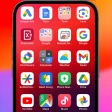
Screenshots
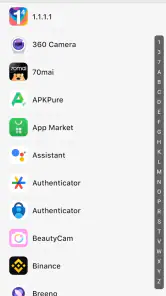
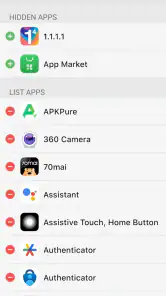
Analysis by Reviewed
I’d judge a phone launcher by a simple question: does it make the home screen feel more comfortable to use, or does it only change the wallpaper and icons? OS Launcher 18 - Phone 16 Max is aimed at Android users who like the visual language of an iPhone and want to bring some of that tidy, rounded look to a device they already own. I find it most appealing when the goal is a familiar redesign rather than a complete change to how Android works.
Choosing the right kind of change
A useful way to decide is to separate appearance from routine. If your main wish is a coordinated, iPhone-inspired home screen, this launcher is pointed in the right direction. If you want to change how Android handles system settings, notifications, or app behavior, a launcher is not the tool for that broader job. I’d install it for the look and the home-screen arrangement, not as a promise that every part of the phone will behave like an iPhone.
It also helps to think about how you actually reach apps. Someone who taps a small group of familiar icons may appreciate a cleaner visual arrangement more than someone who depends on a carefully built folder system or a particular manufacturer’s shortcuts. Before changing anything, I’d note which apps I open most often and where I expect to find them. That small check makes it easier to tell whether the new design is convenient or merely attractive.
What to decide before changing launchers
A launcher affects the place you return to throughout the day: the home screen, app access, and the way you move between common actions. Before installing one, I’d think about whether I want a new visual style, a different way to organize apps, or a deeper change to the phone’s behavior. This app is strongest as a personalization choice; it shouldn’t be mistaken for an iPhone or for a replacement operating system.
It’s a free Android app from Smart Launcher Studio, with optional in-app purchases ranging from $0.99 to $9.49 per item. It is rated for Everyone and requires Android 6.0 or later. Its current version is 7.2. The 4.5 average from around 36,000 ratings and more than a million installs suggest it has found a sizeable audience, though popularity alone can’t tell you whether its particular style will suit your habits.
The First Impressions
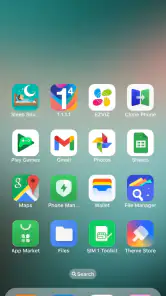
From the moment you install OS Launcher 18 - Phone 16 Max, you’re greeted with an interface that mirrors the clean and sleek design of iOS. The icons are rounded, the animations are smooth, and there's an overall polish that makes you feel like you've just stepped into Apple territory. The best part? It’s incredibly intuitive. You don’t need a degree in software engineering to figure out how to navigate around.
Features That Stand Out
One of the standout features of this app is its ability to mimic the iPhone's control center. With a simple swipe, you have access to toggles for Wi-Fi, Bluetooth, screen brightness, and more. It’s all about convenience and efficiency, and I’m all here for it.
More From Our News Desk

Clash of Clans Is Won Between the Battles

Android Auto Makes the Case for Quieter Car Software

MobiOffice: Transforming Mobile Productivity with Seamless Integration

EA SPORTS FC™ Mobile Soccer: Redefining Mobile Sports Gaming

How Microsoft OneDrive Became a Mobile Productivity Giant

How Google Translate Breaks Language Barriers Effortlessly
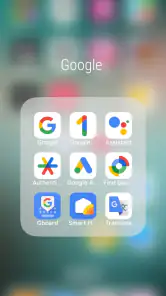
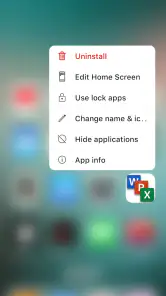
Customization is another big win. You can tweak the app drawer, change the icon layout, and even apply different themes to suit your personal taste. For those who love having a personalized touch, this feature is a game-changer.
And let's not forget the app’s performance. It runs smoothly without causing any lag on your device, which is crucial for any launcher. You’ll appreciate how it doesn’t hog your system resources, allowing your phone to run just as fast as before.
Getting more from the home screen
I’d use the app drawer as a practical counterweight to the iPhone-inspired front page. Keep the first screen for the few apps you reach for repeatedly, then use the drawer to find everything else instead of filling every available space with icons. That creates a clear first impression without making the phone harder to scan as your app collection grows. If you often search by habit rather than by icon, try the layout for a few ordinary days before reorganizing it again.
Themes and icon placement are best adjusted in small steps. Changing several visual choices at once can make it difficult to know which one improved the experience, so I’d first settle the arrangement and then try a theme. A useful test is to check the screen outdoors, in a hurry, and one-handed: a polished layout that looks good while sitting still may be less helpful if your most-used app is awkward to reach.
The control-center-style panel is convenient for quick access, but I wouldn’t make it my only route to phone settings. A visual shortcut and Android’s built-in settings serve different purposes: the former helps with a quick everyday adjustment, while the latter remains the place I’d go when I need to check or manage the underlying device option. Keeping that distinction in mind avoids expecting a launcher panel to replace the system itself.
Making the look work for you
The practical benefit of an iPhone-inspired layout is consistency: rounded icons and a coordinated theme can make a mixed collection of apps look less scattered. I’d start with a restrained setup, then adjust the app drawer and icon arrangement only after using the home screen for a day or two. That makes it easier to tell whether a change genuinely helps or simply looks appealing in the setup moment.
For a realistic daily use case, imagine checking messages before leaving home, opening a map, then switching to music while you walk. A launcher can make those frequently used apps easier to spot and give the phone a more unified appearance, while Android still runs the apps themselves. If you share your phone with someone who relies on the familiar layout, though, a dramatic rearrangement may make their routine less comfortable.
Integration and Use
Integration with other apps is seamless. Whether you're opening your favorite social media app or your go-to productivity tool, everything feels like it’s part of one cohesive system. It’s refreshing to have an app that understands the importance of synergy.
Also worth mentioning is how OS Launcher 18 handles notifications. Just like on an iPhone, you get a quick overview without having to dive deep into menus or settings. It's straightforward, and that's what makes it effective.
In practice, I’d judge that notification presentation by whether it helps me notice what matters without changing the way I respond to it. If I rely on Android’s usual notification habits, a new visual treatment may take a little getting used to even when the information is easy to see. I’d check the experience with the alerts I care about most, rather than assume a familiar appearance means identical behavior across the phone.
That distinction matters for anyone deciding whether the launcher is suitable for work or family use. The home screen can make messages and everyday apps feel more orderly, but the apps and Android still determine what those services do. I’d keep important communication apps easy to reach, then make sure the new arrangement doesn’t hide a shortcut I depend on when I’m busy.
Which alternative fits your priorities?
Compared with a phone maker’s default launcher, this one is a better fit if you actively want the iPhone-like appearance; the default is usually the sensible choice if you value the familiar arrangement that came with your device. Other Android launchers may suit people who want a highly customized workspace or a different organizational approach rather than an iOS-inspired presentation. I wouldn’t choose this solely for its visual resemblance if my real priority were a specific advanced workflow.
There is also a limit to what a launcher can change. It reshapes the home-screen experience, but it doesn’t turn Android into iOS, so differences in system behavior remain. The iPhone-style control-center presentation may feel convenient, yet I’d still treat Android’s own settings and controls as the dependable route when I need to manage the phone rather than just reach a quick toggle.
For a reader who wants a manufacturer’s launcher to remain predictable, staying with the default is a reasonable choice, not a missed opportunity. It usually preserves the arrangement and familiar entry points already learned on that device. On the other hand, someone who wants to experiment with a more elaborate Android workspace may prefer a launcher focused on flexible organization instead of an iPhone-like visual direction. The deciding question is whether that aesthetic is the point or just a substitute for a feature you actually need.
I’d also consider how much of the phone’s identity I want to change. This app can create a noticeably different home-screen presentation, but it won’t make Android apps, system menus, or device-specific tools identical to their iPhone counterparts. If that mismatch would bother you every time you move beyond the home screen, an iPhone-inspired launcher may not be satisfying for long. If you simply enjoy the look while keeping Android’s flexibility, the distinction is much easier to accept.
What switching feels like
Changing the launcher is a small decision with a visible effect: icons and home-screen habits may need adjusting, and you might want to spend a little time arranging the layout to match your routine. I’d take a screenshot of the existing home screen before experimenting, especially if I’ve carefully placed folders or shortcuts. That gives me a simple reference if I decide the new arrangement isn’t for me.
Because the app is free to try, I’d begin without buying anything and see whether the look remains comfortable after the novelty wears off. Optional purchases may be worth considering only if the available customization already fits what I want; I wouldn’t pay just in the hope that it will reproduce every part of an iPhone experience. If I prefer the original setup, I can switch back to the phone’s usual launcher rather than forcing myself to adapt.
For a low-risk trial, I’d change the default launcher only after I’ve noted how to return to the previous one in the phone’s settings. I’d then use the new setup through a normal day rather than spending the whole first session rearranging icons. That reveals the real trade-off: whether the time spent adapting pays off in easier access and a style I still enjoy once I’m focused on the task, not the appearance.
The first few days are also a good time to notice small friction points. Do I keep reaching for an icon that moved? Is the drawer easier to scan, or do I now hesitate before opening an app? Those are better signals than whether the home screen looks impressive in a screenshot. A launcher is a daily interface, so comfort after repeated use matters more than a strong first impression.
Since the app is free, there is a straightforward way to decide about its optional purchases: first establish that the basic experience suits your routine, then consider paying only if a customization you genuinely want is available as a purchase. The listed per-item range runs from $0.99 to $9.49; I’d treat that as a reason to check the specific item before buying, rather than assume every extra is necessary. The free starting point makes it possible to test the core idea without making that decision immediately.
Who will enjoy this style—and who may not
I think the strongest match is an Android user who likes the visual neatness of iPhone-style icons, wants a more coordinated home screen, and is happy to make a few small adjustments. It can also suit someone who has grown tired of the phone’s default look but doesn’t want to replace the device or rebuild every part of the way Android works. For those people, the appeal is a fresh surface that still leads to their existing apps.
I’d be more cautious if I were setting up a phone for someone who depends on a stable, familiar layout, or if I needed a launcher primarily to support a specialized work routine. A visual makeover can create extra steps when someone else uses the device or when every shortcut already has a purpose. In those situations, preserving the familiar launcher—or choosing a tool whose organization matches the task—may be the more considerate option.
It is also not my pick for anyone who expects an exact iOS conversion. The visual resemblance is the draw, but Android remains underneath it. A person who values the distinctive behavior of their Android phone, or who wants system-level changes rather than a new home-screen style, may find the imitation less useful than a launcher designed around Android’s own approach.
Final Thoughts
In the vast ocean of Android launchers, OS Launcher 18 - Phone 16 Max stands out as a beacon for those craving an iOS look and feel. It’s not just about aesthetics; it’s about offering functionality and ease of use without compromising performance.
So, if you’re ready to give your Android a taste of Apple flair, this might just be the app you’ve been searching for. With its impressive features and smooth operation, it’s definitely worth a try. Trust me, your phone will thank you.
My recommendation
I’d recommend it to someone who enjoys iPhone-inspired visuals, wants to personalize an Android home screen, and is comfortable spending a little time settling into a new layout. I’d skip it if I rely on my phone maker’s existing organization, want Android’s stock look, or expect a launcher to copy the full iOS system. For me, the best reason to try it is straightforward: it offers a distinct visual change without requiring a new phone, and the free starting point makes it easy to decide whether that change actually suits everyday use.
My clearest advice is to decide based on the home screen you want to use repeatedly, not on the novelty of a familiar-looking style. Try a modest layout, keep your essential apps easy to reach, and give yourself enough ordinary use to notice whether the design helps. If it does, the launcher has earned its place; if the visual theme keeps drawing attention to the differences from iOS, returning to Android’s default presentation is a perfectly sensible outcome.
OS Launcher 18 - Phone 16 Max Frequently Asked Questions
Is OS Launcher 18 - Phone 16 Max compatible with iPhones?
No. OS Launcher 18 - Phone 16 Max is an Android personalization app, so it is intended for Android phones, not iPhones. It changes the look of an Android home screen to give it an iDevice-inspired style; it does not install iOS or turn an Android phone into an Apple device. iPhone users should look for customization options designed for iOS instead.
Will OS Launcher 18 replace Android or change how my phone works?
OS Launcher 18 - Phone 16 Max changes the appearance of your Android home screen to create a style inspired by iOS. It is a launcher app, not a replacement operating system, so your phone remains an Android device. The launcher can affect how you view and arrange the home screen, while the underlying Android system continues to handle the phone’s core functions.
Which Android phones can install OS Launcher 18 - Phone 16 Max?
OS Launcher 18 - Phone 16 Max is an Android personalization app, and it supports devices running Android 6.0 or later. Before downloading, check your phone’s Android version in its settings to make sure it meets that requirement. The launcher changes the appearance of the home screen, so it is intended for Android phones rather than iPhones.
What is OS Launcher 18 - Phone 16 Max?
OS Launcher 18 - Phone 16 Max is an Android application designed to give your phone the look and feel of the latest iOS operating system. It offers a user interface similar to that of iPhone's iOS 16, providing features such as app icons, widgets, and a control center resembling those found on Apple devices. Its stated aim is to make an Android phone look simple and luxurious, like an iDevice.
Does OS Launcher 18 affect the performance of my Android device?
OS Launcher 18 - Phone 16 Max is optimized to run smoothly on most Android devices. However, users may experience slight performance changes depending on their phone's hardware and specifications. It's recommended to ensure your device has adequate storage and processing power for optimal performance with this launcher. As with any launcher, how it feels in daily use can vary from one device to another.
Pros
- Intuitive user interface design.
- Customizable app icons and widgets.
- Smooth and responsive performance.
- Supports gesture controls.
- Improves phone's aesthetics significantly.
Cons
- Contains in-app advertisements.
- Limited customization options.
- High battery consumption.
- Occasional app crashes.
- Some features require in-app purchases.
- Category
- Personalization
- Version
- 7.2











