Orlando Sentinel
- 303.00
- 2.3
- Installs
- 50.00K
- Price
- Free

Screenshots

Analysis by Reviewed
Orlando Sentinel is a news and magazine app from Tribune Publishing Inc. that puts the publication’s reporting on a phone or tablet in a compact, reading-focused format. I approached it as someone who wants local coverage within reach during ordinary parts of the day: checking headlines before work, catching up while waiting, or opening a longer story when I have a quiet few minutes. The experience is straightforward, but its usefulness depends heavily on how reliably the app can reach its content and how comfortable you are with a publication-centered news service rather than a broad, multi-source aggregator.
The app is free to install and is suitable for Everyone, which makes the initial barrier low. It belongs to the News & Magazines category, and its purpose is narrower than a general news reader: the focus is Orlando Sentinel’s own journalism and premium storytelling. That focus can be a strength if Orlando-area reporting is what you actually want. It is less compelling if your main goal is to scan many publishers, compare coverage quickly, or keep a single app for national and international headlines.
How Orlando Sentinel feels when connectivity is part of the experience
I find it helpful to treat Orlando Sentinel as a connected reading stop rather than something I can count on in every signal condition. That makes it easier to plan when to check headlines and when to leave a longer story for later, instead of letting a slow load derail a short break. The next question is how that choice affects the handoff between discovering a story and making time to read it.
Fresh headlines depend on the connection at the right moment
My first impression is that the app makes most sense when I open it with a dependable connection and enough time to let the current content appear. A news app is only as useful as the information it can retrieve when I need it, and this one is built around access to the publication’s changing stream of stories. That means the quality of the experience can shift with the network around me: a strong home connection makes browsing feel natural, while a crowded public network can turn a quick headline check into a wait.
This is an important distinction between Orlando Sentinel and a static reading app. I am not simply opening a fixed library of articles stored on the device. I am checking a living publication, so the app’s value rises when I want current local coverage and falls when connectivity is poor or unavailable. I would not choose it for a trip where I expect to spend long periods without a reliable connection unless I had already tested my own reading routine carefully.
The publication-centered approach also affects how I browse. Instead of jumping between dozens of unrelated sources, I can stay within one editorial home. That feels calmer than a large aggregator, especially when I want to follow Orlando news without sorting through repeated versions of the same national story. The trade-off is breadth: a general news app usually offers more viewpoints and more subject areas in one place.
A practical morning routine
A realistic use case is a weekday morning when I have a few minutes before leaving home. I open the app on Wi-Fi, look through the available headlines, and decide whether I have time for a short update or a longer piece. The connection matters because the routine works best when the initial content loads before I am moving between locations. If I wait until I am already on a bus, in a lift, or inside a building with weak reception, the experience becomes less predictable.
More From Our News Desk

Weather by Xiaomi Review: Clear at a Glance, Less Clear Up Close

X Under Pressure: Can It Recover When Posting Goes Wrong?

Clash of Clans Is Won Between the Battles

Android Auto Makes the Case for Quieter Car Software

MobiOffice: Transforming Mobile Productivity with Seamless Integration

EA SPORTS FC™ Mobile Soccer: Redefining Mobile Sports Gaming
For that reason, I would make a small habit of opening the app before heading out, especially if I know I want to read a substantial story later. I would not assume that every article will remain available in a fully disconnected state simply because I viewed a headline earlier. Treating the app as a connected news window, rather than an automatic offline archive, is the safer expectation.
That workflow is one of the more useful practical insights here: use the app when you can give it a stable connection, then read at your own pace while the content is already on screen. It avoids turning a short break into a troubleshooting session. It also helps separate two needs that are often confused—getting the latest update and reading deeply. The first needs timely connectivity; the second is more comfortable when I prepare ahead.
Mobile reading is convenient, but the screen changes the balance
On a phone, the app suits quick checks better than long, uninterrupted sessions. A small screen encourages me to scan headlines first and postpone anything that deserves concentration. That is not a criticism of the publication; it is simply how mobile reading works. A longer feature can be worthwhile, but I prefer to begin it when I am seated and connected rather than while walking between places or trying to conserve battery.
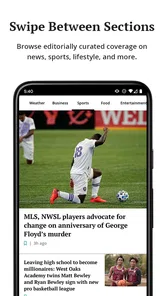
The app’s simple presentation is helpful in those moments because I do not have to learn a complicated workflow before reaching the news. I can treat it as a direct route to Orlando Sentinel’s coverage instead of configuring an elaborate collection of feeds. Readers who already know what they want from this publication may appreciate that focus more than users who enjoy constantly adjusting a large news dashboard.
Tablet use is a different proposition. A larger display should make extended reading more comfortable, particularly for premium storytelling that needs attention rather than a quick glance. I would still keep connectivity in mind when switching from a short article to a longer one. If the app needs to retrieve more content at that point, starting the piece on a stable network is less frustrating than discovering a delay halfway through a limited break.
What happens when the connection fails
Network trouble is where expectations matter most. If a headline or article does not appear immediately, I first check whether the problem is the connection rather than the app itself. Moving from a weak mobile signal to a reliable Wi-Fi network, then reopening the relevant screen, is a more sensible first step than repeatedly tapping the same control. News services can look frozen when they are simply waiting for a response.
I also prefer to avoid making several quick refresh attempts on an unstable connection. That can waste time and mobile data without improving the result. My recovery routine is simple: stop the repeated requests, confirm the network, give the app another chance, and only then consider closing and reopening it. This is a small habit, but it makes connected reading feel much more manageable.
The important limitation is that the app should not be treated as a guaranteed fallback when connectivity disappears. I would not rely on it as my only source of information during a service interruption, nor would I plan a reading session around content that has not visibly loaded. A separate saved-reading method or another source may be better for people who regularly commute through dead zones or work in places with restricted access.
That does not make the app unsuitable for mobile use. It simply means the best experience comes from matching the tool to the situation. For a connected home, office, library, or café, it can be a convenient way to reach the publication. For a long flight, remote journey, or underground commute, I would choose an option specifically designed around dependable saved access rather than assume this app will cover that need.
Managing mobile data without overthinking it
Readers who watch their mobile-data usage should build their routine around deliberate sessions. I would start with Wi-Fi when possible, especially before opening several stories or exploring longer pieces. A quick headline check is a different habit from continuous browsing, and keeping those activities separate makes it easier to control how often the app is drawing fresh content over a cellular connection.
There is also a useful trade-off between immediacy and economy. Checking repeatedly throughout the day may feel convenient, but it creates more opportunities for content to reload. Opening the app at a few chosen times gives me a clearer reading plan and avoids turning every spare minute into another network request. For someone with generous data, that may not matter much; for someone on a limited plan, it can make the app feel more considerate.
I would also avoid beginning a long reading session in a place where the signal is fluctuating. If the story is important, waiting until I reach stable Wi-Fi is the practical choice. That approach is less about a special setting and more about using the app intelligently: connectivity is part of the reading conditions, just like screen size and available time.
Premium storytelling and the cost question
The app presents Orlando Sentinel’s own premium storytelling, so the free installation should not be confused with unlimited access to every piece of content at no cost. In-app purchases range from $4.99 to $199.99 per item, which is a wide span and makes it especially important to understand what a purchase offers before confirming it. I would review the wording on the purchase screen carefully and avoid tapping through quickly just because the app itself was free to download.
This is one area where the app differs from a free news aggregator. An aggregator may collect accessible headlines from many places, while this app is tied to one publication’s reporting and its premium access model. Paying can make sense for a reader who values Orlando Sentinel’s coverage enough to return regularly. It is harder to justify for someone who only wants occasional headlines and rarely reads the publication’s deeper work.
My advice is to judge the app on reading habits rather than on the download price. If I use it several times a week for local reporting, the focused experience may feel worthwhile. If I open it only when a particular story appears in a search result, a broader free source may suit me better. The purchase range also means I would treat account and payment decisions as a separate step from simply testing the app’s basic navigation.
Who will get the most from it?
Orlando residents and people with a strong interest in the area are the clearest audience. The app is also a reasonable choice for former residents, family members, or professionals who want a direct connection to Orlando-focused reporting while living elsewhere. Its value comes from editorial focus, not from trying to be every kind of news service at once.
I would recommend it to a reader who prefers one publication’s voice, wants a simple mobile route to its stories, and usually has a stable connection when reading. It can also suit someone who dislikes the clutter of a large aggregator and would rather spend a few minutes with a focused selection than sort through an endless stream.
I would steer other readers toward alternatives when their priorities are different. Someone who wants breaking updates from multiple publishers may prefer a general news aggregator. Someone who mainly reads saved articles during travel should look for a service built around clearly supported offline reading. Someone who wants international coverage, live sports, weather tools, and several local sources in one dashboard may find this app too narrow.
Everyday friction worth knowing before installing
The average rating is 2.3 from around 600 ratings, with over 300 written reviews, so the public response is mixed and leans negative. I would not treat that figure as a complete verdict, because news apps can be judged for many reasons, including access expectations, connectivity, account issues, or changes in how people consume news. Still, it is a useful warning to keep expectations realistic and test the experience personally before committing to paid access.
The app has been available since January 20, 2011, and the current version is 10.0.60. It supports Android 8.0 and later, which covers many devices but still makes the operating-system requirement worth checking before installation. The install base is over 50 thousand, suggesting that it has a real audience without making it one of the most broadly used news apps on the platform.
I also noticed how much the app’s usefulness depends on the relationship between publication and reader. If I already trust Orlando Sentinel as a source, the direct format feels purposeful. If I am undecided about the publication, the focused design may feel restrictive because there is less incentive to open the app for unrelated subjects. That is not a technical flaw, but it is a meaningful choice in the product’s design.
My connectivity verdict
Orlando Sentinel works best as a connected gateway to Orlando Sentinel’s reporting, not as a universal news toolbox or a dependable offline reader. I like the directness: I can open one publication’s app, scan local coverage, and decide what deserves more of my time. The experience is most comfortable when I begin on stable Wi-Fi, especially if I plan to read premium or longer-form material.
The main trade-off is clear. The focused catalog can be more useful than a noisy aggregator for readers who care about Orlando, but it offers less variety for people who want many sources in one place. Network interruptions can also expose the limits of using a connected publication app for travel or low-signal routines. I would prepare important reading in advance and keep an alternative source available rather than expecting every story to appear on demand.
For me, the decision comes down to three questions: Do I regularly want Orlando-specific journalism? Am I comfortable checking content while connected? And am I willing to examine the purchase terms before accessing premium material? If the answers are yes, the free app is worth trying. If not, a multi-source news reader or a service with a stronger saved-reading workflow will probably be a better match.
My final take: this is a focused News & Magazines app for readers who want Orlando Sentinel close at hand, with connectivity shaping nearly every useful moment. I would recommend it as a convenient publication companion, but not as the only news app on my phone. Its strongest quality is the direct route to local storytelling; its biggest weakness is that the connected, publication-specific model does not fit every mobile situation. Tribune Publishing Inc. has created a focused tool, and it works best when the reader’s interests are just as focused.
Orlando Sentinel Frequently Asked Questions
Who publishes the Orlando Sentinel app?
The Orlando Sentinel app is published by Tribune Publishing Inc. It is a news and magazine app centered on the newspaper’s reporting and premium storytelling. If you are comparing it with other news apps, its main appeal is following Orlando Sentinel coverage in a mobile format, rather than using it as a general-purpose social network or messaging tool.
What is the Orlando Sentinel app used for?
The Orlando Sentinel app provides access to local and regional news from Central Florida, including Orlando, Orange County, Seminole County, Osceola County, and nearby communities. During testing, its main focus was on breaking news, politics, education, traffic, weather, sports, entertainment, business, and investigative reporting. It is designed for readers who want a convenient mobile way to follow stories published by the Orlando Sentinel.
Is the Orlando Sentinel app free to download and use?
The app can generally be downloaded without an upfront charge, but downloading it does not necessarily provide unlimited access to every article. Some stories may be available to all readers, while premium content can require a subscription or may be limited by a digital access allowance. The app is free to download, and in-app purchase options range from $4.99 to $199.99 per item. Check the current details in the app before subscribing.
Do I need an Orlando Sentinel subscription to read the articles?
A subscription may be required for unlimited access to the Orlando Sentinel’s full digital content, particularly premium, investigative, or archived articles. Free users may still be able to read selected stories, headlines, newsletters, or limited articles depending on the current access policy. If you already subscribe through the newspaper’s website or another eligible plan, signing in with the associated account may unlock the content included with your subscription.
Does the Orlando Sentinel app provide breaking news alerts and local updates?
Yes, the app may support notifications for breaking news and important local developments, making it useful for readers who want timely updates about Central Florida. Notification categories and availability can vary by app version and device settings. After installation, review the notification preferences carefully so you receive the topics you care about without being overwhelmed by alerts. You can usually change these permissions later through the app or your phone’s settings.
Pros
- Covers Central Florida news with strong local relevance.
- Offers breaking news alerts for important regional events.
- Includes reporting on Disney
- tourism
- sports
- and local politics.
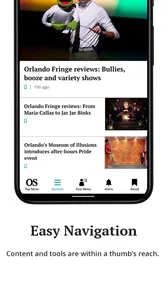
- Clean layout makes articles easy to browse on mobile devices.
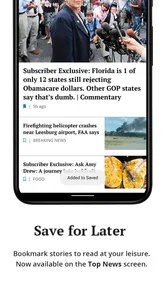
- Supports saving articles for reading at a more convenient time.
Cons
- Many premium articles require a paid subscription to access.
- Advertising can interrupt browsing and reduce reading comfort.
- Some stories may load slowly on weaker mobile connections.
- News coverage is focused mainly on the Orlando area.
- Frequent notifications may feel excessive for casual readers.













