Baltimore Sun
- 157.00
- 2.7
- Installs
- 50.00K
- Price
- Free

Screenshots
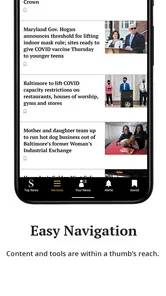
Analysis by Reviewed
I spent time with Baltimore Sun as a mobile news reader, and its main value is straightforward: it puts reporting from The Baltimore Sun in a format I can check when I am away from a computer. That sounds simple, but the effect depends heavily on what I want from a news app. If I care about Baltimore-focused coverage and prefer reading from one established local newsroom, the app has a clear purpose. If I want a broad, highly customizable news dashboard, I would look elsewhere.
This is a free News & Magazines app from Tribune Publishing Inc., available for Android devices running Android 8.0 or later. It is intended for everyone, so the basic audience is broad rather than limited to a specialist or mature readership. The app has passed the fifty-thousand-install mark, while its average rating sits at about 2.7 from roughly four hundred ratings. I see that combination as a reason to approach it with practical expectations: the publication itself may be useful, but the mobile experience will not suit every reader.
How Baltimore Sun turns local reporting into a daily mobile habit
I find the appeal of Baltimore Sun clearest when I treat it as a deliberate check-in rather than another feed to keep open all day. Its local focus gives me a reason to pause and ask which Baltimore stories could affect my plans, work, or conversations; from there, the next useful question is how well that habit fits the places and moments where I actually read.
The capability that matters most
The central capability is access to Baltimore Sun content whenever I want to read it. The important distinction is that this is not primarily a general-purpose news aggregator. Its identity is tied to one publication, one regional perspective, and the editorial choices made by that newsroom. That focus can be a strength when I want local context instead of a stream assembled from unrelated sources.
In everyday use, a single-publication app changes how I approach news. I am not opening it to compare dozens of outlets or build a custom feed around international subjects. I am opening it because I want to see what The Baltimore Sun considers worth covering, then read the selected stories in one place. That makes the app especially relevant to people who live in the Baltimore area, work there, follow its public life, or have a personal connection to the region.
I also like the clarity of that purpose. Many news apps compete for attention with a mixture of headlines, alerts, opinion, video, and stories from many publishers. Here, the decision is easier: if the Baltimore Sun newsroom is the source I want, the app is directly relevant; if it is not, the app has less to offer. That is a useful trade-off rather than a flaw by itself.
What using it feels like in practice
I would treat the app as a quick check-in tool rather than an entire information system. A realistic routine would be opening it during a commute, scanning the latest headlines, reading one or two stories, and returning later when there is time for a longer article. That workflow works best when I already know why I am there. I am looking for local developments, familiar subjects, or a deeper regional angle—not endless discovery from every corner of the internet.
More From Our News Desk

Weather by Xiaomi Review: Clear at a Glance, Less Clear Up Close

X Under Pressure: Can It Recover When Posting Goes Wrong?

Clash of Clans Is Won Between the Battles

Android Auto Makes the Case for Quieter Car Software

MobiOffice: Transforming Mobile Productivity with Seamless Integration

EA SPORTS FC™ Mobile Soccer: Redefining Mobile Sports Gaming
The app’s current version is 10.0.60, which is useful to know when checking compatibility or deciding whether an older phone can run it. It has also been around since January 18, 2011, so this is not a newly launched experiment. That long presence gives the app a recognizable role, although longevity alone does not guarantee that every part of the mobile experience will feel modern or equally polished.
One practical tip is to use it with a specific reading intention. For example, I might open it first thing in the morning for a local overview, then return in the evening for a more focused reading session. That approach is better than repeatedly refreshing it without a purpose, especially if I already use another app for national or international headlines. The Baltimore Sun becomes the local layer in my routine instead of trying to replace every other source.
A useful workflow for local awareness
The most effective workflow I found is to separate scanning from reading. On a busy morning, I would look through the available headlines and identify the stories that affect my day: transportation, public decisions, schools, local business, community events, or other Baltimore-area subjects. Later, I could come back to the items that deserve attention. This prevents a local news app from becoming another interruption and makes its focused coverage more manageable.
That habit also helps me judge the app fairly. A publication-focused reader is not necessarily supposed to provide the same breadth as a large aggregator. Its benefit is the chance to spend less time filtering irrelevant material. If I am already familiar with the kinds of stories I want from the Baltimore Sun, the narrow scope can feel efficient. If I expect a constantly personalized front page built around my changing interests, I may find the experience restrictive.
Another useful consideration is screen size. On a phone, I would use the app for quick updates and shorter sessions. On a larger device, a long article is naturally easier to follow, but the app’s usefulness still comes from the publication’s content rather than from turning a small screen into a full newspaper replica. Readers who dislike extended phone reading may prefer to use the app for discovery and continue longer sessions elsewhere when that is more comfortable.
When it makes the biggest difference
The strongest scenario is a person who wants Baltimore coverage without searching manually through a browser each time. Imagine someone who has moved away from the city but still follows local decisions, neighborhood changes, or community news. A focused app gives that reader a repeatable doorway into the publication. The same applies to a former resident, a family member, or someone whose work connects them to the region.
It can also help a local reader who is tired of broad national feeds. National platforms are useful, but they often push the biggest stories rather than the stories that explain what is happening close to home. A publication centered on Baltimore has a better chance of making local developments the main event. That is the key effect of the app’s capability: it changes the balance of attention, placing regional reporting ahead of the wider news cycle.
For a busy user, I would not recommend opening it with the expectation of reading everything. A better plan is to choose a few moments during the day and use the app as a deliberate local briefing. That reduces the temptation to treat news consumption as an endless scroll and makes the focused editorial identity more valuable.
The subscription and payment question
The app is free to download, but in-app purchases range from about one dollar to nearly two hundred dollars per item. That is important because “free” describes access to the app itself, not necessarily every possible way of using the publication. I would check the purchase details shown on my device before committing to anything, particularly if I am only testing the app or already have another way to read the Baltimore Sun.
For me, the sensible approach is to install it, explore the reading experience, and decide whether its local coverage earns a regular place in my routine before spending money. The purchase range suggests that different access options may be presented inside the app, so I would pay attention to the wording and renewal conditions displayed at the point of purchase. This is one area where a careful pause is worthwhile, especially for families sharing a device or anyone trying to keep app spending predictable.
The app’s Everyone age rating makes it approachable for a general household audience, but that does not mean every article will match every reader’s interests or sensitivities. News changes from day to day. I would still use ordinary judgment about what younger readers consume, even though the app is not restricted to adults.
Where the experience can feel limiting
The average rating of about 2.7 is the clearest warning sign for me. It does not tell me that every reader will have a poor experience, but it does suggest that the app has caused enough frustration for many users to lower confidence in the overall mobile product. I would not ignore that signal when choosing between this app and a browser shortcut or another news reader.
The focused design can also work against people who want variety. If I use a general news app, I can move from local reporting to technology, global affairs, sports, or business without changing tools. Baltimore Sun is more specialized. That specialization is exactly why it may be useful, but it also means I should not expect it to replace a broader news service.
There is a second trade-off involving control. A single publisher decides what appears and how it is organized. I may appreciate that editorial judgment, yet I have less control than I would in an RSS reader or multi-source aggregator. Those alternatives are better when I want to select individual publications, combine local and national sources, or arrange topics around a personal research project.
I would also avoid assuming that an app with a long history will feel identical across every phone. Android versions, screen sizes, and device settings can affect comfort and responsiveness. Since the minimum requirement is Android 8.0, owners of older hardware should check compatibility before relying on it as their daily news tool. That small step can prevent disappointment after installation.
How it compares with common alternatives
Compared with reading the Baltimore Sun through a mobile browser, the app is more convenient for someone who wants a dedicated entry point. I do not need to remember a web address or open a general browser first. The browser, however, may be preferable if I rarely read the publication, want to keep fewer apps installed, or prefer handling all news sites in one place.
Compared with an aggregator, this app offers less breadth but potentially more editorial consistency. An aggregator is better for comparing coverage and discovering stories from many publishers. The Baltimore Sun is better when my question is specifically, “What is this local newsroom reporting?” That distinction matters more than a feature checklist because it determines whether I will return to the app after the first few uses.
Compared with an RSS reader, the app requires less setup. I do not have to build a list of feeds or maintain it over time. The cost of that convenience is reduced customization. Someone who enjoys designing a personal reading system may prefer RSS, while someone who wants the Baltimore Sun’s own selection without configuration may find the dedicated app easier.
Compared with social media, the app gives me a calmer starting point for local news. Social platforms can surface useful reports quickly, but they also mix commentary, repetition, and unrelated posts. A publication app does not eliminate the need for judgment, yet it gives the reading session a clearer source and purpose. I would still cross-check major claims when the subject is important, but I would rather begin with a newsroom than an unpredictable social feed.
Who gets the most value from it
I think the best match is a reader with a continuing connection to Baltimore and a preference for one publication’s coverage. That includes residents, commuters, students, local professionals, and people who have moved elsewhere but still care about the area. The app makes sense when local relevance is more important than having every possible topic in the same feed.
It is also a reasonable choice for someone who wants a simple starting point and does not want to configure a personalized news system. The free installation lowers the barrier to trying it, and the broad age rating means it is not positioned as a niche professional tool. Still, I would judge it by repeated usefulness rather than by the low entry cost. If I only open it once every few weeks, a browser bookmark may be enough.
I would skip it if my main goal is worldwide coverage, aggressive personalization, or a single dashboard combining many publishers. I would also hesitate if I am especially sensitive to app reliability issues suggested by the modest average rating. In that situation, the Baltimore Sun website, a broader reader, or an RSS setup may fit better. The right alternative depends on whether I value direct access to this newsroom more than convenience across many sources.
My recommendation after using it
The app is most worthwhile when local focus is the feature you actually need. I would recommend trying it to anyone who wants Baltimore Sun reporting in a dedicated mobile format, especially if local awareness is part of a daily routine. I would not recommend installing it simply because it is free or because I want a complete replacement for every other news service.
My practical advice is to test it during a normal week rather than judging it from one opening. Use it for a morning scan, return for an article that matters to you, and compare that experience with your current browser or news reader. Notice whether the focused coverage saves time or whether the narrow scope makes you switch tools immediately. Before making any in-app purchase, read the displayed terms carefully and decide whether the publication has earned a place in your regular budget.
In the end, Baltimore Sun is a focused gateway rather than an all-purpose news command center. Its strength is the direct relationship between the app and Baltimore Sun journalism; its weakness is that readers expecting a richer, more flexible, or more consistently polished news platform may find it limited. For the right reader, that narrow purpose is useful. For everyone else, a browser or multi-source alternative will probably be the more practical choice.
Baltimore Sun Frequently Asked Questions
Who publishes the Baltimore Sun app, and what kind of app is it?
The Baltimore Sun app is a news and magazine app published by Tribune Publishing Inc. It is intended for readers who want to access journalism from The Baltimore Sun on a mobile device, with the store summary describing access to its award-winning content anytime, anywhere. The app is free to download, and its content rating is Everyone.
What devices and operating systems can run The Baltimore Sun app?
The Baltimore Sun app is available for Android and iOS devices. On Android, it requires version 8.0 or later, so check your device’s system settings before installing. The app’s current version is 10.0.60. Keeping your operating system and app updated can help you use the available features and maintain compatibility as the app changes.
What is The Baltimore Sun app used for?
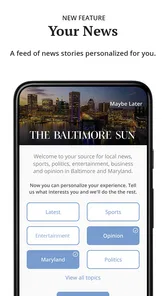
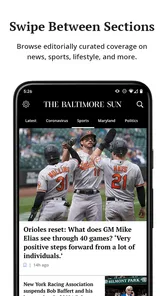
The Baltimore Sun app provides access to local and regional journalism from Baltimore and Maryland. After installing it, readers can browse breaking news, politics, sports, business, entertainment, opinion, and community coverage. The app is designed for people who want updates in one place, with articles and alerts that can be viewed while traveling or away from a desktop browser.
Is The Baltimore Sun app free to download and use?
The app can generally be downloaded without charge, but access to all of its journalism may depend on a Baltimore Sun subscription or the number of articles available to non-subscribers. Some content may be free, while premium stories and unlimited reading can require a paid plan. The app offers in-app purchases, so check the current terms, pricing, and trial conditions in the app or official store listing before subscribing.
What features are available in The Baltimore Sun app?
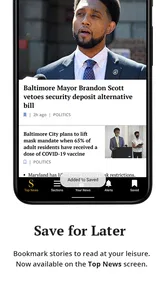
The Baltimore Sun app typically includes article browsing, category navigation, breaking-news notifications, saved or bookmarked stories, and sharing options. Depending on the version and your account, you may also find personalized content, subscriber-only articles, newsletters, puzzles, or other digital products. Features can change after updates, so availability may differ between Android, iPhone, and iPad.
Pros
- Reliable coverage of Baltimore-area news and local events.
- Includes in-depth reporting
- investigations
- and opinion pieces.
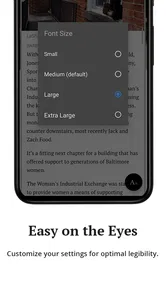
- Clean layout makes articles easy to read on mobile devices.
- Supports saving articles for later reading.
- Push notifications can keep you updated on breaking stories.
Cons
- Many premium articles require a paid subscription to access.
- Some content may load slowly on weaker mobile connections.
- Notification frequency can feel excessive for some readers.
- The app focuses heavily on Baltimore and nearby communities.
- Certain features may vary depending on your subscription plan.













