

OnStage: Worship Team Planner
- 10.00
- 4.3
- Installs
- 50.00K
- Price
- Free

Screenshots
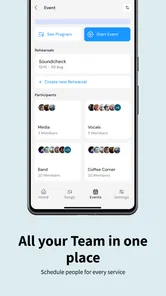
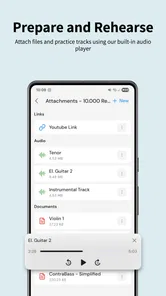
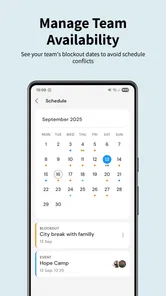
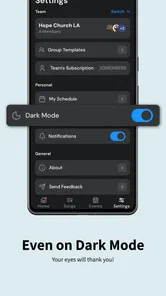
Analysis by Reviewed
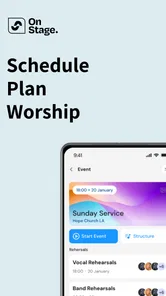
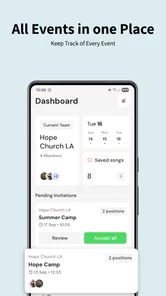
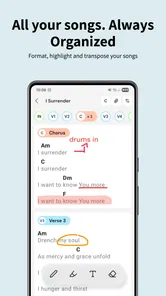
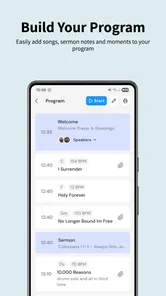
I usually judge a planning app by what happens after the first enthusiastic setup. It is easy for a tool to feel useful when everything is new; the real test is whether I still open it when Sunday is approaching, the team is busy, and nobody wants another complicated system to manage. OnStage: Worship Team Planner is aimed precisely at that recurring pressure. It is an events app from OnStage, built around organizing Sunday services, preparing setlists, and coordinating a worship team.
My first impression is that its appeal comes from putting service preparation in one focused place rather than treating every Sunday as a collection of scattered messages, notes, and last-minute decisions. The app is free to start, carries an Everyone age rating, and is available for Android devices running version 7.0 or later. That makes it approachable for a mixed team, especially when not every volunteer uses a recent phone.
After spending time with it, I see the real value as a repeatable weekly habit, not as a flashy event utility. It can help a worship leader turn a vague plan into something the team can follow. At the same time, it asks the leader to keep information current. If the person responsible stops maintaining the plan, the app cannot prevent the same confusion it was meant to solve.
From a promising first week to a useful Sunday routine
I find that the jump from trying OnStage for one service to relying on it every week depends less on adding more detail than on choosing a small, repeatable planning moment. In this section, I look at how a leader can turn early experimentation into a routine the team can follow, while keeping the plan clear enough to remain useful when Sunday gets busy.
Why the initial setup feels worthwhile
The first week is where OnStage makes its strongest case. A normal service may involve choosing songs, arranging their order, deciding who is involved, and communicating changes. Even when those tasks are simple, they become awkward when they live across group chats, handwritten notes, calendars, and memory. A dedicated worship team planner gives those decisions a common home.
I particularly like the way the app’s purpose stays close to the actual rhythm of a church service. It is not trying to be a general project-management platform with worship terminology added afterward. The focus on Sunday services and setlists makes the starting point clear: create the service plan, shape the musical flow, and give the team something concrete to work from.
That focus also makes the app easier to explain to volunteers. Instead of asking someone to learn a broad workplace system, a leader can frame it around a familiar question: what are we doing for this service, and what does each person need to know? For a small or medium worship group, that clarity may matter more than a long list of advanced options.
More From Our News Desk

 Gmail
GmailGmail in a Busy Inbox: Who Benefits Most?
From first account to crowded workday, Gmail earns its place through dependable search and flexible sorting—but its best fit depends on how much inbox maintenance you can tolerate.

 Prime Video
Switching to Prime Video: What Changes in Your Viewing Routine
Prime Video can make a compelling second home for streaming, but switching means learning a different catalog, rental layer, and route from browsing to playback.

 Universal TV Remote Control
Universal TV Remote Control Works Best as a Reliable Backup
A phone remote earns its place through quick setup and reliable habits. Here is how to get more from Universal TV Remote Control—and where its limits show.

 Weather - By Xiaomi
Weather by Xiaomi Review: Clear at a Glance, Less Clear Up Close
Xiaomi’s weather app makes everyday forecasts quick to scan, but its calm surface can leave useful details and recovery paths harder to find than they should be.

 X
XX Under Pressure: Can It Recover When Posting Goes Wrong?
A resilience-focused review of X, examining setup, mistaken posts, interruptions, weak connections, and the gaps that matter when recovery needs to be dependable.

 Clash of Clans
Clash of Clans Is Won Between the Battles
Its raids are quick; its community is a long-term project of coordination, teaching, rivalry, and shared responsibility—with all the friction that entails.
Latest News



A practical scenario for a busy week
Imagine a worship leader preparing for Sunday after a demanding workweek. The setlist is not finalized, one musician needs the latest order, and another volunteer wants to know whether they are expected to attend. Without a central plan, the leader may answer the same questions repeatedly and risk sending an outdated version. With OnStage, the intended workflow is to build the service plan and use it as the reference point for the team.
The benefit is not that the app removes every decision. It is that the decisions become visible and easier to revisit. If the order changes, the leader has a defined place to update it instead of relying on a message that may be buried by Saturday. That small change in behavior can reduce avoidable uncertainty, particularly for volunteers who serve only occasionally.
My advice during the first week is to start with one real upcoming service rather than trying to organize an entire season immediately. Build the next setlist, add the people who genuinely need access, and see where the team still asks questions. Those questions reveal what needs to be maintained. They also prevent the initial setup from becoming a large administrative project before anyone has developed the habit of using it.
What makes it more useful than a simple notes app
A notes app can hold a list of songs, but it usually leaves the surrounding context to the reader. OnStage is more useful when the service itself is the organizing unit. The setlist is not just a detached note; it belongs to a particular event and can be treated as part of a recurring planning process.
That distinction is easy to underestimate. A plain note may be quicker for one person making a private draft, while a worship team needs a shared point of reference. The planner approach becomes especially helpful when several people need the same current version and when a leader wants to look back at the shape of a service before preparing the next one.
Still, I would not describe it as a replacement for every communication channel. A team may continue using messages for urgent changes or personal reminders. The healthiest arrangement is to make OnStage the authoritative service plan and keep conversation elsewhere only when conversation is actually needed. If every detail is duplicated in multiple places, the app loses one of its main advantages.
The first-week friction I noticed
The first challenge is behavioral rather than technical: everyone has to agree that the plan inside the app is the plan that counts. If the leader updates a setlist there but continues sending separate versions in chat, volunteers may not know which source to trust. OnStage can organize information, but it cannot establish a team habit by itself.
There is also a natural learning curve around deciding how much detail to include. Too little information leaves musicians asking follow-up questions. Too much can turn a simple Sunday plan into something people avoid reading. I found the best approach is to include what affects preparation and participation, while leaving casual discussion out of the formal plan.
That balance is one of the less obvious skills involved in using this app well. The strongest setup is not necessarily the most detailed one. It is the one a volunteer can open quickly and understand without needing a separate explanation from the leader.
Whether it earns a place in the monthly routine
A monthly routine is a better test than a successful first setup: it shows whether the planner still helps when services vary and the team’s habits settle. I consider what makes continued use worthwhile, where upkeep can become a burden, and how to decide whether a focused worship planner fits the way your group already works.
Recurring value comes from repetition
After the novelty fades, OnStage has a sensible reason to remain installed: worship planning repeats. A service planner is not useful only for a special event or one unusually complicated Sunday. Its value grows when the same basic process is followed regularly and the team learns where to look.
That recurring role separates it from a one-off checklist. A checklist may help a leader remember tasks, but it does not necessarily help a group coordinate around a service. OnStage is better suited to the shared planning layer, where the order of the service and the people involved need to stay aligned.
I would recommend setting a fixed planning moment each week. For example, the leader can create or review the upcoming service at the same point in the week, then make one deliberate update after the final rehearsal or decision. The exact schedule is less important than having a predictable point at which the app becomes current.
This is also where the app’s free-to-start model is attractive. Someone can test whether the workflow fits their congregation before committing the team to a paid system. However, in-app purchases range from $6.49 to $649.99 per item, so I would examine the purchase screen carefully and decide who, if anyone, should authorize spending. A free starting point does not mean every possible expansion has the same cost.
How I would use it across several services
For month-to-month use, I would keep the process intentionally simple. First, create the service event. Next, shape the setlist while decisions are still flexible. Then, make sure the relevant worship team members can work from the current plan. Finally, review the service before it begins and correct anything that would cause confusion.
The important insight is to treat updates as part of planning rather than as emergency cleanup. If a song moves position or a volunteer changes, update the central plan as soon as the decision is made. Waiting until the last possible moment increases the chance that someone prepares from an older version.
I would also avoid using the app as a storage area for every thought about worship ministry. A service plan should answer practical questions about that service. Broader creative ideas, pastoral notes, and long-term team discussions may belong elsewhere. Keeping the event record focused makes it more likely that volunteers will actually consult it.
Who benefits most over time
OnStage seems best suited to worship leaders, music directors, and teams that regularly coordinate more than one person. It can be particularly helpful when volunteers rotate, when the lineup changes from week to week, or when a leader is tired of repeating the same logistical information.
It may also suit a growing team that has outgrown a single shared document but does not want the weight of a broad church-management platform. The dedicated focus can make adoption less intimidating, provided the leader is willing to establish a clear routine.
On the other hand, a solo musician or a very small group with an already reliable informal process may not gain much. If everyone already knows the service order and changes are rare, opening a separate planner could feel like extra work. The app earns its place when coordination is the problem, not merely because planning software exists.
How it compares with familiar alternatives
Compared with group messaging, OnStage offers a more stable reference point. Messages are good for quick questions, but they are poor archives for a changing setlist. Important details can disappear into conversation, and a late correction may not be seen by everyone. The planner approach is stronger for the final version of a service.
Compared with a shared document, the advantage is focus. A document can be flexible and inexpensive, but it often depends on one person maintaining formatting and making sure the right section is used. OnStage is designed around the event and worship-team workflow, which may reduce the amount of interpretation required from volunteers.
Compared with a full church-management or project-management platform, it appears more approachable for the specific task of service planning. A larger system may be better if a congregation needs attendance records, pastoral administration, finance, or broad volunteer operations in the same environment. OnStage is not the choice I would make simply because an organization wants one tool for everything.
Maintenance is the deciding factor
The ongoing burden is moderate, but it is real. Someone must create services, keep setlists accurate, reflect personnel changes, and communicate the expectation that the app is worth checking. That responsibility usually falls to a leader, so the app does not eliminate administration; it organizes it.
The best maintenance practice is to make one person clearly responsible for the official plan while allowing the wider team to refer to it. Shared responsibility can sound democratic, but it can also mean nobody notices that a change was never entered. A named owner gives the workflow a reliable center.
I would also review old service plans periodically and remove clutter where appropriate, rather than allowing the workspace to become a long trail of abandoned drafts. The point is not to preserve every planning thought forever. It is to make the next service easy to understand.
Where fatigue can appear
The main source of fatigue is duplicate work. If a leader has to enter the same information into OnStage, a chat, a calendar, and a document, the app may become another obligation instead of a simplifier. The team should agree which information belongs in the planner and which channel handles urgent conversation.
Another potential strain is uneven adoption. A few committed users may keep the plan current while others continue relying on personal messages. That creates pressure on the leader, who then has to maintain the app and answer questions from people who did not check it. A short team demonstration and a clear expectation can help, but adoption still depends on local habits.
The purchase structure may also deserve attention for churches managing shared budgets. The app is free to start, yet the listed in-app purchase range is wide. I would not assume that a free installation tells the whole financial story. Before rolling it out to a large team, the person responsible for the account should understand which functions require payment and whether the cost matches the group’s actual needs.
There is a further trade-off between structure and spontaneity. A planned setlist helps people prepare, but worship services can change for good reasons. Leaders should avoid treating the app as a rigid script. It works best as a current plan that can be adjusted, not as a substitute for judgment during the service.
Technical reach and trust signals
The current version is 1.8.18, and the app was released on March 18, 2025. Those details matter less than the practical question of whether the app fits the devices a team already owns. The minimum Android requirement of 7.0 is relatively accommodating for groups with a mixture of older and newer phones.
Its store presence shows a 4.3 average from around 371 ratings, with over 50K installs. I read that as a useful sign of interest and generally positive reception, but not as a guarantee that every worship team will find the workflow natural. A planning app succeeds through local consistency, so a small trial with the actual people who will use it tells me more than a rating alone.
The Everyone content rating also makes it easier to consider for a broad church volunteer group. That does not remove the need for sensible account and communication practices, but it means the app is not positioned as something restricted to a narrow age group.
Questions I would answer before inviting the team
The first question is whether a leader can make the app the single source of truth. If the answer is no, I would not introduce it yet. The tool is most valuable when people know that the setlist and service details inside it are the current version.
The second is whether the team has enough recurring coordination to justify a dedicated planner. If services are simple and the same people serve every week, a shared note may remain faster. If changes, rotations, and repeated questions are common, OnStage has a clearer advantage.
The third concerns payment. Because the app is free to start but includes in-app purchases from $6.49 to $649.99 per item, I would inspect the available options before promising that the whole workflow will remain free. That conversation is easier before the team becomes dependent on a setup.
The fourth is who will maintain it. If no one owns the weekly update, the app will gradually become stale. I would assign that role before inviting volunteers, even if the role rotates among trusted leaders.
Finally, I would ask whether the team wants a focused worship planner or a broader church operations system. OnStage makes more sense for the former. A congregation seeking one platform for many administrative departments may be better served by a larger alternative, even if it feels less direct for setlists.
My long-term verdict
OnStage: Worship Team Planner earns lasting space when it becomes part of the weekly preparation rhythm. Its strongest quality is not novelty; it is the possibility of replacing scattered service details with one shared, current plan. For worship leaders who regularly coordinate volunteers and setlists, that can be a meaningful improvement.
I would recommend it to a team willing to establish two simple rules: the app contains the official service plan, and someone is responsible for keeping it updated. Without those rules, its benefits are easy to dilute through duplicate messages and neglected records.
I would skip it for a group that already coordinates effortlessly through a lightweight method, or for a church looking for a complete administrative suite rather than a focused events tool. I would also approach the purchase options deliberately instead of assuming the free starting point covers every need.
Overall, I see OnStage as a practical candidate for a worship team’s regular toolkit, especially when Sunday preparation has become harder to track than it should be. It does not remove the human work of choosing music, assigning people, or adapting to change. What it can do is give that work a dependable place to live. If your team will actually maintain the plan, the app has a good chance of remaining useful long after the first week.
OnStage: Worship Team Planner Frequently Asked Questions
Who is OnStage: Worship Team Planner intended for?
OnStage: Worship Team Planner is an events app from OnStage for people organizing worship services and the teams involved in them. Worship leaders, church coordinators, and team members may find it relevant when they need a shared place to plan service details. Its focus is practical coordination around worship gatherings rather than general-purpose event planning.
What is OnStage: Worship Team Planner used for?
OnStage: Worship Team Planner is designed to help worship teams organize services, rehearsals, songs, musicians, and setlists in one place. After reviewing its workflow, it is particularly useful for worship leaders and church coordinators who need to communicate arrangements, assign roles, and keep everyone informed about upcoming services without relying on scattered messages or spreadsheets.
Is OnStage: Worship Team Planner suitable for small churches and volunteer teams?
Yes, the app can be useful for both small volunteer groups and larger worship ministries. Smaller teams may appreciate having a simple central place for schedules and song plans, while larger teams can benefit from clearer coordination between singers, instrumentalists, and leaders. The actual usefulness will depend on how consistently every team member updates and checks the shared information.
Can I manage songs, setlists, and musician assignments in the app?
The app focuses on the practical planning tasks required before a worship service, including organizing songs and preparing service plans with the people involved. Depending on the current version and account setup, available options may include assigning team members to particular services or roles, sharing arrangements, and reviewing upcoming plans. It is worth checking the latest listing for exact feature availability.
Does OnStage: Worship Team Planner work on both Android and iPhone?
OnStage: Worship Team Planner may be offered through different platforms or access methods depending on the developer’s current distribution. Before downloading, users should confirm compatibility with their device, operating system version, and region in the official Google Play or Apple App Store listing. Checking these details is especially important for team members who use different phones.
Pros
- Clear service planning keeps every team member aligned.
- Easy access to song details
- schedules
- and team assignments.
- Useful notifications help reduce missed rehearsals and services.
- Supports better communication between worship leaders and volunteers.
- Helpful for churches managing recurring worship teams and rotations.
Cons
- Some features may require a paid church or team subscription.
- New users may need time to learn the planning workflow.
- Depends on internet access for timely updates and synchronization.
- Limited usefulness for individuals outside a worship ministry.
- Notifications can become overwhelming when several teams are active.











