

OneBlinc - Financial tools
- 671.00
- 4.6
- Installs
- 100.00K
- Price
- Free

Screenshots
Analysis by Reviewed
When an unexpected expense lands between paydays, the real problem is often timing rather than income. That is the situation I kept in mind while testing OneBlinc, a free finance app from OneBlinc that lets eligible users request access to wages and send the money to a linked account. Its appeal is easy to understand: instead of turning immediately to a credit card, overdraft, or a separate short-term lender, you have a focused tool built around getting part of your earned pay when you need it.
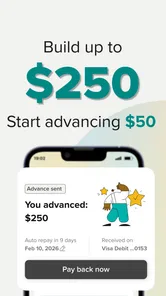
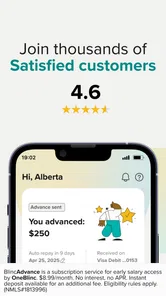
I like the idea because it addresses a very specific cash-flow gap. It is not trying to replace a bank account, budgeting app, investment service, or full personal-finance dashboard. The app’s store summary describes access to wages up to 250 dollars through a linked account, so I see it as an emergency bridge rather than a general money-management solution. That distinction matters, because the best experience comes when you use it for a clearly defined need and already understand how you will manage the next payday.
How OneBlinc feels when speed matters
The first thing I noticed about this kind of service is that perceived speed depends on more than the app opening quickly. A clean screen and a short request flow are useful, but the important moment is what happens after you connect the account and ask for access to wages. OneBlinc presents itself around that single purpose, which makes it easier to understand than a broad financial app crowded with charts, offers, and unrelated tools.
That focused design is a genuine strength. If I were using it because a utility bill, transport cost, or necessary purchase could not wait, I would rather have a direct path than spend time navigating a complicated financial marketplace. The app is free to install, and its current version is 7.12.0, so keeping it updated is sensible when dealing with account connections and money-related requests.
Still, I would not confuse a simple interface with a guaranteed instant result. A request can involve linking an account, checking eligibility, and moving funds to that account. Those steps are part of the experience, and a user should begin before the last possible minute. My practical advice is to connect and review the process while your finances are calm, not for the first time during an urgent evening payment.
There is also an important difference between needing money now and needing certainty about exactly when it will arrive. OneBlinc may feel fast when the account is already connected and everything proceeds normally, but I would leave room for verification or transfer timing. Anyone facing a deadline that cannot move should treat the app as a possible option, not as the only plan.
What the focused workflow is good for
The most useful workflow is to give the request a job before starting it. For example, if I needed to cover a necessary prescription until payday, I would request only what solves that immediate gap, confirm the destination account, and note how the amount will affect my next pay cycle. That is more disciplined than opening the app whenever the balance looks uncomfortable.
More From Our News Desk

 Instagram
Instagram’s Power Comes From Its Place in Your Phone
A close look at how Instagram turns Meta’s reach, recommendation systems and everyday camera habits into durable platform power—and what that costs users.

 Gmail
GmailGmail in a Busy Inbox: Who Benefits Most?
From first account to crowded workday, Gmail earns its place through dependable search and flexible sorting—but its best fit depends on how much inbox maintenance you can tolerate.

 Prime Video
Switching to Prime Video: What Changes in Your Viewing Routine
Prime Video can make a compelling second home for streaming, but switching means learning a different catalog, rental layer, and route from browsing to playback.

 Universal TV Remote Control
Universal TV Remote Control Works Best as a Reliable Backup
A phone remote earns its place through quick setup and reliable habits. Here is how to get more from Universal TV Remote Control—and where its limits show.

 Weather - By Xiaomi
Weather by Xiaomi Review: Clear at a Glance, Less Clear Up Close
Xiaomi’s weather app makes everyday forecasts quick to scan, but its calm surface can leave useful details and recovery paths harder to find than they should be.

 X
XX Under Pressure: Can It Recover When Posting Goes Wrong?
A resilience-focused review of X, examining setup, mistaken posts, interruptions, weak connections, and the gaps that matter when recovery needs to be dependable.
Latest News



A second useful habit is checking the linked account before submitting anything. An old account, a recently changed bank connection, or an account that is not the one you actively use can turn a quick request into a frustrating recovery task. This is not glamorous advice, but it is exactly the sort of small check that protects the speed advantage the app is meant to provide.
I would also keep notifications and account-access details organized. If the app asks me to confirm identity or reconnect a financial account, I want to know where the relevant information is rather than improvising under pressure. The practical benefit is not a hidden button; it is reducing avoidable pauses in a process where timing is the whole point.
How it behaves during repeated or heavy use
Heavy use for a finance app does not necessarily mean running it for hours. It means opening it repeatedly around a pay cycle, checking a request, reviewing the linked account, or trying again after an interruption. In those moments, I value stability and clarity more than visual effects. OneBlinc’s narrow purpose should help keep the experience less cluttered than a full banking suite, but repeated money requests still deserve caution.
I would not use it as a revolving source of spending money. Even when access to wages solves a real short-term problem, taking money early can leave less available later. The trade-off is easy to overlook because the immediate balance feels better. My rule would be to use the app only when the expense is necessary and the next payday can absorb the smaller remaining amount.
There is a realistic everyday example here. Imagine a commuter whose car repair is essential for getting to work, but the repair falls shortly before payday. OneBlinc could be worth considering if the person has a linked account and a clear repayment-through-pay timing plan. The same person should probably skip it for an optional purchase, because moving future wages forward for convenience can turn a minor want into a tighter week.
During repeated use, I would also avoid submitting duplicate requests simply because the first screen does not change immediately. In financial apps, impatient tapping can create confusion about what was actually sent. I prefer to check the request status, wait for the app to respond, and keep a simple note of what I asked for. That small workflow is especially valuable when the phone is slow or the connection is unreliable.
Reliability, recovery, and account confidence
Reliability here means more than avoiding crashes. I want the app to make the state of a request understandable, preserve my account connection sensibly, and give me a clear route back when something goes wrong. A financial tool should never leave me guessing whether a tap created a request, whether the linked account is still valid, or whether I need to take action.
My confidence would be highest when I use a stable internet connection, keep the app current, and verify the destination before confirming. Those are ordinary precautions, but they matter more for OneBlinc than they would for a casual entertainment app. A failed video can be restarted; a misunderstood money request can affect a real budget.
Recovery is another reason not to wait until an emergency. If I changed banks, lost access to an old email address, replaced my phone, or encountered an account-verification prompt, I would want time to resolve the issue. I would keep my sign-in and financial-account information available through safe channels, never share sensitive details in an informal message, and contact official support through the app or the developer’s recognized support route if needed.
I also appreciate that the app’s purpose is easy to explain to another person. If a family member asked what it does, I could describe it as a wage-access tool rather than pretending it is a complete banking replacement. That clarity helps with responsible use. It also makes the limitations clearer: the app cannot solve a recurring deficit if the underlying income and expenses remain out of balance.
Device demands and practical constraints
OneBlinc is listed for Android devices running version 7.0 or newer, which gives it a broad compatibility range for people who do not own a recent phone. That is helpful, especially for a finance tool that may be used by someone keeping an older device for budget reasons. Even so, compatibility is not the same as a perfect experience on every phone.
On an older handset, I would expect the main pressure points to be available storage, background activity, outdated system components, and an unstable connection rather than demanding graphics. Finance apps generally benefit from a responsive network and a device that can safely handle account authentication. If the phone is nearly full or constantly closing apps, I would clear space and update the operating system before attempting an urgent transfer.
Resource demands are also about trust. I would be uncomfortable using any financial app on a shared or poorly protected device, even if the app itself is lightweight. A screen lock, current system security, and careful handling of notifications are more important to me than saving a small amount of storage. I would avoid leaving account details visible on a public device and would sign out or secure the phone when other people can access it.
The age rating is Everyone, but that does not mean every financial decision is suitable for every person. Younger users and anyone unfamiliar with wage-access products should involve a responsible adult or trusted adviser before moving earned pay forward. The label describes audience suitability for the app, not a guarantee that borrowing or early access is financially wise in every household.
Where it sits beside ordinary alternatives
Compared with an overdraft, OneBlinc feels more purpose-built for someone who wants to access wages rather than simply spend beyond an account balance. An overdraft may be integrated into a bank account, but it can be easy to treat as extra money. The wage-access approach at least frames the funds as part of income arriving earlier, which encourages me to think about the next payday.
Compared with a credit card, the app may be more direct for a one-off timing problem, while a card can be more flexible for purchases and recurring payments. A credit card can also create a longer repayment cycle, so neither option is automatically better. I would choose based on the nature of the expense, the total cost involved, and whether I can repay without carrying the problem forward.
Compared with a budgeting app, OneBlinc solves a different problem. A budget helps me prevent a shortfall by planning income and expenses; this app helps address the shortfall after it appears. I would pair the two ideas mentally, even if I do not use another app: request only what is necessary, then adjust the upcoming budget so the same emergency does not repeat.
Compared with asking an employer about payroll timing, the app may be more convenient for a user who wants a self-service route, while an employer conversation may be better when the issue is a regular payroll mismatch. If someone needs early access every pay period, I would investigate the cause rather than relying indefinitely on a short-term bridge. OneBlinc is most convincing as occasional support, not as a substitute for stable cash-flow planning.
Who should use it, and who should pass
I would recommend trying it to a worker who has a genuine short-term gap, receives wages in a way compatible with the service, and can link the correct account. It is especially appealing to someone who wants a focused finance tool instead of a large banking platform. The free price removes an installation barrier, although free access should never be interpreted as free money; the effect on the following pay cycle still deserves careful thought.
I would be more cautious with anyone whose expenses already exceed income every month. Early wage access can make the current week look manageable while making the next one harder. In that situation, a conversation with a bank, employer, debt adviser, or trusted financial counselor may be more useful than another short-term request.
I would also skip it if I cannot confidently identify the linked account, if my phone is shared, or if I need funds for a deadline that allows no room for transfer or verification delays. Those are not criticisms of the app’s concept; they are signs that the situation requires a more predictable or more comprehensive solution.
The app has attracted a substantial audience, with over 100 thousand installs and a 4.6 average from around 4.8 thousand ratings. That level of adoption makes it easier for a curious user to take the product seriously, but popularity does not remove the need to inspect each request carefully. My own decision would still rest on the specific expense and my next-payday plan.
My performance verdict after using it
OneBlinc succeeds because it stays centered on a recognizable financial moment: wages are coming, but an important expense arrives first. I find that focus more useful than a collection of loosely related money tools. The experience should feel quickest when the account is prepared, the phone is secure and responsive, and the user knows exactly how much is needed.
Its main weakness is not that it tries to do too little; it is that a narrow solution can be mistaken for a complete financial safety net. The app cannot make an unaffordable pattern affordable. It can potentially smooth timing, but it cannot replace an emergency fund, a realistic budget, or a conversation about recurring income problems.
OneBlinc is a sensible option for a carefully chosen short-term need, particularly when the alternative is a more expensive or less controlled reaction. I would install it before an emergency, prepare the linked account, test my understanding of the request flow, and use it sparingly. If you can accept that discipline, this free finance app from OneBlinc is worth considering; if you need ongoing credit, guaranteed immediate cash, or full budgeting guidance, a traditional bank service or dedicated financial counselor is likely the better fit.
OneBlinc - Financial tools Frequently Asked Questions
Is OneBlinc free to download, and what should I know before installing it?
OneBlinc is a finance app from OneBlinc, and it is free to download. It is rated for Everyone, so its audience is not limited by an age-based content restriction. Before installing, remember that a free download does not necessarily mean every financial service inside the app is free; review the terms and costs of any offer before you accept it.
What does OneBlinc’s wage-access feature do?
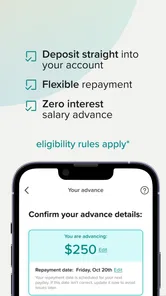
OneBlinc’s main store description says users can access wages up to 250 dollars, with funds sent directly to a linked account. This can be useful when you need access to part of your earnings before your usual payday, but availability and terms may depend on your circumstances and the offer shown in the app. Read the repayment details before using the feature.
What is OneBlinc, and what financial tools does it offer?
OneBlinc is a financial services app designed to help eligible users manage short-term cash needs and everyday money tasks from a mobile device. Depending on eligibility and availability, its tools may include paycheck-linked advances, spending or payment features, budgeting support, and account management. The exact products, limits, fees, and repayment terms can vary, so review the offer details carefully before accepting anything.
Who can use OneBlinc, and what information is required to sign up?
OneBlinc is not necessarily available to everyone. During registration, the app may verify your identity, employment or income information, banking details, and other eligibility criteria. You should provide accurate information and use an account that belongs to you. Approval, available features, and borrowing limits can depend on factors such as your income, transaction history, location, and the company’s current policies.
Does OneBlinc charge fees or interest?
The cost of using OneBlinc depends on the specific financial product and offer presented in the app. Some services may include membership charges, transaction fees, expedited-transfer fees, or other costs, while borrowing products may have their own pricing and repayment conditions. Before confirming a transaction, read the fee summary, annualized cost information where provided, and repayment schedule so there are no surprises.
Pros
- Builds credit history through eligible reported payments
- Offers tools to help manage cash flow between paychecks
- Clear mobile interface makes account activity easy to review
- May provide access to financial education and budgeting guidance
- Useful for users seeking alternatives to traditional overdraft products
Cons
- Eligibility and available limits depend on personal financial information
- Membership or service fees may apply to certain features
- Credit-building results are not guaranteed for every user
- Some services may only be available in selected U.S. states
- Late or missed payments could negatively affect your finances











