

One Step
- 505.00
- 4.4
- Installs
- 50.00K
- Price
- Free

Screenshots
Analysis by Reviewed
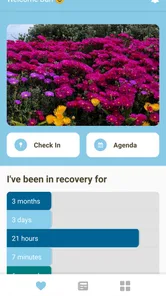
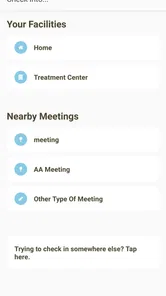
Recovery work in a house setting depends on small, reliable habits: checking in, attending meetings, and making sure the right people can find support when it matters. One Step is built around that narrow but important routine. Developed by ONE STEP SOFTWARE, this free House & Home app gives house staff a focused place to manage recovery-related contact rather than asking them to piece everything together from texts, calendars, and separate map tools.
I found the app most interesting as a practical coordination tool, not as a replacement for counseling, emergency services, or a complete case-management system. Its value comes from reducing the number of steps between a planned check-in, a meeting, and location sharing. That sounds simple, but in a busy house the difference between a clear routine and a scattered one can be significant.
Where the first-use experience can feel difficult
The main challenge is understanding what role the app is meant to play. The short name, One Step, does not explain much by itself, and someone expecting a general home organizer may be unsure why recovery check-ins and meetings belong in a House & Home category. I would approach it as a staff-facing support tool for recovery housing, where consistency and communication matter more than a long list of personal productivity features.
That distinction affects how you should judge it. This is not the kind of app I would install to manage rent, chores, maintenance requests, or household shopping. Its purpose is more specific: helping house staff keep track of recovery support activities and share relevant location information. If that matches your role, the focused design can be an advantage. If it does not, the app may feel too limited from the start.
A second point of friction is that the usefulness of a coordination app depends on everyone using the same routine. One staff member checking in through the app while another continues to rely only on messages can leave information split between places. I would therefore agree on a simple house rule before introducing it: decide which activities belong in One Step, who is expected to update them, and when staff should look for changes.
That is a workflow decision rather than a technical setting, but it prevents a common mistake. People often blame an app when the real problem is that nobody has defined what “updated” means. For example, does a meeting entry mean it was planned, attended, or simply shared with the team? The app can support a routine, but staff still need to agree on the meaning of each action.
The audience also matters. The app is suitable for an everyday, broad audience from an age-rating perspective, yet the subject matter is specialized. A resident looking for a personal recovery journal may not find the staff-oriented approach comfortable. Likewise, a large organization that needs detailed reporting, formal records, or complex permissions should assess whether a focused check-in tool is enough for its procedures.
More From Our News Desk

 Gmail
GmailGmail in a Busy Inbox: Who Benefits Most?
From first account to crowded workday, Gmail earns its place through dependable search and flexible sorting—but its best fit depends on how much inbox maintenance you can tolerate.

 Prime Video
Switching to Prime Video: What Changes in Your Viewing Routine
Prime Video can make a compelling second home for streaming, but switching means learning a different catalog, rental layer, and route from browsing to playback.

 Universal TV Remote Control
Universal TV Remote Control Works Best as a Reliable Backup
A phone remote earns its place through quick setup and reliable habits. Here is how to get more from Universal TV Remote Control—and where its limits show.

 Weather - By Xiaomi
Weather by Xiaomi Review: Clear at a Glance, Less Clear Up Close
Xiaomi’s weather app makes everyday forecasts quick to scan, but its calm surface can leave useful details and recovery paths harder to find than they should be.

 X
XX Under Pressure: Can It Recover When Posting Goes Wrong?
A resilience-focused review of X, examining setup, mistaken posts, interruptions, weak connections, and the gaps that matter when recovery needs to be dependable.

 Clash of Clans
Clash of Clans Is Won Between the Battles
Its raids are quick; its community is a long-term project of coordination, teaching, rivalry, and shared responsibility—with all the friction that entails.
Latest News



What I would clarify before relying on it
Before making One Step part of a house routine, I would answer a few practical questions with the team. Who creates a meeting entry? Who checks that a check-in has happened? What should staff do if someone cannot update the app? Which situations require a phone call or an emergency response instead of a location-sharing action?
These questions are especially important because location sharing can be useful without being a complete safety system. I would never treat an app update as proof that someone is safe, and I would not delay direct help while waiting for a status to change. Used properly, the app can make ordinary coordination clearer; it should not replace judgment or established emergency procedures.
Setup checks that prevent avoidable problems
Installation itself should be straightforward because the app is free and available for the minimum operating-system level listed for it. Still, I would begin by checking that the phone has enough free space, a stable connection during installation, and an operating system compatible with the current release. The current version is 2.7.2, so keeping the app updated is a sensible first step when troubleshooting unexpected behavior.
After installing, I would open the app while connected to the internet and complete the initial setup without rushing. The goal is not merely to get past the first screen. It is to confirm that the staff member can reach the areas used for check-ins, meetings, and location sharing, and that the app behaves consistently after closing and reopening it.
A useful setup test is to use a low-risk, ordinary example rather than waiting for a real concern. Create or review a routine meeting, perform a sample check-in according to the house process, and test location sharing only with the people who are supposed to receive it. This exposes confusion about timing or recipients before the feature is needed in a stressful moment.
I would also make sure each staff member knows which account or device they are expected to use. Shared phones can create uncertainty about who completed an action, while several personal devices can make the workflow inconsistent. The app may be functioning correctly even when the team is looking at different devices or expecting information to appear somewhere else.
When an action appears not to save, my first checks would be practical: confirm the connection, wait briefly, reopen the relevant screen, and verify whether the item actually appeared before trying repeatedly. Repeated taps can create confusion if the first attempt succeeded but the screen did not refresh immediately. If the problem continues, restarting the app and then the phone is a reasonable general troubleshooting step.
I would avoid changing several settings at once. If location sharing is the issue, check the phone’s location controls and whether the app is allowed to use the relevant device function. If meetings are the issue, focus on the meeting workflow rather than altering unrelated phone settings. Narrow troubleshooting makes it easier to tell whether the difficulty is with the app, the device, or the team’s process.
Make the first routine deliberately simple
My preferred rollout would start with one recurring staff routine rather than every possible use at once. For example, the team could use One Step for a morning check-in and a single meeting workflow for several days. Once everyone understands where to look and what counts as complete, location sharing can be introduced for the situations where it genuinely helps.
This gradual approach has a less obvious benefit: it reveals whether the app is reducing work or merely adding another obligation. If staff must duplicate every action in a paper log, a messaging group, and the app, adoption will suffer even if the software works well. The best use is the one that replaces scattered coordination, not the one that creates a second copy of it.
I would also write a short internal instruction in plain language. Something like “check in after the agreed activity, review the meeting details before leaving, and use location sharing only through the house procedure” is more useful than telling people simply to “use the app.” Clear instructions are particularly helpful for rotating staff who were not present when the workflow was introduced.
Building a recovery workflow that survives busy days
Once setup is complete, the app’s strongest role is routine reinforcement. Check-ins work best when attached to an existing moment in the day rather than treated as an extra task to remember later. Staff might review the relevant status during a scheduled handover, then address missing updates while the context is still fresh.
Meetings benefit from the same discipline. Instead of treating the app as a passive calendar, I would use it as a shared reference point before and after a planned activity. Beforehand, staff can confirm what is expected. Afterwards, they can follow the house process for recording or checking the outcome. The important detail is agreeing on when the action happens; an entry made hours later may be less useful than a timely update.
Location sharing requires more care because it can feel more intrusive than a normal check-in. I would reserve it for clearly defined situations, explain the purpose to the people involved, and avoid turning it into constant monitoring by default. A focused request connected to a real coordination need is easier to understand than an open-ended expectation that someone should always be visible.
One practical insight is to separate “the person has completed the routine” from “the person needs help.” A check-in can confirm that an expected action occurred, but it should not be interpreted as a full assessment of wellbeing. Staff still need to notice changes in behavior, communicate directly, and follow their established support procedures. The app is most useful when it handles the administrative signal while people handle the human conversation.
Another useful habit is to review missed updates in context. A missing check-in might come from a dead battery, poor connectivity, a forgotten step, or a genuine concern. Treating every missing update as proof of a problem creates unnecessary alarm, while treating every one as a harmless technical issue creates risk. One Step can help identify where attention is needed, but it cannot make that judgment for staff.
How it compares with familiar alternatives
The usual alternative is a mixture of group messaging, paper notes, shared calendars, and phone calls. Those tools are flexible, and a small house may already know how to use them. Their weakness is that important updates can disappear in a fast-moving conversation or remain on one person’s device. One Step is appealing when the team wants a more focused place for recovery check-ins, meetings, and location sharing.
Messaging apps are usually better for conversation and urgent back-and-forth. A general calendar is often better for broad scheduling. A paper log may remain useful where phones are unavailable or where the organization requires a physical record. I would not replace those tools automatically. Instead, I would give One Step the specific coordination tasks it handles best and keep other tools for communication or formal procedures.
That trade-off explains who should skip it. If your household has no recovery-support workflow, installing it will probably add clutter. If you need advanced reporting, extensive records, or a broad resident-management platform, a more comprehensive system may be a better fit. The focused nature that makes One Step approachable for a recovery house can also make it unsuitable for a larger administrative operation.
When the app is not the cause of the problem
Not every failed check-in or missing update points to a software fault. A phone with a weak connection, a depleted battery, an outdated operating system, or a user who signed out can produce the same visible result as an app error. Before reinstalling, I would check the device, connection, and account situation, then ask whether another staff member can complete the same action successfully.
That comparison is useful because it separates a single-device problem from a wider service issue. If one phone struggles while another works, focus on the first device. If several people see the same problem at the same time, record what happened, avoid creating duplicate entries, and use the team’s backup communication method while investigating further.
Location issues deserve their own caution. A phone may be indoors, disconnected, low on power, or configured in a way that prevents the expected location behavior. Even when sharing works, the information may not reflect a person’s current situation perfectly. I would use it as one piece of coordination information, never as a substitute for direct contact when there is a serious concern.
Privacy and trust can also affect results. Someone who does not understand why location sharing is requested may delay or refuse it, and that is a communication problem as much as a technical one. Explain the house procedure in advance, keep requests connected to a legitimate support purpose, and make sure staff know what to do when sharing is unavailable. A transparent process is more dependable than silent assumptions.
Support should follow the simplest path first: check the connection, reopen the app, restart the device, confirm the operating-system requirement, and test one action at a time. Keep notes about the exact screen, action, and timing if a problem persists. That information is far more useful than saying only that “the app does not work,” especially when the issue appears intermittently.
My practical verdict after using it as a staff tool
One Step earns its place when a recovery house needs a focused routine for check-ins, meetings, and location sharing. I like that it concentrates on the moments staff actually need to coordinate instead of presenting itself as a general-purpose household manager. The free price also makes it easy to test with a small team before deciding whether it fits the house’s working habits.
Its public reception is encouraging: it holds a 4.3 average from around 1.2 thousand ratings, with over 500 reviews and more than 50 thousand installs. Those figures suggest that it has found a real audience, although popularity alone should not decide whether it matches your procedures. I would judge it by whether staff can complete the agreed workflow consistently and whether residents understand how the support process works.
The developer, ONE STEP SOFTWARE, has kept the product’s identity closely tied to its purpose. That focus is its main strength and its main limitation. You get a tool aimed at recovery-house coordination, not a complete communication platform, medical record, emergency service, or household operations suite.
My recommendation is to try it with one clearly defined routine, test it on the actual devices staff use, and keep a backup communication method available. If the app removes duplicated messages and makes ordinary follow-up easier, it is a sensible addition. If the team needs complex administration or dislikes app-based location workflows, another option will likely serve them better.
For the right audience, the best way to use One Step is as a dependable coordination layer, not as the whole support system. That expectation keeps the workflow realistic: the app helps staff notice and organize routine actions, while people remain responsible for judgment, communication, privacy, and care.
One Step Frequently Asked Questions
What is One Step used for in a recovery house?
One Step is an app for recovery support, with check-ins, meetings, and location sharing for house staff. It is intended to help residents stay connected with support routines while giving staff a way to coordinate around those activities. Before downloading, consider whether those tools suit the needs and practices of your recovery house.
Who developed One Step, and what devices can run it?
One Step is developed by ONE STEP SOFTWARE. It is available for Android devices running version 9 or later, and its current version is 2.7.2. Checking your device’s operating system before installation can help you avoid compatibility issues. The app is categorized under House & Home, reflecting its focus on residential support rather than general task management.
What is One Step, and how does the app work?
One Step is designed to help users organize and complete everyday activities through a simple, step-by-step experience. After opening the app, you can follow its guided features to move through tasks or challenges in a clear order. The interface is generally easy to understand, although first-time users may need a few minutes to explore the menus and learn where the main tools are located.
Is One Step free to download and use?
One Step can generally be downloaded at no initial cost, but availability of specific features may depend on the version you install and the platform you use. Some functions may include advertising, optional purchases, or premium access. Before confirming a subscription or payment, check the app-store listing carefully so you understand what is included in the free version and whether charges renew automatically.
Does One Step require an internet connection?
The internet requirements depend on the feature you are using. Basic navigation and some locally stored content may work without a connection, while updates, online synchronization, account services, advertisements, or certain interactive functions may require mobile data or Wi-Fi. If you plan to use One Step while traveling, open it beforehand and verify which tools remain available in offline mode.
Pros
- Simple one-touch controls make the game easy to pick up.
- Short levels are convenient for quick gaming sessions.
- Minimalist visuals keep the screen clear and distraction-free.
- Increasing difficulty provides a steady challenge as you progress.
- Offline play makes it suitable for travel or limited connectivity.
Cons
- Repetitive gameplay may become monotonous after extended sessions.
- The difficulty can feel abrupt on later levels.
- Limited content may reduce long-term replay value.
- Ads may interrupt the experience in the free version.
- Some players may find the controls too basic for their taste.







