

Olauncher. Minimal AF Launcher
- 4.53K
- 4.8
- Installs
- 1.00M
- Price
- Free

Screenshots
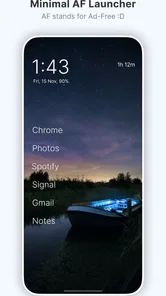
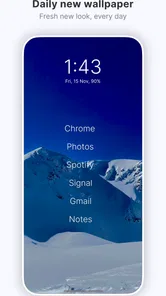
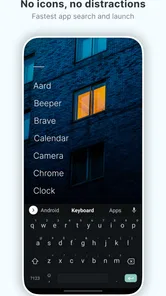
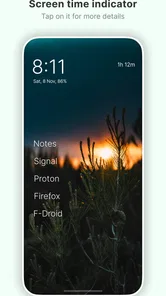
Analysis by Reviewed
I judge a launcher by what it changes in the small moments: how quickly I can open something, whether I get pulled into browsing, and how much attention the home screen asks for. Olauncher takes a deliberately spare approach. It is a free Android personalization app from Digital Minimalism, designed for people who want their phone to feel less like a wall of tempting icons and more like a tool. That simplicity can be a relief, but it also asks you to accept a different way of navigating.
Who Benefits from a Quieter Home Screen
I would consider this launcher if I tend to unlock my phone with a purpose but get sidetracked by whatever is on the screen. It suits someone who prefers a short route to a few regular tasks over a neatly arranged catalogue of every app. That could mean keeping communication, navigation, and one daily utility within easy reach, while making less-used apps a conscious choice rather than a constant visual invitation.
It is less compelling for someone who enjoys browsing a large icon grid or treats a home screen as a workspace. If I depend on several pages of folders, prominent widgets, or a glanceable collection of changing information, I would choose a conventional launcher that is built around those habits. Minimalism is useful only when it removes friction I do not want; when it removes a shortcut I rely on, it is simply friction in a different form.
A Practical Way to Settle In
I would not try to redesign my whole phone on the first day. I would begin with the handful of actions I perform almost automatically, then pay attention to what I reach for over a few ordinary days. If I repeatedly need an app that is not easy to reach, I would adjust the setup instead of treating inconvenience as proof that I am being more disciplined. The aim is a home screen that supports intentional use, not a test of willpower.
For example, imagine checking a family message before leaving home, then opening a map to meet someone. A pared-back first screen can make those steps feel direct, without offering an entire row of unrelated choices along the way. Later, when there is no urgent task, I may still choose to open entertainment or social apps. The useful distinction is that I am making that choice rather than being nudged toward it by a busy home screen.
First Impressions
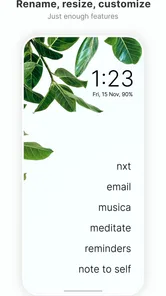
Upon installing Olauncher, the first thing you'll notice is its sheer simplicity. There's no unnecessary fluff or overly complicated features. Just pure, unadulterated minimalism. The app is designed with the idea that less is more, and boy does it deliver on that promise. It's almost like a Zen garden for your phone—peaceful, orderly, and utterly calming.
A Home Screen That Changes the Routine
The everyday workflow is intentionally direct: keep a few important apps visible, then reach for anything else when you actually need it rather than scanning a crowded grid. I find that useful when I unlock my phone to check one practical thing and want to avoid drifting into unrelated apps. It is not a blocker, though; it changes the first impression of your phone, while your own habits still determine what happens next.
More From Our News Desk

 Gmail
GmailGmail in a Busy Inbox: Who Benefits Most?
From first account to crowded workday, Gmail earns its place through dependable search and flexible sorting—but its best fit depends on how much inbox maintenance you can tolerate.

 Prime Video
Switching to Prime Video: What Changes in Your Viewing Routine
Prime Video can make a compelling second home for streaming, but switching means learning a different catalog, rental layer, and route from browsing to playback.

 Universal TV Remote Control
Universal TV Remote Control Works Best as a Reliable Backup
A phone remote earns its place through quick setup and reliable habits. Here is how to get more from Universal TV Remote Control—and where its limits show.

 Weather - By Xiaomi
Weather by Xiaomi Review: Clear at a Glance, Less Clear Up Close
Xiaomi’s weather app makes everyday forecasts quick to scan, but its calm surface can leave useful details and recovery paths harder to find than they should be.

 X
XX Under Pressure: Can It Recover When Posting Goes Wrong?
A resilience-focused review of X, examining setup, mistaken posts, interruptions, weak connections, and the gaps that matter when recovery needs to be dependable.

 Clash of Clans
Clash of Clans Is Won Between the Battles
Its raids are quick; its community is a long-term project of coordination, teaching, rivalry, and shared responsibility—with all the friction that entails.
Latest News



One of the standout features of Olauncher is its ability to automatically change wallpapers daily, offering a fresh look each day without any effort on your part. This feature alone makes your phone feel like it's constantly getting a mini makeover.
Navigating through the interface is as intuitive as it gets. Instead of cluttered screens full of app icons, you're greeted with just a few essential apps. You can customize these to suit your needs, but the beauty of Olauncher is that it encourages you to keep only what you truly use, promoting a more mindful interaction with your device.
Settings and Shortcuts Worth Thinking Through
The best setup is not necessarily the most austere one. I would start by choosing a short list that reflects actions I genuinely need to take, such as messaging family, checking a calendar, or opening a map. If every app is treated as essential, the home screen loses its purpose; if a frequently needed tool is left out just to make the screen look disciplined, the extra friction can become annoying. A useful test is to notice which apps you reach for repeatedly over several ordinary days, then make those the easy ones.
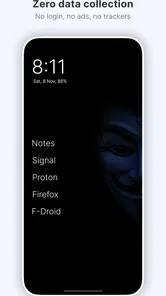
Another noteworthy feature is the app's focus on privacy. Olauncher doesn’t track any of your data, which is a huge plus in today's world where privacy concerns are at an all-time high. It's refreshing to use an app that prioritizes your privacy and doesn't bombard you with ads or unnecessary notifications.
The launcher is free, has no ads, and is rated for Everyone. Its average rating is 4.9 from around 63,000 ratings, with more than a million installs. Those figures suggest that the stripped-back idea appeals to many people, but they do not mean the layout will suit every Android user. It was released in July 2020, and the current version is 5.3.4; it requires Android 7.0 or later.
Building Faster, Repeatable Habits
A practical way to use a minimalist home screen is to give each visible choice a job. For example, I might reserve the displayed apps for communication, navigation, and a daily task, rather than picking them just because I like their icons. This makes the screen a small prompt for what I meant to do. The daily wallpaper adds visual variation, while the reduced set of app choices keeps that refresh from turning into another customization project.
Picture a weekday morning: I unlock the phone to check a message, then need to leave for an appointment. With a few carefully selected essentials in view, I can answer and open directions without first passing a grid of social and entertainment apps. That is a modest change, not a guarantee of lower screen time. If I still open distracting apps whenever I feel bored, the launcher cannot make that decision for me; its value is that it removes some automatic cues.
Performance and Usability
Performance-wise, Olauncher is a dream. It's light on resources, which means it doesn't slow down your phone or drain your battery. This makes it an excellent choice for older devices or anyone looking to extend their battery life.
Usability is where Olauncher truly shines. It might take a moment to get used to if you're coming from a more traditional launcher, but once you do, there's no going back. The app encourages you to focus on what's important, cutting out the digital noise that often clutters our daily lives.
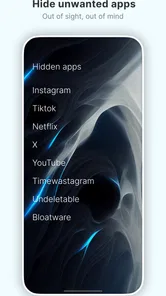
That adjustment is the main trade-off. People who rely on visual app grids, several home-screen pages, or a highly decorated setup may find the spare presentation slower rather than calmer. A conventional Android launcher is a better fit if you want to organize many icons into folders, keep widgets prominent, or make the home screen a dashboard. Olauncher is more appealing when you would rather reduce those choices than arrange them.
Making the Minimal Setup Work Day to Day
A useful refinement is to separate “often used” from “must be visible.” I would make the easy-to-reach choices serve recurring tasks, not every app I happen to open frequently out of habit. That distinction helps the screen stay focused without making ordinary tasks awkward. If an app is essential only at certain times—for example, when travelling or handling a particular errand—I would not automatically give it a permanent place just because I used it yesterday.
I would also judge the setup by interruptions and detours, not by how sparse it looks. If I find myself repeatedly searching for a tool or changing the visible choices, the arrangement needs work. Conversely, if I unlock the phone and complete the intended task without browsing around, the layout is doing its job. This is a more useful measure than trying to make the screen as empty as possible.
Where Minimalism Reaches Its Limits
I would not choose this approach for someone who needs to see a lot of changing information at a glance or depends on a carefully arranged visual workspace. Minimalism can also expose a habit without solving it: if an app is still easy to reach elsewhere on the phone, a plain home screen alone may not change how often it is used. Treat the launcher as one part of a routine, not as a substitute for deciding when to put the phone down.
For a smoother transition, I would keep the first setup simple and resist trying to perfect it immediately. Pick only the apps that support regular tasks, use the phone normally for a few days, and then adjust the visible choices based on actual use. That avoids a common trap: turning a tool meant to reduce screen clutter into another thing to continually tune. The point is not to hide every app, but to make the first tap more deliberate.
There is also a personal adjustment cost: when I am used to identifying apps by their icons, a text-led or otherwise pared-back screen can make quick visual scanning less natural. I would give myself time to learn the new rhythm before deciding whether it is genuinely slower. But if my work depends on switching rapidly among many apps, or if I regularly show someone else where to find things on my phone, a familiar grid may remain the more practical choice.
Final Thoughts
In a world where we're constantly bombarded with information, Olauncher offers a refreshing change of pace. It's perfect for anyone looking to declutter their digital space and embrace a more minimalist lifestyle. While it might not be for everyone, those who appreciate simplicity will find it hard to go back to anything else.
If you're tired of the same old, cluttered interface and are craving something different, give Olauncher a try. You might just find that less really is more.
My recommendation is straightforward: try it if your home screen has become a menu of distractions and you are willing to trade visual browsing for a shorter list of deliberate choices. Skip it if you enjoy widgets, dense layouts, or quick access to many apps at once. For the right person, the useful change is not a dramatic feature but a calmer default routine—and that is exactly where this launcher makes its case.
Olauncher. Minimal AF Launcher Frequently Asked Questions
Will Olauncher work on an iPhone or only on Android?
Olauncher is an Android launcher, so it is intended for compatible Android phones rather than iPhones. A launcher changes the home-screen experience on Android; it does not replace the operating system or the apps on your phone. If you use an Android device running Android 7.0 or later, you can install Olauncher and choose it as your home screen.
What happens if I decide Olauncher is not for me?
You can switch away from Olauncher by choosing another launcher as your phone’s home-screen app. The change affects how you access your apps and return to the home screen, rather than removing those apps from the device. This makes it possible to try its minimalist layout and move back to your previous setup if you prefer a more feature-rich launcher.
Is Olauncher compatible with my Android phone, and what does installation change?
Olauncher is an Android launcher for phones running Android 7.0 or later. After installing it, you can choose it as your home-screen launcher, so it becomes the main place you return to when you leave an app. It is free and rated for Everyone. Switching launchers changes the home-screen experience, rather than replacing the apps already installed on your phone.
What is Olauncher and how does it differ from other Android launchers?
Olauncher is a minimalist Android launcher designed to enhance your smartphone experience by simplifying your home screen. Unlike other launchers filled with extensive features and customizations, Olauncher focuses on providing a clutter-free interface with minimal distractions. It emphasizes speed, efficiency, and simplicity, making it ideal for users who prefer a cleaner and more focused smartphone environment. Its aim is to help reduce screen time, and it includes daily wallpapers with zero ads.
How does Olauncher improve phone performance and battery life?
Olauncher improves phone performance and battery life by minimizing resource usage. Its lightweight design reduces the load on your device’s processor and RAM, ensuring faster performance. By eliminating unnecessary animations and features, it also conserves battery life, making your phone run longer between charges. This makes it particularly suitable for users with older or less powerful devices.
Pros
- Super lightweight and fast.
- No ads or distractions.
- Highly customizable interface.
- Saves battery life.
- Open source and free to use.
Cons
- Limited widget functionality.
- Basic design may not suit all.
- No app drawer available.
- Lacks advanced features.
- Might be too minimalistic.











