OKN Drum Pro
- 0.00
- 0.0
- Installs
- 500.00
- Price
- $4.99

Screenshots
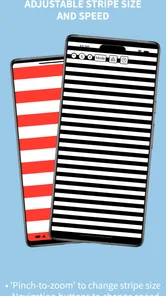
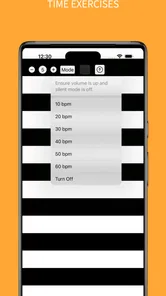
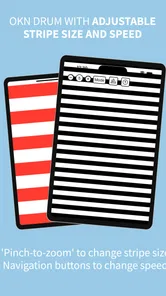
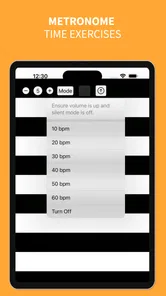
Analysis by Reviewed
I approach a household app differently from a personal one: the useful question is not only whether it works for me, but whether it fits the way several people might use the same device. OKN Drum Pro is a medical app centered on OKN drum use, so it belongs in a very different conversation from a music-making drum kit. That distinction matters before anyone installs it or passes a phone or tablet around. I would treat it as a focused tool for a specific visual task, not as a general entertainment app or a substitute for professional guidance.
When a shared screen has a clear purpose
A realistic shared-device situation might be a caregiver preparing a phone for a brief appointment-related activity, then handing it to another person while staying nearby. In that setting, the value is less about collecting lots of functions and more about having a dedicated OKN drum resource ready when it is needed. I would decide in advance who is operating the device, who is viewing it, and what the session is meant to support. That simple division can make a shared screen feel purposeful rather than like an unsupervised app session.
For a clinician or someone already familiar with OKN strips, a dedicated tool may be more convenient than searching for a suitable video or assembling a makeshift visual stimulus each time. For a household user, though, convenience should not be mistaken for clinical meaning. An app can provide a visual aid; it does not, by itself, explain what a response means or determine what should happen next. I would keep any interpretation and care decisions with an appropriate professional.
Agree on the device before opening the app
Because this is a specialized medical tool, I would set a few practical boundaries before sharing it. Choose a device that can be held steadily or placed where the person using it can see comfortably, and make sure the person in charge can reach the controls. If more than one person needs the app, agree on who is responsible for setting it up and putting the device away afterward. These are ordinary household arrangements, not special app controls, but they help prevent a focused task from becoming a confusing handoff.
I would also avoid treating a borrowed family phone as though every user has the same account, comfort level, or reason for opening the app. Keep the app’s use tied to the person and situation it is intended for, and do not assume that one person’s settings or experience establish what another person needs. If a device is used for many unrelated tasks, preparing it before the session can reduce interruptions from notifications or other apps. That is a general device habit, not a feature I would attribute to this app.
Coordination is part of using a specialist tool
When several adults help with care, a short handoff can be more useful than a long explanation. The person setting up the app can tell the next person what the agreed purpose is, whether the activity is being guided by a professional, and who should be contacted with questions. I would not use the app as a way to settle disagreements about symptoms or to compare people’s responses informally. Keeping the task narrow protects both the person being observed and the family from drawing conclusions the tool cannot support on its own.
For someone who works with OKN stimuli regularly, the app may be a practical item to keep accessible on a device used for that purpose. For a household that only encounters this need occasionally, it may be worth asking the relevant professional whether an app is appropriate for the specific situation before paying for one. That is a more useful decision than installing it simply because the name sounds like a general-purpose health or vision app.
More From Our News Desk

 Gmail
Gmail in a Busy Inbox: Who Benefits Most?
From first account to crowded workday, Gmail earns its place through dependable search and flexible sorting—but its best fit depends on how much inbox maintenance you can tolerate.

 Prime Video
Switching to Prime Video: What Changes in Your Viewing Routine
Prime Video can make a compelling second home for streaming, but switching means learning a different catalog, rental layer, and route from browsing to playback.

 Universal TV Remote Control
 Works Best as a Reliable Backup
A phone remote earns its place through quick setup and reliable habits. Here is how to get more from Universal TV Remote Control—and where its limits show.

 Weather - By Xiaomi
Weather by Xiaomi Review: Clear at a Glance, Less Clear Up Close
Xiaomi’s weather app makes everyday forecasts quick to scan, but its calm surface can leave useful details and recovery paths harder to find than they should be.

 X
X Under Pressure: Can It Recover When Posting Goes Wrong?
A resilience-focused review of X, examining setup, mistaken posts, interruptions, weak connections, and the gaps that matter when recovery needs to be dependable.

 Clash of Clans
 Is Won Between the Battles
Its raids are quick; its community is a long-term project of coordination, teaching, rivalry, and shared responsibility—with all the friction that entails.
Latest News



Age context deserves care, even though the app’s content rating is Everyone. That rating is about the app’s content, not a promise that every use is suitable for every age or that a child should use it without an adult. I would have an adult manage the device and follow professional direction where the app is being used in a care context. For anyone who feels discomfort or uncertainty during an activity, pause rather than pressing on just to finish. Trust here comes from clear supervision and appropriate advice, not from the label alone.
The practical trade-off is that a specialist app can be more direct than improvised alternatives, but it also assumes a more specific purpose than most household apps. A web video or a generic visual pattern may be easier to find, yet it may not be an appropriate substitute for the intended tool or a professional’s instructions. Conversely, if you need an explanation, diagnosis, or treatment plan, this app is not the right alternative to a qualified clinician. I would choose the option that matches the task, rather than expecting one screen to do all three jobs.
Getting Into the Groove
First things first, let’s talk about the interface. It’s sleek, intuitive, and doesn’t overwhelm you with too many buttons. The moment you open it, you’re greeted with a virtual drum kit that's almost begging you to start jamming. The app layout is pretty straightforward, making it super easy to navigate, even if you’re someone who doesn’t usually dabble with music apps.
Features That Hit the Right Notes
One of the standout features of OKN Drum Pro is the variety of drum kits it offers. Whether you’re into rock, jazz, or something a bit more electronic, there’s a kit just waiting for you. The sound quality is top-notch, which is crucial when you’re trying to nail that perfect beat. Plus, the responsiveness of the drums is impressive; there’s no lag, just pure, uninterrupted drumming goodness.
Another cool feature is the recording option. You can record your sessions, which is perfect for tracking your progress or just sharing your latest beats with friends. And let’s not forget the metronome tool, which is an absolute lifesaver for keeping your timing impeccable.
Why You’ll Love It
What I personally love about this app is that it caters to everyone. Whether you’re a beginner just learning the ropes or a seasoned drummer looking for a portable practice tool, OKN Drum Pro has something for you. It’s like having a full drum set, minus the space and noise complaints from the neighbors!
And if you’re worried about getting bored, don’t be. The app is regularly updated with new features and drum kits, keeping things fresh and exciting. It's like Netflix for drum enthusiasts!
A Few Beats Away from Perfect
No app is without its quirks, and while OKN Drum Pro is pretty close to perfect, it could use a few tweaks here and there. Sometimes, the app takes a little longer to load, especially when switching between different drum kits. It’s not a deal-breaker, but it’s something to keep in mind if you’re in a hurry to start drumming.
Also, while the app is free, some of the more advanced features are locked behind a paywall. But honestly, for the quality and variety you’re getting, it’s a small price to pay for such a versatile app.
In conclusion, if you’re looking for a fun and functional way to practice your drumming skills on the go, OKN Drum Pro is definitely worth checking out. It’s a fantastic tool for musicians of all levels, and it's sure to keep your drumming passion alive and kicking!
What this app is actually for
There is an important mismatch between the name and the practical decision a reader has to make. Despite the word “Drum,” this is not a virtual musical instrument: OKN refers to optokinetic nystagmus, and the app is presented as an OKN drum resource. I would not install it expecting playable percussion, recording, a metronome, musical sound sets, or a way to practice rhythm. Those expectations belong to a different kind of app, and confusing the two could lead to a purchase that does not meet the household’s needs.
The useful comparison is with other ways of presenting a moving visual stimulus, not with music apps. A dedicated app can be easier to keep ready than looking for a video or trying to improvise a pattern, but whether it is suitable depends on the purpose and professional instructions. A clinician’s equipment or recommended method may be the better choice when consistency or a specific clinical workflow matters. I would use this app only when its role has been made clear, rather than assuming every OKN-related task can be handled the same way.
Who should consider it, and who should pass
I can see it making sense for someone who already knows why an OKN drum is being used and wants a phone-based option to discuss with a relevant professional. It may also be worth considering for a caregiver who needs to understand a specific tool used during care, provided the caregiver is not expected to interpret results independently. The key advantage is focus: it is aimed at a particular medical use rather than trying to be a broad health dashboard.
I would skip it if you are looking for a general vision test, symptom checker, treatment advice, or a diagnosis. I would also pass if you simply want a drum-machine game or an instrument for making music. If a professional has recommended a particular device or procedure, follow that recommendation instead of substituting an app based only on a similar-sounding name. For occasional household curiosity, the cost may be hard to justify unless there is a concrete use for it.
Small decisions that make a session clearer
One practical tip is to settle the purpose before opening the app: is someone following professional guidance, learning what the tool is, or merely exploring? Those are different situations and should not be blurred together. If the use is care-related, keep a note of the instruction that prompted it and direct interpretation questions back to the professional. This avoids the common trap of treating a visible response as a self-explanatory result.
A second useful habit is to test the device arrangement without turning the activity into an informal experiment. Check that the screen is visible from the intended position, that the person responsible can operate it, and that the session can be paused if needed. On a shared device, close unrelated apps and silence interruptions when appropriate. These steps do not add medical capability, but they can make a brief, guided task less chaotic and reduce the chance that someone mistakes a notification or handoff for part of the activity.
Finally, keep account and privacy expectations modest. A shared phone is still a shared phone: decide who may open the app and avoid leaving it displayed if that would make another user uncomfortable. I would not assume the app provides family profiles, caregiver permissions, or a way to separate one person’s use from another’s. Those boundaries need to come from the household’s device habits, and any personal or care-related notes should be handled through an appropriate channel rather than presumed to be managed inside the app.
Cost, availability, and a grounded verdict
OKN Drum Pro is a paid medical app from developer Michael Ullman. It costs $4.99, has an Everyone content rating, and its current version is 1.8; it was released on April 6, 2024. It has over 500 installs and an average rating of 0.0, so there is little public rating signal to help a new user judge it. It is listed for operating system version 7.0 or later. I would treat these details as practical context, not as evidence of clinical quality or a reason to skip professional advice.
My household verdict is cautious rather than enthusiastic: this is potentially useful when someone has a defined OKN-related need and understands how the app fits into that need. It is not a casual family download, a diagnostic shortcut, or a music app, and the Everyone label should not replace adult judgment about the person using it. Before paying, I would confirm that the intended professional or care context actually calls for this kind of app. If that purpose is clear, a dedicated tool may be convenient; if it is not, asking first is the better use of both money and screen time.
OKN Drum Pro Frequently Asked Questions
What is OKN Drum Pro, and what is it used for?
OKN Drum Pro is a medical app with the short description “OKN Drum” and a summary referring to OKN Strips, OptoDrum, and OKN. Those terms point to the app’s focus, so it is aimed at people looking for an OKN-related mobile tool rather than a general music or entertainment app. Consider whether that medical purpose fits your needs before downloading.
Who developed OKN Drum Pro, and what does it cost?
OKN Drum Pro is developed by Michael Ullman and costs $4.99. That price is worth considering before you download, especially if you are comparing it with other medical apps or simply want to try it first. The app is intended for an OKN-related use, so it makes sense to check that this is the tool you need before making the purchase.
What platforms is OKN Drum Pro available on?
OKN Drum Pro is available for both Android and iOS platforms, making it accessible to a wide range of mobile users. Whether you're using a smartphone or a tablet, you can easily download and enjoy the app from the Google Play Store or the Apple App Store, depending on your device's operating system.
Is OKN Drum Pro suitable for beginners?
Yes, OKN Drum Pro is designed to be user-friendly and suitable for both beginners and experienced musicians. The app offers a range of tutorials and easy-to-follow guides that help new users get started with drumming exercises and beat-making, while more advanced features are available for those with more experience.
Does OKN Drum Pro require an internet connection?
While you need an internet connection to download OKN Drum Pro and access certain features like updates and online tutorials, the app can be used offline for practicing and creating music. This makes it convenient for users who want to practice drumming or work on their music projects without being connected to the internet.
Pros
- User-friendly interface
- Variety of drum kits
- High-quality sound output
- Customizable settings
- Responsive support team
Cons
- Limited free features
- In-app ads can be intrusive
- Occasional app crashes
- No cloud sync option
- Requires internet for full features