

Official MN State Fair App
- 43.00
- 3.9
- Installs
- 50.00K
- Price
- Free

Screenshots

Analysis by Reviewed
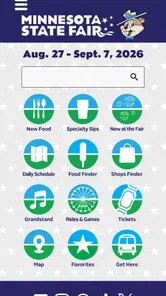
If I were heading to the Minnesota State Fair, I would install the Official MN State Fair App before leaving home rather than trying to organize the day from scattered web searches. This free Events app is built around the practical questions that come up once you arrive: where to find a particular food, what to browse in the shopping areas, which entertainment options deserve attention, and how to make a large fairground feel less overwhelming. It is not a replacement for curiosity or a good pair of walking shoes, but it can turn a loose plan into something much easier to follow.
My overall impression is that this is most useful as a planning companion and an on-site reference tool, not as an app you casually explore for hours. The difference matters. Someone visiting for a short afternoon will benefit from reducing wasted walking, while a regular fairgoer may appreciate having familiar information in one place instead of rebuilding a plan every time. The app is free, carries an Everyone age rating, and comes from Official Minnesota State Fair App, so its purpose is refreshingly focused on the event itself.
How I would use it before and during a fair day
I’d use it in two deliberate passes: first to pick a few priorities before leaving, then to settle the next choice when there’s a natural pause during the visit. That keeps planning useful without turning the fair into a checklist. I’d also note any must-do stops separately, so a slow connection or a busy moment doesn’t derail the day.
Start with a short list, not an oversized itinerary
My baseline workflow would begin at home with three lists: food or drinks I want to try, shops or exhibits I do not want to miss, and entertainment that has a fixed time or a strong personal priority. I would avoid filling every part of the day. A fair visit changes constantly, and an app is more helpful when it supports decisions than when it encourages an unrealistic schedule.
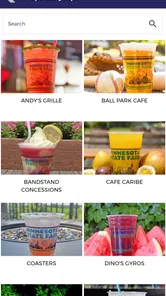
The food and drink search is especially valuable at this stage. Instead of remembering a vendor name only after I am already inside, I would look up the items that matter most and use that information to create a rough route. This is a small but important habit: choose a few anchors, then leave room for discoveries. The app’s focus on foods, sips, shops, entertainment, and related fair information makes that kind of preparation more practical than relying on a general map application.
For a family, I would make the plan around different energy levels. One adult could identify a meal stop, another could choose entertainment, and children could each pick one destination. That gives everyone a reason to stay engaged without pretending that the group will move efficiently all day. For a solo visitor, the same approach works even better because the app can help turn a personal wish list into a flexible loop.
Use the app as a reference when plans change
Once I am at the fair, I would not keep staring at the screen while walking. I would check it at natural pauses: before leaving a food area, while waiting for a performance, or when the group needs to decide what comes next. This reduces the common problem of repeatedly opening an app without making a decision.
More From Our News Desk

 Gmail
GmailGmail in a Busy Inbox: Who Benefits Most?
From first account to crowded workday, Gmail earns its place through dependable search and flexible sorting—but its best fit depends on how much inbox maintenance you can tolerate.

 Prime Video
Switching to Prime Video: What Changes in Your Viewing Routine
Prime Video can make a compelling second home for streaming, but switching means learning a different catalog, rental layer, and route from browsing to playback.

 Universal TV Remote Control
Universal TV Remote Control Works Best as a Reliable Backup
A phone remote earns its place through quick setup and reliable habits. Here is how to get more from Universal TV Remote Control—and where its limits show.

 Weather - By Xiaomi
Weather by Xiaomi Review: Clear at a Glance, Less Clear Up Close
Xiaomi’s weather app makes everyday forecasts quick to scan, but its calm surface can leave useful details and recovery paths harder to find than they should be.

 X
XX Under Pressure: Can It Recover When Posting Goes Wrong?
A resilience-focused review of X, examining setup, mistaken posts, interruptions, weak connections, and the gaps that matter when recovery needs to be dependable.

 Clash of Clans
Clash of Clans Is Won Between the Battles
Its raids are quick; its community is a long-term project of coordination, teaching, rivalry, and shared responsibility—with all the friction that entails.
Latest News



A realistic afternoon might look like this: I arrive with one meal in mind, check the app for another nearby interest, and then choose entertainment based on the time available rather than crossing the grounds for a single uncertain stop. If the group is already tired, the app helps me revise the next destination instead of treating the original plan as a commitment. That flexibility is one of its strongest everyday uses.
I would also keep a simple priority order. First come time-sensitive activities, then hard-to-find food or shopping targets, and finally anything that can be enjoyed whenever I happen to pass it. This prevents a casual browse from displacing the one event someone in the group was genuinely excited about.
What the app does better than the usual alternatives
A general search engine can locate individual vendors or attractions, but it often produces disconnected results. A paper map gives useful physical context, yet it does not make it as easy to search a specific kind of food or quickly revisit an attraction name. Social media can provide ideas, but it is a poor substitute for an organized fair-focused reference because posts are mixed with opinions, photos, and unrelated conversation.
This app sits between those options. Its advantage is not that it makes the fair effortless; no app can remove crowds, distance, or indecision. Its advantage is that it keeps the fair’s main categories together. I can move from a food question to an entertainment question without changing tools, which is exactly the kind of small convenience that becomes valuable during a busy day.
Settings and preparation habits worth checking
Before relying on it at the entrance, I would open the app at home and explore the main sections while connected to a dependable network. I would check how quickly the content loads, confirm that I can find the categories I care about, and make sure my phone has enough battery for a long day. These are simple steps, but they matter more than squeezing another destination into the schedule.
I would also review the phone’s normal notification and location controls rather than assuming the app needs every permission available. If I want the least distraction, I would keep notifications limited to what I personally find useful. If I prefer privacy and do not need location-based assistance, I would avoid enabling location access unless the app clearly makes that choice worthwhile. The important point is to make those decisions deliberately instead of tapping through setup in a hurry.
Another useful habit is to keep the app easy to reach without leaving it open constantly. I would place it where I can find it quickly, then close it when I am done planning. That saves battery and keeps the visit centered on the fair rather than on repeated phone checks. I would also update the app before a major visit when an update is available, while remembering that an update alone does not guarantee that every on-site detail will match the moment perfectly.
The current version is 3.0.2, and the app runs on Android versions starting with 6.0. That broad compatibility is helpful for people using an older phone as their fair-day device. Still, compatibility is not the same as comfort. An older phone may have a smaller display, slower loading, or a battery that struggles under heavy use, so I would prepare a backup plan such as writing down the most important stops.
Faster patterns for repeat visitors
Experienced users can get more from the app by repeating the same preparation routine each visit. I would begin with the categories that caused the most wasted time last year, rather than browsing everything from the beginning. If finding a particular food took too long before, that becomes an early search. If entertainment was the main priority, I would start there and build meals around it.
Another efficient pattern is the “one anchor per phase” method. I would choose one must-do item for arrival, one for the middle of the visit, and one for the final stretch. Between those anchors, I would use the app to make nearby choices. This gives the day structure without forcing a rigid route, and it works for both short visits and longer outings.
For groups, I would ask each person to state one non-negotiable destination before opening the app. Then I would combine those requests into a practical order. This avoids the familiar situation in which everyone scrolls through possibilities but nobody decides. The app becomes a coordination tool rather than a source of endless options.
I would also separate “search now” information from “remember later” information. Anything tied to a specific time deserves attention before walking away. General food, shopping, or entertainment ideas can wait until the group is ready for the next decision. This distinction reduces screen time and makes the app feel faster because I am using it for one clear purpose at a time.
Where the experience can feel limited
The app’s usefulness depends on how clearly I already know what I want. If I arrive with no preferences and expect it to invent a complete day for me, the experience may feel less satisfying. A large fair contains too many possible choices for any single tool to remove the need for judgment. I still have to decide whether a long walk, a wait, or a crowded area is worth it.
I would also avoid treating digital information as an absolute guarantee. Event details and on-site circumstances can change, and real-world conditions may not behave like a clean plan on a phone. For an important performance or a group with limited mobility, I would leave extra time and confirm the most important details through the app close to the visit rather than checking only once at home.
Another trade-off is attention. The more I use the app to optimize every stop, the more likely I am to miss the spontaneous parts of the fair. I think the best approach is to use it for high-value decisions—finding a specific target, organizing time-sensitive entertainment, or recovering from a change of plan—then put the phone away. Visitors who prefer a completely unplanned day may find a paper map or simple wandering more enjoyable.
It is also not the right choice for someone looking for a broad travel planner, restaurant discovery outside the fair, or a general events calendar. Its strength comes from being specific to the Minnesota State Fair. If that is not the event I am attending, a wider local-events app would naturally be more useful.
What the numbers suggest about its place in the ecosystem
The app has an average rating of 3.9 from around 89 ratings, with 41 written reviews and over 50 thousand installs. I read that as evidence of a useful but not universally perfect companion. It has enough adoption to feel established among fair visitors, while the rating reminds me not to expect a flawless replacement for personal preparation.
Its free price removes the biggest barrier to trying it before a visit. The Everyone rating also makes it suitable for a family device, although younger users will still benefit from an adult handling the practical planning. Because it is an event-specific app, I would judge it by whether it saves time and reduces confusion during a fair day, not by whether it offers the broad feature set of a general navigation platform.
Who should install it, and who can skip it
I would recommend it to first-time visitors who feel unsure about the fair’s scale, families coordinating different interests, and repeat visitors who want to find particular foods, shops, or entertainment without starting from scratch. It is also a good fit for anyone making a short visit, because limited time makes every unnecessary detour more noticeable.
I would be less enthusiastic for visitors who already have a fixed tradition and do not want to search for anything new. If my entire day consists of meeting friends, visiting one familiar area, and leaving whenever I feel like it, the app may add little. The same is true if I dislike using my phone during outings or if my device has weak battery life and I am unwilling to prepare a written backup.
For accessibility or mobility-conscious planning, I would use the app as one part of the decision rather than assuming a listed destination is automatically convenient. Distances, crowds, waiting, and the condition of the day still influence comfort. The app can help identify where I want to go; it cannot make the physical journey easy for every visitor.
My verdict after building a repeatable routine
My preferred way to use this app is simple: prepare a short priority list, explore the relevant categories before leaving, check time-sensitive choices first, and use the app only at decision points once I am inside. That workflow makes it feel considerably more useful than a quick glance at the store summary would suggest. The real benefit comes from combining the app with sensible habits, not from expecting it to plan every minute.
The best reason to install it is practical control without losing spontaneity. I can reduce unnecessary searching, make better use of a short visit, and still leave room for an unexpected snack, shop, or performance. Its limits are equally clear: it cannot remove crowds, guarantee that a plan will remain unchanged, or replace common sense about battery, time, and walking distance.
At no cost, the Official Minnesota State Fair App is an easy recommendation for anyone actively visiting the Minnesota State Fair. I would install it before going, test the sections I expect to use, and keep a small offline-style backup note for the few things that matter most. Used that way, it becomes a focused companion rather than another app competing for attention—and that is exactly the role I think it handles best.
For me, the final decision is straightforward: if the fair is the destination, I would keep this app on my phone; if I am only curious about general local events, I would choose a broader alternative. Its value is narrow but genuine, and that focused purpose is what makes it worth recommending to a friend planning a fair day.
Official MN State Fair App Frequently Asked Questions
Is the Official MN State Fair App available for my phone?
The Official MN State Fair App is available for Android devices running version 6.0 or later, and it is listed for iOS as well. Before downloading, check that your device’s operating system is compatible and that you have enough storage for the app. The app is free, so you can install it as a planning aid without paying a download charge.
Who publishes the Official MN State Fair App, and is it intended for fair visitors?
The app is published by Official Minnesota State Fair App and is intended as a digital companion for people visiting the Minnesota State Fair. Its store summary highlights finding foods, sips, shops, entertainment, and more, making it relevant for visitors who want to explore fair offerings. Its content rating is Everyone, so it is suitable for a broad audience.
What is the Official MN State Fair App used for?
The Official MN State Fair App is designed to help visitors plan and navigate their Minnesota State Fair experience. It typically provides information about attractions, food vendors, entertainment, exhibits, schedules, maps, and fairground locations. After installing it, visitors can use the app as a convenient digital companion instead of relying only on printed guides or searching for information while walking around the fairgrounds.
Does the Official MN State Fair App include a map and directions?
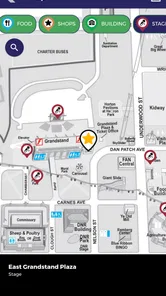
Yes, one of the app’s most useful features is its fairgrounds map, which helps visitors locate stages, buildings, food stands, restrooms, entrances, transportation areas, and other important facilities. The map can make it easier to plan a route, especially when the fair is crowded. Users should remember that indoor positioning and turn-by-turn accuracy may vary depending on their device and signal.
Can I use the app to find food, events, and entertainment?
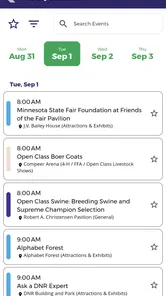
The app is intended to make discovering fair activities easier by organizing information about food vendors, attractions, exhibits, concerts, shows, and other scheduled events. Visitors can browse available options and check details before heading to a particular area. Since schedules and vendor information may change, it is still wise to verify important details in the app or through official fair announcements during your visit.
Pros
- Find food
- rides
- vendors
- and attractions with convenient fair maps.
- Daily schedules make it easier to plan concerts
- shows
- and special events.
- Quick access to admission
- parking
- transportation
- and fairground information.
- Useful search tools help locate specific buildings
- vendors
- and activities.
- Official updates can provide timely information about changes and announcements.
Cons
- Some features may be less useful before the annual fair begins.
- Event details can change
- so app information may occasionally need refreshing.
- Heavy map and image content may use significant mobile data and battery.
- Users may need location permissions for the best map and navigation experience.
- The app is mainly valuable during the Minnesota State Fair season.











