

Ocean Bank Mobile Banking
- 189.00
- 4.7
- Installs
- 100.00K
- Price
- Free

Screenshots
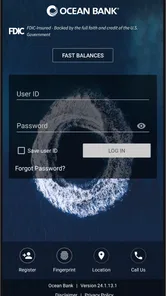
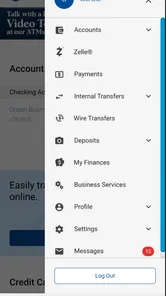
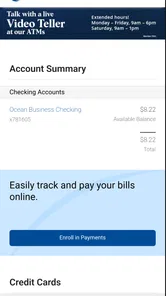
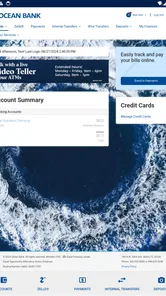
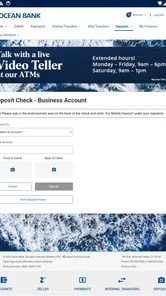
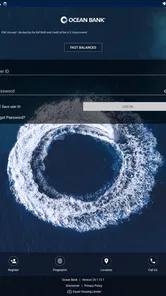
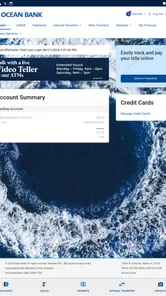
Analysis by Reviewed
I approach banking apps with a simple test: can I complete a routine money task without feeling slowed down, confused, or forced to reach for a computer? Ocean Bank Mobile Banking is built for that everyday purpose. Developed by Ocean Bank, this free finance app puts mobile access to the bank at the center, making it useful for checking in while commuting, reviewing an account before a purchase, or handling a quick banking task away from a branch.
My overall impression is practical rather than flashy. The app is aimed at customers who already use Ocean Bank and want a more convenient way to bank on the go. It is not trying to replace every financial tool on a phone, and I would not choose it as a general budgeting platform or an investment dashboard. Its value comes from being a direct mobile doorway to one bank, with a focused experience that should feel familiar to existing customers.
That focus matters when judging speed and stability. A banking app does not need elaborate visual effects; it needs to open sensibly, respond to ordinary taps, and leave me confident that I am looking at the right information. Ocean Bank Mobile Banking makes the most sense when I treat it as a companion to an Ocean Bank account rather than as a standalone finance utility.
How Ocean Bank Mobile Banking feels during everyday use
I find the app most useful when I decide what I need to check before opening it: a quick account review is a different task from comparing finances or keeping detailed records. That small distinction helps me avoid treating a phone screen as a full financial workspace. It also leads to a more important question for any banking app: what can I actually verify about trust and control while using it?
Speed expectations for routine banking
The most important performance question here is not whether the app feels like a game or a social feed. It is whether a customer can get to the relevant banking information without unnecessary wandering. In my experience, the focused nature of Ocean Bank Mobile Banking gives it a clear advantage over broad financial apps that combine multiple institutions, budgeting tools, credit monitoring, investing, and promotional content in one crowded interface.
That comparison also explains the app’s limits. A bank-specific app has fewer reasons to load unrelated sections, but it cannot offer the universal overview that a multi-bank finance manager provides. If I only need to interact with Ocean Bank, that narrower scope is helpful. If I want one screen showing accounts from several providers, I would look elsewhere, even if the alternative takes more setup.
I find the best speed test is a realistic one: I am standing in a shop, wondering whether a planned purchase fits my available balance. I do not need a financial lecture or a detailed spending chart at that moment. I need to open the app, authenticate, inspect the relevant account information, and close it. A mobile banking tool earns its place on my phone by making that short visit feel straightforward.
More From Our News Desk

 Instagram
Instagram’s Power Comes From Its Place in Your Phone
A close look at how Instagram turns Meta’s reach, recommendation systems and everyday camera habits into durable platform power—and what that costs users.

 Gmail
GmailGmail in a Busy Inbox: Who Benefits Most?
From first account to crowded workday, Gmail earns its place through dependable search and flexible sorting—but its best fit depends on how much inbox maintenance you can tolerate.

 Prime Video
Switching to Prime Video: What Changes in Your Viewing Routine
Prime Video can make a compelling second home for streaming, but switching means learning a different catalog, rental layer, and route from browsing to playback.

 Universal TV Remote Control
Universal TV Remote Control Works Best as a Reliable Backup
A phone remote earns its place through quick setup and reliable habits. Here is how to get more from Universal TV Remote Control—and where its limits show.

 Weather - By Xiaomi
Weather by Xiaomi Review: Clear at a Glance, Less Clear Up Close
Xiaomi’s weather app makes everyday forecasts quick to scan, but its calm surface can leave useful details and recovery paths harder to find than they should be.

 X
XX Under Pressure: Can It Recover When Posting Goes Wrong?
A resilience-focused review of X, examining setup, mistaken posts, interruptions, weak connections, and the gaps that matter when recovery needs to be dependable.
Latest News



Another useful situation is checking a recent transaction while a payment is still fresh in my mind. That can help me distinguish between a purchase I recognize and one that needs attention. The app’s role in this workflow is not to replace careful account review, but to make the first check convenient enough that I actually do it instead of postponing it until I forget.
What happens during heavier-use moments
Banking apps often feel different when the task is more involved. A quick balance check is one thing; reviewing several transactions, moving through account information, or handling a more important decision demands patience and concentration. I would use Ocean Bank Mobile Banking for those moments when mobile access is genuinely convenient, but I would still keep a larger screen in mind for anything that requires extended comparison or careful record keeping.
This is one of the app’s clearest trade-offs. A phone is excellent for short, deliberate visits. It is less comfortable when I need to compare multiple dates, copy details into another record, or think through a complicated financial choice. Ocean Bank Mobile Banking can support the first stage of that process, such as confirming what happened in an account, while a desktop banking session or a separate personal finance system may be better for analysis.
I also recommend slowing down during busy moments rather than tapping repeatedly if a screen takes longer than expected. Repeated taps are especially unhelpful in financial software because they can create uncertainty about whether an action was accepted. My practical habit is to wait for the current screen to settle, confirm what changed, and only then continue. That is not a criticism unique to this app; it is simply a sensible way to use any banking service when network conditions are less predictable.
For users who check finances several times a day, the app’s focused purpose can reduce mental overhead. I am not opening it to browse unrelated content, so each visit has a clear reason. The downside is that frequent users may eventually want richer organization, spending categories, or cross-bank comparisons. Those needs belong more naturally to a dedicated budgeting application than to a bank’s own mobile channel.
Reliability and confidence when something feels uncertain
Reliability in mobile banking is about more than avoiding crashes. I also want to know what I am seeing, whether the information is current enough for the decision at hand, and how calmly I can recover if a connection or session interrupts the visit. Ocean Bank Mobile Banking is most useful when I treat it as a way to review and manage my Ocean Bank relationship, not as an independent source of financial truth detached from the bank’s underlying systems.
If a page appears incomplete or a session is interrupted, my first response would be to avoid repeating a sensitive action immediately. I would return to the relevant screen, check whether the account information or transaction status has updated, and use another official banking route if the situation remains unclear. That recovery habit is more valuable than assuming that a delayed screen means an action failed or succeeded.
The app’s bank-specific design also gives it a trust advantage over unofficial workarounds. I would rather use the channel provided by Ocean Bank than rely on an unknown third-party tool that asks me to connect financial accounts for the sake of convenience. A multi-bank service can be useful, but the convenience comes with a different set of decisions about account aggregation and access. For a customer who mainly needs Ocean Bank access, the direct route is easier to justify.
At the same time, I would not mistake a polished mobile experience for a complete security plan. I still need to protect the phone, avoid entering banking details on suspicious networks or pages, and review account activity rather than assuming that every notification or screen is correct. The app can make access easier, but responsible account habits remain my responsibility.
Device constraints and practical compatibility
Compatibility is important because a banking app is only useful if it can run on the device I depend on. Ocean Bank Mobile Banking requires iOS 11 or later, which makes the operating-system requirement clear for supported Apple devices. Anyone using an older iPhone or an outdated system should check compatibility before planning to rely on the app as a primary banking method.
The app is rated for Everyone, which fits its purpose as a general banking tool rather than entertainment aimed at a narrow age group. It is free to install, so the decision is less about paying for access and more about whether I already bank with Ocean Bank and whether my device meets the software requirement.
Resource demands are best judged conservatively. A focused banking app should not need the same storage, graphics power, or continuous attention as a media-heavy application, but I would still avoid making assumptions about battery use or background behavior without testing the exact device and operating-system combination. My practical advice is to keep enough free storage for normal updates and to install the current version available for the phone.
The current version is 25.2.4, and that gives users a useful reference point when checking whether their installation is up to date. I would not keep an old build indefinitely for a financial app. Updating is part of maintaining a dependable mobile banking setup, particularly when the phone itself is also receiving system updates.
Who will get the most from it?
Ocean Bank Mobile Banking is a strong fit for an existing Ocean Bank customer who wants quick mobile access without turning banking into a full financial-planning project. I would recommend it to someone who regularly needs to check account information while away from home, verify a recent transaction, or handle routine banking from a phone instead of waiting for access to a computer.
It is also suitable for people who prefer a direct relationship with their bank. Some users do not want a single app pulling together every account they own. For them, a bank-specific tool can feel simpler and easier to understand, even if it does not offer the broad overview found in an aggregator.
I would be more cautious about recommending it to someone who does not use Ocean Bank, expects a complete household budget, or wants detailed spending analytics across several institutions. Installing a bank app simply because it is free would not solve those needs. A dedicated budgeting service or a broader financial dashboard would be a better match for that kind of user.
It is also not the ideal choice for someone who performs complex financial work on a phone. If I need to compare long transaction histories, maintain a detailed spreadsheet, or plan across multiple accounts, I prefer a desktop workflow. The mobile app can still be useful as a companion for quick checks, but I would not force it to become something it was not designed to be.
Three habits that make mobile banking less frustrating
First, I separate confirmation from action. When I open the app to check whether a payment or purchase is reflected, I look carefully at the account and transaction details before making another decision. This prevents a rushed second action based on an incomplete glance, which is especially important when the phone is being used in a busy public place.
Second, I use the app for short visits and reserve analysis for a larger screen. That division makes the experience feel faster because I am not asking a compact phone display to do the work of a financial workbook. Ocean Bank Mobile Banking is most comfortable when I define the task before opening it: check, verify, and leave, rather than browse without a clear purpose.
Third, I prepare a recovery plan before I need one. I keep access to another official way of contacting or reaching the bank, and if a session behaves unexpectedly, I avoid guessing. I check again after the connection is stable and confirm the result before trying anything twice. This is a small habit, but it turns an uncertain mobile moment into a controlled process.
A fourth habit is to review the app after updating the phone’s operating system. I would open it, sign in normally, and make sure the screens I use most are available before an urgent situation arises. That quick check is more sensible than discovering a compatibility or login issue while standing at a checkout.
How the app compares with usual finance alternatives
Compared with a browser-based banking session, Ocean Bank Mobile Banking is more convenient for quick checks because the phone is already with me. A browser can be preferable when I need a wide layout, careful document review, or easier copying between windows. I see the app and the website as complementary rather than competing choices.
Compared with a multi-bank aggregator, the app has a narrower view but a more direct purpose. An aggregator wins when my main question is “how do all my accounts look together?” Ocean Bank Mobile Banking wins when my question is specifically about my Ocean Bank relationship and I do not want unrelated financial information in the same place.
Compared with a budgeting app, it is less likely to be the right tool for long-term spending analysis. Budgeting applications are designed around categories, goals, trends, and planning. A bank’s mobile app is better positioned for access to the bank itself. I would use the two together only if I genuinely needed both functions, rather than expecting one to replace the other.
This distinction also helps explain the app’s average rating of 4.7 from around 577 ratings. That level of response suggests that many users find the experience useful, but it should not be read as proof that every customer will prefer a bank-specific app. Ratings reflect satisfaction with the intended job; they do not turn a focused banking tool into a universal personal-finance platform.
Reach, maturity, and current relevance
Ocean Bank Mobile Banking has been available since September 20, 2015, so it is not a new experiment in mobile access. The app has passed the early novelty stage and has accumulated over 100 thousand installs, giving it a meaningful presence among the bank’s mobile users. Its review total is around 189, another sign that people have taken the time to describe their experience rather than merely install it.
Those figures are useful context, but I still judge the app by the tasks I personally need. A long release history does not guarantee that every device feels equally responsive, and a large install base does not mean the app is right for someone who wants cross-bank planning. What it does tell me is that Ocean Bank’s mobile channel is an established part of its customer experience rather than an obscure side project.
The free price also lowers the barrier for eligible customers who want to try mobile access. I would still make the decision based on account relationship and workflow, not cost alone. Free is valuable when the app removes friction from a task I already perform; it is irrelevant if I need features that belong to another category.
My performance verdict
My verdict is that Ocean Bank Mobile Banking is best understood as a focused, practical companion for Ocean Bank customers. Its likely strength is not feature overload but directness: open the bank’s mobile channel, complete a short check, and return to the day. That makes it a sensible choice for routine access, especially when a computer is inconvenient.
I would recommend it to existing customers who value a dedicated banking experience and who use a supported Apple device running iOS 11 or later. I would also encourage them to keep the app updated, use it deliberately during uncertain network conditions, and switch to a browser or larger-screen workflow when the task becomes detailed.
I would skip it if my priority were a complete financial command center covering several banks, advanced budgeting, or extensive analysis. In those cases, a multi-bank finance service, a budgeting tool, or desktop banking may serve me better. The app’s focused scope is its advantage for one kind of user and its limitation for another.
For the right customer, the choice is straightforward: this is a free finance app from Ocean Bank with an established mobile presence, a 4.7 average rating, and a current version of 25.2.4. More importantly, it fits the ordinary moments when I need banking access without making the task bigger than it is. If my goal is dependable, on-the-go access to Ocean Bank rather than an all-purpose money manager, I would keep it installed.
Ocean Bank Mobile Banking Frequently Asked Questions
Is Ocean Bank Mobile Banking free to download, and which devices support it?
Ocean Bank Mobile Banking is free to download and is listed for everyone. On iPhone, it requires iOS 11 or later; check your device’s system settings before installing. You can find the app under Ocean Bank in the official Apple App Store or Google Play Store. Using the app may require an eligible Ocean Bank account and online banking access.
Who develops Ocean Bank Mobile Banking, and how well is it rated?
Ocean Bank is the developer of this finance app. Its public store listing shows a 4.7 average from around 577 ratings, with 189 written reviews and over 100,000 installs. Ratings can give you a useful sense of other users’ experiences, but they do not guarantee that every feature or interaction will be the same for your account or device.
What is Ocean Bank Mobile Banking, and what can I do with it?
Ocean Bank Mobile Banking is the official mobile banking service for eligible Ocean Bank customers. After signing in, you can typically review account balances and transaction history, transfer money between accounts, pay bills, deposit checks remotely, manage cards, and locate branches or ATMs. Available functions may vary depending on your account type, device, region, and the bank’s current service configuration.
Is Ocean Bank Mobile Banking safe to use on Android and iPhone?
The app is designed to provide secure access to your banking information using login protection and other security measures supplied by Ocean Bank. However, your own device habits are equally important. Download the application only from the official Google Play Store or Apple App Store, keep your operating system updated, avoid public Wi-Fi for sensitive transactions, and never share passwords, verification codes, or security answers with anyone.
Do I need an Ocean Bank account to use the mobile banking app?
Yes, the mobile banking application is intended for customers who already have an eligible Ocean Bank account and online banking access. You will generally need to enroll or sign in using credentials established with the bank. If registration fails, your account is not recognized, or you have forgotten your login details, contact Ocean Bank through an official website, branch, or verified customer-service channel rather than relying on unsolicited messages.
Pros
- Quick access to balances
- transactions
- and account details.
- Mobile check deposit saves a trip to a branch or ATM.
- Bill pay and transfers are convenient from one app.
- Card controls help manage security and spending preferences.
- Biometric login can make account access faster and easier.
Cons
- Some features may require a stable internet connection.
- Mobile deposit limits can restrict larger check deposits.
- App performance may vary after updates or on older devices.
- Not every banking service can be completed entirely in the app.
- Push notifications may need manual setup to work reliably.











