

Oasis
- 48.00
- 5.0
- Installs
- 10.00K
- Price
- Free

Screenshots
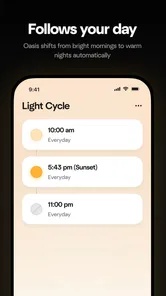
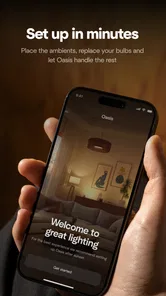
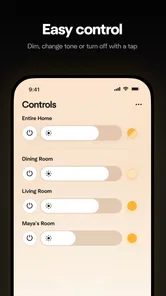
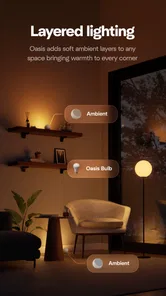

Analysis by Reviewed
I approached Oasis as a practical House & Home companion rather than as a general smart-home dashboard. Its purpose is focused: the app is made to help control Oasis products. That narrow role is important when deciding whether it belongs on your phone, because its value depends less on how many tools it offers and more on whether you own the right Oasis equipment and want a dedicated way to interact with it.
In my experience, focused control apps can be more comfortable than trying to manage a physical product through several unrelated methods. A phone is usually nearby, the controls are easier to revisit, and you do not need to remember where a particular button or setting is located. At the same time, a dedicated app is not automatically useful for everyone. If you do not have an Oasis product, there is little reason to install it simply because it is free.
What it feels like to use Oasis at home
The first thing I would keep in mind is the app’s relationship with the hardware. Oasis is not presented as a standalone home-planning tool, a shopping app, or a broad automation platform. It is a remote control and management layer for various products from Mixtiles, the developer behind it. That makes the ownership question the starting point: the app makes sense when it gives you a more convenient way to handle something already in your home.
A realistic example is a busy evening when you are moving between rooms and do not want to stop what you are doing to operate a compatible Oasis product manually. Opening the app lets the phone become the central point of control. That sounds simple, but simple is often exactly what a household control app should aim for. I would rather have a short path to the action I need than a crowded interface filled with unrelated home features.
That focus also makes Oasis different from the usual alternatives. A general smart-home platform may bring lights, speakers, thermostats, cameras, and appliances into one place, but it can also introduce extra menus and device categories that have nothing to do with your Oasis equipment. A physical control is immediate and does not depend on a phone, while the app is more flexible when you want to manage a product from a different position in the room. The better option depends on whether convenience or independence from a phone matters more to you.
I would not describe the app as a replacement for every other control method. Instead, I see it as an additional route to your Oasis products. That distinction matters in daily use. If your household already has a routine built around physical controls, Oasis may be most useful as a backup or a more comfortable option in particular situations rather than as the only way to interact with the product.
A focused app from Mixtiles
Mixtiles gives the app a clear identity, and the store summary explains its job without promising a wider ecosystem than the product is meant to support. I appreciate that kind of direct positioning. It lets me judge the app on responsiveness, clarity, and control rather than expecting it to become a complete home-management center.
More From Our News Desk

 Gmail
GmailGmail in a Busy Inbox: Who Benefits Most?
From first account to crowded workday, Gmail earns its place through dependable search and flexible sorting—but its best fit depends on how much inbox maintenance you can tolerate.

 Prime Video
Switching to Prime Video: What Changes in Your Viewing Routine
Prime Video can make a compelling second home for streaming, but switching means learning a different catalog, rental layer, and route from browsing to playback.

 Universal TV Remote Control
Universal TV Remote Control Works Best as a Reliable Backup
A phone remote earns its place through quick setup and reliable habits. Here is how to get more from Universal TV Remote Control—and where its limits show.

 Weather - By Xiaomi
Weather by Xiaomi Review: Clear at a Glance, Less Clear Up Close
Xiaomi’s weather app makes everyday forecasts quick to scan, but its calm surface can leave useful details and recovery paths harder to find than they should be.

 X
XX Under Pressure: Can It Recover When Posting Goes Wrong?
A resilience-focused review of X, examining setup, mistaken posts, interruptions, weak connections, and the gaps that matter when recovery needs to be dependable.

 Clash of Clans
Clash of Clans Is Won Between the Battles
Its raids are quick; its community is a long-term project of coordination, teaching, rivalry, and shared responsibility—with all the friction that entails.
Latest News



The app is free to download, which lowers the barrier to trying it if you already own compatible Oasis equipment. It is marked for Everyone, so its presentation is intended for a broad household audience rather than a specialist technical audience. That does not mean every person will find setup or daily control effortless, but it does suggest that the app is aimed at ordinary home use instead of professional installation work.
Its current version is 2.8.0, and the minimum operating-system requirement is 7.0. In practical terms, that gives the app a wide reach across Android devices that are still in use. I would still check that your particular phone and Oasis product work together before planning a household around it, especially if the device is older or the product was installed some time ago.
The app has a 4.9 average from around 180 ratings, with dozens of written reviews, and it has passed the ten-thousand-install mark. Those figures indicate a very positive reception among the people who have chosen to use it, but I would read them in context. A focused product-control app naturally attracts an audience that already has a reason to install it. The rating is encouraging, yet personal compatibility and your preferred control style remain more important than the number alone.
Where convenience is genuinely useful
The strongest use case is reducing small points of friction. When a product is part of a daily routine, even a few unnecessary steps can become irritating. A phone interface can make control easier to repeat, particularly for someone who prefers visible on-screen choices over physical buttons or who has difficulty reaching the product itself.
I also see value for shared spaces. A household may not want every person to learn a different physical control layout. Having a recognizable app on a phone can make the basic interaction more approachable. However, I would not assume that an app automatically solves household sharing. Before relying on it for several people, I would personally check how account access and device control behave in the exact setup, rather than handing over credentials casually.
Another useful workflow is to treat the app as a deliberate control check. Instead of changing a setting quickly and walking away, I can use the phone interface to confirm what I selected. That can be helpful when the physical product is out of sight or when I am unsure whether an action registered. The benefit is not flashy; it is the confidence that comes from seeing the control surface clearly.
One less obvious trade-off is that centralizing control on a phone can make the experience feel easier and more dependent at the same time. If the phone is unavailable, out of battery, being used by someone else, or experiencing a connection problem, the app may be less convenient than a direct control. For that reason, I would keep the original physical method familiar, even if Oasis becomes my preferred option.
Trust begins with what the app visibly lets you control
For a home-control app, trust is not only about the developer’s name or the rating. It is also about whether I can understand what I am doing before I do it. Oasis earns confidence when its controls are clearly tied to the products I own and when actions do not feel hidden behind vague labels. A focused interface has an advantage here because there are fewer unrelated features competing for attention.
I would pay close attention during first use to the screens that request access, connect the app with a product, or ask me to sign in. The useful question is not simply whether a permission prompt appears, but whether the reason for it is understandable at that moment. If a request feels unrelated to controlling the product, I would pause rather than approve it automatically.
The same cautious approach applies to account controls. I would look for an obvious way to identify the active account, review connected products, and sign out when necessary. These are ordinary checks, but they matter more when an app is used to control something in the home. If another person needs access, I would prefer a dedicated sharing method, if the app presents one, over sharing my main login details.
I also recommend checking the app’s visible settings before depending on it. Look for choices involving notifications, connected devices, account details, and access to the phone. The important point is user agency: I should be able to see which choices are active and change them without hunting through unrelated menus. If those controls are easy to find, the app feels more respectful of the person using it.
I cannot treat a high rating as proof that an app collects little information or handles data in a particular way. Those are separate questions. My own trust judgment would come from the permissions and data explanations shown during installation and inside the app, along with the control I have over my account. That is a healthier standard than assuming that a polished control screen tells me everything about data practices.
Moments when privacy deserves extra attention
Home-control apps can feel personal because they are connected to routines and spaces where people live. Even when the main task is straightforward, I would be careful around account creation, product pairing, household sharing, and any screen that asks for access beyond the immediate control function. These are the moments when I would slow down and read rather than tap through the setup.
My practical advice is to install Oasis from the official app source, review every permission prompt, and revisit the operating system’s permission manager afterward. If the app asks for access that does not seem necessary for your intended use, leave it disabled until you understand why it is requested. A control app should not receive broad access merely because the setup process is moving quickly.
I would also avoid using a shared phone profile or an unlocked device as the default place for account management. If the phone belongs to several people, check who can open the app and whether the active account is obvious. This is especially important in a household where different people may control the same Oasis products but should not necessarily have unrestricted access to every account detail.
Another sensible habit is to remove old product connections when equipment changes hands or leaves the home. I would look for a device-management screen and confirm that discontinued products are no longer listed. If the app offers a sign-out or account-removal route, I would use it before selling or giving away the phone. These steps are not exciting, but they prevent old access from becoming invisible background clutter.
Notifications deserve a similar review. A notification can be useful if it tells me something I genuinely need to know, but it can also expose household activity on a lock screen. I would choose the least revealing notification style that still helps me. That small phone setting can make a meaningful difference when other people can see the device.
How much control should you hand to the app?
I like apps that support a clear choice between convenience and caution. With Oasis, I would begin with the smallest setup that lets me control my own product. I would avoid adding extra household accounts, enabling every optional alert, or granting permissions before I know they are useful. Once the basic workflow feels reliable, I could expand it deliberately.
This approach also makes troubleshooting easier. If something goes wrong, there are fewer moving parts to check: the phone, the account, the product connection, and the relevant permission. A common mistake with home apps is changing several settings at once and then not knowing which change caused the problem. With a focused app, I would make one adjustment, test the result, and only then continue.
I would keep a backup routine for important controls. If a product has a manual method, learn it. If the household relies on one person’s phone, decide what happens when that person is away. If the app requires an account, keep recovery information current. These are not criticisms unique to Oasis; they are sensible safeguards whenever a phone becomes part of a physical home routine.
For families, I would introduce the app gradually. Let each regular user understand what the controls do, then decide who should have access. This is better than treating the app as a mysterious remote that only one technically confident person knows how to operate. Clear ownership and simple explanations reduce accidental changes and make the setup easier to maintain.
Who should use it, and who should skip it?
I would recommend Oasis to an Oasis product owner who wants phone-based control without adopting a much larger smart-home system. It is also worth considering if you prefer on-screen controls, need a convenient way to manage a product from a short distance, or want a dedicated app that stays focused on the equipment it supports.
I would be more cautious if you are looking for one app to manage products from many unrelated brands. A general smart-home platform may be the better choice for a mixed household, provided your devices are compatible with it. Likewise, if you dislike account-based services, depend on offline operation, or prefer physical controls exclusively, a dedicated app may add more dependence than convenience.
People buying an Oasis product for an older relative should also test the entire routine rather than judging the app from the installation screen. Large, understandable controls and a stable connection matter more than a long feature list. I would set it up together, confirm that the person can recognize the connected product, and make sure there is still a simple fallback if the phone is unavailable.
For a new owner, the best first step is not to explore every possible setting. Install the free app, connect only the intended Oasis product, test the main control from the usual places in the home, and then examine account and permission settings. That sequence gives you useful evidence about convenience and trust without overcommitting.
My cautious verdict
Oasis makes sense because it stays close to a clear household task: controlling Oasis products. I found that focus more appealing than a crowded dashboard promising to manage everything. The app’s free availability, Everyone age label, broad Android compatibility beginning with version 7.0, and strong user rating make it easy to consider when you already own compatible equipment.
Still, I would not install it just to see what happens, and I would not confuse a positive rating with a complete privacy assessment. My recommendation depends on checking the connection between the app and your specific product, reading permission prompts, reviewing account access, and keeping a manual fallback available. Those steps take little time and give you a more realistic picture than the store page alone.
My final view is favorable but deliberately measured: Oasis is most convincing as a focused, convenient companion for existing Oasis hardware, not as a universal home-control solution. If that matches your situation, the app is worth trying. If you need broad brand support or independence from a phone, the usual alternatives may serve you better. Either way, start with limited access, understand the visible choices, and let actual daily convenience—not the rating alone—decide whether it earns a permanent place on your phone.
Oasis Frequently Asked Questions
What is Oasis, and what can I use it for?
Oasis is an app designed to provide users with a focused digital experience centered on discovering, accessing, and managing its available content or features in one place. Before downloading, it is worth checking the current app description and screenshots because the name “Oasis” may refer to different applications on Android and iOS. The exact tools, supported services, and intended audience can vary by developer and platform. Oasis is developed by Mixtiles and is intended to help you control the various Oasis products, making it most useful if you already use or plan to use those products.
Which devices and operating systems can run Oasis?
Oasis is available for Android devices running Android 7.0 or later. Before installing, check your device’s operating-system version and make sure the app is the Mixtiles version intended to control Oasis products. Confirm that your phone or tablet can access the products you want to manage, and install Oasis through the official app store so you get the genuine app and its updates.
Is Oasis free to download and use?
Oasis is free to download, but some features, content, or services can require in-app purchases or a subscription. After installing it, review the pricing page carefully before starting a trial, since subscriptions may renew automatically unless canceled through your Google Play or Apple account settings. Also check whether the free version includes advertisements, usage limits, or restricted access to premium tools.
Does Oasis require an account or personal information?
Depending on the version of Oasis you install, you may be able to explore certain features without registering, while other functions may require an account. Registration can involve an email address, username, or third-party login. Before creating a profile, read the privacy policy and permissions list to understand how information is collected, stored, and used, particularly if the app requests access to contacts, location, photos, notifications, or other sensitive data.
Is Oasis safe to install on Android and iPhone?
The safest way to install Oasis is through the official Google Play Store or Apple App Store, where the developer information, update history, ratings, and requested permissions can be reviewed. Avoid downloading modified APK files or unofficial copies, as they may contain harmful software. Keep your device updated, examine recent user reviews, and verify that the app publisher matches the official developer before granting access to personal information.
Pros
- Simple interface makes the app easy to navigate from the first use.
- Helpful tools encourage regular use without creating a steep learning curve.
- Clean visual design keeps the experience calm and distraction-free.
- Performance is generally smooth on compatible Android and iOS devices.
- Useful reminders can help users maintain consistent habits over time.
Cons
- Some features may require a subscription or in-app purchases.
- The app can feel limited for users seeking advanced customization.
- Notifications may become repetitive if too many reminders are enabled.
- Certain content or features may depend on an internet connection.
- Compatibility and feature availability can vary between devices and regions.







