

NYC Ferry
- 681.00
- 4.8
- Installs
- 500.00K
- Price
- Free

Screenshots
Analysis by Reviewed
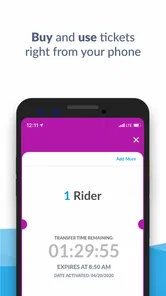
Getting around New York by ferry sounds simple until you are standing near the terminal, checking the time, and trying to work out whether your ticket is ready to use. I found the NYC Ferry App most useful in exactly those moments. It is a focused Travel & Local app from Anchor Operating System that puts mobile ticketing and Scan & Go boarding into a much quicker routine than buying a ticket at the last minute.
NYC Ferry is free, rated for Everyone, and available for Android devices running Android 8.0 or later. Its current version is 5.7.3, and the app has built a strong user base, with an average rating of 4.8 from around 9.5 thousand ratings and more than 500 thousand installs. Those figures suggest that it has become a familiar tool for regular riders, but my experience is that it works best when you prepare before reaching the dock rather than treating it as something to open only when boarding is already happening.
Where the ferry app saves time—and where people get stuck
The main appeal is not that it replaces every part of a journey. It does one important job well: it lets you handle a ferry ticket on your phone and use Scan & Go boarding instead of pausing for a separate purchase at the terminal. That makes it especially convenient for commuters, visitors making several stops around the waterfront, and anyone traveling with a schedule that does not leave much room for hesitation.
The first point of friction is usually timing. A person may install the app while walking toward a landing, open it with a weak connection, and expect the whole purchase process to be instant. Even when the app itself is working properly, this is a stressful way to use it. A better habit is to open it before leaving a subway station, hotel, office, or café, when you have enough time to read each screen and confirm that the ticket is available before you join the boarding line.
Another common stumbling block is confusing the app with the ferry service itself. The app can help with the ticket and boarding part of the trip, but it cannot make a vessel arrive sooner, remove a crowded queue, or solve a service disruption at the landing. If the ferry is delayed or the dock is busy, repeatedly refreshing the app is unlikely to change the situation. I use it as a ticketing tool, not as a substitute for paying attention to the terminal and the actual service conditions.
Scan & Go is convenient because it shortens the moment when staff or equipment needs to check your ticket. The trade-off is that your phone becomes part of the boarding process. A low battery, a locked screen that takes too long to wake, or a ticket buried behind unrelated notifications can turn a smooth trip into an awkward pause. Before I approach the boarding area, I bring the relevant screen up and keep the phone ready in my hand.
That small preparation matters more than it sounds. Ferry boarding often happens in a public space where people are moving in the same direction, so there is little time to stop and troubleshoot without holding others up. I would not call this a flaw unique to the app; it is the normal compromise of mobile ticketing. You gain speed and convenience, but you also need to manage your device responsibly.
More From Our News Desk

 Weather - By Xiaomi
Weather by Xiaomi Review: Clear at a Glance, Less Clear Up Close
Xiaomi’s weather app makes everyday forecasts quick to scan, but its calm surface can leave useful details and recovery paths harder to find than they should be.

 X
XX Under Pressure: Can It Recover When Posting Goes Wrong?
A resilience-focused review of X, examining setup, mistaken posts, interruptions, weak connections, and the gaps that matter when recovery needs to be dependable.

 Clash of Clans
Clash of Clans Is Won Between the Battles
Its raids are quick; its community is a long-term project of coordination, teaching, rivalry, and shared responsibility—with all the friction that entails.

 Android Auto
Android Auto Makes the Case for Quieter Car Software
The car interface is no longer judged by how much it can do, but by how quietly it helps. Android Auto shows what drivers now expect—and what still gets in the way.

 MobiOffice: Word, Sheets, PDF
MobiOffice: Transforming Mobile Productivity with Seamless Integration
MobiOffice: Word, Sheets, PDF is redefining mobile productivity with a surprising blend of functionality and innovation.

 EA SPORTS FC Soccer Mobile 26
EA SPORTS FC™ Mobile Soccer: Redefining Mobile Sports Gaming
Dive into EA SPORTS FC™ Mobile Soccer, where immersive gameplay and strategic depth transform mobile sports gaming.
Latest News



A realistic trip from planning to boarding
Imagine leaving work in Manhattan for an evening appointment near the Brooklyn waterfront. Instead of waiting until the landing to decide how to pay, I would open the app while still indoors, select the ticket needed for the trip, and make sure the purchase or ticket display has completed. I would then check the route information with the same care I would use for a paper ticket or a transit sign, rather than assuming that the next ferry automatically goes where I need.
On the way to the landing, I would keep the phone charged and avoid closing the app in a rush. At the boarding point, the goal is simply to present the ticket for Scan & Go. If the screen does not appear immediately, I would step aside instead of repeatedly tapping through menus in the line. That gives me space to check whether the purchase finished, whether the display is showing the correct ticket, and whether the phone has a usable connection.
This workflow reveals the app’s real strength: it moves the decision and payment step away from the busiest part of the journey. It also reveals its limitation: the app is most helpful when used as preparation, not as emergency equipment. Someone who plans ahead will probably appreciate it much more than someone who downloads it while boarding is underway.
Setup checks that prevent most ticketing headaches
Installation is straightforward for compatible Android phones, but I would still check the operating system before recommending it to someone with an older device. Android 8.0 is the minimum listed requirement, so a phone below that level is not a good candidate for this app. On a supported phone, I would also install the latest available version rather than relying on an old copy, since ticketing tools need to communicate reliably with the current service.
After opening the app, take a moment to understand the ticket screen before you need it. The useful question is not only “Can I buy a ticket?” but also “Where will I find it when I am standing at the landing?” Familiarity with that path is one of the simplest ways to reduce pressure. I prefer making a small practice check at home, without rushing into a purchase, so I know which part of the interface leads to the active ticket and which part is for starting a new transaction.
Phone readiness is just as important as app readiness. Keep enough battery for the entire trip, especially if you are using the phone for maps, messages, and transit information as well. If your device has an aggressive battery-saving mode, it is sensible to avoid changing settings in the boarding line. The safest approach is to prepare the phone before traveling and keep the screen easy to wake when you reach the ferry.
Connection quality deserves a practical check too. A mobile ticketing app may need communication with its service while you are buying or loading a ticket. Underground stations, enclosed buildings, and waterfront areas can all produce inconsistent connectivity. I would complete the ticketing step somewhere with a reliable connection and wait for clear confirmation before walking away from that spot.
Do not assume that seeing a loading animation means the transaction is complete. Give the app time to finish, and look for the ticket itself or another clear indication that the process has ended. If you are unsure, avoid immediately repeating the purchase. First check the ticket area and any visible transaction history or confirmation within the app. Repeating actions while a connection is unstable can create more confusion than waiting a little longer.
For visitors, the best setup is to decide the day’s first ferry journey before reaching the waterfront. That does not mean every later trip must be planned in detail. It simply gives you a calm starting point and lets you learn how the app presents a ticket. Regular riders can go further by making the app part of their leaving-home routine: check the ticket, check the phone battery, then head to the landing.
What to do when the normal workflow breaks
If the app opens but the ticket does not appear, I would start with the least disruptive checks. Confirm that the phone has a connection, wait briefly, and return to the ticket area rather than tapping every visible control. If the display remains stuck, close and reopen the app only after making sure the purchase was not already completed. The aim is to recover the existing ticket, not accidentally start over.
If the app will not open at all, a basic phone restart can help with temporary problems, but it is not something I would attempt for the first time while a line is moving. That is why I recommend opening the app before arriving. It gives you time to restart, reconnect, or choose another sensible way to resolve the situation without making the landing your test environment.
A particularly useful habit is to separate three questions: did the app load, did the ticket purchase finish, and is the ticket visible for boarding? These are different stages. An app that loads successfully may still need time to retrieve a ticket, while a completed payment does not necessarily mean the correct display is already on screen. Thinking through the stages prevents random tapping and makes it easier to explain the problem if staff assistance is needed.
If Scan & Go does not respond at the moment of boarding, hold the phone steady and give the scanner or staff member a clear view of the ticket. Moving the phone quickly, switching between screens, or covering the display with a hand can make the check harder. If that still does not work, step to the side when possible and ask for help rather than blocking the boarding flow.
For a group, I would avoid assuming that one person’s phone automatically solves everyone’s ticketing needs. Keep track of which tickets have been purchased and which screen represents each rider’s boarding entitlement. The app may be fast, but group travel adds a layer of organization that the individual ticket workflow does not remove. One person should be responsible for presenting tickets while another keeps the group together.
These are deliberately ordinary recovery steps: check the connection, wait for completion, reopen carefully, and ask for assistance when the boarding process itself is involved. They do not promise to fix every problem, but they avoid the most damaging reaction—repeating a purchase or abandoning a valid ticket because the first screen was slow to update.
When the app is not the cause of the problem
It is easy to blame the app whenever a ferry trip goes wrong because the phone is the most visible part of the process. In practice, several problems can come from elsewhere. A ferry may be crowded, the landing may be busy, or the service may not be operating as expected. None of those conditions necessarily indicates that the ticketing app has failed.
The same applies to route confusion. A mobile ticket does not replace checking the destination, direction, and landing. New York’s waterfront network can be unfamiliar to occasional visitors, and a valid ticket will not help if you are waiting at the wrong place or expecting a vessel to follow a route it does not serve. I treat the app as one piece of trip preparation and use the physical signs and staff guidance at the landing as the final reference for boarding.
Phone hardware can also be the weak point. A cracked screen, dim display, unreliable touch response, or nearly empty battery can make Scan & Go difficult even if the app is functioning normally. A friend who regularly travels with a phone that struggles in bright outdoor light may prefer a different ticketing arrangement when available, simply because presenting a clear screen is part of the experience.
There is also a difference between convenience and universal suitability. If you are comfortable using a phone for travel, the app removes a needless stop from the journey. If you strongly prefer physical tickets, share a phone with another traveler, or cannot reliably keep a device charged, the digital workflow may feel like an extra responsibility. In those cases, the usual alternative at the ferry service may be more comfortable, even if it is less convenient when the landing is busy.
I would also skip relying on the app as the only source of information for a complicated day involving several transport systems. A broader transit app or a map service may be better for comparing subway, bus, walking, and ferry options. The NYC Ferry App is strongest at its specific task: getting a ferry ticket onto your phone and ready for boarding. It is not the tool I would choose to plan every connection across the city.
Who gets the most value from it
Regular ferry riders are the clearest audience. Once the ticketing sequence becomes familiar, the app can turn a recurring purchase into a quick part of the commute. It is also a good fit for visitors who want to avoid handling cash or stopping at a machine while carrying luggage, provided they are willing to prepare the ticket before reaching the landing.
It can be useful for spontaneous local trips too. A waterfront walk that turns into a ferry ride does not need extensive planning, but I would still pause in a comfortable location to complete the ticketing process. That is a better compromise than waiting until the boarding queue is moving.
Families and groups may appreciate the convenience but should assign one person to manage the ticket screens and another to watch bags or children. The app reduces payment friction; it does not remove the need to coordinate people. For solo travelers, its simplicity is more immediately noticeable because there is no need to hand a ticket back and forth or keep track of several paper slips.
People who should be cautious are those with unsupported older Android phones, unreliable connectivity, or limited battery life. The free price removes a financial barrier, but it does not remove the practical requirement of having a working, charged device at boarding time. I would also recommend a different primary tool to anyone looking for detailed citywide journey planning rather than ferry ticketing.
My practical verdict after using it as a travel tool
NYC Ferry App succeeds because it concentrates on a real point of friction: paying for a ferry trip and presenting the ticket without turning boarding into a separate errand. The Scan & Go approach is particularly useful when the phone is prepared in advance. I found the experience much less convincing when I waited until the last minute, had to deal with a weak connection, or treated the app as if it could solve a service problem at the landing.
Anchor Operating System has kept the product focused rather than trying to make it a general-purpose city guide. That focus is a benefit for riders who already know they want the ferry. It also explains why someone expecting broad route comparisons, extensive local recommendations, or a complete replacement for every transit app may find it limited.
The best way to use it is simple: install it on a supported phone, open it before you leave a reliable connection, complete the ticketing step without rushing, confirm that the ticket is visible, and approach the landing with the screen ready. If something goes wrong, distinguish a missing ticket from a slow connection, a device problem, or a ferry-service issue before repeating any action.
With more than 681 written reviews and a strong overall rating, it is clear that many riders find the app worthwhile. My own recommendation is similarly positive, with an important condition: it is a practical companion for NYC Ferry, not a magic solution for every part of a waterfront journey. For commuters, visitors, and solo riders who are comfortable with mobile tickets, the free download is an easy choice. For people who need a broader travel planner or cannot depend on their phone at the dock, another option may be the safer fit.
NYC Ferry Frequently Asked Questions
Is the NYC Ferry app free, and which devices can run it?
NYC Ferry is a free Travel & Local app from Anchor Operating System. It is intended for riders who want to handle ferry ticketing on their phone, and its mobile tickets support Scan & Go boarding. The app is listed for devices running Android 8.0 or later. If you are considering downloading it, check that your device meets this requirement and that you are using the official NYC Ferry app.
What does the NYC Ferry app let me do before boarding?
The app’s central purpose is mobile ticketing, with Scan & Go boarding offered for getting onto the ferry. That can make it useful when you prefer to manage your ticket on your phone rather than rely only on a paper purchase. It is a focused ferry tool, so check your route and service plans as well as your ticket before heading to a landing.
What is NYC Ferry, and where can I ride it?
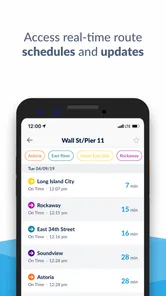
NYC Ferry is New York City’s public ferry service, connecting several waterfront neighborhoods across Manhattan, Brooklyn, Queens, and the Bronx. Routes serve popular areas such as Wall Street/Pier 11, Midtown, Astoria, Rockaway, Red Hook, and Governors Island on seasonal service. Before traveling, check the current route map and timetable because stops, connections, and seasonal schedules can change.
How much does an NYC Ferry ride cost, and how do I pay?
A standard NYC Ferry trip generally uses a flat-fare ticket, with reduced prices available for eligible riders and children under the applicable age limit. Tickets can be purchased through the official NYC Ferry app, at ticket machines near many landings, or through other approved options. Make sure your ticket is valid before boarding, and remember that ferry fares are separate from regular subway and bus fares.
Can I use my MetroCard or OMNY payment on NYC Ferry?
NYC Ferry is not normally included with an unlimited MetroCard or standard OMNY subway and bus transfers. Riders typically need to buy a separate ferry ticket through the NYC Ferry app, a ticket vending machine, or an approved ticketing method. Some services may offer transfer or connection options under specific conditions, so review the latest official fare information before planning your journey.
Pros
- Frequent departures on several popular routes
- Open-air decks provide excellent city and waterfront views
- Useful alternative when subway service is disrupted
- Ferries are generally clean and comfortable
- Bikes are allowed
- making waterfront trips more convenient
Cons
- Routes and schedules vary considerably by season
- Service can be affected by weather or water conditions
- Some terminals are far from subway stations
- Crowding is common during rush hours and weekends
- Ferry fares are separate from standard subway and bus transfers











