NovelZoom
- 154.00
- 2.5
- Installs
- 100.00K
- Price
- Free

Screenshots


Analysis by Reviewed
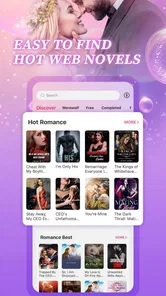
I spent time with NovelZoom as a reading app for romance fiction, and my overall impression is mixed. It is free to install and sits in the Books & Reference category, with a simple promise: give readers a large stream of romance novels in one place. That makes it appealing if you like opening an app during spare moments and moving from one ongoing story to another without carrying a physical book.
At the same time, the experience is not equally comfortable for everyone. Reading accessibility is not just about whether words appear on a screen. It also involves how easily a person can find a title, maintain attention, tap controls, read in changing light, and keep using the app without feeling pressured by interruptions or unclear progression. NovelZoom has the basic appeal of a digital fiction library, but its modest average rating of 2.5 from around 419 ratings suggests that many readers have encountered friction worth considering before making it part of their daily reading routine.
Reading flow, readability, and navigation
The strongest reason to try NovelZoom is its focus. This is not a general-purpose ebook reader, a news app, or a reference database. It is built around romance novels, so the likely audience is someone who wants emotional plots, relationship drama, and serialized reading rather than a broad catalogue of unrelated subjects. That narrow purpose can be useful: when I open an app with a clear genre identity, I spend less time deciding what kind of content I want.
The trade-off is that a romance-first catalogue can become difficult to evaluate if many titles use similar themes, covers, or descriptions. A reader with limited attention may need a quick way to distinguish a promising story from one that only resembles the last five options. I recommend judging a title by more than its cover. Read the opening carefully, notice whether the writing style feels comfortable, and decide early whether the story is worth the effort of continuing.
For readers who have difficulty with dense screens, the most important practical habit is to create a calm reading routine rather than browse endlessly. I would open the app when I already know I want romance fiction, choose one story, and give myself a clear stopping point. This reduces the amount of repeated scanning through promotional artwork and story summaries. It also makes the app easier to use for people who tire quickly when faced with too many visual choices.
NovelZoom is free to download, but that should not be confused with unlimited access at no cost. The app includes in-app purchases ranging from $9.99 to $129.99 per item. For me, that is a major part of the reading decision. Someone who only wants to sample a few chapters should approach the app differently from a committed reader who expects to follow several long stories. Before becoming emotionally invested in multiple unfinished novels, I would check how the reading flow handles locked chapters and whether the required purchase feels reasonable for the particular story.
This is also where NovelZoom differs from a traditional ebook bought once. With a conventional ebook, I usually know the price before starting and can read the complete work without a chapter-by-chapter decision. A serialized romance app may feel more immediate and discovery-oriented, but it can make the total cost harder to judge. If predictable spending matters to you, a library app, subscription service, or standard ebook store may be a better fit.
More From Our News Desk

Weather by Xiaomi Review: Clear at a Glance, Less Clear Up Close

X Under Pressure: Can It Recover When Posting Goes Wrong?

Clash of Clans Is Won Between the Battles

Android Auto Makes the Case for Quieter Car Software

MobiOffice: Transforming Mobile Productivity with Seamless Integration

EA SPORTS FC™ Mobile Soccer: Redefining Mobile Sports Gaming
Small reading habits that make a difference
I found that accessibility often begins before the first paragraph. I would use the app when I have enough time to read several pages, rather than opening it for a rushed minute while walking or handling other tasks. Romance plots often depend on remembering names, relationships, and unresolved conflicts, so fragmented reading can make the experience more tiring. A short note outside the app can help if you regularly return to several stories, especially when the app presents many ongoing titles at once.
Another useful approach is to test one novel before committing to several. Read enough to assess the text size, contrast, spacing, chapter rhythm, and the amount of tapping required. If the screen feels uncomfortable after a few minutes, that is a meaningful warning, not a minor inconvenience. A story may be enjoyable, but it is rarely worth straining your eyes or fighting the interface every evening.
People who rely on device-level display adjustments should also test them in real conditions. Enlarged system text, display zoom, dark-mode preferences, or screen magnification can affect how much content fits on a page and how easily controls remain visible. I would not assume that every screen responds perfectly to those settings. The sensible workflow is to try a chapter at home, then repeat the test in a dim room and outdoors before deciding whether NovelZoom suits your eyes.
Motor, sensory, and situational access
Reading apps can be demanding for users with limited dexterity because the activity is not always just “scroll and read.” Moving between titles, opening chapters, returning to a list, and responding to any purchase-related prompt may require repeated, precise taps. If your hands become tired or you use an alternative input method, the number and placement of controls matter more than the romance catalogue itself.
My advice is to treat the first session as an interaction test. Can you open a story without tapping several times? Can you return to your place without accidentally leaving the chapter? Can you move through the text at your preferred pace? If a control is small, crowded, or positioned where your thumb naturally rests, the problem will become more noticeable over a long reading session.
Readers with tremors or reduced precision may prefer holding the phone with both hands and using a stable surface rather than reading one-handed. I would also avoid browsing while carrying bags, standing on public transport, or walking. Those situations make accidental taps more likely, and they are especially poor moments for any screen involving paid content. A deliberate pause before confirming a purchase is a simple but important safeguard.
For people with low vision, brightness and glare can change the experience dramatically. A bright screen in a dark bedroom may cause fatigue, while sunlight can wash out text and make controls difficult to distinguish. I would test a chapter at the same time of day when I expect to read most often. If the text remains uncomfortable after adjusting the phone’s brightness and display settings, NovelZoom may not be the right reader for you, even if the stories themselves are appealing.
Readers with dyslexia or other processing differences may need more control over presentation than a fiction app provides. The important question is not whether the prose is simple; it is whether the reading surface lets you maintain a comfortable rhythm. I would look for consistent paragraph spacing, manageable chapter lengths, and a layout that does not make it easy to lose my place. If those elements are not comfortable, copying passages into a preferred reading environment may be tempting, but that workflow is not always convenient or available, so a more flexible ebook reader may be preferable.
Audio access is another consideration. I would not choose NovelZoom expecting it to replace an audiobook service. Its identity is centered on reading novels on screen, so anyone who needs text-to-speech, narrated content, or hands-free listening should test their phone’s built-in tools with the app before relying on it. Device-level speech can behave differently from app-integrated narration, particularly around menus, chapter transitions, and decorative interface elements.
Using it in everyday situations
Imagine a reader who commutes by train and wants a romance story for the ride. NovelZoom could be useful during a quiet, seated journey: the reader can settle into one title, adjust the phone for the lighting, and stop at a natural chapter break. It becomes less suitable when the carriage is crowded, the phone must be held at an awkward angle, or the reader is moving between platforms. In that case, a printed book, an audiobook, or an ebook reader with a simpler interface may reduce effort.
At home, the app may work well for a short evening reading ritual. I would keep the phone on a stand if holding it becomes tiring and use a consistent light source behind or beside me rather than reading in complete darkness. This setup helps separate the physical demands of reading from the emotional pull of a cliffhanger. It also makes it easier to stop before sleep if the screen or story becomes too stimulating.
NovelZoom can also suit readers who want to sample romance fiction before spending money on full-length books. The free entry point lowers the barrier to trying the app, and the genre focus makes the purpose immediately clear. However, sampling only works if I keep track of what I have started. Beginning many stories at once can create a confusing reading queue, especially for someone who has memory difficulties or prefers a predictable routine.
Families should pay attention to the Teen content rating. That rating makes the app more suitable for older young readers than for children, but it does not mean every story will match every family’s expectations. I would treat the label as a starting point, not a substitute for personal judgment. If a younger teenager is using the app, an adult may want to discuss spending limits and choose a reading routine that avoids accidental purchases.
Where the experience still creates barriers
The biggest barrier is the tension between free access and paid continuation. A reader may begin a story because it is easy to try, then face a decision when later chapters require payment. That structure can be frustrating for people with limited budgets, readers who dislike financial surprises, and anyone who becomes deeply invested in a story before understanding its full cost. I would set a personal spending limit before browsing, rather than making the decision at the most dramatic point in the plot.
The purchase range also makes NovelZoom less accessible as a casual recommendation. I can suggest it to a friend who enjoys serialized romance and is comfortable evaluating paid chapters, but I would hesitate to recommend it to someone seeking a completely free reading service. A public library, an ad-supported reading platform, or a conventional ebook promotion may give that reader clearer boundaries.
Another barrier is the possibility of fatigue from discovery. Romance apps often depend on continuous browsing, and that can be enjoyable for some people but exhausting for others. If you have attention difficulties, visual sensitivity, or limited energy, a large stream of similar choices may feel like work. My solution would be to select a single title, avoid unnecessary browsing, and stop using the app if the discovery process becomes more demanding than the reading itself.
NovelZoom is maintained by HK IReader Technology Limited, and the current version is 10.8.60. It runs on Android devices using version 7.0 or later, which makes it available to people with older compatible phones. That broader device reach is helpful, but older hardware can still affect comfort through slower screen response, reduced battery life, or a smaller display. I would judge the app on the actual phone I plan to use, not only on its compatibility label.
The app’s reception is another reason to approach it carefully. It has more than 100K installs and around 154 written reviews, but the average rating remains 2.5. I would not treat that rating as proof that every reader will have a poor experience, because romance preferences and tolerance for serialized payment models vary widely. Still, it is a clear signal to test the reading flow, avoid assuming that every feature will suit you, and make spending decisions slowly.
Readers who need robust organization may prefer a dedicated ebook app. Those apps commonly make it easier to manage books purchased from a known catalogue, change reading preferences, and keep a stable personal library. NovelZoom is more appealing when discovery and romance serialization are the priority. It is less convincing when I want a quiet, customizable, ownership-oriented reading environment.
Who I would recommend it to
I would recommend trying NovelZoom if you specifically enjoy romance fiction, like discovering new serialized stories, and are willing to inspect the payment structure before continuing. It can be a convenient option for filling short breaks, particularly when you want emotional fiction rather than general reference material. The free installation gives you a low-risk way to see whether the catalogue and reading surface match your habits.
I would be more cautious if you have strong accessibility requirements. The app may still work with your phone’s display and input settings, but I would test it personally rather than assume it offers the exact text controls, speech support, navigation simplicity, or visual presentation you need. A reader who depends on a specific font, extensive customization, or reliable hands-free access should start with an app known for those functions.
I would also skip it if you dislike unfinished stories, do not want in-app purchases, or need to know the complete cost of a book before opening it. The romance focus is not enough to overcome those concerns. In that situation, a library service or one-time-purchase ebook platform gives you a clearer and often calmer path from selection to completion.
For readers with limited dexterity, I suggest a short trial with the phone supported on a desk. For readers with low vision, test the app under both bright and dim lighting. For readers with attention or memory challenges, keep only one active story at a time. These are not guarantees, but they are practical ways to discover whether the app fits your body and routine before investing money or time.
An inclusive verdict on NovelZoom
NovelZoom has a clear identity and a useful niche: romance readers who want a dedicated stream of novels that can be sampled on a phone. I like the low entry barrier and the convenience of having genre-focused fiction available during a commute, a quiet break, or an evening at home. The app is most convincing when I use it deliberately, with one story selected and a clear idea of how much time and money I am prepared to give it.
Its weaknesses are just as important. The average rating is low, paid items can become expensive, and the reading experience may not provide enough reassurance for people who need highly adjustable presentation or very simple navigation. The Teen rating also means families should make their own content and spending decisions instead of handing the app to younger readers without guidance.
My inclusive verdict is therefore conditional: NovelZoom is worth a careful trial, not an automatic recommendation. Romance fans who enjoy serialized discovery may find a comfortable reading habit here, while readers who need predictable pricing, advanced accessibility controls, audiobooks, or a fully owned library should look elsewhere first. I would install it only when its genre focus matches my mood, test one story in my normal reading environment, and keep purchases separate from the excitement of a cliffhanger.
NovelZoom Frequently Asked Questions
What devices and operating systems can run NovelZoom?
NovelZoom is a mobile app for reading on a phone or tablet, and its minimum operating system requirement is version 7.0. Before downloading, check your device’s software version and available storage so the installation can complete smoothly. Keeping the operating system compatible also helps you access the app’s reading features and any updates offered for your device.
Who develops NovelZoom, and how well is it rated by users?
NovelZoom is developed by HK IReader Technology Limited and is listed in the Books & Reference category. It has an average rating of 2.5 from around 419 ratings, with around 154 written reviews. Those figures offer a quick snapshot of user feedback, but experiences can differ, so it is worth reading recent reviews to see what readers say about the app’s performance and content.
What is NovelZoom, and what can I use it for?
NovelZoom is a mobile reading app designed for users who enjoy discovering and reading serialized novels, fiction stories, and other written content on their phones or tablets. After exploring the app, its main appeal is the convenient library, genre-based browsing, and reading interface. It may also recommend stories based on your interests, making it easier to find new titles without searching manually.
Is NovelZoom free to download and use?
NovelZoom can generally be downloaded without an upfront charge, but downloading the app does not necessarily mean that every story or feature is completely free. Some chapters, premium titles, bonus content, or reading privileges may require in-app purchases, virtual coins, subscriptions, or other payments. Before spending money, check the pricing information and payment terms shown inside the app. In-app purchases range from $9.99 to $129.99 per item.
Does NovelZoom require an internet connection to read novels?
An internet connection is normally needed to download the app, browse the catalog, synchronize your account, load new chapters, and access online features. Depending on the title and the version of NovelZoom you are using, selected chapters may be available for offline reading after being downloaded. Offline access should not be assumed for every story, so verify the download option before traveling or using mobile data.
Pros
- Clean
- easy-to-navigate interface for browsing serialized stories.
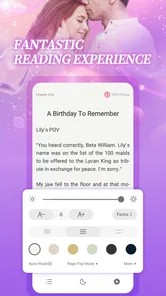
- Zoomed reading format makes small text easier to view on mobile screens.
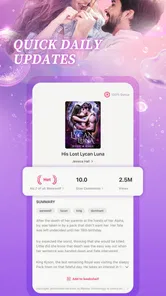
- Story updates can be checked conveniently from a single app.
- Short chapters suit quick reading sessions during commutes or breaks.
- Personalized recommendations may help users discover new titles.
Cons
- Some stories or chapters may require in-app purchases to continue reading.
- The reading experience can depend heavily on a stable internet connection.
- Frequent notifications may feel intrusive for users who prefer quiet apps.
- Content availability may vary by region or change without notice.
- Long reading sessions can consume considerable mobile data and battery.













