NovelsReader
- 135.00
- 2.7
- Installs
- 100.00K
- Price
- Free

Screenshots

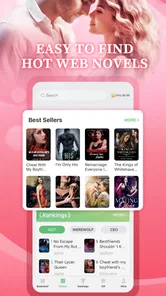
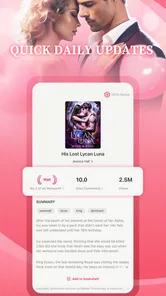
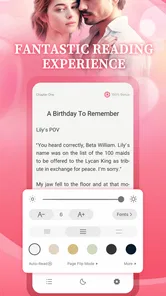
Analysis by Reviewed
I approached NovelsReader as the sort of app you open when you want a romance story immediately, without building a large personal library first. It is a free Books & Reference app from HK IReader Technology Limited, aimed at readers who prefer serialized fiction and a steady stream of romantic plots on a phone. The basic promise is simple, but the experience depends heavily on how patiently you browse, how you manage your reading routine, and how comfortable you are with the app’s mature audience focus.
My first impression was that NovelsReader is less like a traditional ebook shelf and more like a reading feed. That distinction matters. If you usually buy complete ebooks, download public-domain classics, or expect a carefully organized library, this will feel different. If you enjoy discovering ongoing romance stories and returning to them in short sessions, the format makes more sense. I found the app easiest to judge as a habit-based reader rather than as a replacement for every kind of book app.
How I used NovelsReader for everyday reading
The most practical starting point is to treat the app as a small daily ritual. I would open it when I had a few quiet minutes, look for a story that matched my mood, and then keep one or two promising titles in rotation instead of opening everything that caught my attention. That approach reduced the feeling of browsing endlessly and made the reading experience more focused.
NovelsReader is especially suited to people who like romance conventions: emotional tension, relationship drama, secrets, rivalries, and long-running character arcs. The mature 17+ rating is important before you install it. I would not recommend handing it to a younger reader or assuming that every title will have the tone of a light, all-ages love story. The audience setting signals that adult themes can be part of the experience, so personal judgment is needed when choosing what to read.
The app is free to install, which makes trying it low-risk at the beginning. However, the reading journey can involve in-app purchases ranging from $1.49 to $129.99 per item. I would advise deciding your spending limit before getting deeply invested in a serialized story. A free starting point can be appealing, but a reader who dislikes interruptions, locked chapters, or purchase prompts should pay attention to how the particular story develops before committing emotionally.
My preferred workflow was straightforward: browse briefly, open a sample of a story, read enough to judge the writing and pacing, and only then decide whether it deserved a place in my regular rotation. This is more useful than judging a novel by its cover or title alone. Romance fiction often depends on pacing, and a premise that sounds excellent can still feel slow if the opening chapters spend too long setting up the conflict.
For a realistic everyday example, imagine commuting home with fifteen minutes to spare. NovelsReader works well in that space because you can continue a story rather than decide what to watch or listen to. I would use that short session to finish a chapter, note where the plot paused, and return later. The app is less satisfying when I want a complete reading experience in one sitting, because serialized fiction naturally encourages repeated visits.
More From Our News Desk

Weather by Xiaomi Review: Clear at a Glance, Less Clear Up Close

X Under Pressure: Can It Recover When Posting Goes Wrong?

Clash of Clans Is Won Between the Battles

Android Auto Makes the Case for Quieter Car Software

MobiOffice: Transforming Mobile Productivity with Seamless Integration

EA SPORTS FC™ Mobile Soccer: Redefining Mobile Sports Gaming
One useful habit is to separate discovery from commitment. During discovery, I would sample several stories and keep my expectations modest. During commitment, I would stop jumping between titles and give one story enough time to establish its characters. This prevents the common problem of collecting many beginnings without finishing anything. It also helps reveal whether NovelsReader’s catalog suits your taste, rather than merely offering a large-looking selection.
What the reading format does well
The strongest part of this kind of app is convenience. A phone is already available during a lunch break, before bed, or while waiting for an appointment. NovelsReader places romance reading in that same small-screen routine, so it can be easier to return to than a physical book left at home. For readers who enjoy frequent updates or extended storylines, that repeatable access is a genuine advantage.
I also liked the low barrier to experimentation. Because the app is free to start, you can test whether its presentation and story selection work for you without first paying for a full ebook. That does not remove the need to watch purchase prompts, but it does make the first decision simpler: install it, browse, and see whether the reading experience feels natural.
The weaker side is that convenience can encourage unfocused reading. A stream of possible stories can make every title seem worth opening, while very few receive enough attention to become satisfying. I recommend choosing by a clear mood or theme each time you browse. For example, decide whether you want a slow-burn relationship, high drama, or a lighter romantic escape before opening the catalog. A narrow intention makes the app feel calmer.
Settings and choices worth checking early
I would spend a few minutes examining the available reading controls before settling in for a long session. On a phone, small adjustments to text presentation, page movement, and screen behavior can make a bigger difference than people expect. The most comfortable setup is personal: some readers prefer frequent taps, while others want smooth scrolling and fewer interruptions to the story.
It is also worth checking how the app handles your reading position and story organization during normal use. Before relying on it for several books at once, I would close and reopen a title to make sure returning to a chapter feels clear. I would also avoid assuming that every browsing action means a story has been saved for later. If the app offers a way to mark or organize titles, use it deliberately; if not, keep your active reading list small enough to remember.
Another setting-related decision is notification discipline. A reading app can be useful when it reminds you to return to a story, but too many alerts can turn a relaxing habit into background noise. I prefer enabling only the notifications that help me continue a title I already care about. If a notification feels like pressure to open the app rather than a useful reminder, I would turn it off.
Because the content rating is mature, I would also make the app’s place in a shared device routine clear. Parents should not treat the free download as evidence that the content is suitable for children. Adults who share tablets or phones may want to be selective about when and where they read. This is not a minor detail; the intended audience should influence whether NovelsReader belongs on your device at all.
Purchase awareness belongs in the same early check. I would read the wording around any chapter access or virtual reading option before tapping through. The listed purchase range is wide, so a casual reader should not assume that every paid action is a small, one-time amount. Set a personal rule: either read only what is available without spending, or decide in advance what a story is worth. That simple boundary protects the enjoyment of the plot.
Faster patterns for finding and finishing stories
Experienced use is mostly about reducing wasted browsing. I found that a short evaluation routine works better than repeatedly opening random titles. First, I look at the premise and title. Next, I read enough to judge the voice and whether the opening conflict arrives at a reasonable pace. Finally, I ask whether I actually want the next chapter, rather than whether the story merely has an attractive concept.
This method is especially helpful with romance fiction because the first impression can be shaped by familiar tropes. A title may promise an appealing relationship dynamic, but the execution determines whether the story feels engaging. By testing the prose and character interaction early, you save time and avoid building a reading queue around stories you are unlikely to finish.
I would also keep separate mental categories for “comfort reads” and “curiosity reads.” A comfort read is the story you return to when you want predictable emotional movement. A curiosity read is something you sample because its premise is unusual. Mixing those purposes can lead to disappointment: an experimental story may be interesting without being relaxing, while a familiar romance may be enjoyable precisely because it does not surprise you.
Short sessions benefit from stopping at a natural point. If I know I will have only a few minutes, I prefer to begin a chapter I can reasonably finish rather than start a long section just before an appointment. This sounds obvious, but it changes how satisfying the app feels. Ending at a clear beat makes it easier to resume later and reduces the temptation to reread several paragraphs to remember where the scene paused.
For readers who move between many stories, a simple note outside the app can help: record the main characters, the current conflict, and the last chapter you enjoyed. I would not do this for every title, but it is useful when following several serialized romances at once. It also reveals which stories are genuinely holding your attention. If you repeatedly forget a title’s characters, that is a sign to stop forcing yourself through it.
Another efficient pattern is to reserve browsing for a specific time instead of doing it whenever boredom appears. I would browse once, choose a title, and spend the rest of the session reading. This keeps NovelsReader from becoming a catalog that I endlessly scroll through without reading. The app works best when discovery serves reading, not when discovery replaces it.
Where the free model creates friction
The main trade-off is the relationship between free access and paid reading. The app costs nothing to install, but in-app purchases can become part of the experience. That model may suit readers who are happy to sample stories and pay selectively for a favorite. It is a poor match for anyone who expects every novel to be freely available from beginning to end or who dislikes making repeated purchase decisions while reading.
I would also compare the app with ordinary ebook alternatives before deciding it is your main reader. A conventional ebook app is usually better when you already own specific books, want complete editions, need a stable personal library, or prefer classics and nonfiction. NovelsReader is more attractive when discovery and serialized romance are the priority. These are different reading jobs, so the better choice depends on what you want to read rather than on which app has more features.
Dedicated subscription services may also be preferable for readers who want predictable access under one clear payment arrangement. NovelsReader’s listed purchase range means that the cost of following stories can vary by how you use the app. I would choose it over a subscription only if its romance-focused discovery experience feels more valuable to me than a broader, more predictable catalog.
The average rating is 2.7 from around 327 ratings, with roughly 135 written reviews. I read that as a reason to approach the app with realistic expectations rather than as an automatic rejection. A rating at that level suggests that the experience may not satisfy everyone, and the reasons can include content preferences, payment friction, catalog expectations, or the way serialized reading feels on a particular device. I would test it personally before investing money or making it my only reading app.
Its reach is meaningful but still modest compared with the largest reading platforms: NovelsReader has over 100K installs. That tells me there is an audience for it, but not that it has the breadth, polish, or community depth of the most established alternatives. The developer, HK IReader Technology Limited, has positioned this product around romance novel reading, so I would judge it primarily on that focused purpose rather than expecting a universal reference library.
Device compatibility and practical expectations
The app requires Android 7.0 or later, which covers many older Android phones but still makes it important to check your device before planning a long reading habit. The current version is 10.8.60, so I would keep the app updated when possible, especially if reading position, browsing behavior, or purchases are important to you. An older phone may also make long sessions less pleasant because screen size, battery condition, and performance affect reading comfort as much as the app itself.
I would not choose NovelsReader as a serious reference tool simply because it sits in the Books & Reference category. Its real identity is entertainment reading, specifically romance-oriented fiction. If you need dictionaries, research material, textbooks, citations, or a broad collection of reference works, a conventional reference app will serve you better. The category describes where it is found, but the actual use case is relaxed story consumption.
Readers should also consider how they feel about reading on a phone. NovelsReader cannot change the basic limitations of a small screen. If you get eye strain quickly, prefer paper, or want an e-ink experience, a dedicated reader may be the better companion. On the other hand, if your phone is always with you and your reading happens in short bursts, the convenience can outweigh that compromise.
Who should use it, and who should skip it
I would recommend NovelsReader to an adult reader who enjoys romance serials, likes discovering new stories, and is comfortable deciding whether to spend on continued access. It is a particularly reasonable trial for someone who wants a casual reading option without purchasing a complete ebook first. It can also suit readers who enjoy maintaining a small rotation of ongoing stories rather than finishing one book before opening another.
I would skip it if I wanted a carefully curated literary catalog, complete ownership of downloaded books, or a reading experience free from purchase considerations. I would also skip it for children because of the mature 17+ rating. Readers who dislike unfinished or extended story structures may become frustrated as well; a traditional standalone ebook is more dependable when you want a beginning, middle, and end in one purchase.
For people who are undecided, my advice is to make the trial controlled. Install it, sample a few stories, and track how often you actually return to one. Do not buy anything during the first browsing session. If you still want to continue after the novelty fades, then decide whether a purchase fits your budget. This approach answers the most important question—whether the app matches your habits—without confusing curiosity with lasting value.
My final reading verdict
NovelsReader is a focused romance-reading app with a useful free entry point, but it rewards selective users rather than everyone. I enjoyed the idea of turning spare minutes into regular story time, and the app makes that routine easy to imagine. Its best qualities appear when I choose carefully, keep my active list manageable, and treat paid access as a deliberate decision instead of an automatic part of reading.
Its limitations are equally clear. The mature audience narrows who should use it, the purchase range requires attention, and the modest average rating means I would not assume a universally smooth experience. It also cannot replace a traditional ebook library, a research tool, or a broad subscription service for every reader.
My recommendation is to try NovelsReader as a secondary romance reader, not as your only book app. If its stories fit your taste and you enjoy returning day after day, it may become a convenient part of your routine. If you want complete books, predictable costs, or a wider range of subjects, an ordinary ebook or subscription alternative will probably suit you better. The app’s value comes from focused, repeatable romance reading—and once you understand that trade-off, it is much easier to decide whether it belongs on your phone.
NovelsReader Frequently Asked Questions
Is NovelsReader suitable for every reader, or is its content intended for adults?
NovelsReader is a Books & Reference app with a Mature 17+ content rating, so it is intended for an adult audience rather than younger readers. That rating is worth considering before installing, especially if the app will be used on a shared device or by a teenager. Parents and caregivers may want to review the app’s suitability before allowing access.
What is NovelsReader, and what can I use it for?
NovelsReader is an app designed for reading digital novels and other long-form written content on a mobile device. After exploring its reading interface, users can generally expect tools for browsing available titles, opening chapters, adjusting the reading experience, and continuing from their previous position. It is intended for readers who want convenient access to novels without carrying physical books. Its store summary describes it as an unlimited romance novel reading app, which may appeal particularly to readers looking for romance fiction.
Is NovelsReader free to download and use?
NovelsReader is free to download, but the exact reading experience can depend on the app’s current business model. Some novels, chapters, features, or premium content may require in-app purchases, with listed purchase prices ranging from $1.49 to $129.99 per item. Before making a purchase, review the price and terms shown in the app, since spending can add up if you unlock content regularly.
Does NovelsReader work offline?
Offline availability depends on how NovelsReader handles its books and chapters. Some content may need to be opened or downloaded while an internet connection is available before it can be read without connectivity. Readers should not assume that every title is accessible offline, particularly if the app uses online synchronization, advertisements, account verification, or cloud-based content delivery. If offline reading matters to you, check a title’s availability in the app before relying on it during a trip or somewhere with limited service.
Can I customize the reading experience in NovelsReader?
NovelsReader is intended to make extended reading more comfortable, although the available customization options can vary by version and device. Look for settings such as font size, text appearance, screen brightness, page or scrolling style, and possibly dark mode. These features are especially useful for nighttime reading or users who prefer larger text and reduced visual strain. Exploring the reading settings after opening a chapter is a practical way to see which adjustments are available on your device.
Pros
- Clean
- distraction-free interface for comfortable reading sessions.
- Supports multiple novel formats for flexible content access.
- Reading progress sync makes it easier to continue across devices.
- Customizable text size and display settings improve accessibility.
- Bookmarking helps save favorite chapters and important passages.
Cons
- Some novels or features may require an internet connection.
- The catalog can vary by region and available content licenses.
- Advanced reading options may take time to discover.
- Ads may interrupt the experience in the free version.
- Battery usage can increase during long reading sessions.













