

NOVELOUS
- 57.00
- 4.4
- Installs
- 50.00K
- Price
- Free

Screenshots
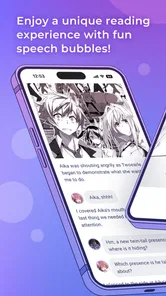


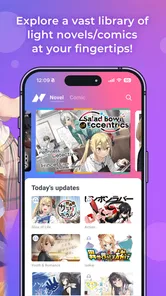
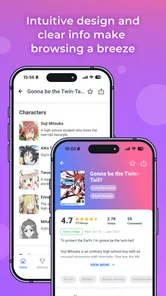
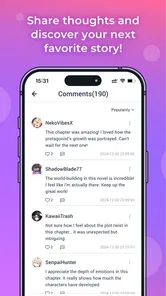
Analysis by Reviewed
I approached NOVELOUS as a reading app rather than as a simple storefront. Created by SHOGAKUKAN INC., it sits in the Books & Reference category and is aimed at readers who want a dedicated way to explore light novels on a phone. My first impression was that its appeal depends less on flashy extras and more on whether its reading experience, account choices, and purchase flow feel comfortable over time. That makes trust an important part of the decision, especially for anyone who plans to use it regularly rather than open it once to browse.
The app is free to install, which makes trying it relatively low-risk from a financial point of view. It is rated Mature 17+, so I would not treat it as a general reading app for children or younger teenagers. The current version is 1.3.10, and it runs on Android 7.0 or later. Those details matter in practical terms: people using an older phone should check compatibility before planning a reading routine, while users on newer devices should have a reasonable starting point for testing the app without paying upfront.
How NOVELOUS Builds Confidence Around Reading and Purchases
I approach a reading app with two questions in mind: can I settle into a book without fuss, and can I stay in control when browsing turns into a purchase? Here, I focus on the small checks I’d make before letting NOVELOUS become part of my routine, from finding the controls I need to building a repeatable way to browse and read. Those habits matter most when a specialized library starts to feel like a regular destination.
A focused home for light-novel readers
The strongest reason to try this app is focus. A general bookstore app can offer novels alongside textbooks, comics, magazines, stationery, and unrelated recommendations. A web browser can reach almost anything, but it also brings distractions, inconsistent layouts, and more opportunities to lose track of where you were reading. NOVELOUS is more appealing when I want the experience to feel centered on light novels instead of making me search through a much larger catalog.
That focus also helps clarify who should skip it. If you mainly read print books, need a broad ebook library across many genres, or want a single app for magazines and reference material as well, a larger general-purpose reader may be more practical. NOVELOUS makes more sense for someone who already knows that light novels are the main reason for installing it. The narrower purpose is a benefit for the right reader, but it can become a limitation if your reading habits are mixed.
The store summary presents the app as a way to enter the world of light novels, while the short description simply identifies it as NOVELOUS. I would not read those lines as a promise that the app replaces every other reading service. Instead, I see them as a signal that discovery is part of the experience. That distinction is useful: install it to explore and read within this particular ecosystem, not because you expect a universal library manager.
What the public signals suggest—and what they do not prove
The app has a 4.4 average from around 297 ratings, with about 57 written reviews. That is encouraging enough for me to test it, but not enough to treat the score as a guarantee that every device, title, or reading habit will feel identical. Written feedback can reveal recurring friction more clearly than a star average, so I would read several recent comments before committing to purchases or making it my only reading app.
More From Our News Desk

 Gmail
GmailGmail in a Busy Inbox: Who Benefits Most?
From first account to crowded workday, Gmail earns its place through dependable search and flexible sorting—but its best fit depends on how much inbox maintenance you can tolerate.

 Prime Video
Switching to Prime Video: What Changes in Your Viewing Routine
Prime Video can make a compelling second home for streaming, but switching means learning a different catalog, rental layer, and route from browsing to playback.

 Universal TV Remote Control
Universal TV Remote Control Works Best as a Reliable Backup
A phone remote earns its place through quick setup and reliable habits. Here is how to get more from Universal TV Remote Control—and where its limits show.

 Weather - By Xiaomi
Weather by Xiaomi Review: Clear at a Glance, Less Clear Up Close
Xiaomi’s weather app makes everyday forecasts quick to scan, but its calm surface can leave useful details and recovery paths harder to find than they should be.

 X
XX Under Pressure: Can It Recover When Posting Goes Wrong?
A resilience-focused review of X, examining setup, mistaken posts, interruptions, weak connections, and the gaps that matter when recovery needs to be dependable.

 Clash of Clans
Clash of Clans Is Won Between the Battles
Its raids are quick; its community is a long-term project of coordination, teaching, rivalry, and shared responsibility—with all the friction that entails.
Latest News



It has passed the 50K-install mark, which gives it a visible user base without making it look like an unavoidable mass-market platform. I find that context helpful when judging trust. A modest audience can mean the app feels specialized, but it also means I would be more careful about depending on it as the sole place for a personal library. For valuable purchases, I prefer keeping my expectations realistic and checking how account access and content restoration work before building a large collection.
SHOGAKUKAN INC. is clearly identified as the developer, which gives the app a recognizable publisher behind it. That is useful context, but a known developer should not make me skip ordinary checks. I still look at the permissions requested during installation, the choices presented when an account is created, and the wording shown before any payment. Trust comes from those visible details, not just from a company name.
Free installation does not mean every reading action is free
The app costs nothing to download, but it includes purchases ranging from $0.99 to $32.99 per item. That is the most important financial distinction to understand before using it. I would treat the free installation as an invitation to inspect the catalog and reading flow, not as evidence that all books or sections are included at no cost.
My practical advice is to separate three decisions: whether the app is comfortable to use, whether a particular title interests you, and whether the price is acceptable. Making those decisions separately reduces impulse purchases. I would first spend time navigating, confirm that the text is comfortable on my phone, and only then consider buying a title. If the app supports a purchase confirmation step through the device’s store, I would leave that protection enabled rather than relying on memory.
The upper end of the listed purchase range is significant enough that families should be especially careful with shared devices. The Mature 17+ rating already suggests that this is not an app to hand casually to a child. I would use the operating system’s purchase authentication and make sure the account used for payments is not left available to anyone who can pick up the phone. That is a simple form of user control, but it matters more than a polished reading screen when real money is involved.
Permissions, accounts, and the moments that deserve attention
When I review an app through a privacy lens, I try not to fill gaps with assumptions. I look at what the installation screen asks for, what the app explains at sign-in, and whether optional requests can be declined without blocking basic reading. For NOVELOUS, those are the places where I would make my decision. I would not assume that a reading app needs broad access to a device, and I would pause if a permission seemed unrelated to browsing or reading.
The most data-sensitive moments are usually easy to identify even without technical knowledge. They include creating or linking an account, entering payment information, receiving personalized recommendations, and contacting support. At each point, I would read the labels instead of tapping through automatically. If a choice is optional, I prefer leaving it off initially and enabling it later only when I understand the benefit.
I would also check whether the app lets me manage account details from inside its settings or directs me to another service. That difference affects how easy it is to change an email address, review sign-in options, or stop using the account. A clean account screen is a sign of good user agency; a confusing path can turn a minor problem into a support request.
Notifications deserve the same attention. Reading reminders can be useful if I am following a release or want a nudge to continue a book, but they can become noise when every update is treated as urgent. I would begin with only the alerts I genuinely want. If the app offers separate switches for promotional messages and reading-related notices, I would keep those categories distinct rather than accepting everything together.
A realistic everyday routine
Imagine I am commuting with a few quiet minutes before work. I open NOVELOUS, browse for a light novel, and read a chapter while waiting. In that situation, the app’s value is not just the catalog; it is the reduced effort of returning to a specialized reading environment. I want to find the title, read without fighting a cluttered browser page, and close the app without feeling that I have started a complicated shopping process.
Later, I might continue at home on the same phone. Before buying anything, I would check the title information carefully, confirm the account currently signed in, and verify the final amount shown by the purchase screen. If I use a family tablet as well, I would repeat that check rather than assuming the same account is active. This workflow sounds cautious, but it prevents a common mistake: purchasing under the wrong account and then wondering why the content is not visible where expected.
For readers who switch devices often, account behavior is a deciding factor. I would test the sign-in and restoration process with free content or a low-cost item before relying on it for a larger collection. I would also keep purchase receipts from the platform used to pay. Receipts make support conversations easier if access needs to be restored, and they give me a record independent of the app’s own interface.
Useful habits that are easy to overlook
One useful habit is to treat the first session as an audit, not just a browsing trip. I would open the settings before settling into a book and note where account, notification, help, and purchase controls are located. This takes only a few minutes, but it tells me whether the app respects my attention. If I cannot quickly find basic controls, I become less comfortable making purchases inside it.
A second habit is to test the reading experience under ordinary conditions. I would try a short session with the screen brightness reduced, rotate the phone if I normally read that way, and check whether the text remains comfortable without constant adjustments. I would also see how easily I can return to the same title after closing the app. These are small details, but they matter more than a promotional description when reading every day.
A third is to separate discovery from ownership. Browsing recommendations can be enjoyable, but I would avoid treating every interesting cover as a purchase decision. I would make a short list, compare the titles I actually intend to read, and return later when I am sure. This is particularly sensible because the app is free to enter but has paid items, including purchases at a relatively high end for a mobile reading app.
A fourth is to review permissions again after updates. An update can change how an app works, and the system may present a new request at a later point. I would grant only what I understand and would revisit notification and privacy choices if the app’s behavior changes. That approach is not specific to one developer, but it is especially useful for a reading app that may become part of a daily routine.
Where it compares well with familiar alternatives
Compared with reading through a mobile browser, NOVELOUS should appeal to someone who values a more dedicated destination for light novels. A browser is flexible and often better for quickly checking information across many sites, but it can feel fragmented. The app’s specialized identity is more convenient when I already know what kind of reading I want to do.
Compared with a broad ebook platform, the trade-off is reach versus focus. A general service may be better for combining light novels with nonfiction, classics, manuals, and books from many publishers. NOVELOUS is the more natural choice when the light-novel category itself is the reason I am opening the app. I would not replace a broad library with it unless my reading is strongly concentrated in that area.
Compared with print books, the app offers the convenience of carrying reading material on a phone, but it also brings screen fatigue, account dependence, and digital purchase considerations. I still prefer print when I want a physical collection or a break from screens. I prefer NOVELOUS when portability and quick access matter more than the physical experience.
Compared with a generic ebook reader, the important question is not simply whether text can be displayed. It is whether the catalog and discovery path match my interests. A generic reader may offer stronger organization for a mixed personal library, while NOVELOUS is more compelling when I want a purpose-built place to look for light novels. The better option depends on whether discovery within this niche or management of a broad collection is my priority.
Who will enjoy it, and who should be cautious
I would recommend giving NOVELOUS a serious trial to readers who already enjoy light novels, prefer reading on a phone, and want a focused app rather than a general bookstore. It is also a reasonable option for someone who likes discovering new titles within one specialized environment and is comfortable checking purchase details before paying.
I would be more cautious if I were buying for a younger reader, sharing a device, or managing a tight budget. The Mature 17+ label makes age suitability a real consideration, and the in-app purchase range means parental or device-level purchase controls should be set before use. I would also hesitate if I needed a large cross-category library, extensive offline planning, or a reading system that is completely independent of one publisher’s ecosystem.
Readers who care deeply about privacy should make their choice based on the actual permission prompts, account screens, and privacy explanations they see on their own device. I would not grant optional access simply to reach the catalog faster. If the app allows the essential reading experience without an uncomfortable request, that is a positive sign; if it makes unrelated access feel mandatory, I would choose a different reader.
My cautious verdict
NOVELOUS has a clear purpose and a sensible entry point: it is free to install, focused on light novels, and backed by SHOGAKUKAN INC. Its 4.4 average and 50K-plus installs make it worth investigating, but they do not remove the need to test the app personally. I like the idea of using it as a specialized reading and discovery tool, especially when I want something more focused than a browser or a broad ebook store.
My recommendation comes with boundaries. I would install it, inspect permissions and account controls, adjust notifications, try the reading flow, and only then consider paid content. I would protect purchases, keep receipts, and test account access before building a substantial collection. Those steps are not signs that the app is untrustworthy; they are sensible ways to keep control when any digital reading service combines accounts, recommendations, and paid items.
In the end, NOVELOUS is best for a reader who wants a dedicated light-novel destination and is willing to make deliberate choices around age suitability, permissions, notifications, and spending. It is not the obvious replacement for every ebook app, and it may be the wrong fit for a broad or print-first reading life. For the right audience, though, its focused identity is a genuine advantage. I would try it with a careful first session, keep my expectations specific, and let the app earn a larger place in my reading routine through its controls and everyday usability.
NOVELOUS Frequently Asked Questions
Who develops NOVELOUS, and what kind of app is it?
NOVELOUS is a Books & Reference app from SHOGAKUKAN INC., presented with the tagline “Dive into the World of Light Novels!” It is aimed at people interested in light-novel content on a mobile device. If you are deciding whether it suits your reading habits, take a moment to review the app’s description and content rating in your device’s official app store before installing.
What age group is NOVELOUS intended for?
NOVELOUS carries a Mature 17+ content rating, so it is intended for adults rather than younger readers. Parents and guardians should consider that rating before allowing a teenager to download or use the app, and should check the app-store controls available on the device. The rating is a useful starting point when deciding whether the app is appropriate for someone in your household.
What is NOVELOUS, and what can I use it for?
NOVELOUS is an app designed to provide users with access to its specific digital content and features in one place. It is a Books & Reference app from SHOGAKUKAN INC. with a focus on light novels, as its store tagline suggests. Depending on the version available in your region, it may include tools for browsing, reading, discovering, or interacting with content. Before downloading, check the official store description to confirm the current features, supported devices, and intended use of the application.
Is NOVELOUS free to download and use?
NOVELOUS is free to download, but in-app purchases are available, with items ranging from $0.99 to $32.99. That means you can install it without an upfront app price, while some content or features may involve additional spending. Review the purchase details shown in the app and your device’s store before buying anything, and use available purchase controls if you want to avoid accidental charges.
Does NOVELOUS require an account or an internet connection?
The requirements can depend on which parts of NOVELOUS you want to use. Basic access may be possible without creating an account, while saving preferences, synchronizing information, or accessing personalized content may require registration. An internet connection is generally needed for downloading content, updating the app, and using online features, so offline availability should be checked in advance.
Pros
- Clean
- distraction-free interface makes reading comfortable on smaller screens.
- Personalized recommendations help readers discover stories matching their interests.
- Offline access lets you continue reading when an internet connection is unavailable.
- Regular content updates keep the catalog feeling fresh for returning users.
- Syncing across devices makes it easier to resume stories wherever you are.
Cons
- Some stories or features may require in-app purchases or a subscription.
- The catalog may feel limited for readers seeking specific niche genres.
- Recommendations can become repetitive after extended use.
- Offline downloads may occupy considerable storage on your device.
- Availability of titles and features can vary by region or platform.











