Novellair-Your Book Nook
- 1.00K
- 3.3
- Installs
- 500.00K
- Price
- Free

Screenshots


Analysis by Reviewed
When I want a story to fill a short break, I don’t always want to choose a book in advance or carry a separate e-reader. Novellair-Your Book Nook is aimed at that kind of reading: an online platform for browsing stories and opening one on a phone. It sits in the Books & Reference category, and the practical question is whether its reading flow fits your habits better than a general e-book app or a book you already own.
From choosing a story to settling in
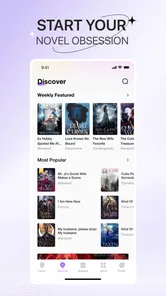
Imagine having access to a library of stories from the comfort of your smartphone. That is the appeal here: browse, find something that suits your mood, and keep it close for the moments when you have time to read. I would approach the catalog with a little patience rather than assuming every title I want will be there. A platform built around online stories can be a good place to discover a new read, but it is not automatically a replacement for a carefully chosen personal library.
Finding a book without turning it into a chore
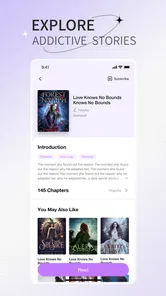
The first useful step is to decide what I feel like reading before I start scrolling. If I have a genre or a particular author in mind, I can use search and categories to narrow the choice; if I’m undecided, browsing is part of the experience. The app’s recommendations are presented as a way to discover stories that match reading interests, but I treat them as suggestions rather than a guarantee that every pick will land. A quick sample of a story’s opening is often a better test than judging by its cover or title alone.
That small habit matters most when I’m reading in short bursts. If I open the app during a commute or while waiting for an appointment, I want to spend the time on a story, not repeatedly changing my mind. I’d save a promising title for later and give it a few pages before deciding whether to continue. This makes discovery feel more deliberate and helps avoid filling a reading queue with books I only selected because they appeared first.
Making the reading session comfortable
Once a story catches my attention, the reading controls are more important than decorative extras. Novellair offers options for adjusting text size, font style, and background color, so I can make a page more comfortable in different lighting or when I’m reading for longer than planned. I’d set those preferences before settling into a chapter; changing them mid-session can interrupt the rhythm, especially if I’m trying to read in a brief window.
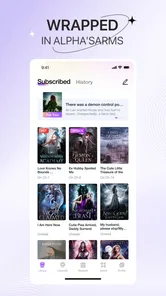
The bookmark is handy when a session ends unexpectedly. I can stop at a natural break, mark my place, and return later instead of trying to remember a chapter or scrolling around to find the right paragraph. Offline reading is also useful when a connection is unreliable, but I would prepare before leaving home by opening the book while I still have a connection. That is a practical trade-off for an online reading platform: it can suit reading on the move, but I shouldn’t assume a title will be ready offline unless I have checked it in advance.
The built-in dictionary and translation tool can keep a difficult passage from becoming a reason to abandon a story. I’d use it selectively: look up a word that changes the meaning of a sentence, then continue reading rather than stopping for every unfamiliar expression. That keeps the tool helpful without turning leisure reading into a series of interruptions. It may also make the app useful for readers exploring stories in a language they are still learning, although the best fit depends on the specific text and the reader’s comfort level.
More From Our News Desk

Weather by Xiaomi Review: Clear at a Glance, Less Clear Up Close

X Under Pressure: Can It Recover When Posting Goes Wrong?

Clash of Clans Is Won Between the Battles

Android Auto Makes the Case for Quieter Car Software

MobiOffice: Transforming Mobile Productivity with Seamless Integration

EA SPORTS FC™ Mobile Soccer: Redefining Mobile Sports Gaming
When a story leads to other readers
Novellair also includes community features, with options to connect with readers, take part in discussions, join book clubs, and follow authors. These features change the experience from solitary reading to sharing reactions and finding another perspective. I’d use them after finishing a chapter or book, when I have something concrete to discuss, rather than checking conversation threads every few minutes. That keeps the social side from pulling attention away from the story itself.
For someone who enjoys talking about fiction, a discussion can help turn a passing read into a more memorable one. Following an author can also give a reader a simple way to keep track of writers they already like. The trade-off is that social features are optional rather than essential: if I only want a quiet reading space, I can focus on the book and leave the community tools alone. Readers who prefer private notes, curated book-club schedules, or a large established discussion group may find a dedicated reading community better suited to those needs.
Who will get the most from it
I can see this app working best for readers who like discovering stories on a phone, want a choice of reading settings, and enjoy the possibility of discussing what they read. It is also a reasonable option for someone building a casual reading habit: a few pages while waiting or a chapter before bed can be easier to fit into the day than planning a long session. A realistic routine would be to browse at home, choose one story, set the text for comfortable reading, and then return to the bookmark during a commute or lunch break.
By contrast, I’d look elsewhere if my priority were managing a personal collection of purchased e-books, reading academic documents, or keeping detailed notes across many titles. A conventional e-reader or library app may be a better match for those workflows. Novellair is more compelling when the goal is to explore stories within the app and keep reading straightforward, rather than organize a broad collection from multiple sources.
Cost, expectations, and the point where it may not fit
The app is free to install, while in-app purchases range from $0.99 to $284.99 per item. That wide span makes it sensible to check what a particular purchase covers before committing, especially if I’m still deciding whether I enjoy the platform. I’d start with free access and a single story, then consider spending only after I understand how the reading experience suits me. The average rating is 3.6 from around 3.8K ratings, which suggests opinions are mixed enough that personal fit matters more than assuming everyone will have the same experience.
It is rated Teen, so it is not presented as a children’s-only reading space. I’d still check individual stories for age suitability if a younger reader will use it; a general content rating does not tell me whether every title will suit every family. The app comes from Q- VOR PTE. LTD., has reached over 500K installs, and its current version is 2.1.2, with Android 6.0 as the minimum OS. Those details help establish whether it can run on a device, but they don’t answer the more personal question: does its available reading material match what I want to read?
A considered reading companion
In the end, Novellair is best approached as a place to find and read stories on a phone, with helpful adjustments for the page and optional ways to connect with other readers. I would try it if browsing new fiction and reading in spare moments sounds appealing; I would skip it if I need a dependable home for a mixed collection or prefer a distraction-free device. The strongest approach is simple: choose a story carefully, set up the page once, use bookmarks to make short sessions easy, and treat purchases and community features as optional parts of the experience rather than reasons to stay.
A practical routine for busy reading days
For an ordinary weekday, I’d make the main decision before the day gets crowded. At home, I would search for a promising story, sample its opening, and keep only one or two genuine possibilities in mind rather than browsing indefinitely. During a break, I could return to the chosen read, adjust the display if the light has changed, and use the bookmark when I need to put the phone away. This small sequence makes the app more useful than opening it with no idea what I want and hoping the first recommendation holds my attention.
If I’m reading somewhere with patchy service, I’d test the offline arrangement before relying on it. Opening a story while connected gives me a chance to see whether I can continue when the connection drops, instead of discovering the limitation in the middle of a commute. I’d also avoid making a purchase simply because I have reached a point where I want to keep reading; first I’d check the item’s terms and decide whether the story and the app suit me. That is a modest bit of planning, but it helps keep a casual reading habit from turning into an unexpected expense or an interrupted session.
How it compares with other reading options
Compared with a conventional e-book reader, this app puts story discovery and its own reading community closer to the center of the experience. That can be appealing when I want to browse for something new without first building a library elsewhere. A general e-book app is usually the more natural choice if I already own books from different sources and want them managed together. A public library app makes more sense when borrowing from a local collection is the priority, while a paper book remains better for readers who want to avoid phone notifications and screens altogether.
Those alternatives are not necessarily better in every situation. For a reader who is curious about stories and likes the convenience of carrying a phone, the built-in reading adjustments and author-following options give Novellair a useful niche. But a reader who wants careful collection management, extensive annotation, or a screen dedicated to reading may feel constrained. I’d choose based on the next task: discovery and informal reading point toward this app; ownership, organized notes, or fewer digital distractions point elsewhere.
Questions worth answering before settling in
Readers often want to know whether they can use it without paying, whether a story can be read offline, and whether the social features are compulsory. It is free to install, but purchases are available inside the app, so I’d check the details of anything that asks for payment rather than treating every story as included. Offline reading is part of the experience, yet I would prepare and test a title while connected. Community participation is an option, not a requirement for someone who simply wants to read.
Another sensible question is whether it suits a younger reader. Its Teen rating gives a broad age signal, but I would still look at the particular stories before handing over a device, especially if the reader is sensitive to themes or language. And if I’m deciding whether the catalog will satisfy me, I would not rely on general recommendations alone: search for a subject or author I already enjoy, then try an opening passage. That quick check is more informative than installing an app and assuming its collection will match my tastes.
Hey there, fellow book lovers! I recently stumbled upon an app that has completely transformed my reading experience, and I couldn't wait to share it with you. Say hello to Novellair-Your Book Nook, an app that feels like a cozy corner bookstore right in your pocket. If you're an avid reader or someone just looking to delve into the world of books, this app might just be your new best friend.
A World of Books at Your Fingertips
Imagine having access to a vast library of books from various genres, all from the comfort of your smartphone. That's exactly what Novellair-Your Book Nook offers. With this app, you can explore an extensive collection of novels, ranging from classic literature to contemporary hits. Whether you're into romance, mystery, sci-fi, or non-fiction, there's something here for everyone. And the best part? You can carry all your favorite reads wherever you go!
User-Friendly Interface
One of the first things I noticed about Novellair is its user-friendly interface. The app is beautifully designed, making navigation a breeze. It's like stepping into a well-organized bookstore where everything is neatly categorized. You can easily search for books by title, author, or genre, and the app even offers personalized recommendations based on your reading history. It's like having a personal librarian who knows your tastes!
Reading Features Galore
Now, let's talk about the reading features. Novellair offers a seamless reading experience with customizable text settings. You can adjust the font size, style, and background color to suit your reading preferences. Plus, the app supports both online and offline reading, so you can dive into a book even when you're off the grid. There’s also a handy bookmark feature that lets you save your place, just like a physical book.
Another feature I loved is the built-in dictionary and translation tool. If you come across a word or phrase you don't understand, you can get a definition or translation without leaving the app. It's a great way to enhance your vocabulary while enjoying a good read.
Community and Social Features
What makes Novellair stand out is its community aspect. The app allows you to connect with other readers, join book clubs, and participate in discussions. It's like being part of a global book club where you can share your thoughts and discover new perspectives. You can also follow your favorite authors and stay updated on their latest releases. It's a fantastic way to engage with the reading community and make new friends who share your passion for books.
In conclusion, Novellair-Your Book Nook is more than just an app; it's a gateway to a world of literary adventures. With its extensive library, user-friendly interface, and engaging community features, it's a must-have for any book lover. So, if you're looking to enrich your reading experience, give Novellair a try. Trust me, you won't be disappointed!
Novellair-Your Book Nook Frequently Asked Questions
What kind of reading experience can I expect from Novellair?
Novellair is an online reading platform for exploring a wide range of stories, making it a potential fit if you enjoy browsing for something new to read. It is listed in the Books & Reference category and is rated for Teen audiences. Before downloading, consider whether an online story-reading app suits the way you like to discover and enjoy books.
Who develops Novellair, and is it a well-established app?
Novellair is developed by Q- VOR PTE. LTD. It has been available since May 12, 2023, and has reached over 500,000 installs. Those figures offer a sense of its reach, while the reader ratings provide another point of reference: the app has a 3.6 average from around 3,800 ratings. Individual experiences can still differ, so it is worth considering what you want from a reading app.
What is Novellair and how does it work?
Novellair is a unique app designed to be your personal book nook, offering a wide range of novels across various genres. Users can explore, read, and even discuss their favorite books with a community of fellow readers. The app provides features such as personalized book recommendations, reading progress tracking, and interactive discussion forums to enhance your reading experience.
Is Novellair free to use or are there any subscription fees?
Novellair is free to download, and it offers in-app purchases ranging from $0.99 to $284.99 per item. Its free availability makes it easy to try, but purchases may apply to some content or app features. Check the purchase details shown in the app before choosing anything paid, so you can decide whether the available options fit your reading habits and budget.
Can I read books offline using Novellair?
Yes, Novellair allows users to download books for offline reading. This feature is especially useful for readers who travel frequently or have limited internet access. Simply download your desired book while connected to the internet, and you'll be able to enjoy it anytime, anywhere, without needing an active connection.
Pros
- User-friendly interface with intuitive navigation
- Extensive library with diverse genres
- Offline access for reading on-the-go
- Personalized recommendations enhance discovery
- Seamless synchronization across multiple devices
Cons
- Limited free content compared to competitors
- Occasional app crashes affect usability
- Some books have formatting issues
- Subscription can be pricey for some users
- Requires internet for initial book downloads












