NovelBar-Your Reading Haven
- 831.00
- 3.5
- Installs
- 500.00K
- Price
- Free

Screenshots




Analysis by Reviewed
When I want a story that fits into a spare moment, I look for an app that makes browsing and picking up a novel feel straightforward. NovelBar-Your Reading Haven is a free Books & Reference app from Q- VOR PTE. LTD., built around reading novels across different genres. I’d think of it as a place to explore fiction on a phone, rather than a replacement for every kind of digital library or ebook reader.
That focus shapes what I’d expect from it. NovelBar has a 3.6 average from around 3,000 ratings, and it has been installed over 500,000 times. Those figures suggest there is an audience for its approach, though they don’t tell me whether a particular reader will enjoy the available stories. I’d use the app’s range as a reason to browse, not assume that every genre or personal favorite will be equally well represented.
Browsing and choosing what to read
So, what's the big deal with NovelBar-Your Reading Haven? Well, for starters, it's like having a library in your pocket. Whether you're into romance, mystery, or sci-fi, this app has got you covered. With a vast collection of novels across different genres, it caters to every reader's taste. I mean, who doesn't love having endless stories at their fingertips?
Making a reading session comfortable
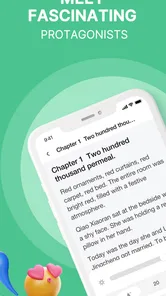
One of the coolest things about NovelBar is its user-friendly interface. Even if you're not tech-savvy, navigating through the app is a breeze. You can easily search for your favorite authors or discover new ones with just a few taps. Plus, the app's dark mode feature is a godsend for those late-night reading sessions when you don't want to strain your eyes.
Let's talk about personalization. NovelBar lets you customize your reading experience by adjusting the font size and style to suit your preference. And for those moments when you can't decide what to read next, the app's smart recommendations based on your reading history are spot on. It's like having a personal librarian who knows your taste!
For a useful way to test whether those suggestions suit you, I’d start with a genre I already enjoy, then try one recommendation outside it. That gives the reading-history feature a chance to become useful without letting it narrow every choice to the same kind of story. If the suggestions don’t match my mood, I’d return to searching rather than treating the recommendation stream as a complete catalog.
Reading around a busy day
A realistic routine for me would be to browse at home, choose a novel before leaving, and use a short commute or waiting-room break to read a little at a time. Since the app supports offline reading, downloading a book while connected is a sensible step before travel. I’d also adjust the text size before settling in, so I’m not interrupting a chapter to fiddle with display settings later. That small bit of preparation matters more on a busy day than having lots of choices on screen.
More From Our News Desk

Weather by Xiaomi Review: Clear at a Glance, Less Clear Up Close

X Under Pressure: Can It Recover When Posting Goes Wrong?

Clash of Clans Is Won Between the Battles

Android Auto Makes the Case for Quieter Car Software

MobiOffice: Transforming Mobile Productivity with Seamless Integration

EA SPORTS FC™ Mobile Soccer: Redefining Mobile Sports Gaming
Reading is often seen as a solitary activity, but with NovelBar, it doesn't have to be. The app boasts a vibrant community of readers and writers, where you can engage in lively discussions, share reviews, and even connect with authors. It's a fantastic way to dive deeper into the stories and gain different perspectives.
And here's a feature I absolutely love: offline reading! You can download your favorite books and enjoy them without worrying about internet connectivity. Perfect for those long flights or commutes when you just want to escape into another world.
What to expect from performance and access
On speed, I’d judge the experience by the parts that matter most in a reading app: whether I can find a story without a frustrating search, settle into a page, and return to reading when I have a few minutes. I wouldn’t choose a novel platform based on assumed loading speeds or battery claims; those can vary with a device and connection. A practical first session is to browse a few genres, open a story, and see whether the reading flow feels comfortable on your own phone.
For heavier use, such as switching between browsing, reading, and community discussions, I’d keep expectations grounded. The app’s purpose is novels, so it makes more sense for reading in focused stretches than for someone who wants a general-purpose ebook manager for books from many sources. Offline access is useful when a connection may drop, but downloading beforehand is the key step; I’d check that the chosen book is ready before relying on it during a trip.
NovelBar is free to install, though it offers in-app purchases ranging from $0.99 to $284.99 per item. I’d check the price shown for any purchase before confirming it, especially if I’m only trying the app or reading casually. That range makes it worth distinguishing between browsing the free app and choosing to spend on an item; I wouldn’t treat “free” as a promise that every reading option costs nothing.
Choosing a reading routine that fits
For someone new to the app, I’d keep the first visit purposeful rather than trying to inspect every genre and community area at once. I’d pick a mood—something light for a break, perhaps, or a longer story for the evening—then search and browse until I find a candidate. Opening a few options before committing is a sensible way to judge whether the writing and premise hold my attention. The point is not to turn choosing a novel into homework; it is to avoid spending a short reading window endlessly scrolling.
There’s also a useful distinction between finding a story and deciding to follow it for a while. Recommendations can help surface possibilities, but I’d treat them as prompts, not as a verdict on my taste. If one suggestion misses, I’d look at a different genre or search directly for an author or theme I enjoy. That small change can keep the app from feeling repetitive, while still giving its discovery tools a chance to help.
Offline reading suits a few everyday situations beyond a flight. I might prepare a book before heading into a place with unreliable reception, or save one for a commute where I don’t want to depend on a signal. I’d make the download part of my departure routine and open the book once while still connected, rather than discovering at the station that I never finished preparing it. That’s a simple precaution, but it makes offline access genuinely useful instead of merely reassuring.
Community, discovery, and trade-offs
The social side may be a draw if I enjoy hearing how other readers interpret a story. A discussion or review can give me a reason to stay with a book, or help me decide whether a premise is worth trying. I’d still separate that activity from the reading itself: if I’m opening the app for a quiet chapter, I can focus on the novel and leave conversations for another time. People who want reading to remain entirely private may find a conventional ebook reader a calmer fit.
Compared with a standard ebook app built around importing or organizing books I already have, NovelBar’s appeal is discovery within a novel-focused environment. That is a meaningful difference, not a universal advantage. If my goal is to keep a personal collection in one place, manage files from different sources, or read nonfiction alongside novels, I’d look for a broader reader. If I want to browse fiction and potentially discuss it with other readers, NovelBar is more directly aimed at that habit.
It may also suit readers who like changing genres rather than sticking to one series or author. The trade-off is that a wide range of choices can make selection feel less focused, especially when I only have a few minutes. I’d use search when I know what mood I’m in and browse when I have time to explore. That division helps me get value from the catalog without expecting recommendations to solve every “what should I read?” moment.
For a family member who is younger, I’d consider the Teen content rating before handing over the phone. The rating is a practical starting point, not a substitute for deciding whether the material and social areas suit that particular reader. A parent or guardian can take a look together and set expectations about purchases and participation. That is more useful than assuming that a reading app is automatically appropriate for every age.
Reliability and device expectations
Reading apps have a different performance bar from games or video services. I care less about flashy transitions and more about whether the page remains comfortable to read, whether browsing feels manageable, and whether I can resume a book after putting my phone away. I’d test those basics in a few short sessions before making the app part of a daily routine. That gives me a realistic impression on my own device without turning an occasional delay into a sweeping claim about the whole service.
When a reading session is interrupted, I’d make a habit of reopening the current book before leaving home, particularly if I expect to be offline. That quick check can reveal whether I’m ready to continue and avoids relying on memory about what I downloaded. I’d also avoid switching rapidly among browsing, discussions, and reading on an older or busy phone until I know how it handles the app. These are ordinary precautions, not special technical requirements.
The app is on version 1.9.8 and requires Android 6.0 or later. A phone meeting that minimum can install it, but age alone doesn’t guarantee the same responsiveness on every device. If my phone is older or already struggles with several open apps, I’d close what I don’t need and try a short chapter first. That is a better test of practical comfort than guessing from the version number.
I would not choose it based on claims about battery use or speed that can differ with screen settings, network conditions, and device workload. For a fair check, I’d compare a brief reading session with my normal phone use and notice whether the app feels comfortable enough to keep open. If it does, the modest demands of reading may suit my routine; if navigation or returning to a story feels cumbersome, a simpler reader could be preferable.
Who will enjoy it—and who may prefer another reader
I’d recommend giving NovelBar a try if you mainly want fiction discovery, enjoy moving between genres, and like the idea of a reader community alongside your stories. It may be less suitable if you want a broad ebook bookshelf centered on books you already own, or if you prefer a quiet reading app with no social element. In those cases, a conventional ebook reader may fit better; for exploring novels and finding something new, NovelBar’s genre-led approach is the more relevant reason to open it.
It’s rated Teen, so I’d keep that age guidance in mind when choosing whether it’s appropriate for a younger reader. The app is on version 1.9.8 and requires Android 6.0 or later. Those details help with the basic compatibility check, but day-to-day smoothness still depends on the device in hand. If an older phone feels strained, I’d close other demanding apps and test a short reading session before committing to longer use.
My best everyday use case is a reader who wants fiction ready for the gaps in a day: a few pages between appointments, a chapter on public transport, or a longer stretch on the couch after dinner. I’d choose a book when I have time to browse, make sure it is available offline if needed, and leave community conversations until I’m in the mood to engage. That approach makes the app feel like a reading companion rather than another feed demanding constant attention.
For a different reader, the same mix may be a drawback. Someone who wants to buy a particular ebook, organize a large existing library, or keep all reading activity strictly offline may be better served by a dedicated ebook manager. Someone who likes discovering new fiction but doesn’t need social interaction can still focus on the books, though they may prefer a quieter alternative. I’d decide based on whether discovery and community are useful parts of my reading life, not simply on the number of available choices.
My reading verdict
In a nutshell, NovelBar-Your Reading Haven is a must-have app for anyone who loves to read. It's convenient, diverse, and packed with features that enhance your reading journey. Whether you're a casual reader or a hardcore bookworm, this app is sure to become your go-to reading platform. So, why wait? Dive into the endless world of stories that NovelBar has to offer and let your imagination run wild! 🌟
My more measured take is that it’s worth trying when you want a phone-based route into novels, especially if browsing and reading on the go are your priorities. I’d take time to see whether its stories, recommendations, and community suit my habits, and keep purchases deliberate. If what I want is a dependable place to explore fiction in small pockets of time, it has a clear appeal; if I need a universal library for every ebook I own, I’d look elsewhere.
Before settling in, I’d also decide how I want to handle spending. The app is free to download, but in-app items can cost from less than a dollar to as much as $284.99 each. I’d read the purchase screen carefully and make sure an item fits my budget before confirming anything. For casual browsing, that simple pause keeps the free starting point separate from optional spending and avoids treating a purchase as a necessary part of trying the app.
Overall, I see NovelBar as a focused option for readers who enjoy finding fiction on a phone and don’t mind a platform that combines stories with reader interaction. Its strongest practical case is a flexible routine: browse when connected, prepare a novel, then read in short stretches or offline. I’d skip it if I need one reliable home for every kind of ebook or prefer a completely solitary reading tool. For everyone else, a few sessions are enough to judge whether its selection and pace fit the way they actually read.
NovelBar-Your Reading Haven Frequently Asked Questions
Is NovelBar suitable for younger readers?
NovelBar has a Teen content rating, so it is intended for teen readers and older audiences. The app focuses on novels across different genres, and individual stories may vary in theme and tone. If you are choosing the app for a younger reader, it is sensible to review the books they plan to read and consider whether each title suits their age and preferences.
What devices can I install NovelBar on?
NovelBar is a mobile reading app for Android and iOS users. On Android, it requires version 6.0 or later, so check your device’s operating system before downloading. Its latest listed version is 1.9.8. Once installed, you can explore its novel collection and reading options through the app, making it a convenient choice for people who prefer reading on a phone or tablet.
What is NovelBar and how does it work?
NovelBar is a mobile application designed for avid readers who enjoy exploring a vast collection of e-books and novels across various genres. Once you download the app, you can browse, purchase, and read from a wide selection of novels. The app features a user-friendly interface, allowing you to easily navigate through categories, search for specific titles, and customize your reading experience with adjustable fonts and themes.
Is NovelBar free to use?
NovelBar is free to download and offers a selection of free novels for users to enjoy. However, many titles require purchase or a subscription to access. Users can opt for a premium subscription, which provides unlimited access to the app's entire library, ad-free experience, and additional features. Make sure to check the app's pricing details for the most accurate information. Individual in-app purchases range from $0.99 to $284.99, so review any purchase carefully before proceeding.
Can I read offline on NovelBar?
Yes, NovelBar allows users to download novels for offline reading. This feature is particularly useful for users who want to read without an internet connection, such as during travel or in areas with poor connectivity. To use this feature, you simply need to download the desired novel while connected to the internet, and it will be available in your library for offline access.
Pros
- Extensive library of novels available.
- User-friendly and intuitive interface.
- Regular updates with new content.
- Offline reading mode supported.
- Customizable reading settings.
Cons
- Limited free content access.
- Contains in-app advertisements.
- Requires internet for updates.
- Some novels lack proper translation.
- Occasional app performance lags.












