Novel Effect: Read Aloud Books
- 224.00
- 4.1
- Installs
- 100.00K
- Price
- Free

Screenshots



Analysis by Reviewed
I found Novel Effect: Read Aloud Books most useful when I wanted story time to feel active rather than passive. It is an education app from Novel Effect Inc. that adds an interactive layer to reading aloud, turning a normal book session into something children can listen to, watch, and respond to while an adult remains part of the experience. The idea is simple, but the way it changes the rhythm of a familiar story is more interesting than a standard digital picture book.
My first impression was that this is not really a replacement for books, and it is not trying to be a conventional reading lesson either. Its value comes from combining a physical read-aloud habit with app-based reactions. That makes it especially appealing for parents, grandparents, teachers, and caregivers who want to hold the book in their hands while giving a child more sound and atmosphere around the words.
The app is free to install and is rated for Everyone, although individual items can involve in-app purchases ranging from less than a dollar to nearly sixty dollars. That distinction matters: the initial download is easy to try, but families should still look at what is available before assuming the entire experience is included. With a 4.1 average from roughly a thousand ratings and more than one hundred thousand installs, it has attracted a meaningful audience without feeling like an unavoidable mainstream platform.
How the reading experience feels in everyday use
A faster start than a conventional reading activity
The strongest speed advantage is not raw loading performance; it is how quickly the app can make a child interested in a book. A normal read-aloud session may need a little encouragement before everyone settles down. Here, the expectation of sounds and reactions gives the child a reason to pay attention from the beginning. I found that useful on evenings when a child was restless but still wanted a story.
The adult still controls the pace by reading the printed words. That is important because the app does not force the family into a fixed playback speed. You can pause, explain a picture, repeat a funny line, or let a child ask a question without abandoning the shared activity. In that sense, it feels more flexible than an animated video and more engaging than a silent digital page.
There is also a practical trade-off. The app’s response depends on the reading session being set up correctly, so it is not as immediate as pressing play on an audiobook. If you are looking for something that entertains a child while you do another task, this is the wrong format. The adult has to read, keep the book positioned sensibly, and stay involved.
What happens when the session gets busy
The most demanding moments are likely to come when several things happen at once: a child interrupts, the reader changes pace, pages are turned quickly, and the room is noisy. Those are normal conditions for family reading, not unusual edge cases. My advice is to treat the app as a companion to a calm reading routine rather than as a system that should be tested under chaotic conditions.
More From Our News Desk

Clash of Clans Is Won Between the Battles

Android Auto Makes the Case for Quieter Car Software

MobiOffice: Transforming Mobile Productivity with Seamless Integration

EA SPORTS FC™ Mobile Soccer: Redefining Mobile Sports Gaming

How Microsoft OneDrive Became a Mobile Productivity Giant

How Google Translate Breaks Language Barriers Effortlessly
A useful workflow is to prepare the book before inviting the child over. Keep the device nearby, make sure the volume is comfortable, and decide where the book will rest. This removes the awkward pause in which the adult searches for the right position while the child loses interest. It also helps the app feel like part of the story instead of a separate technical activity.
For classroom use, the same principle becomes even more important. A teacher may be able to use it successfully with a small group, but a crowded room can make every interactive reaction harder to hear and harder to coordinate. I would use it for a focused reading corner, a short literacy activity, or a special story session rather than assuming it will scale effortlessly to a full class.
One non-obvious strength is that the app can give a hesitant reader a role without requiring that child to read independently. A child can predict what sound might appear, point to an illustration, repeat a phrase, or wait for a familiar reaction. That creates participation before fluent reading develops. It is a small but meaningful bridge between being entertained by a story and actively following one.
Stability matters more than spectacle
For this kind of app, reliability is less about impressive graphics and more about preserving the mood of the read-aloud. A technical interruption at the wrong moment can break concentration, especially for younger children. I therefore judge it by whether it stays out of the way once the session begins.
The app runs on devices using at least iOS or Android equivalent version 8.1, and the current version is 4.2.5. That broad operating-system reach is helpful for families using an older spare phone or tablet, although compatibility on paper does not guarantee the same experience on every device. Older hardware may be more sensitive to storage pressure, background activity, or audio handling, so I would test the exact device before planning a school event around it.
When something goes wrong, the best recovery is usually simple: pause the reading, check that the book and app are ready, and restart the session without rushing. This is another reason I prefer using it with an adult present. A child left alone may interpret a missed reaction as part of the story or become frustrated, while an adult can calmly continue reading even if the interactive element needs attention.
The important reliability advantage is graceful fallback: the physical book remains usable even when the app is not cooperating perfectly. You do not lose the story itself. That makes the experience less fragile than a fully digital book whose pages, narration, and illustrations all depend on the application working correctly.
Battery, storage, and device comfort
Novel Effect is not the kind of education app I would choose for long, unattended screen sessions. Its purpose is shared reading, so the device should be treated as an audio and interactive accessory rather than the main screen. That helps reduce the temptation to hand over a tablet and walk away, which is one of the clearest differences between this and many children’s entertainment apps.
Resource demands are also best considered in practical terms. Audio and interactive responses naturally require the device to stay active, and a bright tablet screen can be distracting during a bedtime story. I prefer placing the device beside the book, lowering the screen brightness when possible, and letting the printed pages remain the visual focus. This arrangement makes the technology feel supportive rather than dominant.
Families with limited storage or older devices should be selective about what they keep installed and should avoid beginning an important session with a nearly empty battery. I would not describe that as a flaw unique to this app; it is simply the cost of adding a device to an activity that previously needed only a book and a person. Still, it is a genuine consideration if your goal is the simplest possible bedtime routine.
The minimum operating-system requirement also deserves attention before installation. Someone using a much older phone or tablet may need to update the system or choose a newer device. For most current family devices, this should not be a major obstacle, but it reinforces the point that the app is best evaluated on the actual hardware your child will use, not just on the store page.
Where it fits among other reading choices
Compared with an audiobook, this app keeps the adult reader at the center. An audiobook offers convenience and consistent narration, which is better for car journeys, independent listening, or moments when no adult is available. Novel Effect is better when the goal is conversation, eye contact, page turning, and a shared response to the story.
Compared with a standard e-book, it preserves the tactile quality of a physical book while adding atmosphere. A normal e-book may be easier to carry and may offer adjustable text, but it can also turn reading into another screen task. This app makes more sense for families who already enjoy printed books and want an extra layer without giving up that routine.
Compared with educational games, it is quieter and less focused on measurable exercises. You are not opening it primarily to practise spelling drills, complete levels, or earn rewards. Its learning value is indirect: attention, listening, vocabulary exposure, prediction, and conversation happen inside the story. That makes it a poor choice for a parent looking for structured assessment, but a strong choice for building positive reading habits.
Compared with ordinary read-aloud time, the difference is emotional rather than academic. The added reactions can make a familiar book feel new, especially for children who have trouble staying with a story. The downside is that some children may focus on waiting for the next effect instead of listening to the language. I would occasionally read a book without the app as well, so the child learns to enjoy the story even when there is no digital response.
Who will get the most from it
I would recommend it most to families with young children who already like being read to but need an extra reason to settle into the activity. It also suits adults who want to be more involved than simply starting an audiobook. Grandparents and babysitters may appreciate the added structure because it gives them natural moments to pause, ask questions, and invite the child to react.
It can also work well for children who are not yet confident readers. The app does not require the child to decode every word, so participation can begin through listening and observation. A caregiver can ask, “What do you think will happen next?” before turning the page, then use the interactive response as a prompt for discussion. That turns entertainment into a small prediction-and-recall routine without making the session feel like homework.
For families with more than one child, the experience can become a shared performance. One child holds the book, another listens for a reaction, and the adult reads. Giving each child a small job helps prevent the device from becoming the only object of attention. This is a better use of the app than placing it in front of children and expecting it to manage the whole session by itself.
I would be more cautious about recommending it to adults who want independent educational practice, detailed progress tracking, or a large amount of reading content in one place. It is also not ideal for a child who becomes overstimulated by sound or who prefers quiet, uninterrupted books. In those cases, a regular printed book or a calmer e-reader may produce a better experience.
Three practical habits that improve the experience
First, I would introduce the app with a book the child already knows. Familiarity makes it easier to notice how the interactive layer changes the story, and it gives the child confidence to predict what comes next. Starting with an unknown book while also learning the app’s routine can create unnecessary confusion.
Second, I would use the effects as conversation markers rather than interruptions. After a reaction, pause briefly and ask the child what caused it or what the character might do next. This keeps the adult in control of the learning value. Without that pause, the session can become a sequence of sounds that is entertaining but less memorable.
Third, I would keep a non-interactive backup plan. If the device is low on power, the room is too noisy, or the child is tired, simply continue with the printed book. That habit prevents technical friction from turning into an argument and teaches the child that the story matters more than the feature layered on top of it.
A fourth useful approach is to reserve the app for selected books instead of activating it every time. Occasional use protects the novelty and leaves room for quiet reading. It also helps parents judge whether the child is responding to the story itself or only to the expectation of an effect. In my experience, that balance produces a healthier reading routine than making every book session dependent on the device.
Cost and long-term value
The free entry point makes experimentation straightforward, particularly for a family that wants to see whether interactive read-aloud sessions fit its routine. However, the presence of in-app purchases means the real value depends on how much of the available experience you want to use. I would decide on a spending limit before letting a child browse, because a child may naturally assume that every appealing story or option is available immediately.
The purchase range, from $0.99 to $59.99 per item, is wide enough that families should pay attention rather than treating the app as entirely free. That does not make the model automatically unreasonable, but it changes the decision from “install and forget” to “try it, then choose deliberately.” For occasional reading, a smaller commitment may be enough. For a household that uses the app regularly, it is worth considering whether the added engagement justifies the total cost beside the books you already buy.
Its long-term value is strongest when it changes behavior: more frequent reading, longer attention, or better conversations about stories. If it only produces a brief burst of excitement and then sits unused, even a free installation has little practical value. I would judge it after several ordinary sessions, including one when the child is tired and one when the adult has limited time. That gives a more honest picture than testing it only during a special occasion.
My performance verdict
Novel Effect: Read Aloud Books is a thoughtful education app for shared storytelling, not a substitute for an adult, a library, or a structured literacy course. Its perceived speed comes from making the reading session engaging quickly, while its strongest performance quality is the way the physical book remains useful if the digital layer needs a pause. That makes it more forgiving than a fully screen-based reading product.
I like the balance between adult control and child participation. The reader sets the pace, the child gets reasons to listen, and the book stays at the center. The main friction is that setup, device condition, room noise, and purchase choices all matter. Anyone expecting a completely hands-off experience, a detailed learning dashboard, or unlimited content at no cost should choose a different kind of app.
For a parent or caregiver who wants to make read-aloud time more lively without handing over an entire tablet experience, I think it is worth trying. Use it with a familiar book, keep the device secondary, and treat every reaction as an invitation to talk rather than as the point of the session. With those expectations, this free interactive reading app can add genuine warmth and participation to a routine that might otherwise feel difficult to maintain.
Novel Effect: Read Aloud Books Frequently Asked Questions
Which devices can run Novel Effect: Read Aloud Books?
Novel Effect is an education app for mobile devices, so check that your phone or tablet meets its operating-system requirements before downloading. It supports iOS versions 8.1 and later. A compatible device is especially important because the app listens while someone reads aloud and needs access to the microphone to trigger the story’s sounds and music.
What is Novel Effect: Read Aloud Books?
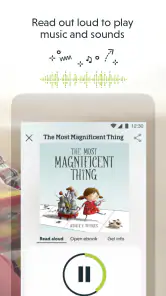
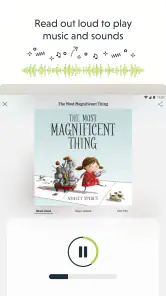
Novel Effect is an interactive reading companion designed to make story time more engaging for children and families. It listens while an adult reads a supported book aloud and responds with music, sound effects, character voices, and other audio elements at the appropriate moments. The app is intended to complement physical books rather than replace them, helping bring selected stories to life during shared reading sessions.
How does Novel Effect work while reading a book?
After opening the app, you select a compatible title from its library and follow the on-screen instructions. You then read the physical book aloud while Novel Effect listens through the device microphone. When it recognizes passages from the supported story, it plays matching sounds and music automatically. In my experience, clear reading, a quiet room, and keeping the device reasonably close to the reader help the app respond more reliably.
Do I need a physical book to use Novel Effect?
Yes, Novel Effect is primarily designed to accompany physical books that are supported by the app. The application does not generally function as a complete digital bookstore or replace the printed story. Before downloading, check the available title list and confirm that the book you own, or plan to purchase, is included. Supported books and availability may change over time and can vary by region.
Is Novel Effect free, and are there in-app purchases?
Novel Effect is free to download, with in-app purchases ranging from $0.99 to $59.99 per item. Access to some content or features may depend on the selected purchase and book availability. Parents should review purchase options in the app and use their device’s approval settings if children might browse or use it independently.
Pros
- Makes shared reading more interactive with synchronized sound effects.
- Works with many popular children’s books and familiar story titles.
- Encourages kids to listen closely and participate during reading.
- Simple setup makes it easy for parents and teachers to start using.
- Can add variety to repeated bedtime or classroom reading sessions.
Cons
- Requires a compatible physical book for the full experience.
- Some titles and features may require in-app purchases or subscriptions.
- Audio effects can occasionally distract from the reader’s narration.
- Performance depends on clear reading and a quiet surrounding environment.
- The catalog may not include every book a child wants to read.
- Category
- Education
- Version
- 4.2.5











