

Norwegian Cruise Line
- 2.09K
- 4.8
- Installs
- 1.00M
- Price
- Free

Screenshots

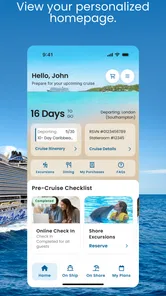
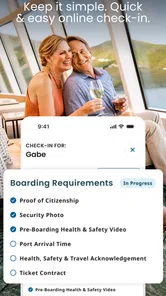
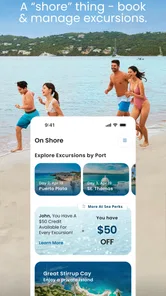

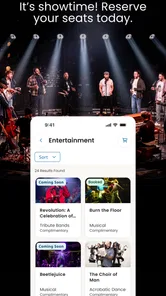
Analysis by Reviewed
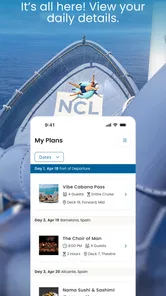
Planning a cruise is very different from booking an ordinary hotel stay. There are ports, embarkation times, onboard activities, dining choices, excursions, and a schedule that can change the shape of an entire day. I found Norwegian Cruise Line most useful as a shared travel companion: one person can check the trip while another uses the same information to decide what to do next. It is a free Travel & Local app from Norwegian Cruise Line Holdings LTD, aimed at keeping the cruise experience in one place rather than making passengers jump between separate travel tools.
My first impression was that the app makes more sense before and during a sailing than after it. Before departure, it helps turn a vague holiday plan into a sequence of decisions. Once onboard, its value comes from reducing the need to remember every reservation, time, and activity personally. That sounds simple, but cruise days are busy enough that a small amount of organization can prevent missed plans and unnecessary trips around the ship.
How it works for a shared household trip
Imagine a household preparing for a cruise with one person handling reservations, another comparing shore activities, and everyone wanting to know what is happening next. The app can serve as a common reference point, but it does not automatically solve the social side of planning. I still recommend agreeing on who is responsible for checking details and who makes final decisions. A shared device can be convenient, yet it also means that the person holding the phone may become the unofficial gatekeeper of the itinerary.
That matters when different travelers have different priorities. One passenger may care about dining, another about entertainment, and a child or teenager may only want to know when everyone is meeting. Instead of handing the phone around constantly, I would use the app during a short planning session, note the decisions everyone agrees on, and then keep the device available for last-minute checks. This approach makes the app part of the household routine without pretending it replaces conversation.
The strongest use case is coordinated awareness, not total automation. I would not treat it as a personal assistant that makes every travel choice for the group. It is better understood as a central place for cruise-related information, where each traveler can confirm the plan and spot changes before they become problems.
Starting with the right account boundary
Setup deserves more attention than it usually receives in a travel app review. The person installing the app should decide whether the phone is personal or shared. On a personal phone, keeping the account and travel details under one traveler’s control is usually less confusing. On a household tablet or communal phone, I would be more deliberate: make sure everyone knows whose travel information is being viewed, and avoid leaving the device open when other people use it for unrelated tasks.
I also prefer that the main trip organizer completes the initial setup rather than asking several family members to configure the same journey independently. Duplicate effort can lead to uncertainty about which screen reflects the latest plan. Once the trip is visible, other travelers can use the app as a reference while the organizer remains responsible for checking important details.
More From Our News Desk

 Weather - By Xiaomi
Weather by Xiaomi Review: Clear at a Glance, Less Clear Up Close
Xiaomi’s weather app makes everyday forecasts quick to scan, but its calm surface can leave useful details and recovery paths harder to find than they should be.

 X
XX Under Pressure: Can It Recover When Posting Goes Wrong?
A resilience-focused review of X, examining setup, mistaken posts, interruptions, weak connections, and the gaps that matter when recovery needs to be dependable.

 Clash of Clans
Clash of Clans Is Won Between the Battles
Its raids are quick; its community is a long-term project of coordination, teaching, rivalry, and shared responsibility—with all the friction that entails.

 Android Auto
Android Auto Makes the Case for Quieter Car Software
The car interface is no longer judged by how much it can do, but by how quietly it helps. Android Auto shows what drivers now expect—and what still gets in the way.

 MobiOffice: Word, Sheets, PDF
MobiOffice: Transforming Mobile Productivity with Seamless Integration
MobiOffice: Word, Sheets, PDF is redefining mobile productivity with a surprising blend of functionality and innovation.

 EA SPORTS FC Soccer Mobile 26
EA SPORTS FC™ Mobile Soccer: Redefining Mobile Sports Gaming
Dive into EA SPORTS FC™ Mobile Soccer, where immersive gameplay and strategic depth transform mobile sports gaming.
Latest News



This is especially helpful for households where one adult manages travel arrangements for several people. The app can reduce the need to forward every update manually, but it does not remove the need to explain the plan in plain language. A younger traveler may understand “we meet after breakfast” more easily than a sequence of reservation screens, while an older relative may prefer seeing the exact schedule directly. The best arrangement combines the app’s information with a simple verbal summary.
Coordinating a day without overplanning it
Cruise itineraries can tempt people into filling every available moment. I found it more practical to use the app as a planning checkpoint rather than a demand to follow a rigid timetable. In the morning, I would review what is fixed, such as a reservation or departure-related commitment, then leave room around it for meals, rest, and spontaneous choices. That prevents the common mistake of treating a holiday like a series of appointments.
A useful household habit is to identify the next non-negotiable event and ignore the rest until it becomes relevant. If the group is splitting up, everyone should know the next agreed meeting point and time before leaving. The app helps confirm the schedule, but the household still needs a clear plan for regrouping. That distinction is important because a digital itinerary can show what is happening without guaranteeing that every traveler has seen it.
I would also check the app before leaving the ship for a port day, not only after arriving. A quick review can help the group understand the day’s structure and avoid relying on memory. For a family with different energy levels, this supports a more realistic compromise: some people can pursue an activity while others take a slower break, provided the group agrees on when to reconnect.
What younger travelers should and should not handle
The Everyone age rating makes the app approachable for a broad household audience, but an age label is not the same as independent travel responsibility. I would let a child or teenager view suitable schedule information and help choose activities, while keeping account ownership and important travel decisions with the responsible adult. That is less about restricting curiosity and more about avoiding confusion over who is authorized to change or confirm plans.
Trust also matters among adults. A shared phone may be useful for a couple or a multigenerational group, but everyone should understand whether they are merely viewing information or actively managing the trip. I would not assume that every traveler wants the same level of access. Some people enjoy checking details themselves; others prefer a concise update. The app works best when the household agrees on that boundary before the trip becomes busy.
For older relatives, the practical advantage is not necessarily more features. It is having a recognizable place to check cruise information instead of searching through messages, screenshots, and paper notes. I would still keep a simple backup note for the day’s essential meeting details, especially when a traveler is uncomfortable navigating a phone. That is not a criticism of the app; it is sensible planning for a group with mixed technical confidence.
Where it fits beside ordinary travel tools
I see this app as more focused than a general itinerary manager. A broad travel organizer may be better for combining flights, hotels, rail tickets, and restaurant bookings from many companies. A calendar may be better for reminders across an entire household. Messaging apps remain better for quick conversations. Norwegian Cruise Line occupies a narrower but more relevant role for passengers whose trip is centered on one cruise operator.
That specialization is its main advantage. Instead of forcing cruise information into a generic calendar, the app gives the journey its own context. The trade-off is that it is less useful as a universal travel hub. If your holiday includes several unrelated providers and you want one master schedule, you may still prefer a general itinerary app alongside it. I would use Norwegian Cruise Line for the cruise itself and a calendar or notes app for flights, transfers, and household reminders.
The app’s popularity suggests that it has found a substantial audience: it has a 4.8 average from around 34 thousand ratings and more than a million installs. Those figures do not make every experience identical, but they do indicate that the app is familiar to many passengers. I would still judge it by how well it fits your travel style, particularly if you dislike managing plans through a phone or prefer printed documents.
Practical friction I noticed
The first limitation is dependence on attention. An app cannot help if nobody checks it, and a household can easily assume that someone else is monitoring the trip. I recommend assigning one person to review the day’s information and tell the group about anything that affects everyone. That small responsibility prevents the app from becoming a silent storage place for details that no one actually uses.
The second limitation is screen sharing. When several people need the same information, passing one phone around is awkward. It can also create a boundary problem if the device contains personal notifications or other private material. A household may be better served by having each traveler use the app on their own device where appropriate, while still agreeing on one shared version of the plan.
The third is that digital convenience can encourage overconfidence. I would not rely on a single glance at the app for a time-sensitive departure or meeting. Read the details carefully, allow extra time, and make sure the people involved understand the plan. The app can organize information, but it cannot account for a slow elevator, a busy corridor, a distracted child, or a traveler who has left the phone in the cabin.
There is also a learning curve for people who rarely use travel apps. Even when the interface feels straightforward, cruise terminology and multiple types of plans can be unfamiliar. I found that showing someone the exact screen they need is more effective than telling them to “check the app.” A short walkthrough before the sailing can save repeated questions later.
Device fit, cost, and ongoing maintenance
The app is free, which makes it easy to recommend as a first step for passengers who want a digital way to organize their cruise. It is available for Android devices running version 7.0 or later, so people using older phones should check compatibility before relying on it. I would also install and explore it before departure rather than waiting until the travel day, when battery, connectivity, and time are already under pressure.
Its current version is 1.42.0, and I would keep the app updated before the trip if the device allows it. Updates can matter more in travel than in casual apps because a small change in how information is displayed can affect how quickly a passenger finds something important. At the same time, I would avoid making an update the only preparation step. Save the essential plan in a form the household can understand even if the phone is unavailable.
For a shared device, battery management becomes part of the workflow. The person carrying the phone should charge it before leaving the room and avoid assuming that someone else will do it. This sounds mundane, but a travel app is only useful when the device is available at the moment the group needs it. A portable charger and a short written meeting note are sensible companions, especially on long port days.
Who will appreciate it most
I think the app is a strong match for first-time cruisers, households with several travelers, and anyone who feels overwhelmed by scattered cruise details. It is particularly helpful when one person wants to coordinate the group without repeatedly searching through emails or asking everyone to remember the same information. It also suits passengers who enjoy checking plans themselves but want cruise-specific information gathered in one place.
It is less compelling for someone who is taking a cruise with no interest in digital planning and already has a reliable paper-based system. It may also be the wrong primary tool for a complex vacation involving multiple cruise lines, independent hotels, and several transport providers. In that situation, a general itinerary manager should probably handle the whole journey, with this app used only for the Norwegian Cruise Line portion.
I would also hesitate to make it the sole planning method for a group with significant accessibility or communication needs unless every traveler has tested the workflow in advance. The app can be useful, but a responsible organizer should confirm that each person can find the information they need and knows what to do if the phone is unavailable.
My household verdict
After using Norwegian Cruise Line as a cruise-planning companion, I see its value in reducing uncertainty rather than creating excitement by itself. The most successful household setup is simple: one person takes responsibility for the account and key checks, everyone receives a clear explanation of the day, and travelers use the app to confirm details instead of guessing. That arrangement respects privacy, age differences, and different comfort levels with technology.
Norwegian Cruise Line Holdings LTD has built an app that makes sense for passengers who want the cruise experience represented digitally from their own device. Its free price removes the main barrier to trying it, and the Everyone rating makes it suitable for shared household use when adults set sensible boundaries. I would recommend installing it before the trip, exploring it together, and deciding which information must also be written down.
My final recommendation is positive, with one condition: treat the app as a coordination tool, not as the entire travel plan. It is at its best when it gives a household a shared point of reference while leaving room for human judgment. If that is what you need, it can make cruise days easier to manage. If you want one universal organizer for every part of a complicated holiday, pair it with a broader travel tool rather than expecting it to do that job alone.
Norwegian Cruise Line Frequently Asked Questions
Can I download the Norwegian Cruise Line app before booking a cruise?
Yes. You can download the app before booking and explore the information and tools available to travelers. Its most useful features are connected to a specific sailing, so itinerary details and onboard options become more relevant once you have a reservation. Having the app ready ahead of time can make it easier to access your cruise information when your booking is available.
Which operating system version do I need to run the Norwegian Cruise Line app?
The app supports devices running Android 7.0 or later. Check your device’s operating-system version before downloading, and install available system updates if needed. Keeping both the phone and app current can help with stability and access to the latest features. The app is also available for iOS devices, making it a practical option for many travelers who prefer to manage trip details on a phone.
Is the Norwegian Cruise Line app compatible with my device?
The Norwegian Cruise Line app is available for Android and iOS devices, making it a practical option for many travelers who want cruise information on their phone. Before downloading, check that your device meets the app’s minimum operating-system requirement. Keeping your phone’s software and the app up to date can also help with stability and access to current features.
Who develops the Norwegian Cruise Line app, and is it intended for guests?
The app is developed by Norwegian Cruise Line Holdings LTD and is designed as a travel companion for people planning or taking a Norwegian Cruise Line cruise. It is most useful when you have a reservation to connect, since many itinerary and onboard tools relate to a specific sailing. You can download it before your trip and explore the available information as your booking becomes accessible.
What is the Norwegian Cruise Line app used for?
The Norwegian Cruise Line app is a useful companion for guests before and during their cruise. After signing in and linking your reservation, you can review your itinerary, check port information, explore dining and entertainment, reserve selected activities, and receive important updates. It helps organize your trip in one place, although some features may only become available after your booking is confirmed or once you are onboard.
Pros
- Easy access to cruise bookings
- itineraries
- and onboard reservations in one app.
- Mobile check-in can reduce waiting time at the terminal.
- Daily schedules help passengers keep track of activities and entertainment.
- Useful reminders for dining reservations
- excursions
- and departure times.
- Supports onboard planning without carrying printed documents or schedules.
Cons
- Some features may require an internet connection or onboard Wi-Fi access.
- App performance can vary depending on the ship and connection quality.
- Frequent notifications may feel excessive during a busy cruise.
- Certain reservations may still require assistance from onboard staff.
- Information may take time to update after itinerary or schedule changes.












